Create Aeronautics Needed by Create: Modular Propellers aeromodular-0.3.1.beta.jar
requiredMatching file found Matched file: Create Aeronautics 1.3.3 for mc1.21.1
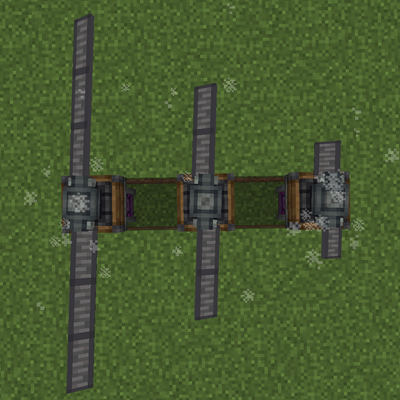
CurseForge · Minecraft mod
Adds modular propellers to Create: Aeronautics with three blade types, balanced thrust, and Ponder tutorials.
Quick answer
Create: Modular Propellers aeromodular-0.3.1.beta.jar targets 1.21.1 with NeoForge. The project page does not say whether this file belongs on the client, dedicated server, or both. All 4 required mods have matching files.
Where it goes
The project page does not say whether this file belongs on the client, dedicated server, or both.
The source does not explicitly classify this release as client-only or server-only.
aeromodular-0.3.1.beta.jar on 1.21.1 NeoForge. Every mod below is checked against that same setup.
Install Create Aeronautics, Create: Copycats+, Sable, Create first. We found matching files for this game-version and loader setup. 6 come through another mod in the chain.
6 extra mods were pulled in by other dependencies. Indented rows show who needs each one. We only count dependency files that match this setup. A file for another loader does not fill the gap.
Before you install it
Built for Create: Modular Propellers aeromodular-0.3.1.beta.jar on 1.21.1 NeoForge. Pick another file and the loader, install side or required mods may change.
Use aeromodular-0.3.1.beta.jar. It targets 1.21.1 with NeoForge; another release may have different loader, side or dependency requirements.
Install Create Aeronautics, Create: Copycats+, Sable, Create first. We found matching files for this game-version and loader setup. 6 come through another mod in the chain.
The project page does not say whether this file belongs on the client, dedicated server, or both.
Use the “Get this file” button beside aeromodular-0.3.1.beta.jar. It opens that exact file at the source.
About this project
Create: Modular Propellers adds individually installable, adjustable-length blades to Create: Aeronautics. Regular propellers start as empty hubs—including a new Copycat Hub that lets you match the hub's appearance to your aircraft's blocks—so you choose the hub style, blade material, length, and count when building your aircraft.
There are four blade types:
All blade types have adjustable lengths, giving you even more control over the look and proportions of your builds.
Right-click a hub with a blade to install it. A propeller needs at least two matching blades to produce thrust. Different materials cannot be mixed on the same hub. To change materials, stop the propeller and remove the existing blades with Shift + right-click using an empty hand. Removed blades are returned to you.
Thrust increases with the number of installed blades. Two wooden blades preserve the original wooden propeller’s thrust, while four andesite blades preserve the original andesite propeller’s thrust. Copper blades produce less thrust than wooden blades at the same blade count and RPM. These values describe output, so the four materials act as distinct building options rather than a straight progression from weakest to strongest.
Wooden and andesite blades retain their Aeronautics appearance. The smart, automatically balanced propeller keeps its original behavior.
All four blade types and the Copycat Hub have crafting recipes, appear in JEI, and sit in the Aeronautics creative section. Hold W over a hub or blade to open Ponder. Dedicated scenes cover the different setups, including installation, removal, blade limits, length adjustment, and thrust.
Propeller Blur is supported, and item names, tooltips, and Ponder instructions are available in English and Russian.
This is an early beta for Minecraft 1.21.1 on NeoForge, built for Create and Aeronautics.
Project description from CurseForge.
Pick your setup
Choose the version and loader you play, then open the matching release.
Check the dependencies, then try the file in a copied instance before changing a world you care about.
Recent files
20 Nov 2026
16 Nov 2026
create-modular-propellers.0.2.1-beta.jar
15 Nov 2026
15 Nov 2026
15 Nov 2026
16 Oct 2026
Looking for an older file? The official CurseForge project page is in Resources.
 mod
A Book of Dragons addon to allow the customization of a dragons color palette.
 mod
TFC compat for nether and the end dimensions
 mod
Pilotable multi-block spaceships, holographic star maps, 5 tiers of space suits, magnetic boots, and planetary disasters for Create.