Minecraft version
Back to mods 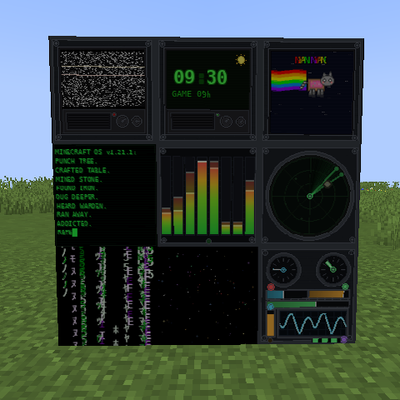
CurseForge · Minecraft mod
High Tech Blocks
High Tech Blocks is a set of 9 animated tech blocks for builders who want their bases to look high tech.
Choose a version Pick your version below, then grab the matching file.
Quick answer
Which High Tech Blocks release should I use?
Latest stable file hightechblocks-26.1.2-neoforge-26.1.2.jar
Game version 26.1.2
Loader NeoForge
High Tech Blocks hightechblocks-26.1.2-neoforge-26.1.2.jar targets 26.1.2 with NeoForge. The project page does not say whether this file belongs on the client, dedicated server, or both. No extra mods listed for this file.
Where it goes
Is High Tech Blocks required on the client, server, or both?
The project page does not say whether this file belongs on the client, dedicated server, or both.
Client Source doesn’t say
Dedicated server Source doesn’t say
Loader for this release NeoForge
Required install it here Optional supported, not mandatory Not supported do not install here Source doesn’t say do not assume
The source does not explicitly classify this release as client-only or server-only.
What else does High Tech Blocks hightechblocks-26.1.2-neoforge-26.1.2.jar need?
hightechblocks-26.1.2-neoforge-26.1.2.jar. Change the file and its required mods may change too.
This file does not list any required mods. Do not add a library just because a different file uses it.
This file does not list any required or optional mods.
Before you install it
Add High Tech Blocks without breaking your instance.
Built for High Tech Blocks hightechblocks-26.1.2-neoforge-26.1.2.jar. Pick another file and the loader, install side or required mods may change.
- 01
Stick to this file
Use hightechblocks-26.1.2-neoforge-26.1.2.jar. It targets 26.1.2 with NeoForge; another release may have different loader, side or dependency requirements.
- 02
Bring the mods it needs
This file does not list any required mods. Do not add a library just because a different file uses it.
- 03
Put it on the correct side
The project page does not say whether this file belongs on the client, dedicated server, or both.
- 04
Pick the file you checked
Use the “Get this file” button beside hightechblocks-26.1.2-neoforge-26.1.2.jar. It opens that exact file at the source.
About this project
What does High Tech Blocks add?
High Tech Blocks.
Every block lives in a custom Creative Tab — 'High Tech Blocks' — and every block is a full redstone component: emits 15, connects to redstone, can power doors, lamps, and contraptions.
The 9 Blocks:
- Space Block — The Walk-Through Block
Your doorway to nowhere. Has no collision — you can walk straight through it. Use it for sci-fi forcefields, invisible doorways, space portals, or anywhere you want the "Space Effect" without a door animation. Unbreakable, redstone-powered, invisible wall trick that builders love.
- Matrix Block
The classic falling-code look. Dark with digital rain. Perfect for server rooms, hacking labs, and cyberpunk builds. Looks amazing in a wall of 3x3.
- Machine Block
Heavy industrial metal with vents and bolts. Your go-to filler for factories, reactors, and engine rooms.
- Computer Block — The Addicted Terminal
A flickering CRT monitor running MINECRAFT OS v1.21.1. Green scanlines, typing cursor, and a story every player knows: punch tree, craft table, mine stone, find iron, dig deeper, hear the Warden, run away, get addicted, repeat. 32-frame typing animation strip that loops forever.
- Equalizer Block
Audio visualizer bars. Great for studios, DJ booths, clubs, and spaceship cockpits. Looks like it's pulsing even when it's not.
- Radar Block
Sweeping radar dish display. Put it in your watchtower, bunker, or Star Destroyer bridge. Feels like it's tracking something.
- Static Block
Noisy TV static — white noise, no signal. Perfect for broken screens, horror builds, abandoned labs, and glitch aesthetics.
- Nyan Block
You know what it is. Pure chaotic color. For when the lab needs to be less serious. Secret party block.
- Time Block — The Star of the Mod
Fully functional digital clock synced to the real game time.
48 unique textures = every half hour from 00:00 to 23:30.
At /time set 0 it shows 06:00 sunrise
At /time set 6000 it shows 12:00 noon
At /time set 12000 it shows 18:00 sunset
At night it shows a moon icon, during day a sun icon
Rotates N/S/E/W and keeps time no matter which way you face it
Unbreakable and ticks every second to stay accurate
Build it into your base wall and you never need to look at the sky again.
Technical Specs (All 9 Blocks):
Unbreakable: Strength -1 / 3,600,000 — survival-proof
Redstone: Emits 15, is signal source, connects to redstone dust
Tab: High Tech Blocks (custom creative tab)
Model: Full cube, Y-axis rotation (places facing you)
Builder Tips:
Use Space Block 2 blocks high as a sci-fi door, power a lamp above it with its redstone output
Line a hallway with Computer + Matrix + Machine for a server corridor
Use Time Block as your base's master clock — one in every room, all synced
All 9 look best with low light — let the screens glow
High Tech Blocks — because your base should look like it was built in the future.
Project description from CurseForge.
Pick your setup
High Tech Blocks by Minecraft version and loader
Choose the version and loader you play, then open the matching release.
Minecraft version
1.21.1
1 loader buildCheck the dependencies, then try the file in a copied instance before changing a world you care about.
Recent files
High Tech Blocks versions and loaders
hightechblocks-26.1.2-neoforge-26.1.2.jar
20 Oct 2026
Client Source doesn’t say Server Source doesn’t say Dependencies No extras listed Listed on Release listing
Check the 26.1.2 · NeoForge setup NeoForge26.1.2 release
hightechblocks-1.21.1-neoforge-1.21.1.jar
16 Oct 2026
Client Source doesn’t say Server Source doesn’t say Dependencies No extras listed Listed on Release listing
Check the 1.21.1 · NeoForge setup 1.21.1NeoForge release
Looking for an older file? The official CurseForge project page is in Resources.
 mod
mod CurseForge · Minecraft
Ultimate Tweaks
Utility items for modpack creators, two custom music discs and their sounds. Items ship without recipes, ready for KubeJS. Requires UltimateArmoury: Tools And Weapons.
 mod
mod CurseForge · Minecraft
Realms of Reverie
Realms of Reverie Modpack Mod
 mod
mod CurseForge · Minecraft
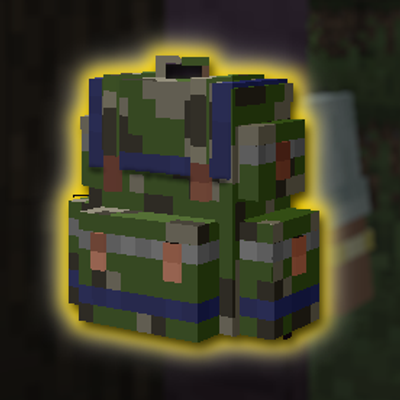
Sophisticated Tactical Backpacks (And Ammo Reload Upgrade)
Adding tactical camouflages to Sophisticated Backpack. Also an ammo reloading upgrade for TACZ, Vic Point Blank, JEG, and Scorched Guns