WorldEdit Needed by WE Assist 0.2.0 (26.1.*)
requiredMatching file found Matched file: WorldEdit 7.4.3 (NeoForge/Fabric for MC 26.1.x)
CurseForge · Minecraft mod
WorldEdit with your mouse: wheel resizes the selection, live selection box, Ctrl+C/V/Z, paste hologram and a radial command menu with block preview.
Quick answer
WE Assist 0.2.0 (26.1.*) targets 26.1, 26.1.1, 26.1.2 with Fabric. The project page does not say whether this file belongs on the client, dedicated server, or both. All 2 required mods have matching files.
Where it goes
The project page does not say whether this file belongs on the client, dedicated server, or both.
The source does not explicitly classify this release as client-only or server-only.
WE Assist 0.2.0 (26.1.*). Change the file and its required mods may change too.
Install WorldEdit, Fabric API first. We found matching files for this game-version and loader setup.
We only count dependency files that match this setup. A file for another loader does not fill the gap.
Before you install it
Built for WE Assist 0.2.0 (26.1.*). Pick another file and the loader, install side or required mods may change.
Use WE Assist 0.2.0 (26.1.*). It targets 26.1, 26.1.1, 26.1.2 with Fabric; another release may have different loader, side or dependency requirements.
Install WorldEdit, Fabric API first. We found matching files for this game-version and loader setup.
The project page does not say whether this file belongs on the client, dedicated server, or both.
Use the “Get this file” button beside WE Assist 0.2.0 (26.1.*). It opens that exact file at the source.
About this project
Scroll to resize the selection, Ctrl+C / Ctrl+V to copy builds, see the paste before it happens.
I got tired of typing //expand and //contract all day, so I made the mouse wheel do it.
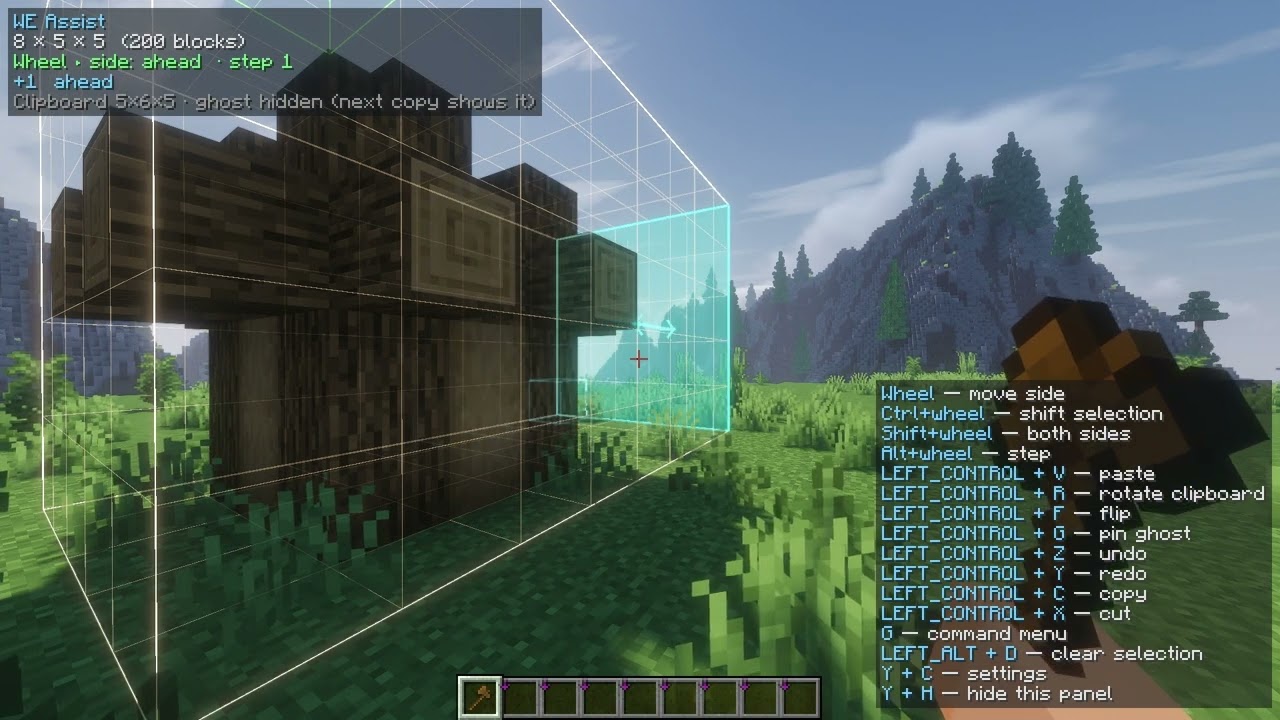
Hold the wand and look at a side of the selection. Scroll up, it grows. Scroll down, it shrinks. The box is drawn right in the world and the side that will move is highlighted.
Ctrl+C, Ctrl+V, Ctrl+Z, Ctrl+Y. After a copy you see a hologram of the build exactly where it will land. Ctrl+R rotates it, Ctrl+F flips it.
Ctrl+G pins the hologram in place. Scroll to nudge it, then Ctrl+Shift+V pastes right there.
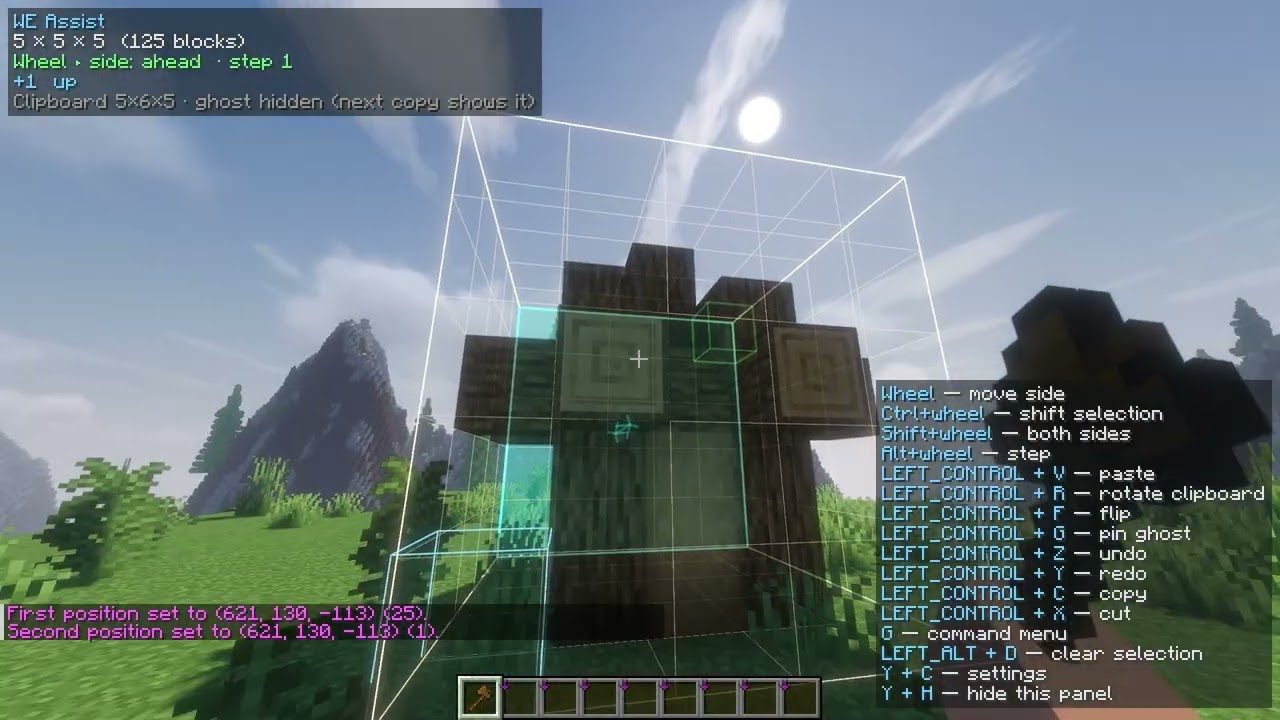
Fill, walls, faces, replace, mirror, stack, smooth, hollow. Pick a block and the result shows up in the world before you apply it. Stairs, slabs and logs: choose which way they face. You can also mix blocks by percent.
Client only, don't put it on the server.
No WorldEditCUI needed, works with Iris shaders. Don't use together with wegui, both grab the mouse wheel.
Keys only work with the wand in hand. Y+H shows all of them, Y+C opens settings.
Fabric 1.20.1 to 26.1.2 · NeoForge 1.21.11 · English, Russian
Found a bug? Leave a comment with your Minecraft version and latest.log.
News (in Russian): https://t.me/modweassist
Project description from CurseForge.
Pick your setup
Choose the version and loader you play, then open the matching release.
Showing the newest 12 of 17 game versions. Older files are in the list below.
Check the dependencies, then try the file in a copied instance before changing a world you care about.
Recent files
weassist-0.2.0-26.1.2.jar
9 Nov 2026
weassist-0.2.0-1.21.11.jar
9 Nov 2026
weassist-0.2.0-1.21.10.jar
9 Nov 2026
weassist-0.2.0-1.21.8.jar
9 Nov 2026
weassist-0.2.0-1.21.5.jar
9 Nov 2026
weassist-0.2.0-1.21.4.jar
9 Nov 2026
weassist-0.2.0-1.21.11-neoforge.jar
9 Nov 2026
weassist-0.2.0-1.21.1-neoforge.jar
9 Nov 2026
weassist-0.2.0-1.21.1.jar
9 Nov 2026
weassist-0.2.0-1.20.6.jar
9 Nov 2026
weassist-0.2.0-1.20.4.jar
9 Nov 2026
weassist-0.2.0-1.20.1.jar
9 Nov 2026
Looking for an older file? The official CurseForge project page is in Resources.
 mod
Sick of wasting time with Minecraft’s slow launcher just to change your skin? Quick Skin lets you swap skins instantly even on “offline” servers and gives you access to every official Minecraft cape.
 mod
An easy to use Claims mod to manage player's interactions with the world.
 mod
Client-side smart item protection (Slot Lock & Double-Tap Q) and customizable auto-trash filter for Survival and PvP.