Minecraft version
Back to mods 
CurseForge · Minecraft mod
Ore Finder | By Omega Plugins
A client-side ore radar that highlights ores through terrain with distance lines, dig guidance, and surface markers — fully lag-free and configurable.
Choose a version Pick your version below, then grab the matching file.
Quick answer
Which Ore Finder | By Omega Plugins release should I use?
Latest stable file orefinder-1.0.0.jar
Game version 1.21.11
Loader Fabric
Ore Finder | By Omega Plugins orefinder-1.0.0.jar targets 1.21.11 with Fabric. The project page does not say whether this file belongs on the client, dedicated server, or both. No extra mods listed for this file.
Where it goes
Is Ore Finder | By Omega Plugins required on the client, server, or both?
The project page does not say whether this file belongs on the client, dedicated server, or both.
Client Source doesn’t say
Dedicated server Source doesn’t say
Loader for this release Fabric
Required install it here Optional supported, not mandatory Not supported do not install here Source doesn’t say do not assume
The source does not explicitly classify this release as client-only or server-only.
What else does Ore Finder | By Omega Plugins orefinder-1.0.0.jar need?
orefinder-1.0.0.jar. Change the file and its required mods may change too.
This file does not list any required mods. Do not add a library just because a different file uses it.
This file does not list any required or optional mods.
Before you install it
Add Ore Finder | By Omega Plugins without breaking your instance.
Built for Ore Finder | By Omega Plugins orefinder-1.0.0.jar. Pick another file and the loader, install side or required mods may change.
- 01
Stick to this file
Use orefinder-1.0.0.jar. It targets 1.21.11 with Fabric; another release may have different loader, side or dependency requirements.
- 02
Bring the mods it needs
This file does not list any required mods. Do not add a library just because a different file uses it.
- 03
Put it on the correct side
The project page does not say whether this file belongs on the client, dedicated server, or both.
- 04
Pick the file you checked
Use the “Get this file” button beside orefinder-1.0.0.jar. It opens that exact file at the source.
About this project
What does Ore Finder | By Omega Plugins add?
Ore Finder is a client-side ore radar for Fabric that highlights ores through terrain and guides you straight to them — with color-coded direction lines, dig-distance readouts, and surface markers. No server-side install required.
Trackable Ores All 11 ore targets are built in, each with its own color and auto-matching of Deepslate variants:
- Overworld: Coal, Iron, Copper, Gold, Diamond, Emerald, Redstone, Lapis Lazuli
- Nether: Nether Quartz, Nether Gold, Ancient Debris
Find one diamond ore and its deepslate twin is matched automatically — no double-configuring, no missed blocks.
Visual Guidance
- Color-coded ore lines — every tracked ore is drawn through the terrain in its own color, so you can tell targets apart at a glance.
- Dig lines + HUD text — a clear vertical line and a "Dig ▼ X blocks" readout tell you exactly how far down to mine.
- Surface X markers — an X marks the surface block above your target, so you know where to start digging.
- Above/below alerts — know instantly whether the nearest ore is above or below you.
- Live distance — distances update in real time as you move.
Built for Performance Ore Finder is engineered to stay lag-free even at maximum settings:
- Y-range section pre-filtering — chunk sections outside the selected ores' natural spawn ranges are skipped entirely (e.g. diamond only scans Y -64 to 32), cutting block lookups by over half.
- Incremental batched scanning — searches are spread across ticks with an adaptive chunk budget, so the game never stutters, even on a full 200-block sweep.
- Tick-budgeted rendering — screen-space drawing is capped and near-camera geometry is culled, keeping your framerate smooth even while standing on a marker.
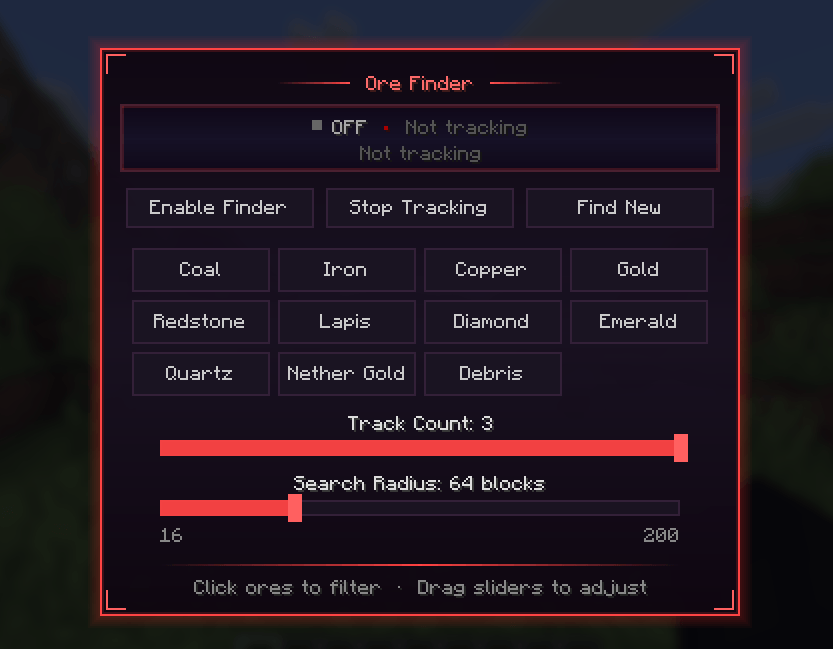
Configuration Open the in-game settings screen and tune everything live:
- Search radius — up to 200 blocks
- Maximum tracked ores at once
- Per-ore enable/disable and colors
- Toggle every HUD element independently
Dedicated keybinds (default M/N/B) let you toggle tracking and open settings without leaving your inventory.
Client-Side Only Ore Finder is purely visual and runs entirely on your client — use it on vanilla servers, realms, modded servers, or single-player. Nothing is installed server-side and nothing is modified beyond what you see.
Requirements
- Minecraft 1.21.11
- Fabric Loader
- Fabric API
Installation
- Install Fabric Loader for Minecraft 1.21.11.
- Drop Fabric API and Ore Finder into your mods folder.
- Launch the game and press M to configure your first scan.
Images/Videos
UI for settings "M"
Toggle tracker on/off "N"
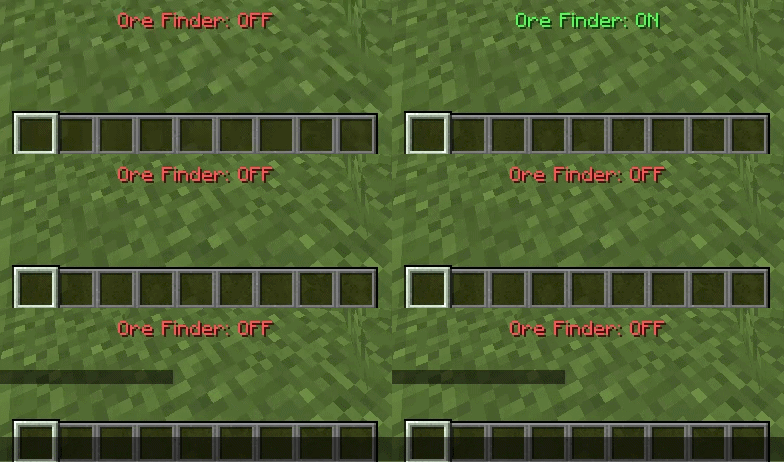
Using ore finder
Project description from CurseForge.
Pick your setup
Ore Finder | By Omega Plugins by Minecraft version and loader
Choose the version and loader you play, then open the matching release.
Check the dependencies, then try the file in a copied instance before changing a world you care about.
Recent files
Ore Finder | By Omega Plugins versions and loaders
orefinder-1.0.0.jar
16 Oct 2026
Client Source doesn’t say Server Source doesn’t say Dependencies No extras listed Listed on Release listing
Check the 1.21.11 · Fabric setup Fabric1.21.11 release
Looking for an older file? The official CurseForge project page is in Resources.
 mod
mod CurseForge · Minecraft
Photon
Photon - Making mc effects as Unity
 mod
mod CurseForge · Minecraft
LazyAI
Optimizes Minecraft mob AI by scaling calculations based on distance to players, improving performance with as minimal gameplay impact as possible
 mod
mod CurseForge · Minecraft
Unoffical NEI rewrite
An unoffical rewrite of the GTNH NEI fork