Minecraft version
Back to mods 
CurseForge · Minecraft mod
SVC Toolkit
Discord-style interface for Simple Voice Chat: voice channels, per-player volume, overlay, a built-in soundboard and 15 real-time voice masks. Client-side, works on any server with Simple Voice Chat.
Choose a version Pick your version below, then grab the matching file.
Quick answer
Which SVC Toolkit release should I use?
Latest stable file svctoolkit-fabric-0.1.0+26.4-snapshot-4.jar
Game version 26.4-snapshot
Loader Fabric
SVC Toolkit svctoolkit-fabric-0.1.0+26.4-snapshot-4.jar targets 26.4-snapshot with Fabric. The project page does not say whether this file belongs on the client, dedicated server, or both. No extra mods listed for this file.
Where it goes
Is SVC Toolkit required on the client, server, or both?
The project page does not say whether this file belongs on the client, dedicated server, or both.
Client Source doesn’t say
Dedicated server Source doesn’t say
Loader for this release Fabric
Required install it here Optional supported, not mandatory Not supported do not install here Source doesn’t say do not assume
The source does not explicitly classify this release as client-only or server-only.
What else does SVC Toolkit svctoolkit-fabric-0.1.0+26.4-snapshot-4.jar need?
svctoolkit-fabric-0.1.0+26.4-snapshot-4.jar. Change the file and its required mods may change too.
This file does not list any required mods. Do not add a library just because a different file uses it.
This file does not list any required or optional mods.
Before you install it
Add SVC Toolkit without breaking your instance.
Built for SVC Toolkit svctoolkit-fabric-0.1.0+26.4-snapshot-4.jar. Pick another file and the loader, install side or required mods may change.
- 01
Stick to this file
Use svctoolkit-fabric-0.1.0+26.4-snapshot-4.jar. It targets 26.4-snapshot with Fabric; another release may have different loader, side or dependency requirements.
- 02
Bring the mods it needs
This file does not list any required mods. Do not add a library just because a different file uses it.
- 03
Put it on the correct side
The project page does not say whether this file belongs on the client, dedicated server, or both.
- 04
Pick the file you checked
Use the “Get this file” button beside svctoolkit-fabric-0.1.0+26.4-snapshot-4.jar. It opens that exact file at the source.
About this project
What does SVC Toolkit add?
SVC Toolkit
A Discord-style makeover for Simple Voice Chat — with a built-in soundboard, 15 real-time voice masks and a proper microphone processing chain.
Everything runs on your client. No server plugin needed: if the server has Simple Voice Chat, SVC Toolkit just works.
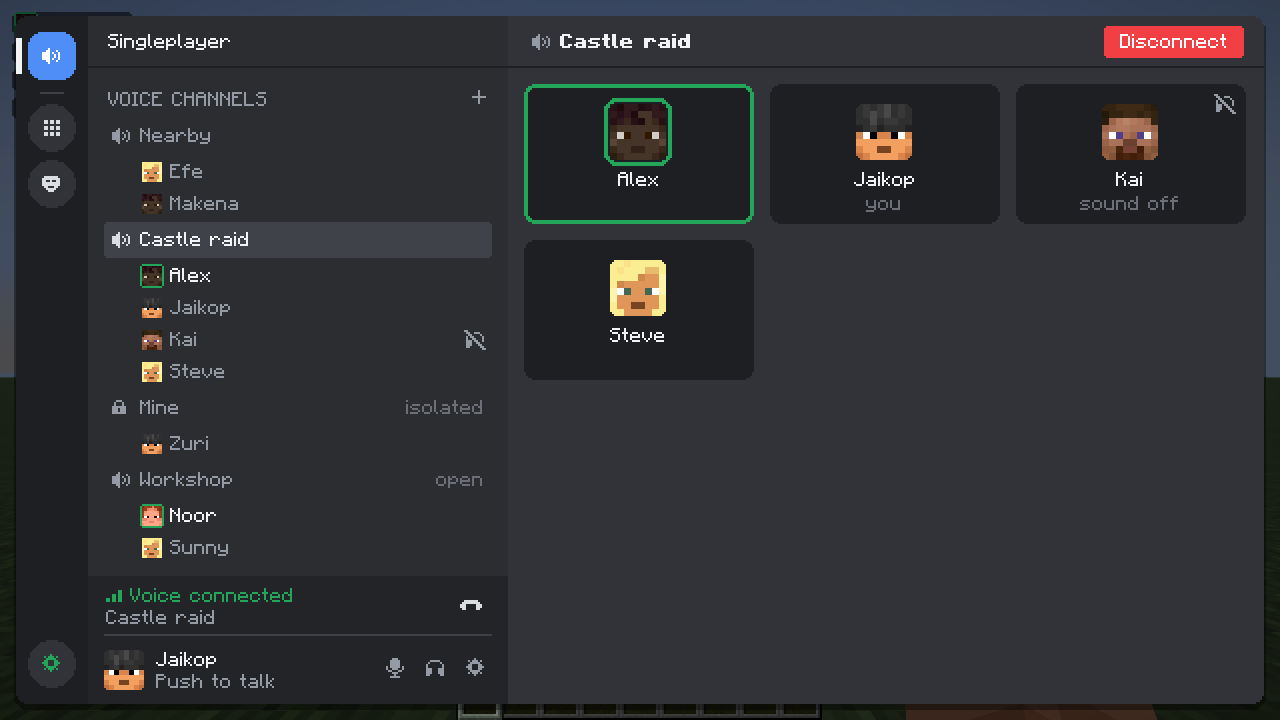
🎧 Discord-style interface
The voice chat keys open one clean window instead of the stock menus:
- Voice channels — every SVC group is a channel with its members, skin heads and a green ring around whoever is talking. Join with one click, create channels with passwords and types.
- User panel — mute and deafen buttons, settings and the connection status with ping and packet loss.
- Right-click a player — volume from 0 to 200 %, mute just for you, invite to your channel, copy name.
- Invites — an SVC invite shows up as a notification and a banner with a Join button.
- Themes — dark, AMOLED and light, any accent color, window opacity.
Prefer the original look? One toggle brings back the stock Simple Voice Chat screens.
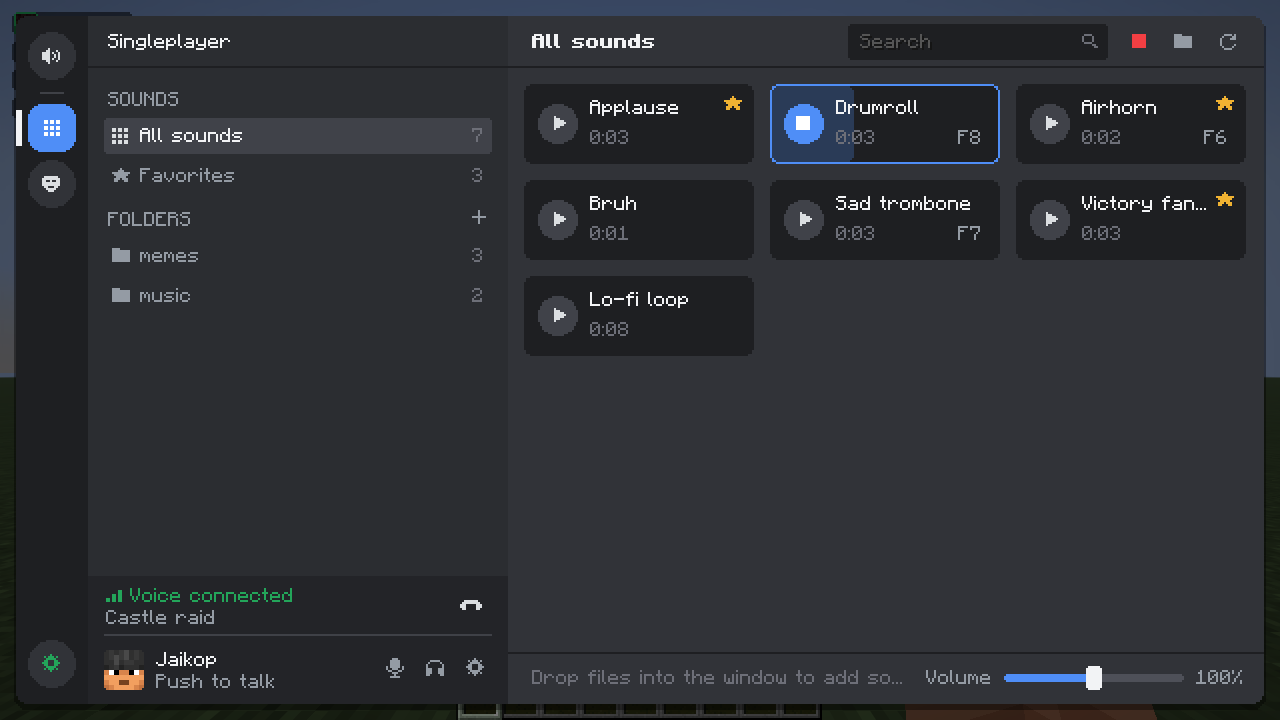
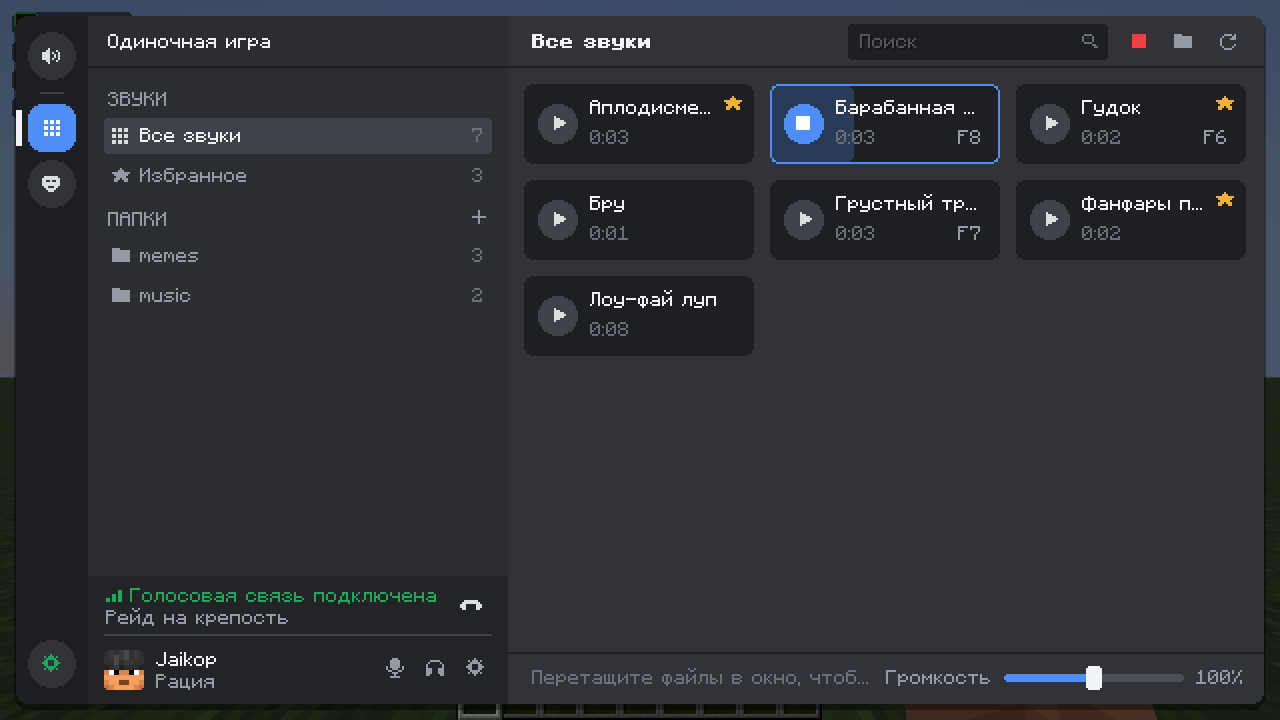
🔊 Soundboard
- Drag & drop WAV, OGG, MP3 or FLAC files right into the game window.
- Trim sounds in a waveform editor and set the volume of each one.
- Folders, favorites and search.
- A hotkey for any sound, plus a "stop all" key.
- Up to 8 sounds at once.
- Works even while your mic is muted or you aren't talking (can be turned off).
- Voice masks never touch soundboard audio — your sounds stay clean.
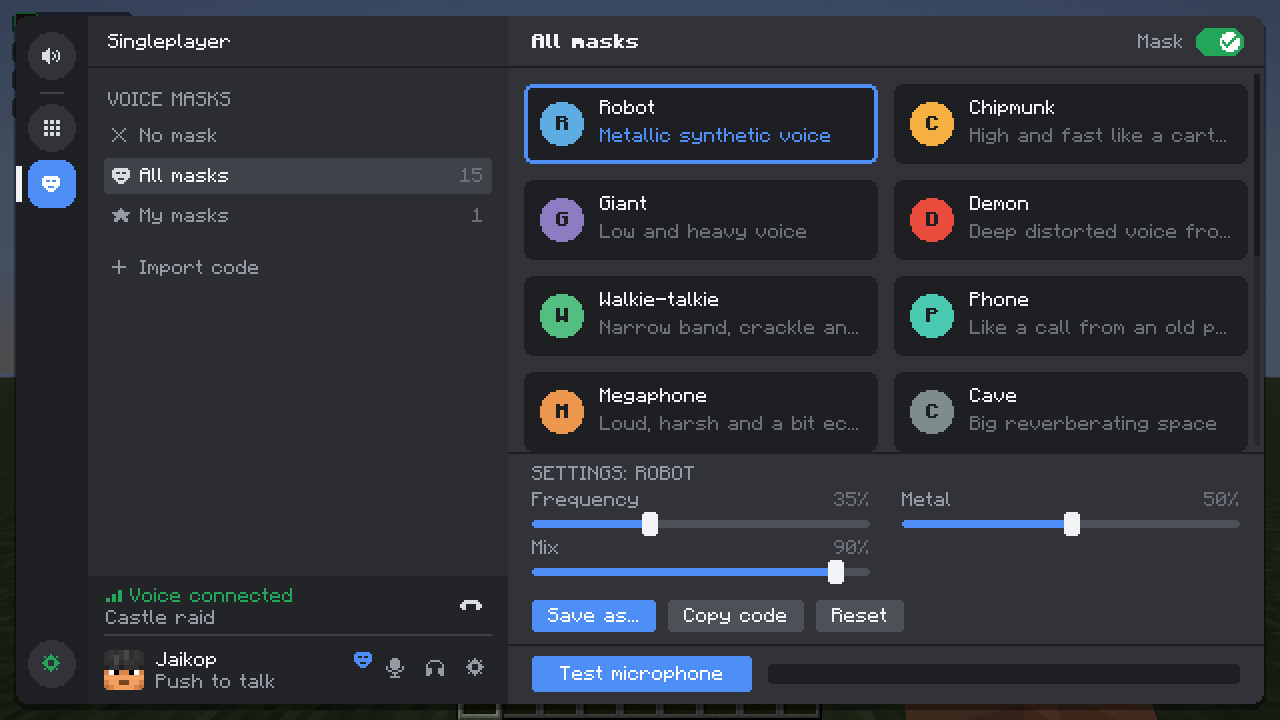
🎭 Voice masks
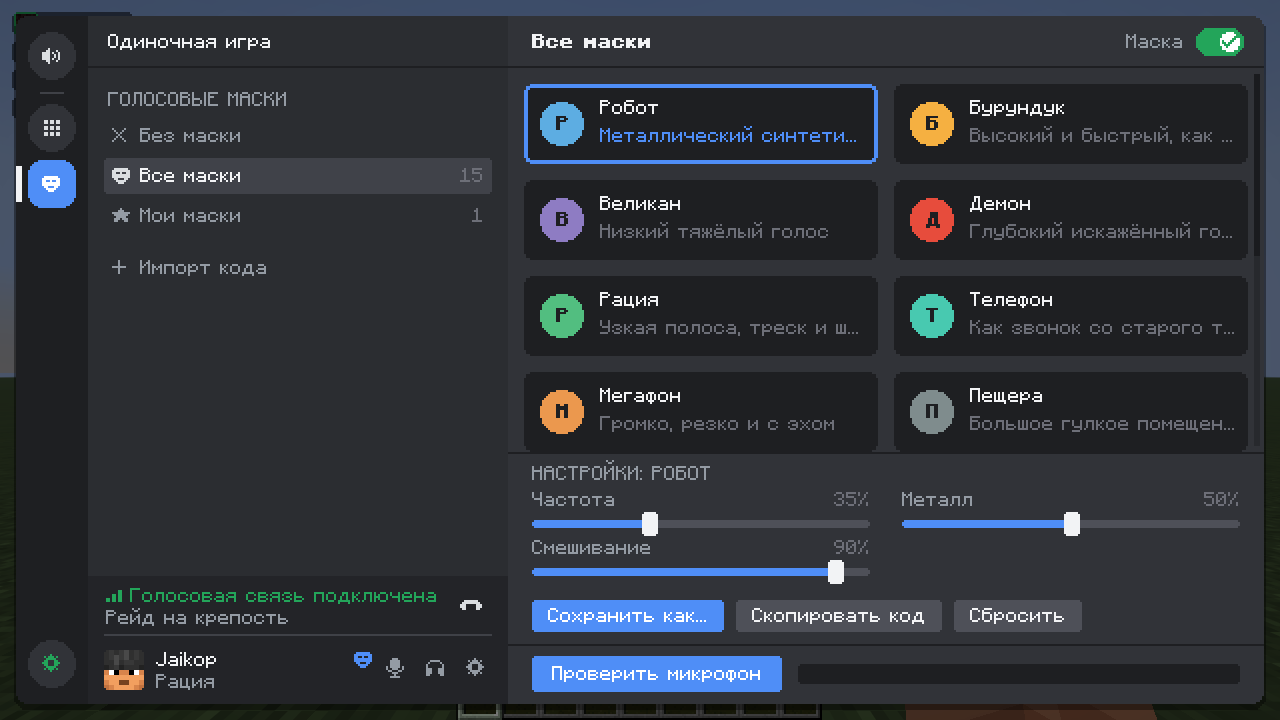
- 15 presets: robot, chipmunk, giant, demon, walkie-talkie, phone, megaphone, cave, ghost, underwater, alien, monster, echo, 8-bit and choir.
- Fine-tune each preset with sliders and save your own versions.
- Share a mask as a short
svct1:code and import someone else's. - Turn the mask on and off or switch to the next one with hotkeys.
- Hear yourself with the mask in the microphone test before going live.
🎙️ Microphone
- Rumble filter, noise gate, 3-band equalizer, compressor and limiter — nobody gets blasted when you shout.
- Push to mute, push-to-talk lock, auto-mute when the game is minimized or you go AFK.
- Discord-style microphone test with a level meter and a draggable activation threshold.
📺 In game
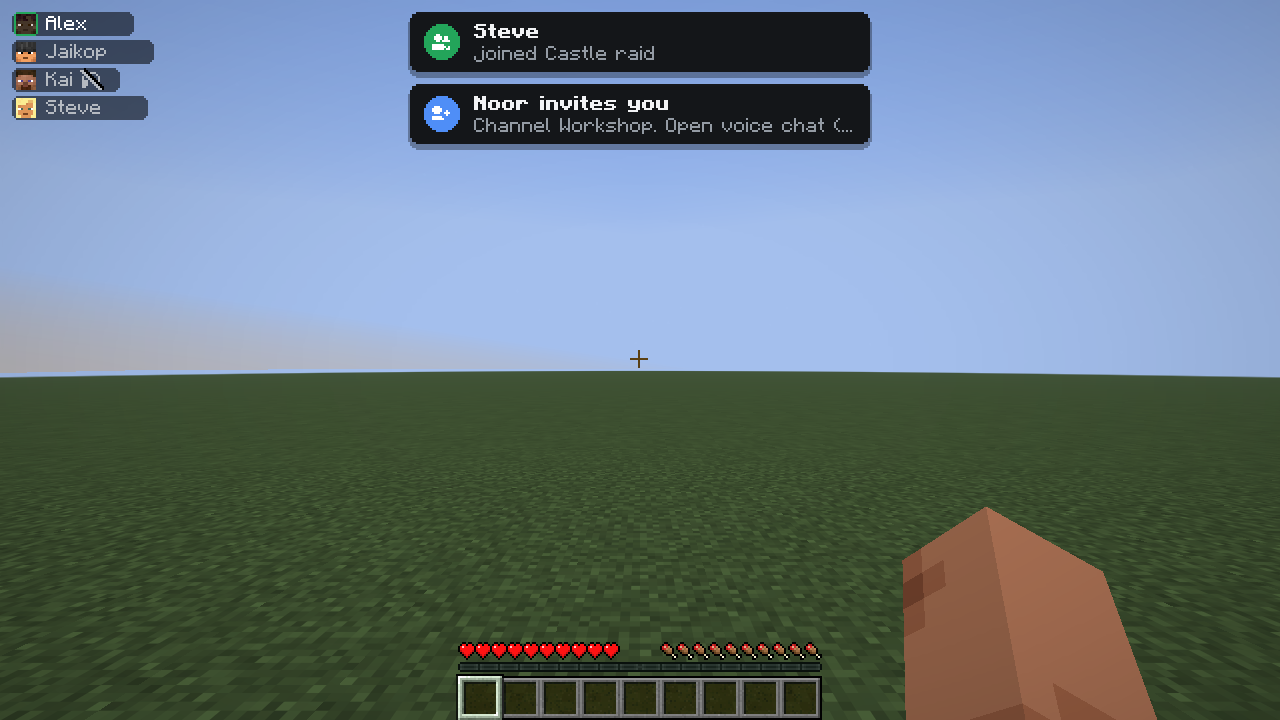
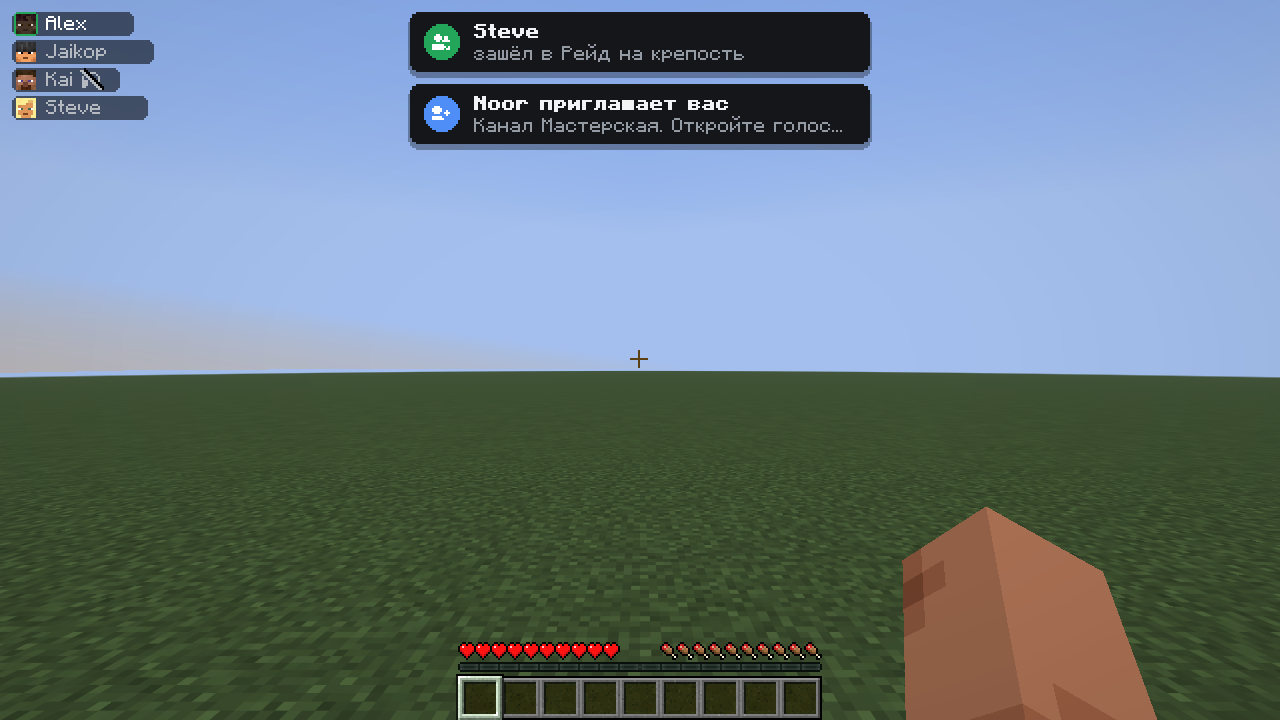
- Overlay — speaking players or your whole channel, in any corner and any size. It replaces the stock SVC group list.
- Notifications — players joining and leaving your channel, invites, microphone problems.
- Event sounds — join, leave, mute and deafen. They follow the game's Interface volume and can be replaced with a resource pack.
- Attenuation — music and game sounds get quieter while someone is talking.
🕶️ Streamer mode
Hides the server address in the voice chat window. Turn it on in the settings or with a hotkey.
Privacy note: by default SVC Toolkit turns streamer mode on by itself while OBS, Streamlabs, XSplit or Twitch Studio is running. To do that it checks the names of running programs on your computer every few seconds. Nothing is sent anywhere, and the check can be switched off in the settings.
Requirements
- Minecraft 26.3, Fabric Loader and Fabric API
- Simple Voice Chat 2.6.24 or newer on the client and the server
- Optional: Mod Menu
More Minecraft versions and NeoForge are planned.
Links
- Source code: https://github.com/Jaikop/svc-toolkit
- Issues and ideas: https://github.com/Jaikop/svc-toolkit/issues
- License: LGPL-3.0
SVC Toolkit is an unofficial addon. It is not affiliated with Simple Voice Chat, henkelmax or Discord Inc.
🇷🇺 Описание на русском
SVC Toolkit
Интерфейс в стиле Discord для Simple Voice Chat, а ещё встроенный саундпад, 15 голосовых масок в реальном времени и нормальная обработка микрофона.
Всё работает на клиенте. Плагин на сервере не нужен: если на сервере есть Simple Voice Chat, SVC Toolkit заработает.
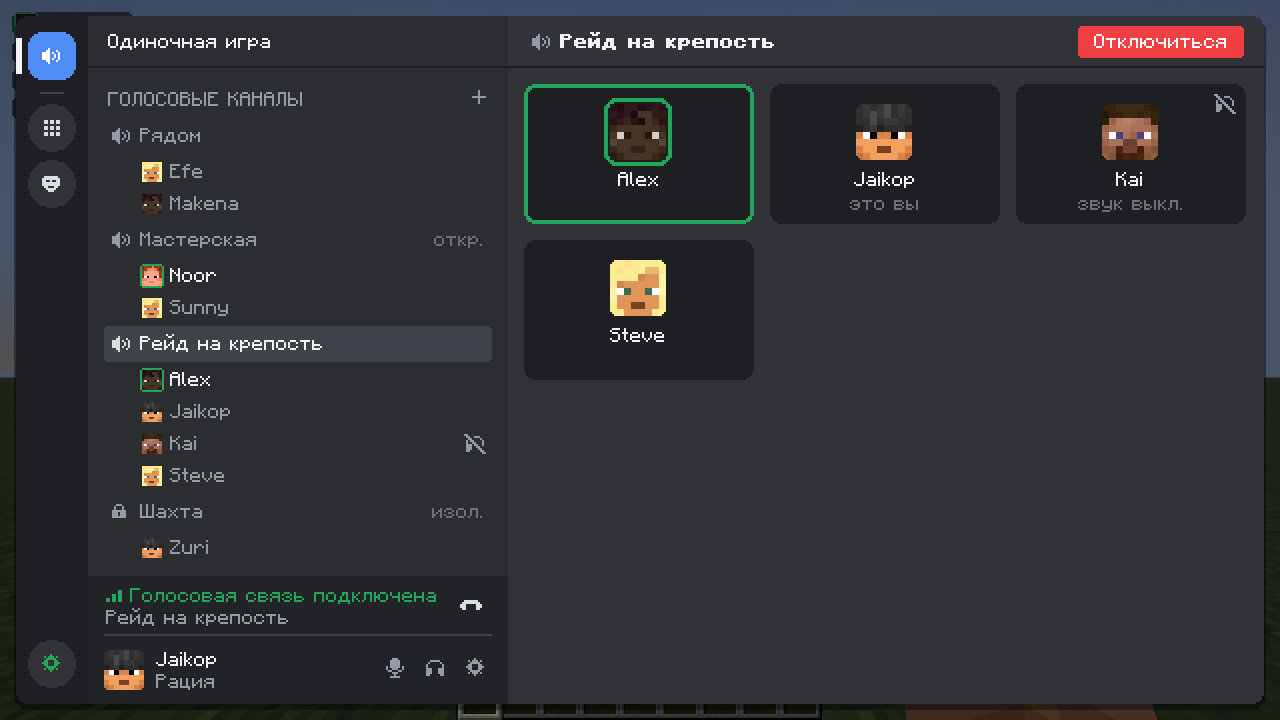
🎧 Интерфейс в стиле Discord
Клавиши голосового чата открывают одно удобное окно вместо стандартных меню:
- Голосовые каналы — группы SVC выглядят как каналы: участники, головы скинов, зелёная обводка у того, кто говорит. Вход одним кликом, создание каналов с паролями и типами.
- Панель пользователя — кнопки «микрофон» и «звук», настройки и статус соединения с пингом и потерями пакетов.
- ПКМ по игроку — громкость от 0 до 200 %, заглушить только для себя, пригласить в свой канал, скопировать ник.
- Приглашения — приглашение SVC приходит уведомлением и баннером с кнопкой «Присоединиться».
- Темы — тёмная, AMOLED и светлая, любой акцентный цвет, прозрачность окон.
Нравится старый вид? Один переключатель возвращает стандартные экраны Simple Voice Chat.
🔊 Саундпад
- Перетаскивай WAV, OGG, MP3 и FLAC прямо в окно игры.
- Обрезай звуки в редакторе с волной и настраивай громкость каждого.
- Папки, избранное, поиск.
- Горячая клавиша на любой звук и клавиша «остановить всё».
- До 8 звуков одновременно.
- Работает, даже когда микрофон выключен или ты молчишь (можно отключить).
- Маски не искажают звуки саундпада.
🎭 Голосовые маски
- 15 пресетов: робот, бурундук, великан, демон, рация, телефон, мегафон, пещера, призрак, под водой, инопланетянин, монстр, эхо, 8-бит и хор.
- Каждый пресет настраивается ползунками, свои варианты можно сохранять.
- Маской можно поделиться коротким кодом
svct1:и импортировать чужую. - Включение маски и переход к следующей — горячими клавишами.
- В проверке микрофона можно послушать себя в маске до выхода в эфир.
🎙️ Микрофон
- Фильтр гула, шумовой гейт, 3-полосный эквалайзер, компрессор и лимитер — даже если закричишь, никого не оглушишь.
- «Зажми, чтобы выключить микрофон», фиксация рации, автовыключение микрофона при сворачивании игры и в AFK.
- Проверка микрофона как в Discord: индикатор уровня и порог активации, который можно перетаскивать.
📺 В игре
- Оверлей — говорящие или весь канал, в любом углу и любого размера. Заменяет стандартный список группы SVC.
- Уведомления — игроки заходят в канал и выходят, приглашения, проблемы с микрофоном.
- Звуки событий — вход, выход, микрофон и звук. Подчиняются громкости «Интерфейс» и заменяются ресурспаком.
- Приглушение — пока кто-то говорит, музыка и звуки игры становятся тише.
🕶️ Режим стримера
Скрывает адрес сервера в окне голосового чата. Включается в настройках или горячей клавишей.
О приватности: по умолчанию SVC Toolkit сам включает режим стримера, когда запущен OBS, Streamlabs, XSplit или Twitch Studio. Для этого он раз в несколько секунд проверяет имена запущенных программ на твоём компьютере. Ничего никуда не отправляется, проверку можно отключить в настройках.
Требования
- Minecraft 26.3, Fabric Loader и Fabric API
- Simple Voice Chat 2.6.24 или новее на клиенте и на сервере
- По желанию: Mod Menu
Другие версии Minecraft и NeoForge — в планах.
Ссылки
- Исходный код: https://github.com/Jaikop/svc-toolkit
- Баги и идеи: https://github.com/Jaikop/svc-toolkit/issues
- Лицензия: LGPL-3.0
SVC Toolkit — неофициальный аддон. Он не связан с Simple Voice Chat, henkelmax и Discord Inc.
Project description from CurseForge.
Pick your setup
SVC Toolkit by Minecraft version and loader
Choose the version and loader you play, then open the matching release.
Minecraft version
26.3
2 loader buildsMinecraft version
26.2
2 loader buildsMinecraft version
26.1.2
2 loader buildsMinecraft version
1.21.11
2 loader buildsCheck the dependencies, then try the file in a copied instance before changing a world you care about.
Recent files
SVC Toolkit versions and loaders
svctoolkit-fabric-0.1.0+26.4-snapshot-4.jar
18 Oct 2026
Client Source doesn’t say Server Source doesn’t say Dependencies No extras listed Listed on Release listing
Check the 26.4-snapshot · Fabric setup Fabric26.4-snapshot release
svctoolkit-neoforge-0.1.0+26.3.jar
18 Oct 2026
Client Source doesn’t say Server Source doesn’t say Dependencies No extras listed Listed on Release listing
Check the 26.3 · NeoForge setup NeoForge26.3 release
svctoolkit-neoforge-0.1.0+26.2.jar
18 Oct 2026
Client Source doesn’t say Server Source doesn’t say Dependencies No extras listed Listed on Release listing
Check the 26.2 · NeoForge setup NeoForge26.2 release
svctoolkit-fabric-0.1.0+26.2.jar
18 Oct 2026
Client Source doesn’t say Server Source doesn’t say Dependencies No extras listed Listed on Release listing
Check the 26.2 · Fabric setup Fabric26.2 release
svctoolkit-neoforge-0.1.0+26.1.2.jar
18 Oct 2026
Client Source doesn’t say Server Source doesn’t say Dependencies No extras listed Listed on Release listing
Check the 26.1.2 · NeoForge setup NeoForge26.1.2 release
svctoolkit-fabric-0.1.0+26.1.2.jar
18 Oct 2026
Client Source doesn’t say Server Source doesn’t say Dependencies No extras listed Listed on Release listing
Check the 26.1.2 · Fabric setup Fabric26.1.2 release
svctoolkit-neoforge-0.1.0+1.21.11.jar
18 Oct 2026
Client Source doesn’t say Server Source doesn’t say Dependencies No extras listed Listed on Release listing
Check the 1.21.11 · NeoForge setup NeoForge1.21.11 release
svctoolkit-fabric-0.1.0+1.21.11.jar
18 Oct 2026
Client Source doesn’t say Server Source doesn’t say Dependencies No extras listed Listed on Release listing
Check the 1.21.11 · Fabric setup Fabric1.21.11 release
svctoolkit-fabric-0.1.0+26.3.jar
16 Oct 2026
Client Source doesn’t say Server Source doesn’t say Dependencies No extras listed Listed on Release listing
Check the 26.3 · Fabric setup Fabric26.3 release
Looking for an older file? The official CurseForge project page is in Resources.
 mod
CurseForge · Minecraft
InfiniteCore
A lightweight client-side Fabric mod focused on PvP visuals, performance optimizations, and useful HUDs for Minecraft 1.21.11.
 mod
CurseForge · Minecraft
SimpleSkills Enhanced
An unofficial community fork of SimpleSkills by Ob'yekt, evolving into an expanded RPG experience with custom gameplay systems, enhanced professions, unique perks, combat mechanics, fishing, farming, exploration, and a revamped interface.
 mod
CurseForge · Minecraft
kenace's Macro
Create client-side Minecraft macros for chat and commands using triggers, hotkeys, profiles, input forms, and chat-screen buttons.