Minecraft version
Back to mods 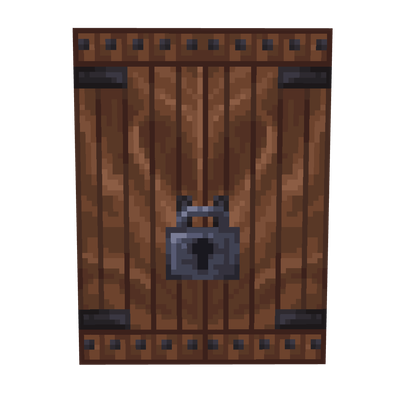
CurseForge · Minecraft mod
Hinged
Adds new huge doors for dungeon builds, in addition to a new Lock and Key system for modpackers!
Choose a version Pick your version below, then grab the matching file.
Quick answer
Which Hinged release matches 1.20.1 Forge?
Best match for your filters hinged-0.1.0.jar
Game version 1.20.1
Loader Forge
hinged-0.1.0.jar targets 1.20.1 with Forge. The project page does not say whether this file belongs on the client, dedicated server, or both. No extra mods listed for this file.
Where it goes
Is Hinged required on the client, server, or both?
The project page does not say whether this file belongs on the client, dedicated server, or both.
Client Source doesn’t say
Dedicated server Source doesn’t say
Loader for this release Forge
Required install it here Optional supported, not mandatory Not supported do not install here Source doesn’t say do not assume
The source does not explicitly classify this release as client-only or server-only.
What else does hinged-0.1.0.jar need?
hinged-0.1.0.jar on 1.20.1 Forge. Every mod below is checked against that same setup.
This file does not list any required mods. Do not add a library just because a different file uses it.
This file does not list any required or optional mods.
Before you install it
Add Hinged without breaking your instance.
Built for hinged-0.1.0.jar on 1.20.1 Forge. Pick another file and the loader, install side or required mods may change.
- 01
Stick to this file
Use hinged-0.1.0.jar. It targets 1.20.1 with Forge; another release may have different loader, side or dependency requirements.
- 02
Bring the mods it needs
This file does not list any required mods. Do not add a library just because a different file uses it.
- 03
Put it on the correct side
The project page does not say whether this file belongs on the client, dedicated server, or both.
- 04
Pick the file you checked
Use the “Get this file” button beside hinged-0.1.0.jar. It opens that exact file at the source.
About this project
What does Hinged add?

Hinged adds giant new doors to Minecraft, plus a lock and key system for modpackers who want to lock doors behind objectives!
The coolest part is that you can add your own doors!!
ADDING A DOOR
Copy one of the folders in config/hinged/doors, rename it, then edit door.json. The id must be unique, lowercase, and use underscores. Hinged currently supports 3x4-sized doors.
Use display_name for the in-game name, texture for the door PNG, and icon for an optional inventory PNG. Without an icon, Hinged renders the door model as the item.
placement_mode can be wall, floor, or ceiling. Floor and ceiling modes lay the 3x4 door blocks horizontally. Your GeckoLib model dictates how the door looks. opening_mode only selects the matching open-hitbox behavior (swing, vertical, or trapdoor). It does not decide which blocks must be clear. animation_ticks controls the movement cooldown, and auto_close_ticks closes it automatically (0 disables this).
hitboxes use coordinates - "from": [x, y, z], "to": [x, y, z]
closed is the shut hitbox. open_left and open_right are the open hitboxes. leaf_left and leaf_right are the extra moving-leaf hitboxes; use [] when the middle should stay empty. Optional columns and rows arrays limit a box to particular blocks in the 3x4 door.
Every door must also have opening_clearance and closing_clearance arrays. These use the same from, to, columns, and rows format as hitboxes, but describe space that must contain replaceable blocks before the door can move. Coordinates may extend outside a door block; for example [0, 0, -16] to [16, 16, 0] checks the block directly in front. Hinged rotates the area with the door. Use [] when that movement needs no clear space.
Sounds can use a Minecraft sound such as minecraft:block.wooden_door.open, or an .ogg file placed beside door.json. The four settings are open_sound, close_sound, unusable_sound, and unlock_sound.
MODELS AND ANIMATIONS
Door and lock models/animations use GeckoLib files. Their Blockbench and animation guide is here:
https://wiki.geckolib.com
The door animations are door.closed, door.open, door.close, and door.unusable. Lock animations are lock.locked, lock.unlock, lock.unlocked, and lock.relock.
LOCKS AND KEYS
Door lock placement is controlled by lock_parent_bone and lock_transform. Use lock_model: "embedded" when the lock is built into the door model. Otherwise the key's lock model is used. key_lock_animation can give that separate lock a door-specific animation.
starts_locked needs a lock_id. A key with the same lock_id opens it. stays_unlocked decides whether it remains unlocked, while unlock_delay_ticks, relock_ticks, and relock_model_swap_ticks control the timing.
Create keys by copying a folder in config/hinged/keys. In key.json, use_mode is single_use, unlimited, or durability. durability sets the use count, can_duplicate allows bound-key copying in a crafting grid, and indestructible protects dropped keys. icon is the inventory texture. lock_model, lock_texture, and lock_animation must be supplied together if that key has its own lock appearance.
Shift-right-click a door with an unbound regular key to lock it. A key already bound to one door cannot lock another. Hold the matching key to open a locked door.
Shift-right-click away from a door to switch between staying unlocked and locking again when closed. Locked doors cannot be broken, and vanilla doors use the same key system.
Restart Minecraft after changing definitions or assets so Hinged can rebuild and load them.
Art by Nekomaster, Programming by Yochu! Inspired by Valhelsia Structures' Dungeon Doors. Enjoy!
Project description from CurseForge.
Pick your setup
Hinged by Minecraft version and loader
Choose the version and loader you play, then open the matching release.
Check the dependencies, then try the file in a copied instance before changing a world you care about.
Recent files
Hinged versions and loaders
hinged-0.1.0.jar
17 Oct 2026
Client Source doesn’t say Server Source doesn’t say Dependencies No extras listed Listed on Release listing
Check the 1.20.1 · Forge setup 1.20.1Forge release
Looking for an older file? The official CurseForge project page is in Resources.
 mod
CurseForge · Minecraft
Shuu's Hit/Damage Indicator
Adds a damage indicator to Minecraft; when you take damage, it will show you the relative location to where the enemy was when they hit you.
 mod
CurseForge · Minecraft
Bubie
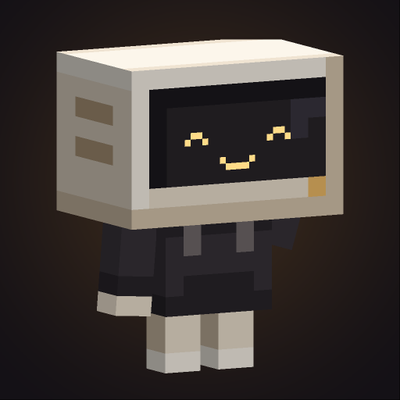
The little CRT robot from bubie.gg as your helper: it chops trees, digs, quarries, farms and mines, then stores everything in your chest.
 mod
CurseForge · Minecraft
Blaze Attack Animation (Mod ver.)
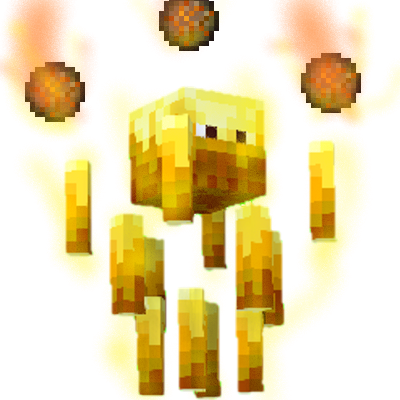
A simple mod that gives blazes a fancier attack animation. Originally from Mob AI Tweaks.