Minecraft version
Back to mods 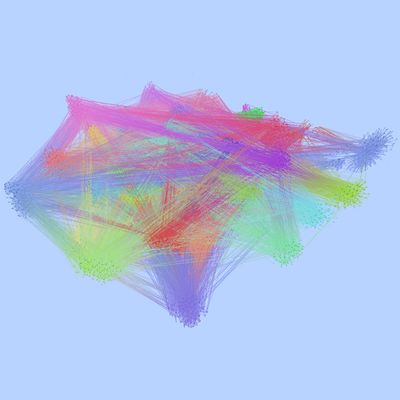
CurseForge · Minecraft mod
Graph Machine
haha graph machine go brrr
Choose a version Pick your version below, then grab the matching file.
Quick answer
Which Graph Machine release should I use?
Latest stable file Graph machine - 1.0.0
Game version 26.3
Loader NeoForge
Graph machine - 1.0.0 targets 26.3 with NeoForge. The project page does not say whether this file belongs on the client, dedicated server, or both. No extra mods listed for this file.
Where it goes
Is Graph Machine required on the client, server, or both?
The project page does not say whether this file belongs on the client, dedicated server, or both.
Client Source doesn’t say
Dedicated server Source doesn’t say
Loader for this release NeoForge
Required install it here Optional supported, not mandatory Not supported do not install here Source doesn’t say do not assume
The source does not explicitly classify this release as client-only or server-only.
What else does Graph machine - 1.0.0 need?
Graph machine - 1.0.0. Change the file and its required mods may change too.
This file does not list any required mods. Do not add a library just because a different file uses it.
This file does not list any required or optional mods.
Before you install it
Add Graph Machine without breaking your instance.
Built for Graph machine - 1.0.0. Pick another file and the loader, install side or required mods may change.
- 01
Stick to this file
Use Graph machine - 1.0.0. It targets 26.3 with NeoForge; another release may have different loader, side or dependency requirements.
- 02
Bring the mods it needs
This file does not list any required mods. Do not add a library just because a different file uses it.
- 03
Put it on the correct side
The project page does not say whether this file belongs on the client, dedicated server, or both.
- 04
Pick the file you checked
Use the “Get this file” button beside Graph machine - 1.0.0. It opens that exact file at the source.
About this project
What does Graph Machine add?
This mod is not for survival gameplay. It was written for a class project, downloadable from CF for anyone who wishes to play around with it in Creative or Spectator mode.
Explore a visualization of Minecraft's code in a Minecraft world! The code is organized into classes, which come from compiled named Java files and are linked by references. Strongly-connected logic in Minecraft's code are divided into clusters.
This graph is available as a world type; among Default, Amplified, Flat, Debug, etc. Hold alt/option while pressing the world type button until you get "Class Graph".
The graph is generated from Minecraft 26.3 classes, using jdeps for class dependency analysis.
Enter the Class Graph world with Creative or Spectator mode for optimal viewing. Flying your character around lets you get close and distant views of the graph.
The panel on the right side of the window gives you finer control:
- Filtering for nodes by class names, package names, or fully-qualified names.
- The filtered nodes has a further option to reveal their connected class nodes, and whether you see connections between those adjacent nodes.
- Showing packages that the class nodes belong to.
- Hiding the visualized edges between class nodes or merging node-to-node into cluster-to-cluster.
- Hiding each cluster of classes. Each are named after a common package.
Also, class node closest to your crosshairs will show the Java class's fully-qualified name above the Clusters subpanel.
Pressing F12 switches the panel in and out of the game window.
Project description from CurseForge.
Pick your setup
Graph Machine by Minecraft version and loader
Choose the version and loader you play, then open the matching release.
Check the dependencies, then try the file in a copied instance before changing a world you care about.
Recent files
Graph Machine versions and loaders
Graph machine - 1.0.0
graphmachine-1.0.0.jar
17 Oct 2026
Client Source doesn’t say Server Source doesn’t say Dependencies No extras listed Listed on Release listing
Check the 26.3 · NeoForge setup NeoForge26.3 release
Looking for an older file? The official CurseForge project page is in Resources.
 mod
CurseForge + Modrinth · Minecraft
Questlog
Adds a quest system designed to make info conveyance in modpacks far more intuitive!
 mod
CurseForge · Minecraft
Create: Radars
Adding advanced surveillance technologies to Create!
 mod
CurseForge · Minecraft
NoMoWanderer
Adds various things to the game to help make the Wandering Trader less annoying.