Fabric API Needed by signboards-forge-1.20.1.jar
requiredNo matching file
CurseForge · Minecraft mod
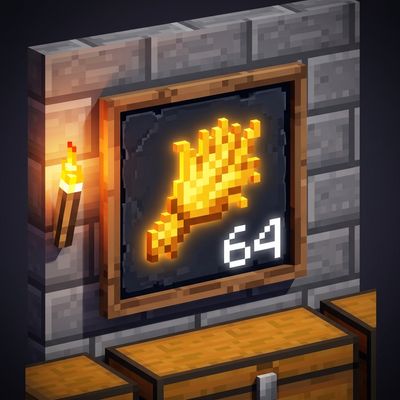
Satisfactory-style item signs from 1x1 to 4x4. Show items, colored emoji, text and numbers to label your storage and farms.
Quick answer
signboards-forge-1.20.1.jar targets 1.20.1 with Forge. The project page does not say whether this file belongs on the client, dedicated server, or both. 1 required mod needs a matching file.
Where it goes
The project page does not say whether this file belongs on the client, dedicated server, or both.
The source does not explicitly classify this release as client-only or server-only.
signboards-forge-1.20.1.jar. Change the file and its required mods may change too.
Install Fabric API first, but 1 required mod has no matching file for this setup. Do not mix loader builds to force a match.
We only count dependency files that match this setup. A file for another loader does not fill the gap.
Before you install it
Built for signboards-forge-1.20.1.jar. Pick another file and the loader, install side or required mods may change.
Use signboards-forge-1.20.1.jar. It targets 1.20.1 with Forge; another release may have different loader, side or dependency requirements.
Install Fabric API first, but 1 required mod has no matching file for this setup. Do not mix loader builds to force a match.
The project page does not say whether this file belongs on the client, dedicated server, or both.
Use the “Get this file” button beside signboards-forge-1.20.1.jar. It opens that exact file at the source.
About this project
Signboards
Know what's in every chest at a glance. Signboards adds Satisfactory-style item signs that hang on walls, floors and ceilings. Each sign shows a big item picture or a colored emoji plus a few lines of text or a number, so your storage rooms and farms finally label themselves.
Features
• Five sizes: 1x1, 1x2 (tall), 2x1 (wide), 2x2 and 4x4. The block you click becomes the sign's bottom-left corner, so lining up a wall of signs is easy.
• Any item as the icon: pick from every item with a search box, or just right click a sign while holding the item.
• 210 colored emoji for crops, animals, ores, tools, warnings, arrows, numbers and colors. Use one as the big icon, or write :fire:, :wheat: or :check: inside your text.
• Ready-made layouts: icon only, icon with text below, icon with text on the right, text only, or icon with a big number in the corner, like a stack count.
• Up to 4 lines of text, each with its own color, size and bold.
• Backgrounds: framed wooden board, plain color or none at all, in 16 colors. Turn on glow to keep a sign bright in the dark.
• Keeps its design: a broken sign drops with its design, so you can move it anywhere. Middle click copies a sign together with its design.
How to use
• Place: right click a wall, floor or ceiling with a sign.
• Edit: right click a sign with an empty hand, with a sign item, with the item it already shows, or while sneaking. The editor shows a live preview.
• Quick icon: right click a sign while holding any other item. That item becomes the icon and is not used up.
• Remove: hit the sign.
Crafting
• 1x1: Item Frame + any Sign (shapeless)
• 2x1: two 1x1 side by side
• 1x2: two 1x1 on top of each other
• A single 2x1 turns into a 1x2, and back
• 2x2: two 2x1 on top of each other, or four 1x1 in a square
• 4x4: four 2x2 in a square
All signs are also in the creative Functional Blocks tab.
Supported versions
• Minecraft 26.3: Fabric, NeoForge
• Minecraft 26.1.x: Fabric (26.1 to 26.1.2), NeoForge and Forge (26.1.2)
• Minecraft 1.21.11: Fabric, NeoForge, Forge
• Minecraft 1.21.1: Fabric (1.21 and 1.21.1), NeoForge and Forge (1.21.1)
• Minecraft 1.20.1: Forge
!! Forge for 26.3 will follow once Forge has a stable 26.3 release.
Credits
Emoji graphics are from Twemoji v17.0.3 (https://github.com/jdecked/twemoji), Copyright 2019 Twitter, Inc and other contributors, licensed under CC-BY 4.0 (https://creativecommons.org/licenses/by/4.0/). A selection of them was resized and packed into a sprite sheet.
The mod's code is licensed under MIT.
Project description from CurseForge.
Pick your setup
Choose the version and loader you play, then open the matching release.
Check the dependencies, then try the file in a copied instance before changing a world you care about.
Recent files
18 Oct 2026
17 Oct 2026
17 Oct 2026
17 Oct 2026
17 Oct 2026
17 Oct 2026
17 Oct 2026
17 Oct 2026
17 Oct 2026
17 Oct 2026
17 Oct 2026
signboards-1.0.0.jar
17 Oct 2026
Looking for an older file? The official CurseForge project page is in Resources.