Minecraft version
Back to mods 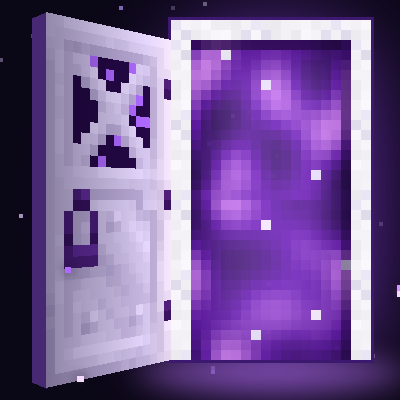
CurseForge · Minecraft mod
Pocket Door
Create your own pocket dimension! Very simple!
Choose a version Pick your version below, then grab the matching file.
Quick answer
Which Pocket Door release should I use?
Latest stable file pocketdoor-1.7.0 for mc1.12.2
Game version 1.12.2
Loader Forge
Pocket Door pocketdoor-1.7.0 for mc1.12.2 targets 1.12.2 with Forge. The project page does not say whether this file belongs on the client, dedicated server, or both. No extra mods listed for this file.
Where it goes
Is Pocket Door required on the client, server, or both?
The project page does not say whether this file belongs on the client, dedicated server, or both.
Client Source doesn’t say
Dedicated server Source doesn’t say
Loader for this release Forge
Required install it here Optional supported, not mandatory Not supported do not install here Source doesn’t say do not assume
The source does not explicitly classify this release as client-only or server-only.
What else does Pocket Door pocketdoor-1.7.0 for mc1.12.2 need?
pocketdoor-1.7.0 for mc1.12.2. Change the file and its required mods may change too.
This file does not list any required mods. Do not add a library just because a different file uses it.
This file does not list any required or optional mods.
Before you install it
Add Pocket Door without breaking your instance.
Built for Pocket Door pocketdoor-1.7.0 for mc1.12.2. Pick another file and the loader, install side or required mods may change.
- 01
Stick to this file
Use pocketdoor-1.7.0 for mc1.12.2. It targets 1.12.2 with Forge; another release may have different loader, side or dependency requirements.
- 02
Bring the mods it needs
This file does not list any required mods. Do not add a library just because a different file uses it.
- 03
Put it on the correct side
The project page does not say whether this file belongs on the client, dedicated server, or both.
- 04
Pick the file you checked
Use the “Get this file” button beside pocketdoor-1.7.0 for mc1.12.2. It opens that exact file at the source.
About this project
What does Pocket Door add?
Pocket Dimensions
Your own private room outside the world, behind a door you can put anywhere.
Craft a Pocket Door, place it, and walk through. You arrive in your own personal pocket dimension: a sealed 64×64×64 room that belongs to you alone. Walk back through the door inside and you come out exactly where you went in. Build a base, stash your loot, or just have somewhere quiet to go.
Why this exists
I made this because I missed Dimensional Doors in InsaneCraft. All I really wanted from it was the personal pocket, so this is that one feature, rebuilt as a small standalone mod. No dungeons, no rifts, no limbo. Just a door and a room.
Features
- One pocket per player. Every player gets their own room, and it's always the same room, no matter which of their doors they use.
- Big. The inside is 64 blocks wide, 64 deep and 64 tall, bigger than a Dimensional Doors personal pocket.
- Chunk Loading (Compatible with FTB claiming/loading). Shift right click your door while inside the pocket to turn on/off pocket chunkloading.
- A glowing portal in the doorway. Open the door and the doorway fills with a swirling, animated purple portal, with particles drifting out.
- Doors anywhere. Place as many Pocket Doors as you like, in any dimension. Each one leads to the pocket of whoever placed it, and you return through the one you came in by.
- Visit your friends. Walk through someone else's Pocket Door and you end up in their pocket. Don't want visitors? Sneak-right-click one of your own doors with an empty hand to lock your pocket; do it again to unlock it. Sneak-right-clicking someone else's door tells you whose it is.
- Reskin the walls. Sneak-right-click a wall, floor or ceiling with any full block to change that one block. Double sneak-right-click to reskin the whole face at once. In survival it uses blocks from your inventory and gives back the ones it replaces.
- Sealed and safe. The shell is unbreakable and blast-proof. No mobs spawn inside, and no weather or day/night cycle reaches you. If something ever does punch a hole in a pocket, anyone who falls through is put back on the floor, and the exit door comes back if it's destroyed.
- JEI support. The Pocket Door recipe shows up in JEI (and HEI) like any other recipe.
- Aeronautics/Valkyrian Skies Compatible
Crafting
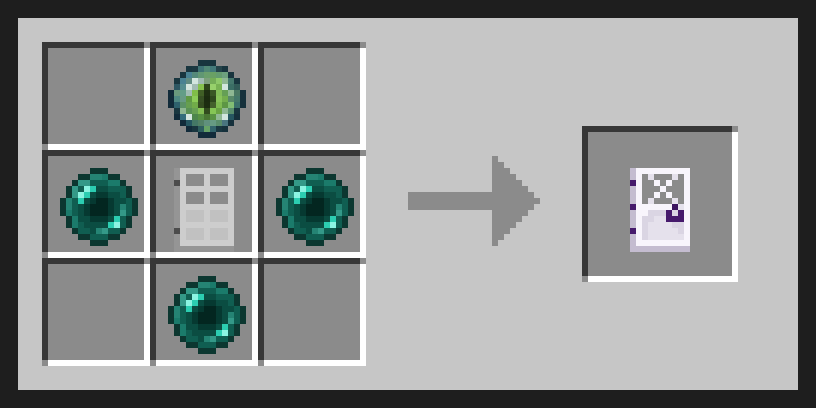
An Iron Door in the middle, an Eye of Ender above it, and Ender Pearls on the left, right and below.
Versions
- Minecraft 1.21.1 (NeoForge)
- Minecraft 1.12.2 (Forge). Made for big modpacks such as InsaneCraft. Uses dimension ID 7353 by default, which you can change in
config/pocketdims.cfgif another mod needs that ID. - Minecraft 1.20.1 (Forge)
- Minecraft 26.2 (NeoForge)
Want it for another version? It can be ported to any Minecraft version. Just ask in the comments and tell me which version and loader you need.
Install on both the client and the server.
Adding to an existing world
Pocket Dimensions is safe to add to a world you're already playing. It doesn't change world generation anywhere else, and your pockets are saved in their own folder inside the world save.
FAQ
What if I die in my pocket? You respawn at your normal spawn point or bed, just like anywhere else. Beds don't work inside a pocket.
Can other people get into my pocket? Only through a door you placed, and only while your pocket is unlocked. Sneak-right-click your door with an empty hand to lock it.
Can I use it in a modpack? Yes, go ahead.
Project description from CurseForge.
Pick your setup
Pocket Door by Minecraft version and loader
Choose the version and loader you play, then open the matching release.
Minecraft version
1.21.1
1 loader buildMinecraft version
1.20.1
1 loader buildMinecraft version
1.12.2
1 loader buildCheck the dependencies, then try the file in a copied instance before changing a world you care about.
Recent files
Pocket Door versions and loaders
pocketdoor-1.7.0 for mc1.12.2
pocketdoor-1.7.0-mc1.12.2.jar
27 Oct 2026
Client Source doesn’t say Server Source doesn’t say Dependencies No extras listed Listed on Release listing
Check the 1.12.2 · Forge setup Forge1.12.2 release
pocketdoor-1.7.0 for mc1.20.1
pocketdoor-1.7.0-mc1.20.1.jar
27 Oct 2026
Client Source doesn’t say Server Source doesn’t say Dependencies No extras listed Listed on Release listing
Check the 1.20.1 · Forge setup 1.20.1Forge release
pocketdoor-1.8.0 for mc26.2
pocketdoor-1.8.0-mc26.2.jar
27 Oct 2026
Client Source doesn’t say Server Source doesn’t say Dependencies No extras listed Listed on Release listing
Check the 26.2 · NeoForge setup NeoForge26.2 release
pocketdoor-1.8.0 for mc1.21.1
pocketdoor-1.8.0-mc1.21.1.jar
27 Oct 2026
Client Source doesn’t say Server Source doesn’t say Dependencies No extras listed Listed on Release listing
Check the 1.21.1 · NeoForge setup 1.21.1NeoForge release
pocketdoor-1.6.4 for mc1.12.2
pocketdoor-1.6.4-mc1.12.2.jar
27 Oct 2026
Client Source doesn’t say Server Source doesn’t say Dependencies No extras listed Listed on Release listing
Check the 1.12.2 · Forge setup Forge1.12.2 release
pocketdoor-1.6.4-mc1.20.1.jar
27 Oct 2026
Client Source doesn’t say Server Source doesn’t say Dependencies No extras listed Listed on Release listing
Check the 1.20.1 · Forge setup 1.20.1Forge release
pocketdoor-1.7.4 for mc26.2
pocketdoor-1.7.4-mc26.2.jar
27 Oct 2026
Client Source doesn’t say Server Source doesn’t say Dependencies No extras listed Listed on Release listing
Check the 26.2 · NeoForge setup NeoForge26.2 release
pocketdoor-1.7.4 for mc1.21.1
pocketdoor-1.7.4-mc1.21.1.jar
27 Oct 2026
Client Source doesn’t say Server Source doesn’t say Dependencies No extras listed Listed on Release listing
Check the 1.21.1 · NeoForge setup 1.21.1NeoForge release
pocketdoor-1.6.3-mc1.12.2.jar
27 Oct 2026
Client Source doesn’t say Server Source doesn’t say Dependencies No extras listed Listed on Release listing
Check the 1.12.2 · Forge setup Forge1.12.2 release
pocketdoor-1.6.3-mc1.20.1.jar
27 Oct 2026
Client Source doesn’t say Server Source doesn’t say Dependencies No extras listed Listed on Release listing
Check the 1.20.1 · Forge setup 1.20.1Forge release
pocketdoor-1.7.3-mc26.2.jar
27 Oct 2026
Client Source doesn’t say Server Source doesn’t say Dependencies No extras listed Listed on Release listing
Check the 26.2 · NeoForge setup NeoForge26.2 release
pocketdoor-1.7.3 for mc1.21.1
pocketdoor-1.7.3-mc1.21.1.jar
27 Oct 2026
Client Source doesn’t say Server Source doesn’t say Dependencies No extras listed Listed on Release listing
Check the 1.21.1 · NeoForge setup 1.21.1NeoForge release
Looking for an older file? The official CurseForge project page is in Resources.
 mod
mod CurseForge + Modrinth · Minecraft
Better MC Screenshots
Enhance your screenshots with previews, sounds, uploader, and an in-game gallery!
 mod
mod CurseForge · Minecraft
SCP : Site Eclipse
Build your SCP facility with ten anomalies, containment rooms, security cameras and playable SCP-079. [ANG] ; Construisez votre site SCP avec dix anomalies, des confinements, des caméras et SCP-079 jouable. [FR]
 mod
mod CurseForge · Minecraft
Unoffical NEI rewrite
An unoffical rewrite of the GTNH NEI fork