Minecraft version
Back to mods 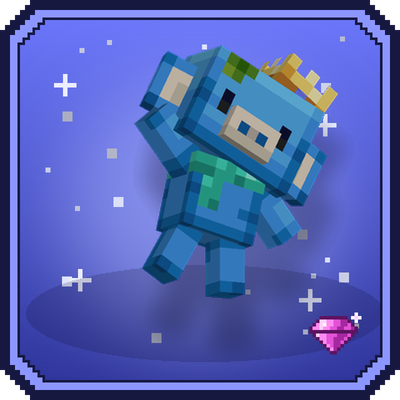
CurseForge · Minecraft mod
Wumpus Discord
Its Wumpus, your discord helper friend, he will help you to become stronger !
Choose a version Pick your version below, then grab the matching file.
Quick answer
Which Wumpus Discord release should I use?
Latest stable file wumpus-1.21.1-1.0.5.jar
Game version 1.21.1
Loader Forge
Wumpus Discord wumpus-1.21.1-1.0.5.jar targets 1.21.1 with Forge. The project page does not say whether this file belongs on the client, dedicated server, or both. No extra mods listed for this file.
Where it goes
Is Wumpus Discord required on the client, server, or both?
The project page does not say whether this file belongs on the client, dedicated server, or both.
Client Source doesn’t say
Dedicated server Source doesn’t say
Loader for this release Forge
Required install it here Optional supported, not mandatory Not supported do not install here Source doesn’t say do not assume
The source does not explicitly classify this release as client-only or server-only.
What else does Wumpus Discord wumpus-1.21.1-1.0.5.jar need?
wumpus-1.21.1-1.0.5.jar. Change the file and its required mods may change too.
This file does not list any required mods. Do not add a library just because a different file uses it.
This file does not list any required or optional mods.
Before you install it
Add Wumpus Discord without breaking your instance.
Built for Wumpus Discord wumpus-1.21.1-1.0.5.jar. Pick another file and the loader, install side or required mods may change.
- 01
Stick to this file
Use wumpus-1.21.1-1.0.5.jar. It targets 1.21.1 with Forge; another release may have different loader, side or dependency requirements.
- 02
Bring the mods it needs
This file does not list any required mods. Do not add a library just because a different file uses it.
- 03
Put it on the correct side
The project page does not say whether this file belongs on the client, dedicated server, or both.
- 04
Pick the file you checked
Use the “Get this file” button beside wumpus-1.21.1-1.0.5.jar. It opens that exact file at the source.
About this project
What does Wumpus Discord add?

💙 About
Before anything thanks to Alexander for the free model
“Wumpus Npc A” by @alexander
https://blockbenchworkshop.com/model/alexander/wumpus-npc-a
Wumpus was waiting on friends… and it's you!
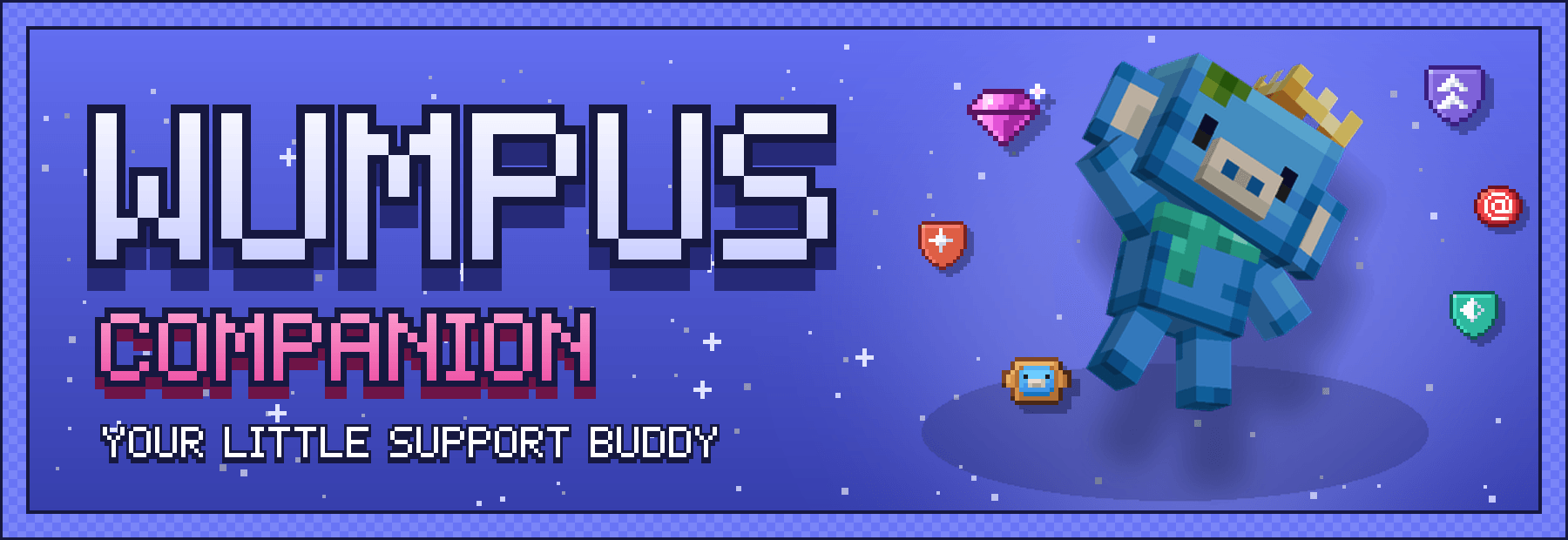
Wumpus Companion turns Wumpus, the lovable Discord mascot, into a support pet for your Minecraft adventures. He follows you everywhere, heals you when you get hurt, carries your stuff in his backpack, buffs you and your friends with a HypeSquad aura, and grows stronger with every level you share together.
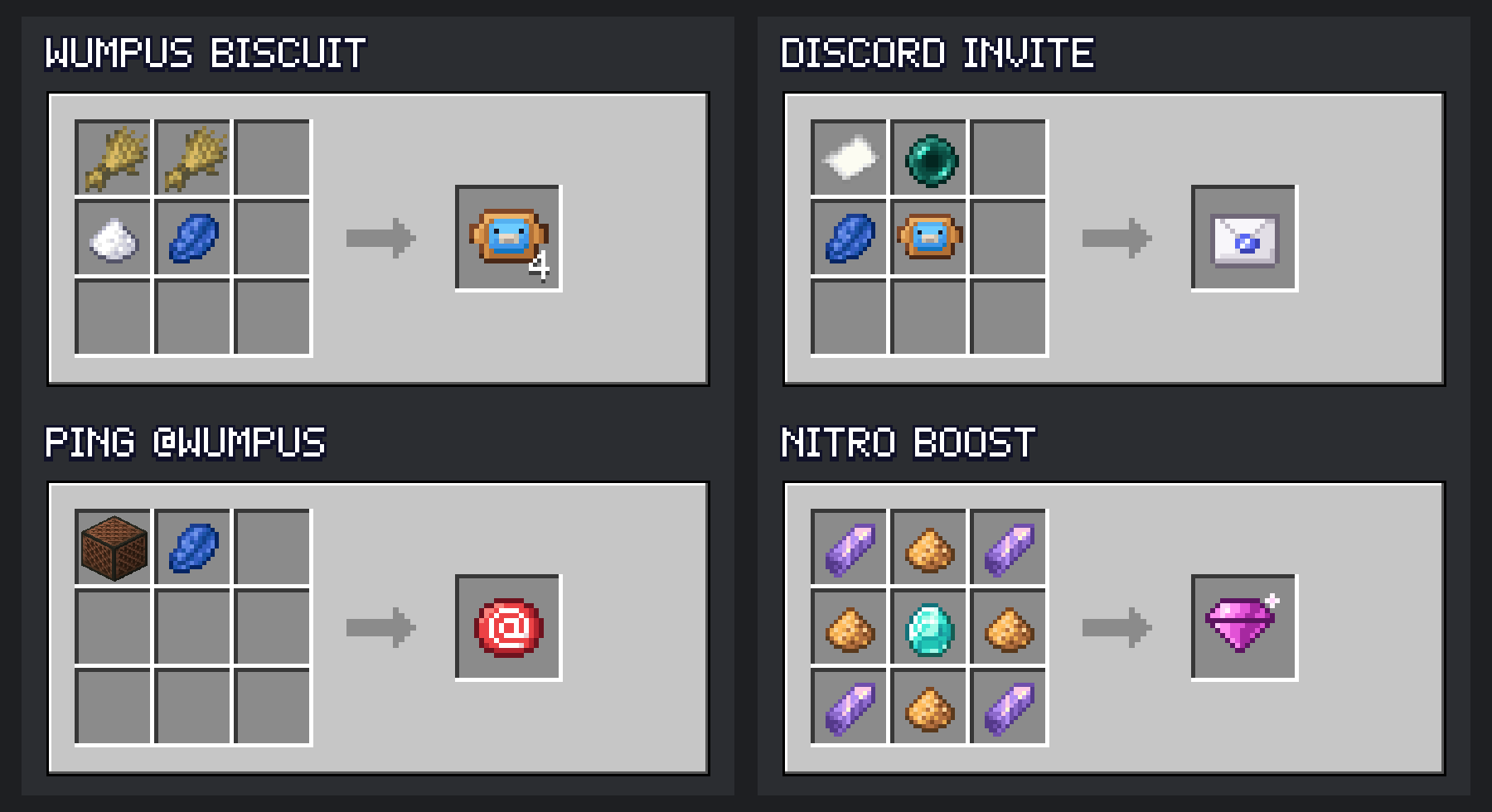
No more lonely caves: befriend a Wumpus, feed him biscuits, boost him with Nitro and watch him become a crowned, life-saving legend.

- 💚 Healer: heals you automatically when you take damage, with a short cooldown.
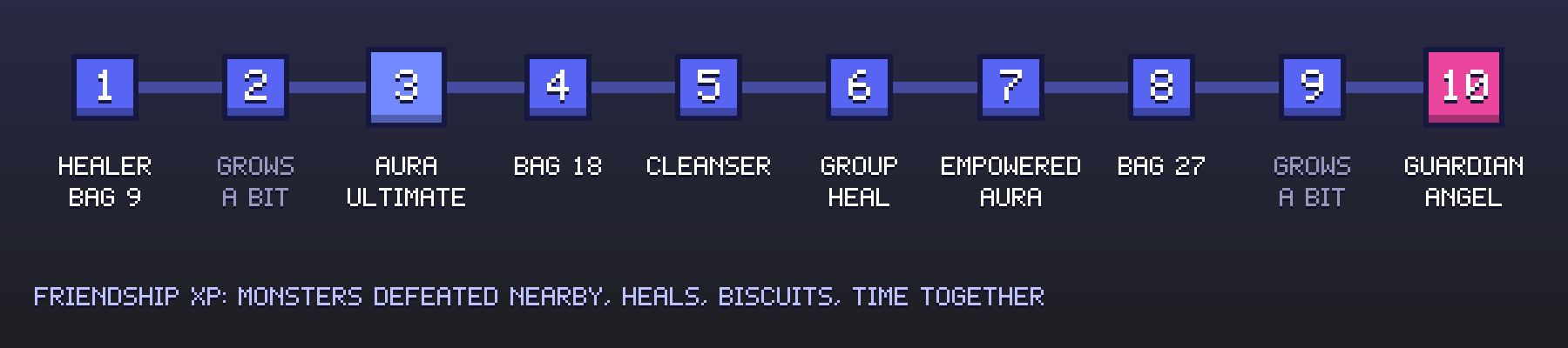
- 🎒 Backpack: 9 slots at the start, 18 at level 4, 27 at level 8.
- ✨ HypeSquad auras: real potion effects for you and nearby allies.
- ⚡ Ultimates: one powerful skill per house, on its own key (R by default).
- 🧹 Cleanser: removes your worst negative effect.
- 👼 Guardian Angel: at level 10, he saves you from death (long cooldown).
- 💎 Nitro Boost: 3 boost tiers, and a crown at tier 3.
- 🟢 Discord statuses: Online, Idle, Do Not Disturb and Offline.
- 🧸 He never dies: when knocked out he goes offline and turns into a plush you carry. He keeps his level, boosts, house and backpack.
- 📖 Wumpus 101: an in-game guide book, a profile screen with his roles and stats, a small HUD and 7 advancements.
- 🌍 Fully translated in English and French.


- Open your Discord Invite (given when you join) with a right-click in the air to get the Ping item, then use the invite on a block to summon your Wumpus, who is already your friend.
- Feed him Wumpus Biscuits until he accepts your friend request. You can only have one Wumpus per player, so choose wisely!
- Right-click him to make him sit or follow you.
- Sneak + right-click to open his profile and backpack.
- Press G (or use the Ping item) to call him to your side.
Controls
- Right-click: sit / follow
- Sneak + right-click: profile & backpack
- Wumpus Biscuit: feed (+XP, heals him)
- R: ultimate
- G: call your Wumpus
- (unbound key): cycle his status

Wumpus earns Friendship XP when you defeat monsters near him, when he heals you, when you feed him and simply by spending time together. He gets a little bigger with every level, up to level 10.

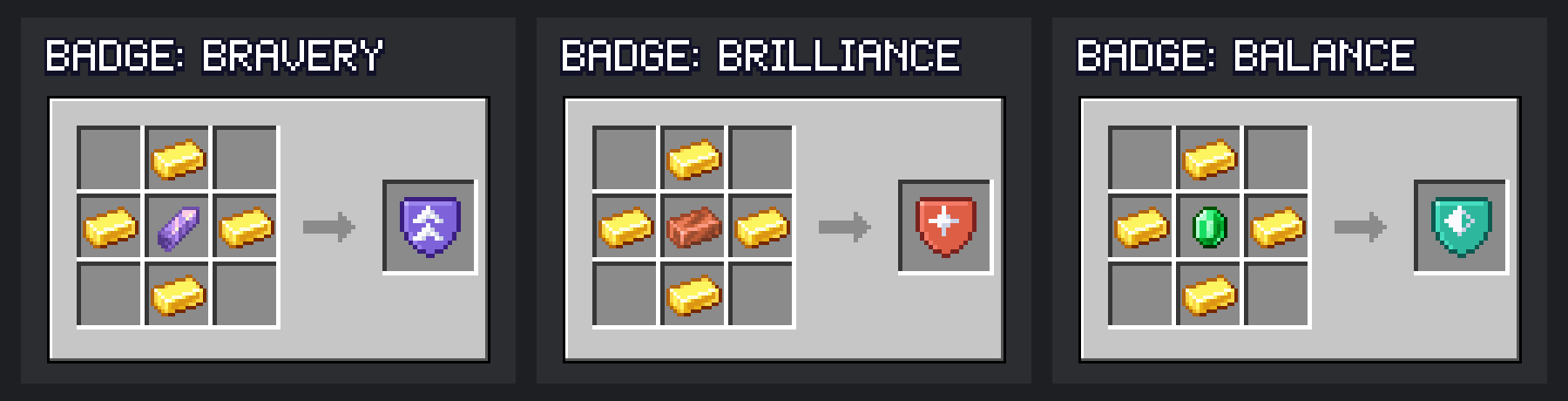
Right-click your Wumpus with a HypeSquad Badge to make him join a house. Each house gives a different aura and ultimate. You can switch house at any time.
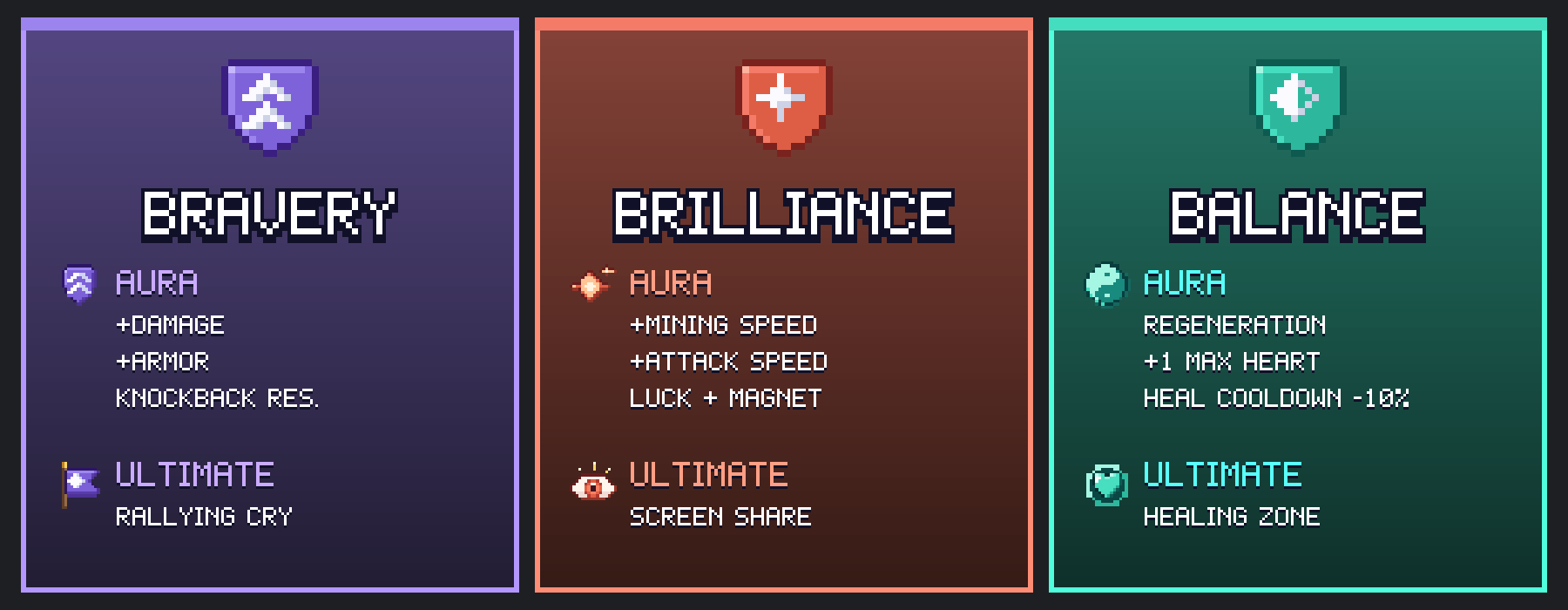
- Bravery · Rallying Cry
- Brilliance · Screen Share
- Balance · Healing Zone

Give Nitro Boosts to your Wumpus to unlock boost tiers: more health, stronger heals, longer range and shorter cooldowns.
- Tier 1 (2 boosts): stronger Wumpus
- Tier 2 (7 boosts): even stronger
- Tier 3 (14 boosts): maximum power + the server owner's crown 👑

Just like on Discord, your Wumpus has a status. Change it from his profile, with /wumpus status or a dedicated key.
- 🟢 Online: follows you and supports you.
- 🟡 Idle: naps where he stands and recovers twice as fast, but does not support you. Touch, feed or call him to wake him up. He also goes Idle by himself when you leave him alone for a while.
- 🔴 Do Not Disturb: supports you quietly, no sounds or chat messages.
- ⚫ Offline: he becomes a plush in your inventory. Right-click with it to reconnect him.


All balance values live in the server config (per world), so modpack makers and server owners can tune everything:
xpMultiplier,healMultiplier,cooldownMultiplierguardianAngel(on / off)supportOtherPlayers: auras, group heals and ultimates also help other playersreconnectDelaySeconds,autoIdleSeconds- Client:
showHud
Commands
/wumpus guide: get the Wumpus book again/wumpus status <online|idle|dnd>/wumpus abandon: lost his plush? Frees your slot so you can befriend a new Wumpus (your current one goes back to the wild)- Operators:
/wumpus level,xp,boosts,cooldowns,house

Does it work on servers?
Yes. Install it on both the server and every client, with GeckoLib.
Does it use AI ?
Only using for developpement with Claude Code, Model is from alexander crown and scarf are done by my friend, assets are AI-Generated.
Project description from CurseForge.
Pick your setup
Wumpus Discord by Minecraft version and loader
Choose the version and loader you play, then open the matching release.
Check the dependencies, then try the file in a copied instance before changing a world you care about.
Recent files
Wumpus Discord versions and loaders
wumpus-1.21.1-1.0.5.jar
20 Oct 2026
Client Source doesn’t say Server Source doesn’t say Dependencies No extras listed Listed on Release listing
Check the 1.21.1 · Forge setup Forge1.21.1 release
wumpus-1.21.1-1.0.4.jar
20 Oct 2026
Client Source doesn’t say Server Source doesn’t say Dependencies No extras listed Listed on Release listing
Check the 1.21.1 · Forge setup Forge1.21.1 release
wumpus-1.21.1-1.0.3.jar
20 Oct 2026
Client Source doesn’t say Server Source doesn’t say Dependencies No extras listed Listed on Release listing
Check the 1.21.1 · Forge setup Forge1.21.1 release
wumpus-1.21.1-1.0.2.jar
18 Oct 2026
Client Source doesn’t say Server Source doesn’t say Dependencies No extras listed Listed on Release listing
Check the 1.21.1 · Forge setup Forge1.21.1 release
wumpus-1.21.1-1.0.1.jar
18 Oct 2026
Client Source doesn’t say Server Source doesn’t say Dependencies No extras listed Listed on Release listing
Check the 1.21.1 · Forge setup Forge1.21.1 release
wumpus-1.21.1-1.0.0.jar
18 Oct 2026
Client Source doesn’t say Server Source doesn’t say Dependencies No extras listed Listed on Release listing
Check the 1.21.1 · Forge setup Forge1.21.1 release
Looking for an older file? The official CurseForge project page is in Resources.
 mod
mod CurseForge + Modrinth · Minecraft
Tiny Takeover Backport
A Minecraft mod that brings the complete Tiny Takeover drop to older Minecraft versions!
 mod
mod CurseForge · Minecraft
Dead Air
Extra Special Studio presents Dead Air: radio towers become station nodes you tune with built-in T1/T2 radios & cross-dim Link. Collect notes, craft upgrades & panels. Requires Apocalypse Structures, GeckoLib & ESC.
 mod
mod CurseForge · Minecraft
Falconry
Trap, train, breed, and hunt with 21 real birds of prey, each with unique behaviors and abilities.