Mod Menu Optional for Quick Info Panel 1.3.1+fabric-1.20.5-1.20.6
optionalMatching file found Matched file: Mod Menu v10.0.0 for 1.20.5
CurseForge · Minecraft mod
A simple client-only mod for Minecraft that adds a little heads-up display with info about directions, coordinates and time of the day. It also displays the corresponding current coordinates in the Nether, the current Biome and weather
Quick answer
Quick Info Panel 1.3.1+fabric-1.20.5-1.20.6 targets 1.20.5, 1.20.6 with Fabric. The project page does not say whether this file belongs on the client, dedicated server, or both. All 1 required mods have matching files.
Where it goes
The project page does not say whether this file belongs on the client, dedicated server, or both.
The source does not explicitly classify this release as client-only or server-only.
Quick Info Panel 1.3.1+fabric-1.20.5-1.20.6 on 1.20.5. Every mod below is checked against that same setup.
Install Fabric API first. We found matching files for this game-version and loader setup. 2 come through another mod in the chain.
2 extra mods were pulled in by other dependencies. Indented rows show who needs each one. We only count dependency files that match this setup. A file for another loader does not fill the gap.
Before you install it
Built for Quick Info Panel 1.3.1+fabric-1.20.5-1.20.6 on 1.20.5. Pick another file and the loader, install side or required mods may change.
Use Quick Info Panel 1.3.1+fabric-1.20.5-1.20.6. It targets 1.20.5, 1.20.6 with Fabric; another release may have different loader, side or dependency requirements.
Install Fabric API first. We found matching files for this game-version and loader setup. 2 come through another mod in the chain.
The project page does not say whether this file belongs on the client, dedicated server, or both.
Use the “Get this file” button beside Quick Info Panel 1.3.1+fabric-1.20.5-1.20.6. It opens that exact file at the source.
About this project
A simple client-only mod that adds a small heads-up display with the direction you're facing, your coordinates and the time of day.
An extra info line above it shows the current biome and weather, and the matching Nether coordinates while you're in the Overworld (or Overworld coordinates while you're in the Nether), so lining up portals takes no maths.
Works on Fabric and NeoForge, from Minecraft 1.20.4 to 26.3. You only need it on your client, so it works on any server.
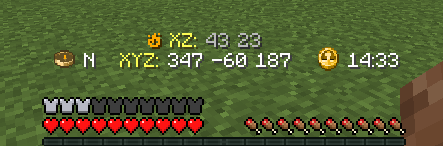
N (Z-)You can hide the whole panel, or just the extra info line, and keep the rest:
| Key | Action |
|---|---|
B |
Show or hide the whole panel |
N |
Show or hide the extra info line (biome, weather and opposite coordinates) |
Both keys can be changed in Options → Controls → Key Binds, under Quick Info Panel.
Open the mod's settings from ModMenu on Fabric, or from the Mods list on NeoForge, to:
In single-player you can also use commands:
/qip toggle main and /qip toggle secondary show or hide the panel and the extra info line/qip toggle axis shows or hides the compass axis/qip set position <default|top-left|top-right|bottom-left|bottom-right> moves the panelSource code, bug reports and translations: GitHub
Project description from CurseForge.
Pick your setup
Choose the version and loader you play, then open the matching release.
Showing the newest 12 of 20 game versions. Older files are in the list below.
Check the dependencies, then try the file in a copied instance before changing a world you care about.
Recent files
quickinfopanel-1.3.1+fabric-1.20.5-1.20.6.jar
24 Oct 2026
Looking for an older file? The official CurseForge project page is in Resources.
 mod
Overhauls the old advancement toast system, focusing on the presentation of advancements
 mod
Hypixel Skyblock Mod for latest version (26.2)
 mod
Swap your elytra in a breeze! Just press the Y button on your keyboard.