Minecraft version
Back to mods 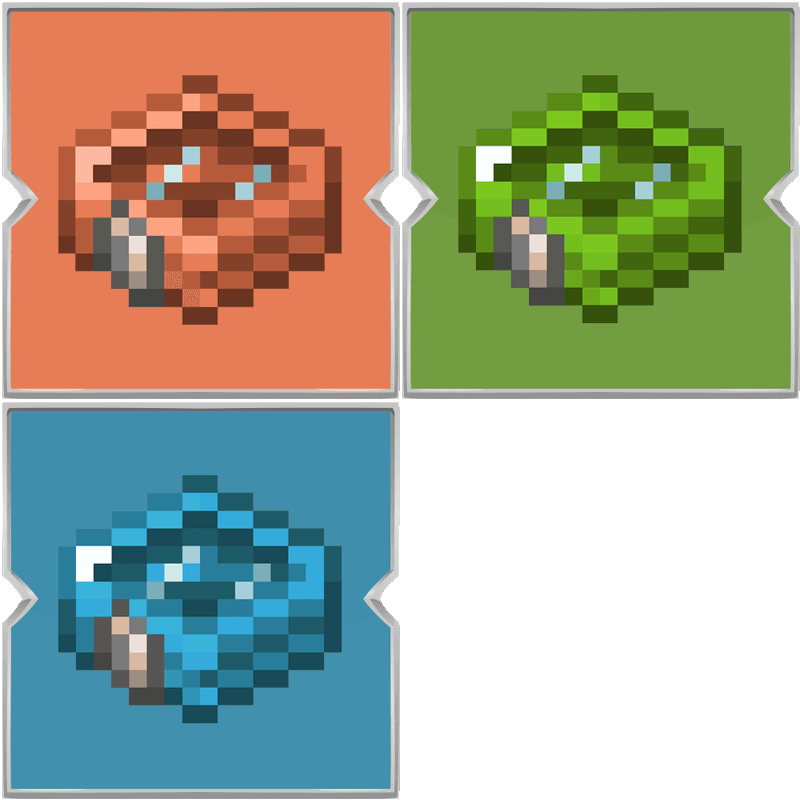
CurseForge · Minecraft mod
Pocket Jukebox: Backport
Play music discs on the go with a handheld, dyeable Pocket Jukebox that holds up to eight tracks.
Choose a version Pick your version below, then grab the matching file.
Quick answer
Which Pocket Jukebox: Backport release matches 26.2 Forge?
Best match for your filters Pocket Jukebox 1.0.0
Game version 26.2
Loader Fabric, Forge, NeoForge
Pocket Jukebox: Backport Pocket Jukebox 1.0.0 targets 26.2 with Fabric, Forge, NeoForge. The project page does not say whether this file belongs on the client, dedicated server, or both. No extra mods listed for this file.
Where it goes
Is Pocket Jukebox: Backport required on the client, server, or both?
The project page does not say whether this file belongs on the client, dedicated server, or both.
Client Source doesn’t say
Dedicated server Source doesn’t say
Loader for this release Fabric, Forge, NeoForge
Required install it here Optional supported, not mandatory Not supported do not install here Source doesn’t say do not assume
The source does not explicitly classify this release as client-only or server-only.
What else does Pocket Jukebox: Backport Pocket Jukebox 1.0.0 need?
Pocket Jukebox 1.0.0 on 26.2 Forge. Every mod below is checked against that same setup.
This file does not list any required mods. Do not add a library just because a different file uses it.
This file does not list any required or optional mods.
Before you install it
Add Pocket Jukebox: Backport without breaking your instance.
Built for Pocket Jukebox: Backport Pocket Jukebox 1.0.0 on 26.2 Forge. Pick another file and the loader, install side or required mods may change.
- 01
Stick to this file
Use Pocket Jukebox 1.0.0. It targets 26.2 with Fabric, Forge, NeoForge; another release may have different loader, side or dependency requirements.
- 02
Bring the mods it needs
This file does not list any required mods. Do not add a library just because a different file uses it.
- 03
Put it on the correct side
The project page does not say whether this file belongs on the client, dedicated server, or both.
- 04
Pick the file you checked
Use the “Get this file” button beside Pocket Jukebox 1.0.0. It opens that exact file at the source.
About this project
What does Pocket Jukebox: Backport add?
Pocket Jukebox lets you take your music with you. Instead of standing next to a jukebox at home, you carry a small music player in your inventory and listen while you explore, build, or travel.
The Pocket Jukebox comes in all sixteen dye colors. Craft one with copper, a Blank Disc, and the dye you want. If you later want a different color, you can recraft it with another dye.

The Blank Disc is a quiet crafting item made from glass panes and paper. It has no song of its own, and it will not play in a normal jukebox.

Each Pocket Jukebox can hold up to eight music discs. Vanilla discs work, and music discs from other mods that play in a normal jukebox can be used as well. While you hold the Pocket Jukebox in your main hand or offhand, it plays the loaded songs in order. When one track ends, the next one starts. The sound follows you, so people nearby can hear it too.

How to use
- Craft a Blank Disc, then craft a Pocket Jukebox in the color you like.
- Put music discs inside by clicking them onto the Pocket Jukebox in your inventory, or by opening it and placing them in the disc slots.
- Hold the Pocket Jukebox to start playing.
- Right click to skip to the next disc.
- Sneak and right click, or right click the Pocket Jukebox while it is in your inventory, to open it and rearrange your tracks.
Hovering over a Pocket Jukebox shows the discs stored inside. A small bar on the item also shows how full it is.
When you want the music to stop, just put the Pocket Jukebox away.
Project description from CurseForge.
Pick your setup
Pocket Jukebox: Backport by Minecraft version and loader
Choose the version and loader you play, then open the matching release.
Minecraft version
26.2
3 loader buildsMinecraft version
1.21.1
2 loader buildsMinecraft version
1.20.1
2 loader buildsCheck the dependencies, then try the file in a copied instance before changing a world you care about.
Recent files
Pocket Jukebox: Backport versions and loaders
Pocket Jukebox 1.0.0
PocketJukebox-26.2.jar
28 Oct 2026
Client Source doesn’t say Server Source doesn’t say Dependencies No extras listed Listed on Release listing
Check the 26.2 · Forge setup FabricForgeNeoForge26.2 release
Looking for an older file? The official CurseForge project page is in Resources.
 mod
CurseForge · Minecraft
AppleStats :timmer+ AppleSkin+ Jade +GUI Clock+Coordinates+Horse Stat
HUD:A lightweight Jade alternative ,effect timmer ,Target Info,Saturation and Coordinates Monitor ,Waila,HWYLA,show Horse speed and jump stats,death location,Death Finder
 mod
CurseForge · Minecraft
No Trade Cycling, Just Pick
Stop rerolling villagers. Press Pick trade and select any 2 trades its profession can offer (max-level enchanted books included). Fast trade and saves time.
 mod
CurseForge · Minecraft
Anvil reset scroll
This mod introduces Reset Scroll. It allows you to keep your gear forever without worrying about the vanilla anvil repair limits.No Anvil Expensive,No Expensive Never Too Expensive