Minecraft version
Back to mods 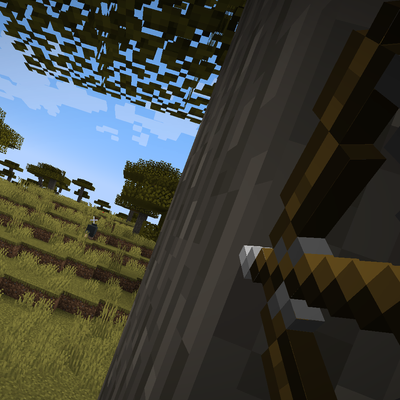
CurseForge · Minecraft mod
Leaning - Stealth for horror
Stealth for horror. Lean around corners without stepping out, hide under beds, and spy through doors left ajar.
Choose a version Pick your version below, then grab the matching file.
Quick answer
Which Leaning - Stealth for horror release should I use?
Latest stable file Leaning - Stealth for horror v1.1
Game version 1.20.1
Loader Forge
Leaning - Stealth for horror v1.1 targets 1.20.1 with Forge. The project page does not say whether this file belongs on the client, dedicated server, or both. No extra mods listed for this file.
Where it goes
Is Leaning - Stealth for horror required on the client, server, or both?
The project page does not say whether this file belongs on the client, dedicated server, or both.
Client Source doesn’t say
Dedicated server Source doesn’t say
Loader for this release Forge
Required install it here Optional supported, not mandatory Not supported do not install here Source doesn’t say do not assume
The source does not explicitly classify this release as client-only or server-only.
What else does Leaning - Stealth for horror v1.1 need?
Leaning - Stealth for horror v1.1. Change the file and its required mods may change too.
This file does not list any required mods. Do not add a library just because a different file uses it.
This file does not list any required or optional mods.
Before you install it
Add Leaning - Stealth for horror without breaking your instance.
Built for Leaning - Stealth for horror v1.1. Pick another file and the loader, install side or required mods may change.
- 01
Stick to this file
Use Leaning - Stealth for horror v1.1. It targets 1.20.1 with Forge; another release may have different loader, side or dependency requirements.
- 02
Bring the mods it needs
This file does not list any required mods. Do not add a library just because a different file uses it.
- 03
Put it on the correct side
The project page does not say whether this file belongs on the client, dedicated server, or both.
- 04
Pick the file you checked
Use the “Get this file” button beside Leaning - Stealth for horror v1.1. It opens that exact file at the source.
About this project
What does Leaning - Stealth for horror add?
Leaning
Stealth for horror. Peek around corners, hide under beds and in furniture, spy through doors left ajar and glance back mid-sprint. Monsters hear you, search for you and can lose you, like in a horror film.
Forge 1.20.1 · English, Português, Español
Everything is set in one menu: /leaning config. Every stealth rule can be turned on or off on its own.
Lean
Hold Shift + Q to lean left or Shift + E to lean right.
- Your view slides sideways and tilts, so you can peek around walls, trees and corners.
- Your hitbox stays where it is: only your eyes move.
- The camera never goes through blocks.
- You aim from the leaned view, and arrows, tridents, snowballs and other projectiles leave from that side.
- Other players see your upper body tilt, cape and elytra included.
Each side can be tuned on its own: how far the view moves (default 0.65 blocks, up to 1) and how much it tilts (default 20°, up to 45°).
Look back
While sprinting, hold Q to look back over your left shoulder or E over your right.
- Only the view turns: you keep running the same way, and it comes back when you let go.
- The last key pressed wins, even with both held.
- Works in first person and in third person from behind.
- The menu sets how far you look (30° to 180°) and how fast.
- While sprinting, the press looks back instead of dropping an item or opening the inventory.
Be careful: hit a wall or a step while looking back and you stumble, slow down and make noise.
Hide
Crouch and right-click a bed to crawl under it, or a chest or barrel, with no block in your hand, to hide inside and watch through a thin gap. Press Space to come out.
- Hostile mobs that did not see you hide lose track of you. The ones that watched you still know where you are.
- The longer you stay, the easier you are to find. There is no time limit, but mobs with a clear line to your hiding spot find you from farther away and more often. After about two minutes, a mob in the room will almost surely find you. Leaving and coming back does not start over.
- Hold your breath (V) when a monster comes close: it finds you far less, and your exposure stops growing. Breath lasts 10 seconds, and the longer you hold it, the louder you gasp when you let go.
- You still take damage while hidden, and you can't use items or attack. If the bed or the furniture is broken, you are out at once.
- In furniture, your body stays unseen right in front of the block, so a stray arrow can still hit you.
Modpacks can add their own furniture with the leaning:hiding_spots block tag.
Doors
Look at a closed wooden door and press the peek key (default: Shift + right-click). It creaks open to 45°, away from you, and stays there.
- Visual only. For the game the door is still closed, and redstone and pressure plates work as usual.
- Peek through the gap. Lean while facing the door and your view slips into the doorway.
- Push it. Leaning against the door pushes it wider, up to 75°. Stop and it eases back to 45°.
- Close it. Press the peek key again to close it slowly and quietly, or the slam key (default: right-click) to slam it. Everyone nearby will hear that.
- Mobs. Near an ajar door, a hostile mob only notices you if it is right in front of your view, looking at you, and within 6 blocks. Their hits do half damage.
- Ajar doors are saved with the world, and other players see them too.
Monsters force closed doors. When one is after you, it pounds on the door and gets through in about 8 seconds, faster with more of them. Look at the door and hold V to hold it shut, using the same breath. If it gives way, you are thrown back.
Monsters that hunt you
- Noise: running, walking, doors, placing and breaking blocks and falling all carry. Monsters come to the sound and search around it. Crouching is silent, and walls muffle sound.
- Lose pursuers: a monster that stops seeing you for two seconds goes to where it last saw you, searches, and gives up.
- Darkness hides you: the darker it is where you stand, the closer a monster has to be to notice you. Putting out a torch is now a decision.
- Distraction (B): throw the item in your hand. Monsters go to where it lands, and you can pick it up again.
- Panic: a heartbeat, heavy breathing and dark screen edges when a monster is near. It never tells you where.
Monsters from other mods join in if they use the usual mob AI. Mobs with their own brain (piglins, the warden) and neutral mobs keep their own senses. In creative you make no noise, and doors are not forced.
Commands
| Command | What it does |
|---|---|
/leaning config |
Opens the menu: lean (both sides), look back, a switch for each stealth rule, and keys |
/leaning reset |
Restores the lean defaults on both sides |
Keys
| Action | Default |
|---|---|
| Lean left | Shift + Q |
| Lean right | Shift + E |
| Sprinting: look back left | Q |
| Sprinting: look back right | E |
| Door: leave ajar / close slowly | Shift + right-click |
| Door: slam shut | Right-click |
| Hold: breath / door | V |
| Throw item (distraction) | B |
Keys can be changed in the menu or in Options → Controls → Leaning, and combinations like Ctrl + right-click work. The door keys only act while you look at a door.
Multiplayer
- Install it on the server and on the clients for everything.
- A client with the mod on a server without it can still lean, look back, trip and feel panic. Hiding, doors and the monster rules need the mod on the server.
- A server with the mod accepts players who don't have it.
- Client and server must be on the same version.
- On a shared server, only operators can turn the rules off for themselves. Everyone else plays with all of them on.
Compatibility
- Works with Embeddium.
- ParCool: its moves are turned off while you are hiding.
- Doors and beds from other mods work when they behave like the vanilla ones. Iron doors are left out, because they need redstone.
Leaning (Português)
Furtividade para terror. Espie pelos cantos, esconda-se embaixo da cama e em móveis, vigie pela porta entreaberta e olhe para trás enquanto corre. Os monstros te ouvem, te procuram e podem te perder, como num filme de terror.
Forge 1.20.1 · English, Português, Español
Tudo se ajusta em um menu só: /leaning config. Cada regra de furtividade pode ser ligada ou desligada separadamente.
Inclinar
Segure Shift + Q para inclinar para a esquerda ou Shift + E para a direita.
- Sua visão desliza para o lado e gira um pouco, para espiar em volta de paredes, árvores e quinas.
- Sua hitbox fica no lugar: só os olhos se mexem.
- A câmera nunca atravessa blocos.
- Você mira pela visão inclinada, e flechas, tridentes, bolas de neve e outros projéteis saem desse lado.
- Os outros jogadores veem seu tronco inclinar, com capa e élitro juntos.
Cada lado é ajustado separadamente: quanto a visão desloca (padrão 0,65 bloco, até 1) e quanto ela gira (padrão 20°, até 45°).
Olhar para trás
Correndo, segure Q para olhar por cima do ombro esquerdo ou E pelo direito.
- Só a visão gira: você continua correndo para a frente, e ela volta quando você solta.
- A última tecla apertada vale, mesmo com as duas seguradas.
- Funciona em primeira pessoa e em terceira pessoa de costas.
- O menu ajusta quanto você olha (30° a 180°) e a velocidade.
- Correndo, a tecla olha para trás em vez de jogar o item fora ou abrir o inventário.
Cuidado: bater numa parede ou num degrau olhando para trás faz você tropeçar, perder velocidade e fazer barulho.
Esconder
Agache e clique com o botão direito numa cama para se arrastar para baixo dela, ou num baú ou barril, sem um bloco na mão, para se esconder dentro e olhar por uma fresta estreita. Aperte Espaço para sair.
- Mobs hostis que não viram você se esconder perdem seu rastro. Os que viram continuam sabendo onde você está.
- Quanto mais tempo você fica, mais fácil te acham. Não há limite de tempo, mas mobs com linha livre até o esconderijo te acham de mais longe e com mais frequência. Depois de cerca de dois minutos, um mob no cômodo quase certamente te acha. Sair e voltar não zera.
- Prenda a respiração (V) quando um monstro chegar perto: ele te acha bem menos, e a exposição para de subir. O fôlego dura 10 segundos, e quanto mais tempo você segura, mais alto o suspiro ao soltar.
- Você ainda leva dano escondido e não pode usar itens nem atacar. Se a cama ou o móvel quebrar, você sai na hora.
- Em móveis, seu corpo fica invisível bem na frente do bloco, então uma flecha perdida ainda pode te acertar.
Modpacks podem incluir seus próprios móveis com a tag de blocos leaning:hiding_spots.
Portas
Olhe para uma porta de madeira fechada e aperte a tecla de entreabrir (padrão: Shift + botão direito). Ela range, abre até 45°, para longe de você, e fica assim.
- Só visual. Para o jogo a porta continua fechada, e redstone e placas de pressão funcionam normalmente.
- Espie pela fresta. Incline-se de frente para a porta e sua visão entra no vão.
- Empurre. Inclinar contra a porta a abre mais, até 75°. Parou, ela volta devagar para 45°.
- Feche. A tecla de entreabrir de novo fecha devagar, sem barulho; a tecla de bater (padrão: botão direito) fecha com força. Todo mundo por perto vai ouvir.
- Mobs. Perto da porta entreaberta, um mob hostil só te nota se estiver bem na frente da sua visão, olhando para você e a até 6 blocos. O dano deles cai pela metade.
- A porta entreaberta fica salva no mundo, e os outros jogadores também a veem.
Monstros forçam portas fechadas. Quando um deles está atrás de você, ele esmurra a porta e passa em cerca de 8 segundos, menos se forem vários. Olhe para a porta e segure V para mantê-la fechada, usando o mesmo fôlego. Se ela ceder, você é jogado para trás.
Monstros que caçam você
- Barulho: correr, andar, usar portas, colocar e quebrar blocos e cair fazem som. Os monstros vão até ele e procuram em volta. Agachado você não faz barulho, e paredes abafam o som.
- Despistar monstros: um monstro que deixa de te ver por dois segundos vai até onde te viu por último, procura e desiste.
- Escuridão esconde: quanto mais escuro onde você está, mais perto o monstro precisa chegar para te notar. Apagar uma tocha agora é uma decisão.
- Distração (B): jogue o item da mão. Os monstros vão até onde ele cair, e você pode pegá-lo de volta.
- Pânico: batimentos, respiração pesada e bordas escuras na tela com um monstro por perto. Nunca diz de onde ele vem.
Monstros de outros mods participam se usarem a IA comum de mobs. Mobs com cérebro próprio (piglins, warden) e mobs neutros continuam com os próprios sentidos. No criativo você não faz barulho, e as portas não são forçadas.
Comandos
| Comando | O que faz |
|---|---|
/leaning config |
Abre o menu: inclinação (os dois lados), olhar para trás, um botão para cada regra de furtividade e teclas |
/leaning reset |
Volta a inclinação ao padrão nos dois lados |
Teclas
| Ação | Padrão |
|---|---|
| Inclinar para a esquerda | Shift + Q |
| Inclinar para a direita | Shift + E |
| Correndo: olhar para trás pela esquerda | Q |
| Correndo: olhar para trás pela direita | E |
| Porta: entreabrir / fechar devagar | Shift + botão direito |
| Porta: bater | Botão direito |
| Segurar: respiração / porta | V |
| Jogar item (distração) | B |
As teclas podem ser trocadas no menu ou em Opções → Controles → Leaning, e combinações como Ctrl + botão direito funcionam. As teclas da porta só agem quando você olha para uma porta.
Multiplayer
- Instale no servidor e nos jogadores para ter tudo.
- Um jogador com o mod em um servidor sem ele ainda consegue inclinar, olhar para trás, tropeçar e sentir pânico. Esconder, as portas e as regras dos monstros precisam do mod no servidor.
- Um servidor com o mod aceita jogadores que não o têm.
- Cliente e servidor precisam estar na mesma versão.
- Em servidor compartilhado, só operadores podem desligar as regras para si. Os outros jogam com todas ligadas.
Compatibilidade
- Funciona com Embeddium.
- ParCool: os movimentos dele ficam desligados enquanto você está escondido.
- Portas e camas de outros mods funcionam quando se comportam como as do Minecraft. Portas de ferro ficam de fora, porque precisam de redstone.
Project description from CurseForge.
Pick your setup
Leaning - Stealth for horror by Minecraft version and loader
Choose the version and loader you play, then open the matching release.
Check the dependencies, then try the file in a copied instance before changing a world you care about.
Recent files
Leaning - Stealth for horror versions and loaders
Leaning - Stealth for horror v1.1
leaning-1.20.1-1.1.jar
6 Nov 2026
Client Source doesn’t say Server Source doesn’t say Dependencies No extras listed Listed on Release listing
Check the 1.20.1 · Forge setup 1.20.1Forge release
Leaning - Stealth for horror
Leaning - Stealth for horror-1.20.1-1.0.jar
27 Oct 2026
Client Source doesn’t say Server Source doesn’t say Dependencies No extras listed Listed on Release listing
Check the 1.20.1 · Forge setup 1.20.1Forge release
Leaning
leaning-1.20.1-1.0.jar
19 Oct 2026
Client Source doesn’t say Server Source doesn’t say Dependencies No extras listed Listed on Release listing
Check the 1.20.1 · Forge setup 1.20.1Forge release
Looking for an older file? The official CurseForge project page is in Resources.
 mod
CurseForge + Modrinth · Minecraft
Armor Trim Item Fix
Adds more trimmed item textures
 mod
CurseForge · Minecraft
Better Allay
Customize how allay differentiates between potions and tipped arrows. Optionally can make allays pick up items even when mob griefing is off and set time for how long allay likes noteblock.
 mod
CurseForge · Minecraft
Village & Pillage Backport
Backport of Village and Pillage to 1.12.2