Fabric API Needed by borderline 1.0.0.26102520-26.3
requiredMatching file found Matched file: [26.3] Fabric API 0.165.0+26.3
CurseForge · Minecraft mod
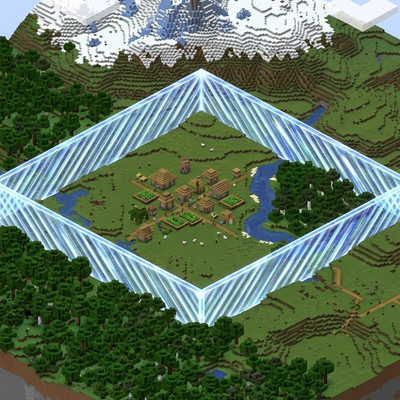
Dynamically derived worldborders across dimensions
Quick answer
borderline 1.0.0.26102520-26.3 targets 26.3 with Fabric, NeoForge. The project page does not say whether this file belongs on the client, dedicated server, or both. All 1 required mods have matching files.
Where it goes
The project page does not say whether this file belongs on the client, dedicated server, or both.
The source does not explicitly classify this release as client-only or server-only.
borderline 1.0.0.26102520-26.3. Change the file and its required mods may change too.
Install Fabric API first. We found matching files for this game-version and loader setup.
We only count dependency files that match this setup. A file for another loader does not fill the gap.
Before you install it
Built for borderline 1.0.0.26102520-26.3. Pick another file and the loader, install side or required mods may change.
Use borderline 1.0.0.26102520-26.3. It targets 26.3 with Fabric, NeoForge; another release may have different loader, side or dependency requirements.
Install Fabric API first. We found matching files for this game-version and loader setup.
The project page does not say whether this file belongs on the client, dedicated server, or both.
Use the “Get this file” button beside borderline 1.0.0.26102520-26.3. It opens that exact file at the source.
About this project
One world size for every dimension.
Borderline reads the overworld world border and applies scaled borders to the Nether and End, so a single world size governs all three dimensions. It runs entirely on the server, needs no client mod, and uses only vanilla world-border packets, so unmodded players see the correct border wherever they are.
/worldborder set), and on demand with a command.For example, with an overworld size of 10000 blocks:
| Dimension | Border size |
|---|---|
| Overworld | 10000 |
| Nether | 1250 |
| End | 5000 |
Vanilla links the overworld border to every other dimension at a 1:1 scale: set it to 10000 and the Nether border is also 10000, which is eight times larger than the Nether's coordinate scale implies. Vanilla also only ever tells clients about the overworld border, so a per-dimension border needs the server to send the right one to each player.
Borderline fixes both: it derives proportional borders and keeps every client in sync, without requiring anyone to install anything.
It only manages the world border. It does not generate, delete, or otherwise alter terrain, and it adds no blocks, items, entities, or registry entries.
mods/ folder.Use the universal jar on either loader, or the matching loader-specific jar if you prefer. The mod is server-side only: clients do not need it, and vanilla clients can see and honour the borders it sets.
Single-player works too, because the integrated server runs the same code. The commands need cheats enabled (permission level 2), just like vanilla /worldborder.
All commands require permission level 2 (operator).
| Command | What it does |
|---|---|
/borderline set <diameter> [seconds] |
Sets the overworld world size, optionally lerping over seconds, derives the Nether and End borders, and saves the size to the config. |
/borderline sync |
Re-derives from the live overworld border and saves its current size. |
/borderline status |
Prints the current size and center of each dimension. |
/borderline set takes a diameter, exactly like vanilla /worldborder set.
The config lives at config/borderline.json and is created with defaults on first run.
{
  "enabled": true,
  "skipWhenUnbounded": true,
  "worldSize": null,
  "nether": { "enabled": true, "sizeScale": 0.125, "centerScale": 1.0 },
  "end": { "enabled": true, "sizeScale": 0.5, "centerScale": 1.0 }
}
| Key | Meaning |
|---|---|
enabled |
Master switch for the whole mod. |
skipWhenUnbounded |
When no worldSize is saved, leave the Nether and End alone if the overworld border is still at the vanilla default (unbounded). |
worldSize |
The last overworld size set through the mod, or null. When set, it is re-imposed at every start. |
nether / end |
Per-dimension enabled, sizeScale (border size multiplier) and centerScale (center multiplier in overworld coordinates). |
The default scales are 0.125 for the Nether and 0.5 for the End. Set a dimension's enabled to false to leave its border untouched.
worldSize when one is present./worldborder command still edits the overworld border; Borderline picks up the change and re-scales the Nether and End.All Rights Reserved (ARR). Copyright (c) 2026 Retired Roca. See the LICENSE file in the repository.
Project description from CurseForge.
Pick your setup
Choose the version and loader you play, then open the matching release.
Check the dependencies, then try the file in a copied instance before changing a world you care about.
Recent files
bl-borderline-1.0.0.26102520-universal-26.3.jar
25 Oct 2026
bl-borderline-1.0.0.26101905-universal.jar
19 Oct 2026
Looking for an older file? The official CurseForge project page is in Resources.
 mod
modConfigure hardcoded aspects of experience, rarity, mob drops, and more
 mod
modStep-by-step crafting guide with recipe overlay/HUD. JEI addon, with optional Just Enough Calculation and Thaumcraft 6 support.
 mod
modSimple mod that disguises wooden, iron and copper trapdoors as carpets.