Minecraft version
Back to mods 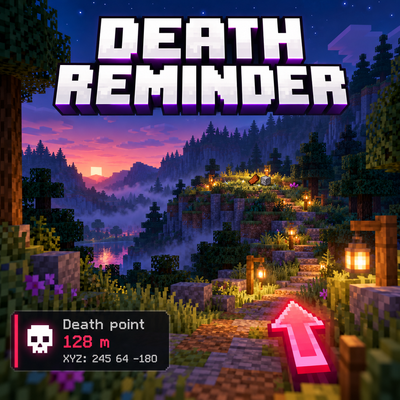
CurseForge · Minecraft mod
Death Reminder
Saves your last death location and guides you back with a compact HUD, directional arrow, and live distance. Client-side mod with persistent markers for each world or server.
Choose a version Pick your version below, then grab the matching file.
Quick answer
Which Death Reminder release matches 26.1 Forge?
Best match for your filters death-reminder-forge-1.0.2+mc26.1.jar
Game version 26.1
Loader Forge
Death Reminder death-reminder-forge-1.0.2+mc26.1.jar targets 26.1 with Forge. The project page does not say whether this file belongs on the client, dedicated server, or both. No extra mods listed for this file.
Where it goes
Is Death Reminder required on the client, server, or both?
The project page does not say whether this file belongs on the client, dedicated server, or both.
Client Source doesn’t say
Dedicated server Source doesn’t say
Loader for this release Forge
Required install it here Optional supported, not mandatory Not supported do not install here Source doesn’t say do not assume
The source does not explicitly classify this release as client-only or server-only.
What else does Death Reminder death-reminder-forge-1.0.2+mc26.1.jar need?
death-reminder-forge-1.0.2+mc26.1.jar on 26.1 Forge. Every mod below is checked against that same setup.
This file does not list any required mods. Do not add a library just because a different file uses it.
This file does not list any required or optional mods.
Before you install it
Add Death Reminder without breaking your instance.
Built for Death Reminder death-reminder-forge-1.0.2+mc26.1.jar on 26.1 Forge. Pick another file and the loader, install side or required mods may change.
- 01
Stick to this file
Use death-reminder-forge-1.0.2+mc26.1.jar. It targets 26.1 with Forge; another release may have different loader, side or dependency requirements.
- 02
Bring the mods it needs
This file does not list any required mods. Do not add a library just because a different file uses it.
- 03
Put it on the correct side
The project page does not say whether this file belongs on the client, dedicated server, or both.
- 04
Pick the file you checked
Use the “Get this file” button beside death-reminder-forge-1.0.2+mc26.1.jar. It opens that exact file at the source.
About this project
What does Death Reminder add?
Death Reminder — English
Find your way back to your last death.
Death Reminder is a client-side mod that saves your last death location and helps you return with a compact HUD, a directional arrow, and live distance. Keep track of your destination while exploring, without opening a map.
Features
- Automatic death tracking: saves your coordinates, dimension, time, and world or server name.
- Directional navigation: the arrow rotates relative to your camera, and the distance updates as you move.
- Compact HUD: the panel sits in the top-left corner by default. Hide it whenever you want.
- Detailed information: hold a key to see coordinates, dimension, world or server, and the time of death.
- Persistent markers: death locations remain available after restarting Minecraft, with separate records for each world or server address.
- Dimension awareness: when the death is in another dimension, the panel shows which dimension to enter instead of a misleading distance or arrow. Custom dimension identifiers are supported.
- Automatic arrival detection: by default, the marker clears within 5 blocks of the location. Arrival uses 3D distance, so standing directly above a cave will not clear a marker far below you.
- Death-screen coordinates: see your saved coordinates and dimension on the standard death screen when there is enough room.
Controls
| Default key | Action |
|---|---|
| G | Hide or show the marker without deleting the saved location |
| Hold H | Show details, even when the main marker is hidden |
| Delete | Clear the saved location after confirmation |
All three keys can be changed in Minecraft's keybind settings under Death Reminder.
Installation
- Choose the Death Reminder JAR for your Minecraft version and loader (Fabric, Forge, or NeoForge). For Forge on Minecraft 1.21.1 or 26.x, choose Death Reminder 1.0.2.
- Place it in your client profile’s
modsfolder. - If you use Fabric, install the matching Fabric API too.
Supported Minecraft versions: 1.20.1, 1.21.1, 26.1, 26.2, and 26.3. Each version has its own JAR; choose the one that matches your game.
Client-side only. Use it in singleplayer or install it locally for multiplayer. No Death Reminder installation on the server, operator permissions, or server commands are required.
Settings and languages
Adjust HUD position, scale, displayed information, horizontal or 3D distance, and automatic marker removal in config/deathreminder/config.json. Close Minecraft before editing this file.
Available languages: English, Russian, and Simplified Chinese. The mod follows Minecraft's selected language.
How death locations work
One last death is stored for each world or server address. A new death replaces that context's previous location; other worlds and servers keep their own records. Multiple worlds behind one proxy address share that address's record.
In another dimension, enter the indicated dimension before following the arrow. Nether 1:8 coordinate conversion is not included in this release.
Death Reminder provides navigation to the saved location. Dropped items still follow Minecraft's normal despawn rules. There is no death history, teleportation, or item recovery in this release.
Death Reminder — Русский
Найди дорогу к месту своей последней смерти.
Death Reminder — клиентский мод, который сохраняет место последней смерти и помогает вернуться к нему. Компактная панель показывает расстояние и стрелку направления, позволяя ориентироваться без открытия карты.
Возможности
- Автоматическое сохранение: координаты, измерение, время и название мира или сервера фиксируются при смерти.
- Навигация: стрелка поворачивается относительно взгляда камеры, а расстояние обновляется при движении.
- Компактная панель: по умолчанию находится слева сверху. Её можно скрыть в любой момент.
- Подробная информация: удерживай клавишу, чтобы увидеть координаты, измерение, мир или сервер и время смерти.
- Сохранение между запусками: точки остаются после перезапуска Minecraft. Для каждого мира или адреса сервера хранится отдельная запись.
- Учёт измерений: если смерть произошла в другом измерении, панель подскажет, куда перейти, вместо неверного расстояния и стрелки. Поддерживаются идентификаторы пользовательских измерений.
- Определение прибытия: по умолчанию метка удаляется при приближении на 5 блоков. Проверка учитывает высоту: стоя над пещерой, ты не потеряешь метку далеко внизу.
- Координаты на экране смерти: сохранённые координаты и измерение отображаются на стандартном экране смерти, если хватает места.
Управление
| Клавиша по умолчанию | Действие |
|---|---|
| G | Скрыть или вернуть панель, сохранив точку |
| Удерживать H | Показать подробности, даже если основная панель скрыта |
| Delete | Удалить сохранённую точку после подтверждения |
Все три клавиши можно переназначить в настройках управления Minecraft, в категории Death Reminder.
Установка
- Выбери JAR Death Reminder для своей версии Minecraft и загрузчика (Fabric, Forge или NeoForge). Для Forge на Minecraft 1.21.1 или 26.x выбирай Death Reminder 1.0.2.
- Положи JAR в папку
modsклиентского профиля. - Для Fabric дополнительно установи Fabric API той же версии.
Поддерживаемые версии Minecraft: 1.20.1, 1.21.1, 26.1, 26.2 и 26.3. Для каждой версии подготовлен отдельный JAR — выбери подходящий своей игре.
Мод устанавливается только на клиент. Он подходит для одиночной игры и локального использования в мультиплеере. Установка Death Reminder на сервер, права оператора и серверные команды для работы не нужны.
Настройки и языки
Положение и масштаб панели, отображаемые сведения, горизонтальное или трёхмерное расстояние и автоматическое удаление метки настраиваются в config/deathreminder/config.json. Перед редактированием файла закрой Minecraft.
Доступны русский, английский и упрощённый китайский. Мод использует выбранный язык Minecraft.
Как работают точки смерти
Для каждого мира или адреса сервера сохраняется одна последняя смерть. Новая смерть заменяет предыдущую запись этого мира или сервера, сохраняя записи остальных. Несколько миров за одним прокси-адресом используют общую запись адреса.
Если точка находится в другом измерении, сначала перейди в указанное измерение. Пересчёта координат Незера 1:8 в этом выпуске нет.
Death Reminder помогает найти сохранённое место. Выпавшие вещи исчезают по обычным правилам Minecraft. Истории смертей, телепортации и восстановления предметов в этом выпуске нет.
Project description from CurseForge.
Pick your setup
Death Reminder by Minecraft version and loader
Choose the version and loader you play, then open the matching release.
Minecraft version
26.2
3 loader buildsMinecraft version
26.1
3 loader buildsMinecraft version
1.21.1
3 loader buildsMinecraft version
1.21
1 loader buildMinecraft version
1.20.1
3 loader buildsCheck the dependencies, then try the file in a copied instance before changing a world you care about.
Recent files
Death Reminder versions and loaders
death-reminder-forge-1.0.2+mc26.1.jar
death-reminder-forge-1.0.2-mc26.1.jar
29 Nov 2026
Client Source doesn’t say Server Source doesn’t say Dependencies No extras listed Listed on Release listing
Check the 26.1 · Forge setup Forge26.1 release
Looking for an older file? The official CurseForge project page is in Resources.
 mod
CurseForge · Minecraft
musicaldash
Insert Musical Dash discs into any Jukebox to teleport to live action stages across all Minecraft updates, spawn a Bot with your exact skin that builds, mines, and fights, record your own replay discs, and return anytime via the Skip Block!
 mod
CurseForge · Minecraft
Camera Monitoring: CCTV System Fully Customizable + Screens
Professional CCTV for Minecraft: PTZ security cameras, live monitor screens that auto-switch to whoever is on camera, patrol and motion tracking modules, alarms and permissions. Fabric, NeoForge and Forge, 1.20.1 to 26.3.
 mod
CurseForge · Minecraft
geential
Instant co-op world hosting, friends & invites hub, custom profile switcher, 3D wardrobe studio (wings, capes, emotes, Mojang & .PNG skin importer), and weak-PC performance booster for Minecraft 1.20.1 (Forge & Fabric).