Minecraft version
Back to mods 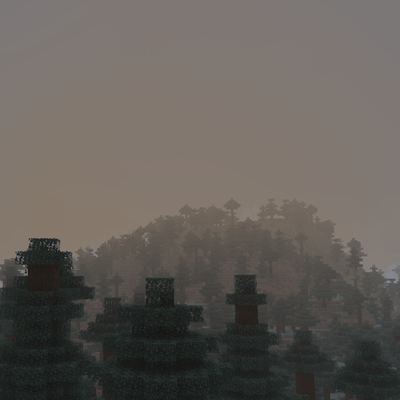
CurseForge · Minecraft mod
Haze - Realistic fog
Realistic fog: on some calm mornings fog settles into the valleys and glows in the sunrise, rain leaves a grey mist and swamps stay misty. Client-side.
Choose a version Pick your version below, then grab the matching file.
Quick answer
Which Haze - Realistic fog release should I use?
Latest stable file Haze 1.1.0 (NeoForge 26.3)
Game version 26.3
Loader NeoForge
Haze - Realistic fog Haze 1.1.0 (NeoForge 26.3) targets 26.3 with NeoForge. The project page does not say whether this file belongs on the client, dedicated server, or both. No extra mods listed for this file.
Where it goes
Is Haze - Realistic fog required on the client, server, or both?
The project page does not say whether this file belongs on the client, dedicated server, or both.
Client Source doesn’t say
Dedicated server Source doesn’t say
Loader for this release NeoForge
Required install it here Optional supported, not mandatory Not supported do not install here Source doesn’t say do not assume
The source does not explicitly classify this release as client-only or server-only.
What else does Haze - Realistic fog Haze 1.1.0 (NeoForge 26.3) need?
Haze 1.1.0 (NeoForge 26.3). Change the file and its required mods may change too.
This file does not list any required mods. Do not add a library just because a different file uses it.
This file does not list any required or optional mods.
Before you install it
Add Haze - Realistic fog without breaking your instance.
Built for Haze - Realistic fog Haze 1.1.0 (NeoForge 26.3). Pick another file and the loader, install side or required mods may change.
- 01
Stick to this file
Use Haze 1.1.0 (NeoForge 26.3). It targets 26.3 with NeoForge; another release may have different loader, side or dependency requirements.
- 02
Bring the mods it needs
This file does not list any required mods. Do not add a library just because a different file uses it.
- 03
Put it on the correct side
The project page does not say whether this file belongs on the client, dedicated server, or both.
- 04
Pick the file you checked
Use the “Get this file” button beside Haze 1.1.0 (NeoForge 26.3). It opens that exact file at the source.
About this project
What does Haze - Realistic fog add?
Haze
Mornings worth waking up for.
Haze adds realistic fog and mist to Minecraft. On calm nights fog settles into the valleys, thickens toward dawn and glows warm when the sun comes up, then slowly burns off over the morning. Rain leaves a grey mist hanging in the air, swamps stay misty all day. Haze is client-side only. Install it and join any server, vanilla or modded.
Features
Morning fog
- Not every morning is foggy. Each calm night has its own chance, so a foggy sunrise feels like an event.
- Fog builds through the night, is thickest around sunrise and burns off later the thicker it is.
- It's more likely after rain and in humid biomes, and never forms in deserts or other dry places. Cold biomes get lighter fog.
- The fog lies low over the land and thins out with height, so hilltops and mountains rise out of it.
Sun glow
- Where the low morning sun shines through the fog, the fog glows warm orange.
Rain mist
- A light grey mist hangs in the air while it rains.
- The mist lingers for a little while after the rain stops.
Swamp mist
- Swamps and mangroves always have a low mist, heavier at night.
Wisps
- The fog drifts in slow, uneven wisps instead of lying as one flat layer.
Settings
Open the settings from Mod Menu (Fabric) or the Mods list (NeoForge / Forge), or set a key for it under Controls.
| Setting | What it does | Default |
|---|---|---|
| Haze | Turn all fog and mist on or off | On |
| Thickness | How thick the fog gets when it rolls in | 100% |
| Foggy Mornings | How often a calm night ends in a foggy morning | 100% |
| Fog Depth | How high the fog layer reaches above the lowlands | 24 blocks |
| Morning Fog | Fog in the valleys on some mornings | On |
| Rain Mist | Mist while it rains and shortly after | On |
| Swamp Mist | Low mist in swamps and mangroves | On |
| Sun Glow | Warm glow where the low sun shines through fog | On |
| Wisps | Fog drifts in slow, uneven wisps | On |
Two keys can be set under Controls: one to toggle Haze and one to open the settings. They aren't bound by default.
Supported versions
| Loader | Minecraft |
|---|---|
| Fabric | 1.20 - 26.3 (needs Fabric API) |
| NeoForge | 1.21 - 26.3 |
| Forge | 1.20.1 |
FAQ
Does it work on servers? Yes. Haze is client-side only.
Does it work with Sodium and Iris? Yes. Haze works with Sodium, and with Iris when no shader pack is loaded. When a shader pack is on, Haze turns its fog off and lets the shader pack handle the look, so you never get double fog.
Can I make it rarer or thicker? Yes. Turn Foggy Mornings down for fewer foggy mornings or up for more, and use Thickness and Fog Depth to change how heavy and how deep the fog gets.
Can I use it in my modpack? Yes, go ahead. A link back is appreciated.
Found a bug?
Report it on the issue tracker with your Minecraft version, loader, and what you saw. A screenshot helps a lot.
Project description from CurseForge.
Pick your setup
Haze - Realistic fog by Minecraft version and loader
Choose the version and loader you play, then open the matching release.
Minecraft version
26.3
2 loader buildsMinecraft version
26.2
2 loader buildsMinecraft version
26.1.2
2 loader buildsMinecraft version
26.1.1
2 loader buildsMinecraft version
26.1
2 loader buildsMinecraft version
1.21.11
2 loader buildsMinecraft version
1.21.10
2 loader buildsMinecraft version
1.21.9
2 loader buildsMinecraft version
1.21.8
2 loader buildsMinecraft version
1.21.7
2 loader buildsMinecraft version
1.21.6
2 loader buildsShowing the newest 12 of 28 game versions. Older files are in the list below.
Check the dependencies, then try the file in a copied instance before changing a world you care about.
Recent files
Haze - Realistic fog versions and loaders
Haze 1.1.0 (NeoForge 26.3)
haze-neoforge-1.1.0+mc26.3.jar
24 Oct 2026
Client Source doesn’t say Server Source doesn’t say Dependencies No extras listed Listed on Release listing
Check the 26.3 · NeoForge setup NeoForge26.3 release
Haze 1.1.0 (Fabric 26.3)
haze-1.1.0+mc26.3.jar
24 Oct 2026
Client Source doesn’t say Server Source doesn’t say Dependencies 1 required · 1 unchecked Listed on Release listing
Check the 26.3 · Fabric setup Fabric26.3 release
Haze 1.1.0 (Fabric 26.4-snapshot-4)
haze-1.1.0+mc26.4-snapshot-4.jar
24 Oct 2026
Client Source doesn’t say Server Source doesn’t say Dependencies 1 required · 1 unchecked Listed on Release listing
Check the 26.4-snapshot · Fabric setup Fabric26.4-snapshot beta
Haze 1.1.0 (NeoForge 26.2)
haze-neoforge-1.1.0+mc26.2.jar
24 Oct 2026
Client Source doesn’t say Server Source doesn’t say Dependencies No extras listed Listed on Release listing
Check the 26.2 · NeoForge setup NeoForge26.2 release
Haze 1.1.0 (Fabric 26.2)
haze-1.1.0+mc26.2.jar
24 Oct 2026
Client Source doesn’t say Server Source doesn’t say Dependencies 1 required · 1 unchecked Listed on Release listing
Check the 26.2 · Fabric setup Fabric26.2 release
Haze 1.1.0 (NeoForge 26.1-26.1.2)
haze-neoforge-1.1.0+mc26.1-26.1.2.jar
24 Oct 2026
Client Source doesn’t say Server Source doesn’t say Dependencies No extras listed Listed on Release listing
Check the 26.1.2 · NeoForge setup NeoForge26.126.1.126.1.2 release
Haze 1.1.0 (Fabric 26.1-26.1.2)
haze-1.1.0+mc26.1-26.1.2.jar
24 Oct 2026
Client Source doesn’t say Server Source doesn’t say Dependencies 1 required · 1 unchecked Listed on Release listing
Check the 26.1.2 · Fabric setup Fabric26.126.1.126.1.2 release
Haze 1.1.0 (NeoForge 1.21.11)
haze-neoforge-1.1.0+mc1.21.11.jar
24 Oct 2026
Client Source doesn’t say Server Source doesn’t say Dependencies No extras listed Listed on Release listing
Check the 1.21.11 · NeoForge setup NeoForge1.21.11 release
Haze 1.1.0 (Fabric 1.21.11)
haze-1.1.0+mc1.21.11.jar
24 Oct 2026
Client Source doesn’t say Server Source doesn’t say Dependencies 1 required · 1 unchecked Listed on Release listing
Check the 1.21.11 · Fabric setup Fabric1.21.11 release
Haze 1.1.0 (NeoForge 1.21.10)
haze-neoforge-1.1.0+mc1.21.10.jar
24 Oct 2026
Client Source doesn’t say Server Source doesn’t say Dependencies No extras listed Listed on Release listing
Check the 1.21.10 · NeoForge setup NeoForge1.21.10 release
Haze 1.1.0 (NeoForge 1.21.9)
haze-neoforge-1.1.0+mc1.21.9.jar
24 Oct 2026
Client Source doesn’t say Server Source doesn’t say Dependencies No extras listed Listed on Release listing
Check the 1.21.9 · NeoForge setup NeoForge1.21.9 release
Haze 1.1.0 (Fabric 1.21.9-1.21.10)
haze-1.1.0+mc1.21.9-1.21.10.jar
24 Oct 2026
Client Source doesn’t say Server Source doesn’t say Dependencies 1 required · 1 unchecked Listed on Release listing
Check the 1.21.10 · Fabric setup Fabric1.21.91.21.10 release
Looking for an older file? The official CurseForge project page is in Resources.
 mod
mod CurseForge + Modrinth · Minecraft
More Banner Features
Banners on Horses, Boats, Happy Ghasts, as Capes, Hats, more layers and more!
 mod
mod CurseForge + Modrinth · Minecraft
Better Library
This is just a simple lib for config, 1st join message and live message
 mod
mod CurseForge · Minecraft
Simple Cans
simple cans mod that aims to give you more space in your inventory!