Minecraft version
Back to mods 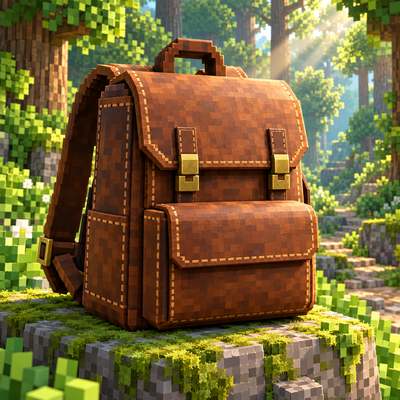
CurseForge · Minecraft mod
MyMochila
Adds wearable 3D backpacks with 27 storage slots, 16 dye colors, opening animations, and quick inventory organization.
Choose a version Pick your version below, then grab the matching file.
Quick answer
Which MyMochila release should I use?
beta file MochilaGPTJJ
Game version 1.21.1
Loader NeoForge
MyMochila MochilaGPTJJ targets 1.21.1 with NeoForge. The project page does not say whether this file belongs on the client, dedicated server, or both. No extra mods listed for this file.
Where it goes
Is MyMochila required on the client, server, or both?
The project page does not say whether this file belongs on the client, dedicated server, or both.
Client Source doesn’t say
Dedicated server Source doesn’t say
Loader for this release NeoForge
Required install it here Optional supported, not mandatory Not supported do not install here Source doesn’t say do not assume
The source does not explicitly classify this release as client-only or server-only.
What else does MyMochila MochilaGPTJJ need?
MochilaGPTJJ. Change the file and its required mods may change too.
This file does not list any required mods. Do not add a library just because a different file uses it.
This file does not list any required or optional mods.
Before you install it
Add MyMochila without breaking your instance.
Built for MyMochila MochilaGPTJJ. Pick another file and the loader, install side or required mods may change.
- 01
Stick to this file
Use MochilaGPTJJ. It targets 1.21.1 with NeoForge; another release may have different loader, side or dependency requirements.
- 02
Bring the mods it needs
This file does not list any required mods. Do not add a library just because a different file uses it.
- 03
Put it on the correct side
The project page does not say whether this file belongs on the client, dedicated server, or both.
- 04
Pick the file you checked
Use the “Get this file” button beside MochilaGPTJJ. It opens that exact file at the source.
About this project
What does MyMochila add?
GPTJJ Backpacks adds wearable 3D backpacks with personal storage, dye customization, and animated opening and closing. Carry supplies on your back, organize your inventory, and choose a color that suits your character.
Portable storage
Each backpack has its own 27-slot inventory. Hold one in either hand or equip it in the mod's dedicated back slot to access its contents. The back slot is separate from your armor, so wearing a backpack does not replace your chestplate.
An equipped backpack is visible on your character, with shoulder straps that follow the torso. Opening it moves the backpack to the front and plays an opening animation; closing it returns it to its original position. Nearby players can see these visual changes in multiplayer.
Colors and customization
Keep the original brown appearance or recolor your backpack using any of the 16 standard dyes. Combine one backpack with one dye in a crafting grid to replace its previous color. Recoloring preserves the stored items and any custom anvil name.
The backpack's inventory interface follows its selected color. Unnamed backpacks display a color-specific item name, while custom names take priority.
Quick organization
The backpack interface includes tools to help manage supplies:
Sort: organize items and merge compatible stacks.
Store matching items: transfer matching stacks from the main player inventory into the backpack without moving the hotbar's contents.
Take items out: move stored items into available inventory space, leaving anything that does not fit inside the backpack.
Capacity indicator: check how many storage slots are occupied.
Backpacks cannot contain other backpacks or shulker boxes.
Crafting and controls
Craft a backpack using eight leather surrounding one iron nugget in a crafting table.
B: open the backpack held in your hand, or the equipped backpack if neither hand holds one. Press B again to close its menu.
Sneak + B: open the back-slot equipment menu.
Escape: close the menu.
Requirements and multiplayer
Minecraft Java Edition 1.21.1
NeoForge 21.1.256
Java 21
Install the same mod version on the server and every player's client. No additional mod dependencies are required.
This is a beta build. In-game verification of storage behavior, multiplayer synchronization, and compatibility with mods that replace player animations or rendering is still required.
Artwork disclosure: The project icon is AI-generated concept art illustrating the backpack theme. It is not an in-game screenshot and does not show the exact appearance of the mod's model or interface.
Project description from CurseForge.
Pick your setup
MyMochila by Minecraft version and loader
Choose the version and loader you play, then open the matching release.
Check the dependencies, then try the file in a copied instance before changing a world you care about.
Recent files
MyMochila versions and loaders
MochilaGPTJJ
MochilaGPTJJ-1.21.1-neoforge-1.6.0-dev.jar
20 Oct 2026
Client Source doesn’t say Server Source doesn’t say Dependencies No extras listed Listed on Release listing
Check the 1.21.1 · NeoForge setup 1.21.1NeoForge beta
Looking for an older file? The official CurseForge project page is in Resources.
 mod
CurseForge · Minecraft
CustomPerm
Granular server-side command permissions for NeoForge. Grant individual vanilla or modded commands to players who are not operators, with or without LuckPerms. Native admin interface, aliases, rate limits and multi-server cluster mode.
 mod
CurseForge · Minecraft
Here be doodles - Draw on your Atlas!
A grease-pencil kit for the Antique Atlas: doodle pens, arrows, zones and text labels that stay glued to the terrain, saved per world on your own machine.
 mod
CurseForge · Minecraft
Millenaire JEImm
Building upon Millenaire JEIm, this mod registers cultures, villages, buildings, and villagers as custom JEI ingredients, complete with interlinked lookup support.