CurseForge · Minecraft mod
NotEnoughGlints
Color enchantment glints with any dye, on tools, armor, and elytra, straight from a smithing table.
Quick answer
Which NotEnoughGlints release matches 26.2 Forge?
NotEnoughGlints 1.4.5 (26.1-26.2) targets 26.1, 26.1.1, 26.1.2 with Fabric, Forge, NeoForge. The project page does not say whether this file belongs on the client, dedicated server, or both. No extra mods listed for this file.
Where it goes
Is NotEnoughGlints required on the client, server, or both?
The project page does not say whether this file belongs on the client, dedicated server, or both.
The source does not explicitly classify this release as client-only or server-only.
What else does NotEnoughGlints 1.4.5 (26.1-26.2) need?
NotEnoughGlints 1.4.5 (26.1-26.2) on 26.2 Forge. Every mod below is checked against that same setup.
This file does not list any required mods. Do not add a library just because a different file uses it.
This file does not list any required or optional mods.
Before you install it
Add NotEnoughGlints without breaking your instance.
Built for NotEnoughGlints 1.4.5 (26.1-26.2) on 26.2 Forge. Pick another file and the loader, install side or required mods may change.
- 01
Stick to this file
Use NotEnoughGlints 1.4.5 (26.1-26.2). It targets 26.1, 26.1.1, 26.1.2 with Fabric, Forge, NeoForge; another release may have different loader, side or dependency requirements.
- 02
Bring the mods it needs
This file does not list any required mods. Do not add a library just because a different file uses it.
- 03
Put it on the correct side
The project page does not say whether this file belongs on the client, dedicated server, or both.
- 04
Pick the file you checked
Use the “Get this file” button beside NotEnoughGlints 1.4.5 (26.1-26.2). It opens that exact file at the source.
About this project
What does NotEnoughGlints add?
This is the Mod version of NotEnoughGlints, also check out the Resourcepack version and the serverplugin version!
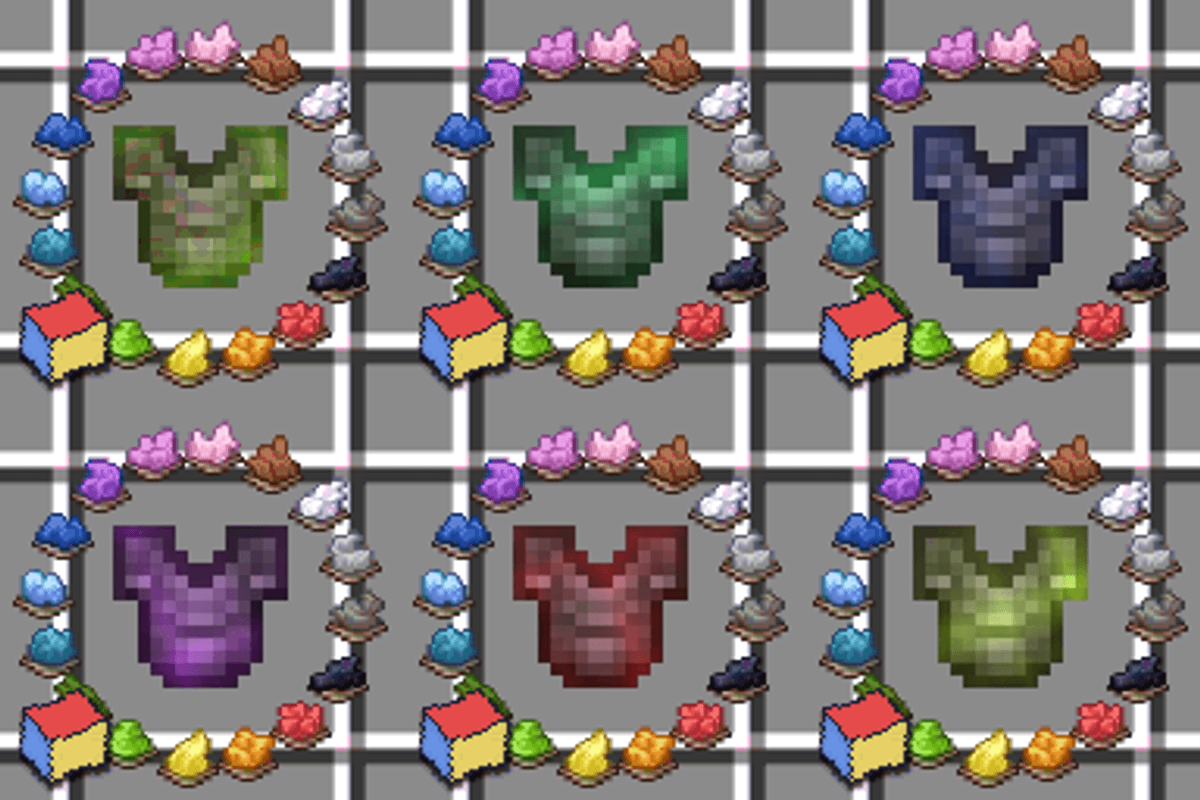
Color your enchantment glints with any vanilla dye. Personalize tools, armor, and elytra straight from a smithing table.
How to use
Place the item, a dye, and a honeycomb in a smithing table.
- Use a glass pane instead of a dye to remove a colored glint.
- Use a nether star instead of a dye for the rainbow glint.
Leather armor is not supported yet, due to an item component limitation.
Compatibility
This modification modifies the item and entity shaders, so it will not work together with other packs that do the same.
Supports Minecraft 26.1+, on both the Vulkan and OpenGL renderers. Download the file that matches your game version (26.1-26.2 or 26.3).
What version should you install?
This page is the jar. For single-player, install it on the client. For a modded multiplayer world, install it on the server and on every player. The server side handles the recipes, and every client needs the jar because the rendering code is inside it. Pick the file for your game version and loader. Fabric 1.5 is the newer release for 26.2 and 26.3. The 1.4.5 jars cover Forge, NeoForge, Quilt, and Fabric on 26.1.
Playing on an unmodified client, without a loader: use the resource pack and data pack instead, NotEnoughGlints Resource Pack.
Playing on a Paper, Purpur, or Folia server: use NotEnoughGlints Server Plugin. It serves the pack to joining players, so they do not need to install it themselves. Fabric clients can skip the mandatory pack download.
You are welcome to join the Discord for sneak peeks at upcoming features, or to ask questions: Discord.
Project description from CurseForge.
Pick your setup
NotEnoughGlints by Minecraft version and loader
Choose the version and loader you play, then open the matching release.
26.2
4 loader builds26.1.2
4 loader builds26.1.1
4 loader builds26.1
4 loader builds1.21.11
2 loader builds1.21.1
2 loader buildsCheck the dependencies, then try the file in a copied instance before changing a world you care about.
Recent files
NotEnoughGlints versions and loaders
NotEnoughGlints 1.4.5 (26.1-26.2)
notenoughglints-1.4.5+Client-26.1-26.2.jar
20 Oct 2026
Looking for an older file? The official CurseForge project page is in Resources.