Minecraft version
Back to mods 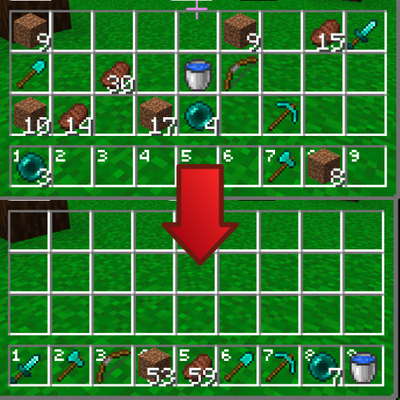
CurseForge · Minecraft mod
Hotbar Configurator
Automate your hotbar with custom slot rules, smart inventory sorting, dimension profiles, and auto-equipping.
Choose a version Pick your version below, then grab the matching file.
Quick answer
Which Hotbar Configurator release should I use?
Latest stable file Hotbar Configurator 1.0.0 (1.21.1)
Game version 1.21.1
Loader Fabric
Hotbar Configurator 1.0.0 (1.21.1) targets 1.21.1 with Fabric. The project page does not say whether this file belongs on the client, dedicated server, or both. No extra mods listed for this file.
Where it goes
Is Hotbar Configurator required on the client, server, or both?
The project page does not say whether this file belongs on the client, dedicated server, or both.
Client Source doesn’t say
Dedicated server Source doesn’t say
Loader for this release Fabric
Required install it here Optional supported, not mandatory Not supported do not install here Source doesn’t say do not assume
The source does not explicitly classify this release as client-only or server-only.
What else does Hotbar Configurator 1.0.0 (1.21.1) need?
Hotbar Configurator 1.0.0 (1.21.1). Change the file and its required mods may change too.
This file does not list any required mods. Do not add a library just because a different file uses it.
This file does not list any required or optional mods.
Before you install it
Add Hotbar Configurator without breaking your instance.
Built for Hotbar Configurator 1.0.0 (1.21.1). Pick another file and the loader, install side or required mods may change.
- 01
Stick to this file
Use Hotbar Configurator 1.0.0 (1.21.1). It targets 1.21.1 with Fabric; another release may have different loader, side or dependency requirements.
- 02
Bring the mods it needs
This file does not list any required mods. Do not add a library just because a different file uses it.
- 03
Put it on the correct side
The project page does not say whether this file belongs on the client, dedicated server, or both.
- 04
Pick the file you checked
Use the “Get this file” button beside Hotbar Configurator 1.0.0 (1.21.1). It opens that exact file at the source.
About this project
What does Hotbar Configurator add?
Hotbar Configurator
A client-side Fabric mod for Minecraft 1.21.1 that automates hotbar and inventory management. Define custom slot rules, auto-equip gear, switch profiles between dimensions, and keep items organized when looting chests.
✨ Features
- 🎯 Custom Slot Rules: Assign item IDs, native tags (
#minecraft:swords), or potion/enchantment filters with priority fallbacks. - 🧠 Smart Sorting: Automatically slots items by list priority, tier, durability, and enchantments without scrambling existing gear.
- 🌍 3 Flexible Dimension Profiles: Configure distinct layouts for any vanilla or modded dimensions (each profile can cover multiple dimensions) with optional auto-switching on portal/dimension travel.
- 🛡️ Auto-Equip: Equips armor, Elytras, shields, and Totems automatically.
- ⚡ Container Quick-Move: Shift-clicking from chests, barrels, and furnaces routes items directly into designated hotbar slots.
- 🔄 Stack Refill: Restocks depleted hotbar stacks from main inventory reserves with a keybind.
⌨️ Default Keybindings
Configure in Options → Controls → Key Binds → Hotbar Configurator:
| Action | Default Key |
|---|---|
| Refill Hotbar | , (Comma) |
| Sort Hotbar | . (Period) |
| Cycle Profiles | Unbound |
| Select Profile 1 / 2 / 3 | Unbound |
📦 Requirements
- Minecraft:
1.21.1(Fabric) - Fabric API
- Cloth Config API (
>= 15.0.0) - Mod Menu (Recommended for in-game configuration)
⚠️ Multiplayer Notice
Hotbar Configurator is 100% client-side and safe for singleplayer, Realms, and survival SMPs. Use caution on strict competitive PvP servers with anti-cheats (e.g. Hypixel), as automated inventory actions may be restricted by server rules.
Project description from CurseForge.
Pick your setup
Hotbar Configurator by Minecraft version and loader
Choose the version and loader you play, then open the matching release.
Check the dependencies, then try the file in a copied instance before changing a world you care about.
Recent files
Hotbar Configurator versions and loaders
Hotbar Configurator 1.0.0 (1.21.1)
hotbarconfigurator-1.0.0.jar
20 Oct 2026
Client Source doesn’t say Server Source doesn’t say Dependencies No extras listed Listed on Release listing
Check the 1.21.1 · Fabric setup Fabric1.21.1 release
Looking for an older file? The official CurseForge project page is in Resources.
 mod
CurseForge + Modrinth · Minecraft
PPE Essentials
A lightweight mod that adds useful commands (like /tpa /repeat) and tweaks
 mod
CurseForge · Minecraft
Book of Dragons: Mazon's Almenac
A Book of Dragons addon that turns dragon ownership into a hands-on bond: heal them, feed them, and customize them your way
 mod
CurseForge · Minecraft
LOTRGUILib
A standardized GUI rendering library and UI framework for Minecraft 1.7.10 LOTR Mod addons.