Architectury API Needed by craftdistrict-forge-1.9+1.20.1.jar
requiredMatching file found Matched file: [Forge 1.20(.1)] v9.2.14
CurseForge · Minecraft mod
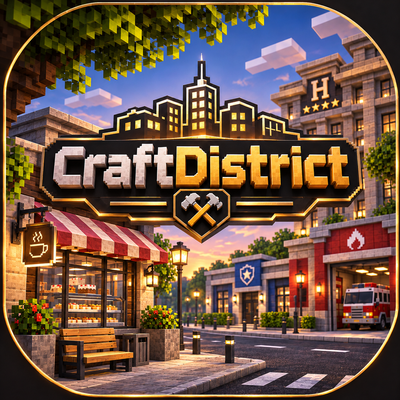
Bring your Minecraft builds to life with detailed furniture, equipment, lighting, and decorations for everyday places.
Quick answer
craftdistrict-forge-1.9+1.20.1.jar targets 1.20.1 with Forge. The project page does not say whether this file belongs on the client, dedicated server, or both. All 1 required mods have matching files.
Where it goes
The project page does not say whether this file belongs on the client, dedicated server, or both.
The source does not explicitly classify this release as client-only or server-only.
craftdistrict-forge-1.9+1.20.1.jar on 1.20.1. Every mod below is checked against that same setup.
Install Architectury API first. We found matching files for this game-version and loader setup.
We only count dependency files that match this setup. A file for another loader does not fill the gap.
Before you install it
Built for craftdistrict-forge-1.9+1.20.1.jar on 1.20.1. Pick another file and the loader, install side or required mods may change.
Use craftdistrict-forge-1.9+1.20.1.jar. It targets 1.20.1 with Forge; another release may have different loader, side or dependency requirements.
Install Architectury API first. We found matching files for this game-version and loader setup.
The project page does not say whether this file belongs on the client, dedicated server, or both.
Use the “Get this file” button beside craftdistrict-forge-1.9+1.20.1.jar. It opens that exact file at the source.
About this project
Bring everyday places to life in Minecraft!
CraftDistrict is a decoration-focused Minecraft mod featuring detailed furniture, equipment, interactive doors, customizable lighting, and everyday props for building realistic shops, workplaces, public buildings, and more.
Create everything from cozy bakeries and busy supermarkets to modern offices, restaurants, police stations, fire stations, hospitals, pharmacies, luxury hotels, casinos, and banks!
Explore 14 themed collections:
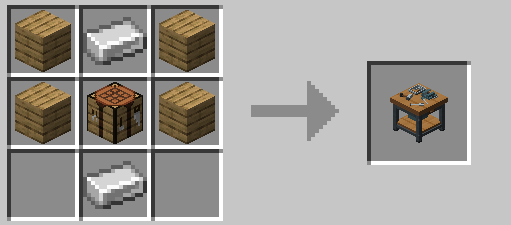
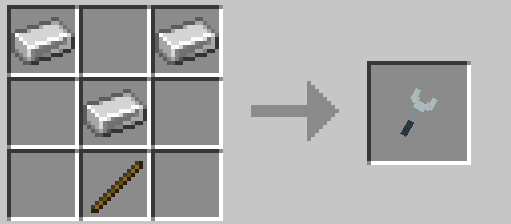
Lighting Tip: Newly placed lights are ON by default. Use the Wrench to configure their settings. The Wrench has 256 durability.
Tablecloth Tip: Right-click with the Wrench to customize tablecloth colors. Use Shift + Wrench + Right-Click to adjust table legs.
Access Control Tip: Shift + Right-click a Badge Reader with the Wrench, then Shift + Right-click a supported door to link them. Use Access Cards to register and authorize access. The Badge Reader GUI includes further instructions.
CraftDistrict decorations can be crafted through the Assembly Station, featuring collection filters, recipe searching, and bulk crafting.
| Material | Ingredients | Output |
|---|---|---|
| Furniture Parts | 2 Wooden Planks + 1 Stick | 4 |
| Metal Parts | 1 Iron Ingot + 1 Iron Nugget | 3 |
| Electronic Parts | 1 Copper Ingot + 1 Redstone Dust | 2 |
All three material recipes are shapeless.
Join our Discord community for CraftDistrict, Sign Builder, and TrafficEngine!
Share your builds, suggest decorations, report bugs, and follow future updates.

Build your world, one detail at a time.
Project description from CurseForge.
Pick your setup
Choose the version and loader you play, then open the matching release.
Check the dependencies, then try the file in a copied instance before changing a world you care about.
Recent files
craftdistrict-forge-1.9-1.20.1.jar
24 Nov 2026
craftdistrict-fabric-1.9-1.20.1.jar
24 Nov 2026
craftdistrict-forge-1.8-1.20.1.jar
21 Nov 2026
craftdistrict-fabric-1.8-1.20.1.jar
21 Nov 2026
craftdistrict-forge-1.7-1.20.1.jar
17 Nov 2026
craftdistrict-fabric-1.7-1.20.1.jar
17 Nov 2026
craftdistrict-forge-1.6.1-1.20.1.jar
13 Nov 2026
craftdistrict-fabric-1.6.1-1.20.1.jar
13 Nov 2026
craftdistrict-forge-1.6-1.20.1.jar
12 Nov 2026
craftdistrict-fabric-1.6-1.20.1.jar
12 Nov 2026
craftdistrict-forge-1.5.1-1.20.1.jar
10 Nov 2026
craftdistrict-fabric-1.5.1-1.20.1.jar
10 Nov 2026
Looking for an older file? The official CurseForge project page is in Resources.
 mod
This Mod makes nights and caves properly dark and adds night vision goggles that work like real ones.
 mod
A clean, fully customizable client-side task manager and hud overlay to track your build,farms and gools diractly in-game
 mod
Immersive camera perspectives, responsive fishing and movement, cinematic respawn, and customizable crosshairs.