Minecraft version
Back to mods 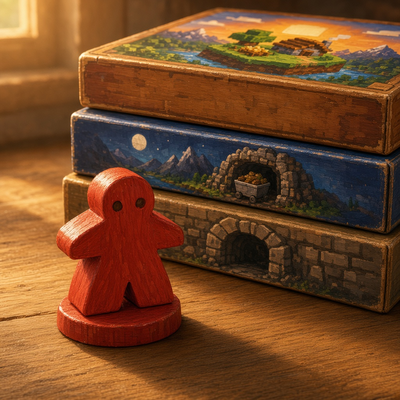
CurseForge · Minecraft mod
MeepleCraft
Craft boardgames, organise the game boxes in stackable cube shelves, and look the recipes up in a handbook.
Choose a version Pick your version below, then grab the matching file.
Quick answer
Which MeepleCraft release should I use?
Latest stable file MeepleCraft 0.1.0 (1.21.1)
Game version 1.21.1
Loader Fabric
MeepleCraft 0.1.0 (1.21.1) targets 1.21.1 with Fabric. The project page does not say whether this file belongs on the client, dedicated server, or both. No extra mods listed for this file.
Where it goes
Is MeepleCraft required on the client, server, or both?
The project page does not say whether this file belongs on the client, dedicated server, or both.
Client Source doesn’t say
Dedicated server Source doesn’t say
Loader for this release Fabric
Required install it here Optional supported, not mandatory Not supported do not install here Source doesn’t say do not assume
The source does not explicitly classify this release as client-only or server-only.
What else does MeepleCraft 0.1.0 (1.21.1) need?
MeepleCraft 0.1.0 (1.21.1). Change the file and its required mods may change too.
This file does not list any required mods. Do not add a library just because a different file uses it.
This file does not list any required or optional mods.
Before you install it
Add MeepleCraft without breaking your instance.
Built for MeepleCraft 0.1.0 (1.21.1). Pick another file and the loader, install side or required mods may change.
- 01
Stick to this file
Use MeepleCraft 0.1.0 (1.21.1). It targets 1.21.1 with Fabric; another release may have different loader, side or dependency requirements.
- 02
Bring the mods it needs
This file does not list any required mods. Do not add a library just because a different file uses it.
- 03
Put it on the correct side
The project page does not say whether this file belongs on the client, dedicated server, or both.
- 04
Pick the file you checked
Use the “Get this file” button beside MeepleCraft 0.1.0 (1.21.1). It opens that exact file at the source.
About this project
What does MeepleCraft add?
MeepleCraft adds physical board-game boxes to Minecraft Java 1.21.1. You craft the boxes, design the games, and stand them on cube shelves. The games are decorative in this version.
The games
There are four games, each a box you can hold and display:
- Settlers of the Overworld
- Terraformers of the End
- Cobblestonne
- Minecarts of the Overworld
They are different widths, so a cubby holds several thin boxes or fewer thick ones. Each cubby has 14 units of usable width.
Cube Shelf
A Cube Shelf is one open cubby. Place several with the same facing and they join into a shelf. Supported groups, measured width by height from the opening, are 1×1, 2×3, 3×2, 3×4, 4×3, 4×4, and 5×5. A 2×2 is four separate cubbies, not one shelf. Only cubbies in the same plane, facing the same way, can connect. Shared borders inside a group are thin. The edge of a group stays thick, so two shelves that touch still look separate.
Right-click a cubby with a game to put it there. Click the left or right half of a box to insert before or after it, or click a gap to use that gap. Games shift only as far as they need to. Shift-right-click places one game in the first free cubby of that group, scanning top to bottom and left to right. It never spills into the next group. Click a game with an empty hand to take that game back. Breaking a filled cubby drops the games.
Game Design Table
Right-click the table. Put one Blank Game Box in the left slot and the game's ingredients in the four middle slots. Order does not matter, and unused slots stay empty. The matching game appears in the output. Taking it uses one blank box and one of each ingredient.
The table does not have the games hard-coded. Each game is a meeplecraft:game_design recipe. The four that ship with the mod are:
- Cobblestonne: cobblestone, wheat, and yellow dye
- Minecarts of the Overworld: rail, minecart, and map
- Settlers of the Overworld: brick, wheat, and oak sapling
- Terraformers of the End: end stone, chorus fruit, and ender pearl
Game Design Handbook
Craft a book with a Blank Game Box to get a Game Design Handbook. Right-click it to open a read-only book. Every game design recipe that is currently loaded is listed with the game's name and icon, and each ingredient's icon and name. If more recipes are added later, they show up in the book on their own.
Crafting
All of these are crafting-table recipes, and they appear in the recipe book once you have the materials.
- Blank Game Box: a row of three paper over a row of three planks.
- Game Design Table: paper across the top, planks, a crafting table, and planks in the middle, and planks across the bottom.
- Cube Shelf: a plank frame with the middle left empty, and a stick in the centre of the top row and the centre of the bottom row. A frame of planks alone is a chest, so the sticks keep that recipe as it is.
- Game Design Handbook: a book and a Blank Game Box, in any order.
The games, the blank box, the handbook, the table, and the cube shelf are in the MeepleCraft creative tab. The shelf and the table are mined with an axe.
Requirements
MeepleCraft needs Fabric Loader and Fabric API on Minecraft Java 1.21.1. Install it on the client and on the server.
Found a bug or have an idea? Leave a comment on this page.
Project description from CurseForge.
Pick your setup
MeepleCraft by Minecraft version and loader
Choose the version and loader you play, then open the matching release.
Check the dependencies, then try the file in a copied instance before changing a world you care about.
Recent files
MeepleCraft versions and loaders
MeepleCraft 0.1.0 (1.21.1)
meeplecraft-0.1.0+1.21.1.jar
21 Oct 2026
Client Source doesn’t say Server Source doesn’t say Dependencies No extras listed Listed on Release listing
Check the 1.21.1 · Fabric setup Fabric1.21.1 release
Looking for an older file? The official CurseForge project page is in Resources.
 mod
mod CurseForge · Minecraft
ReTraffic Control
A modern port of Traffic Control's railroad crossing components. Original mod by CSX8600.
 mod
mod Modrinth · Minecraft
TickTally
Track your true Minecraft playtime across worlds and servers with clean, automatic tracking and zero fluff. TickTally keeps it simple, accurate, and entirely under your control
 mod
mod CurseForge · Minecraft
NeroDecor
Build in the same visual language as the tech — hull, panels, neon, glass, holograms and sci-fi doors for the Neroland universe.