Minecraft version
Back to mods 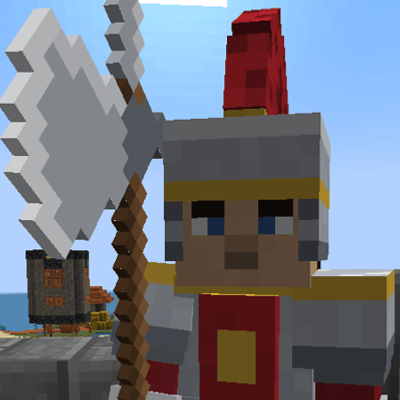
CurseForge · Minecraft mod
Guards-Deluxe
Hire your own guards to protect your base and your town.
Choose a version Pick your version below, then grab the matching file.
Quick answer
Which Guards-Deluxe release matches 1.20.1 Forge?
Best match for your filters Guards-Deluxe v1.20.1-1.9
Game version 1.20.1
Loader Forge
Guards-Deluxe v1.20.1-1.9 targets 1.20.1 with Forge. The project page does not say whether this file belongs on the client, dedicated server, or both. No extra mods listed for this file.
Where it goes
Is Guards-Deluxe required on the client, server, or both?
The project page does not say whether this file belongs on the client, dedicated server, or both.
Client Source doesn’t say
Dedicated server Source doesn’t say
Loader for this release Forge
Required install it here Optional supported, not mandatory Not supported do not install here Source doesn’t say do not assume
The source does not explicitly classify this release as client-only or server-only.
What else does Guards-Deluxe v1.20.1-1.9 need?
Guards-Deluxe v1.20.1-1.9 on 1.20.1 Forge. Every mod below is checked against that same setup.
This file does not list any required mods. Do not add a library just because a different file uses it.
This file does not list any required or optional mods.
Before you install it
Add Guards-Deluxe without breaking your instance.
Built for Guards-Deluxe v1.20.1-1.9 on 1.20.1 Forge. Pick another file and the loader, install side or required mods may change.
- 01
Stick to this file
Use Guards-Deluxe v1.20.1-1.9. It targets 1.20.1 with Forge; another release may have different loader, side or dependency requirements.
- 02
Bring the mods it needs
This file does not list any required mods. Do not add a library just because a different file uses it.
- 03
Put it on the correct side
The project page does not say whether this file belongs on the client, dedicated server, or both.
- 04
Pick the file you checked
Use the “Get this file” button beside Guards-Deluxe v1.20.1-1.9. It opens that exact file at the source.
About this project
What does Guards-Deluxe add?
Guards-Deluxe
Hire your own medieval army. Earn coins, buy contracts at a recruitment desk and lead many different kinds of guards, from a cheap Townguard with a lance up to a flame-sword-wielding Hero. Give them orders, send them on patrol routes and let them hold your walls while you're away.
Compatibility
Guards-Deluxe should be compatible with all mods that add mobs. The mods below will work right out of the box, so neutral and passive mobs will not be attacked by guards:
- Ice and Fire
- Alex's Mobs
- Alex's Caves
- Mowzie's Mobs
- Upgrade Aquatic
- Hybrid Aquatic
- Born in Chaos
- Farlanders
- Guard Villagers
- Whisperwoods
- Mine Colonies
For mods not on this list you might want to add passive and neutral mobs to config/guardsdeluxe-common.toml. Otherwise the guards will attack them!
NOTE! This mod is inspired by Guardscraft, which is an amazing mod by sgtmattbaker. Sadly it's no longer being maintained, so I took it on myself to recreate something similar from scratch.
Table of contents
- Factions
- Territories
- The Guards
- Getting Started
- Recipes
- Giving Orders
- Leveling Up
- How Guards Fight
- Cosmetics
- Configuration
- Planned Future Updates
- Credits
Factions
A faction is a colour-coded team of players and guards. Guards will attack any other players and guards who are not part of their own faction on sight. The guards will wear the colors of their faction. This makes them easily distinguishable.
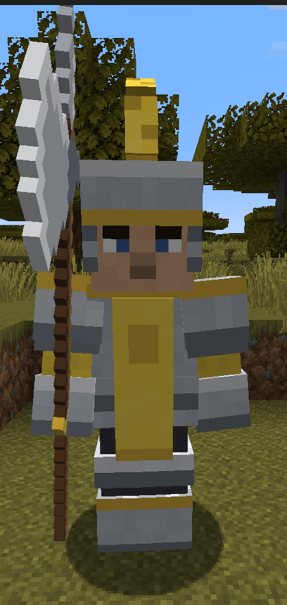
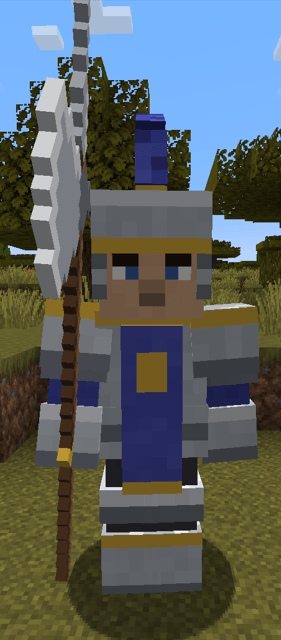
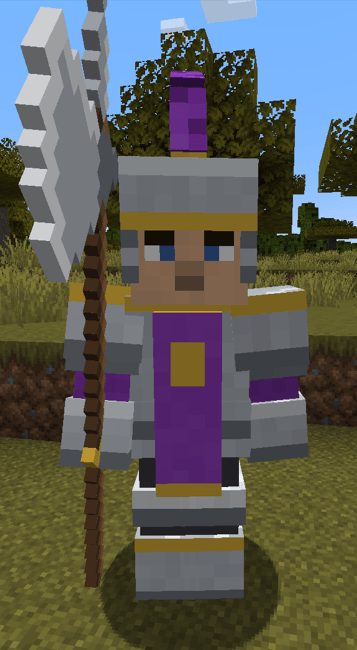
To join or create a faction place a piece of paper with a dye color of your choosing (except red) anywhere in the crafting grid to create a Faction pledge. Hold the Faction pledge in your hand and then right-click to create a faction.
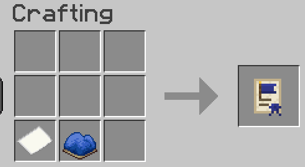
If you are the first player to join a faction then you'll be the Emperor (leader of the faction). Any player who joins after you will be a King (a faction member).
As an Emperor you can:
- Invite players to jion your faction. To do this right-click the player with the Faction pledge in your hand. The player will then get 2 minutes to accept your invitation by right-clicking their own Faction pledge of the same color. This player will become a King. They can command the guards of your faction and the guards will not attack them.
- Expel players from your faction. To do this crouch + right-click a player with the Faction pledge in your hand. The player will become unpledged and they will be attacked by your guards again.
As a King you can:
- Hire and command guards.
- Succeed the Emperor (if he leaves, you'll become the Emperor).
To hire guards for your faction you must first create a recruitment desk (see chapter "Recipes" on this page). Then you must place your recruitment desk together with a dye of your Faction's color anywhere in the crafting grid.
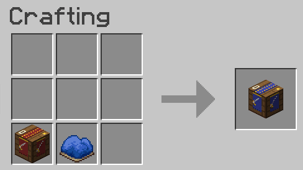
Players of a Faction will have their name in that color + the Faction's flag next to their name. The Emperor will also have a crown next to their name,

Neutral faction
Red is the color of the default recruitment desks and it produces red guards. These guards are neutral will not attack any unpledged players. They will only attack players and guards that are part of a faction.
Territories
A territory is a 300x300 piece of land that belongs to a faction. Players who do not belong to that faction can't place or destroy blocks or use buckets here.
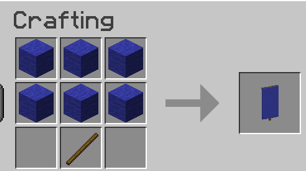
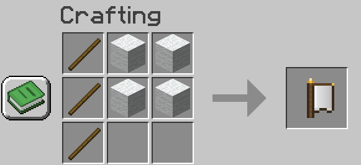
To claim a territory for your Faction you must first create a flag. To do this, you must first create a banner of your Faction's color. Then you must place the banner and a stick in the crafting grid.
1: Banner
2: Flag
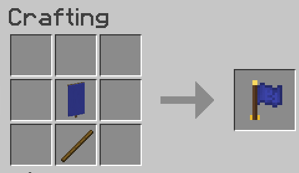
Players of a Faction will spawn at the nearest flag if they have not changed their spawn point with a bed.
Placing a flag
A couple of conditions must be met before you can place a flag:
- The flag must belong to your Faction (i.e. it's the same color).
- It needs a open sky and a clear 7x7 space around it.
- It must at least be 300 blocks away from another flag.
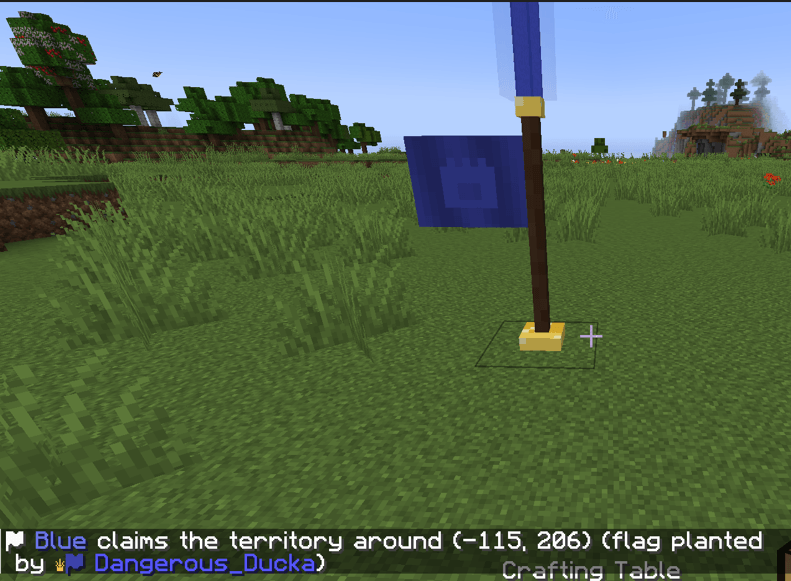
Once a flag has been placed
- Once the flag has been placed, you cannot place any blocks within 3 blocks around the flag.
- Your territory's border will show as a fog in your Faction's colors at the borders of your land. This makes it easy to tell for other players who owns a territory.
- Players will get a warning message once enemy players enter their territory.
- Enemy players are able to place blocks within 12 blocks of your flag. This is intentional to prevent abuse (i.e. placing your flag in an otherwise impossible to reac location).
A flag emits a beam in your Faction's color. This makes it easier for enemy players to tell where your flag is.

Territory borders
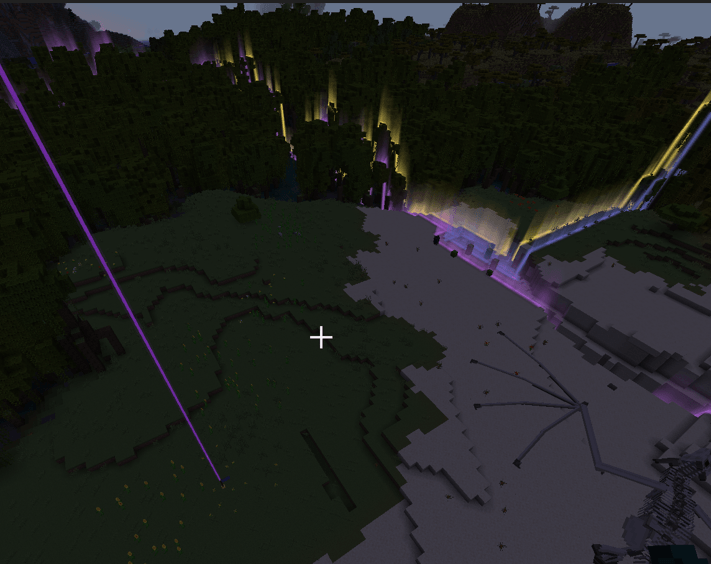
Conquering a territory
Taking another Faction's land can be done in two ways:
- By destroying the enemy's flag (they will get a warning message that a player is damaging their flag).
- By standing within 20 blocks of the flag for 5 minutes.
Once a flag has been destroyed a new flag can be planted to take the land for your Faction.
The Guards
There are 21 different kinds of guards (and counting :-P).
Melee Guards
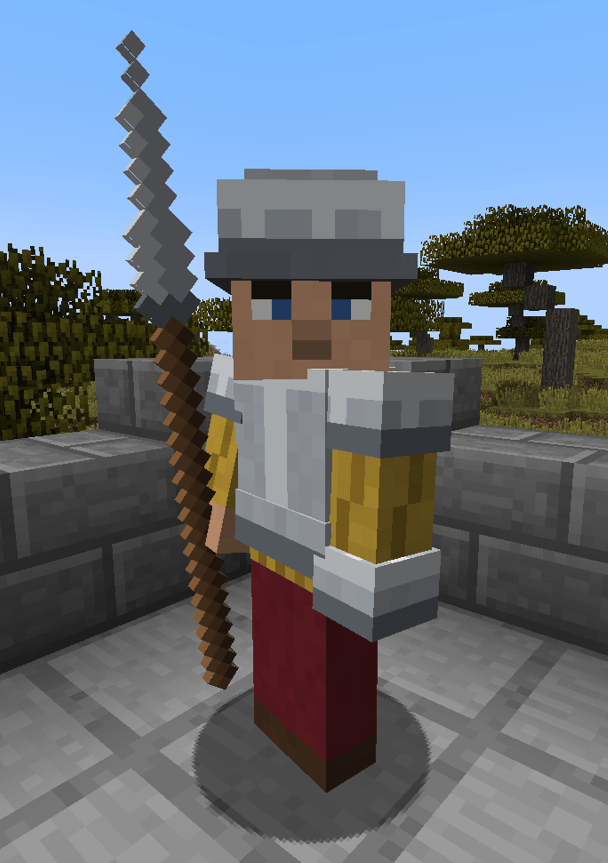
Townguard
Armed with a spear for extra reach and lightly armored. Weak but cheap. Perfect for guarding towns.
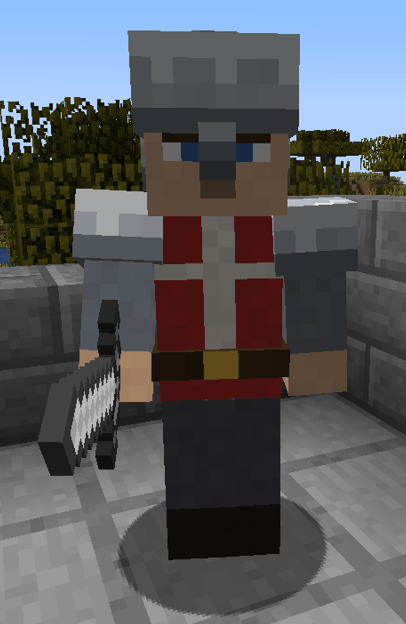
Swordfighter
Slightly stronger and faster than the Townguard. Cheap and good for defending towns or for taking the offensive in numbers.
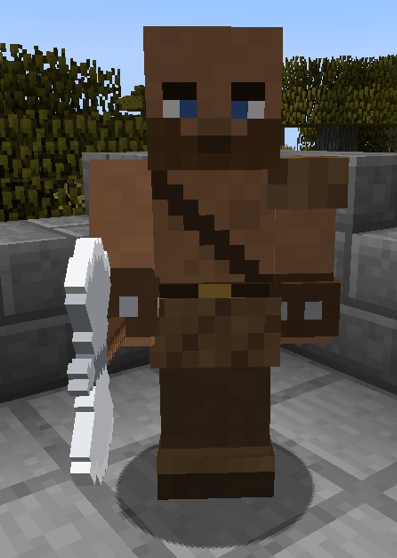
Axe-fighter
The strongest of the low-tier guards but also the least armored. The Axe-fighter is good against opponents with shields.
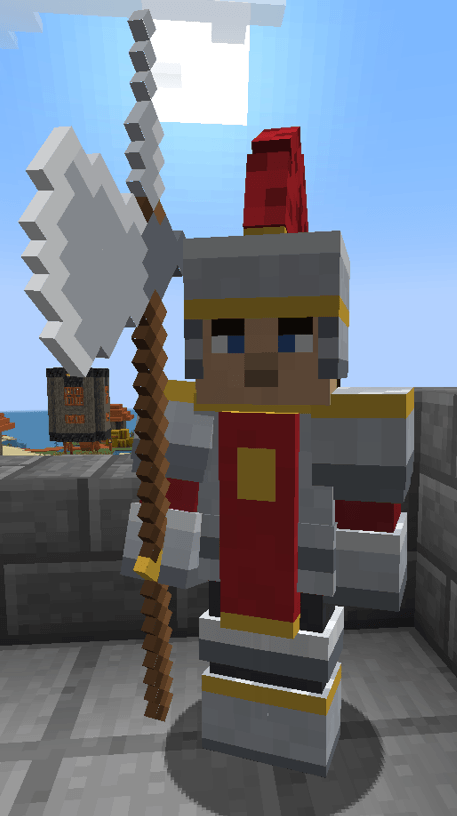
Castle-guard
A much stronger and more elegant counterpart of the Townguard. Armed with a halberd, he has extra reach.
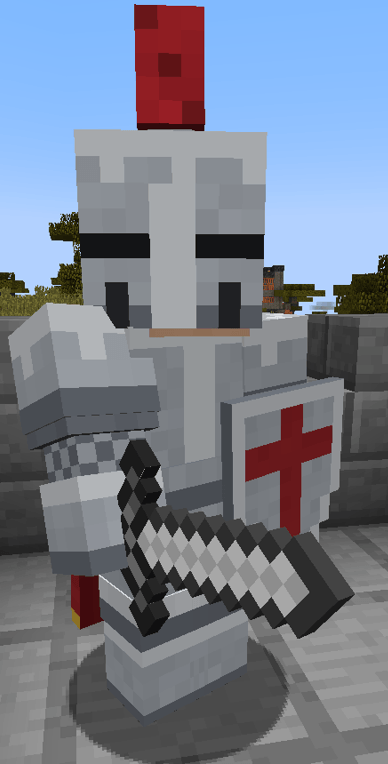
Knight
A tanky melee fighter. With his shield he can block up to 3 attacks before he gets tired and needs to rest for 5 seconds before he can block again.
Special ability: Shield Bash (15 second cooldown). The Knight charges at the nearest mob at high speed and slams into it with his shield, knocking it back and stunning it for 1 second.
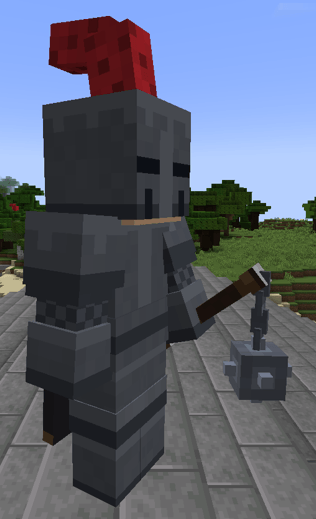
Flail Knight
Armed with a flail, he has extra reach (5.5 blocks).
Special ability: Crushing Blow (30 second cooldown). As he spins his flail it turns red hot and ignores the armor rating of a mob.
Cataphract
A heavily armored mounted fighter who can quickly close the gap between himself and mobs.
Special ability: Charge (10 second cooldown). He charges at the nearest mob, knocking it back for 3 or 20 blocks and deals 16 damage.
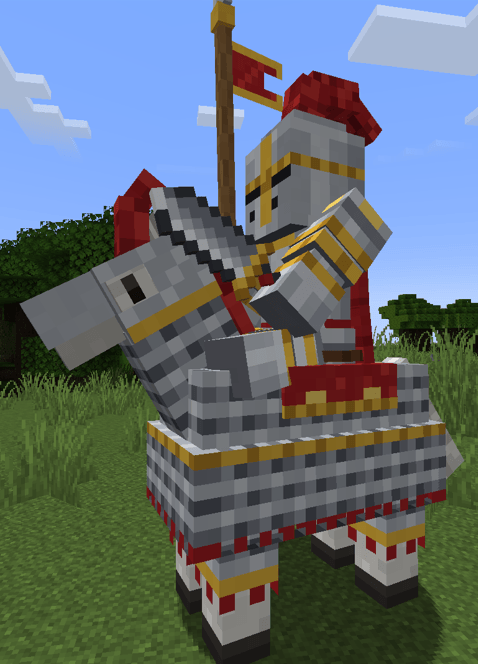
Champion
Armed with a two-handed diamond sword, the Champion is powerful, but due to the size and weight of his sword his attack speed is slow.
Special ability: Great Sweep (20 second cooldown). A wide horizontal swing that hits every enemy in front of him for 20 damage and knocks them back.
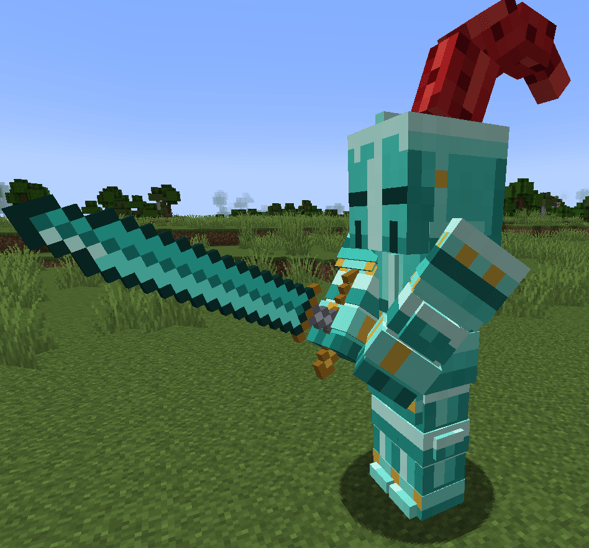
War Elephant
A very tanky and expensive fighter. The elephant attacks mobs with his tusks and the rider attacks with his glaive.
Special ability: Trample (15 second cooldown). The elephant charges at mobs in its path, knocking them back and dealing 12 damage.
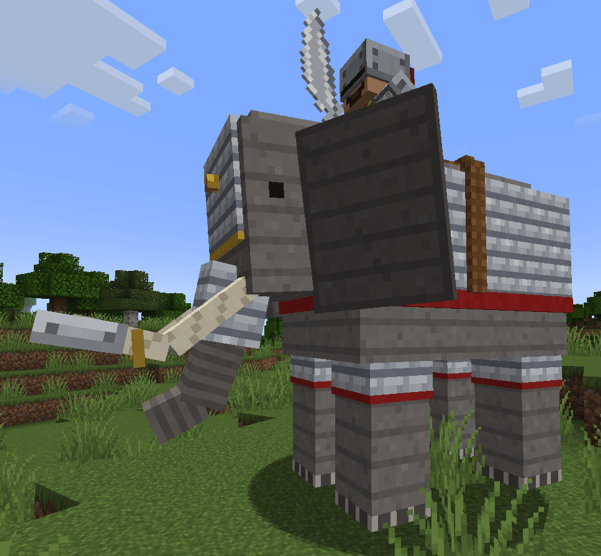
Heroes
The Hero is not only the most expensive and most powerful of all of the guards, players can even borrow some of their power for themselves. Each player can only hire one Hero at a time.
There are currently three Heroes available.
Phoenix Knight
A strong and sturdy Hero. He fights with fire and can summon creatures of fire. He is a good all-around Hero.
Default special abilities:
- Crescent of Fire (15 second cooldown). The Hero sweeps his sword and launches a crescent of flames at a mob up to 20 blocks away. It burns every hostile mob in its path for 25 damage. It never harms players, guards, villagers or animals, and it never sets blocks on fire.
- Healing Potion (20 second cooldown). The Hero throws a healing potion at the most injured guard, player, villager or pet nearby. It leaves a healing area on the ground for 2 seconds, and every friendly standing in it gains the healing effect which heals 20 HP (1 HP per second). Mobs are never healed.
- Phoenix Heating. He heats up your furnaces/blast furnaces in a 6x6 area, allowing the furnaces to work 6x faster. This is a player-issued command (with the Commander's Horn). Select the command in the Horn's menu and click in front of a furnace.
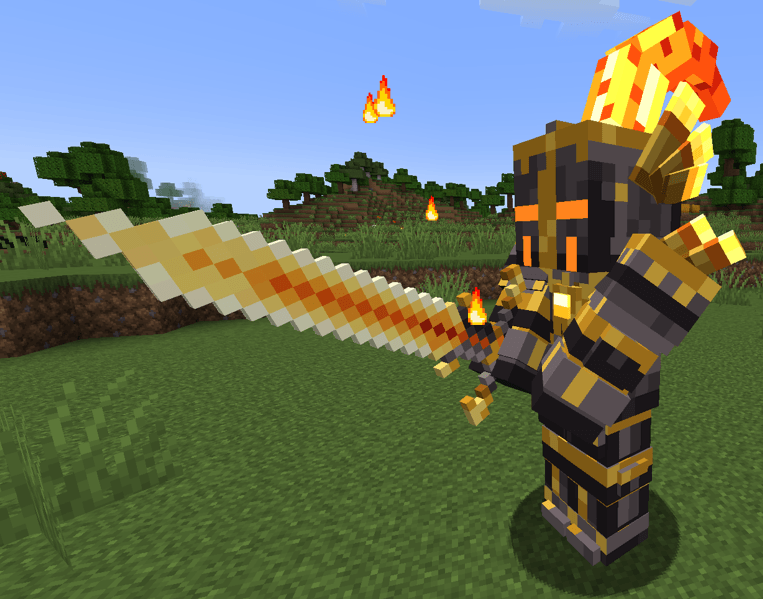
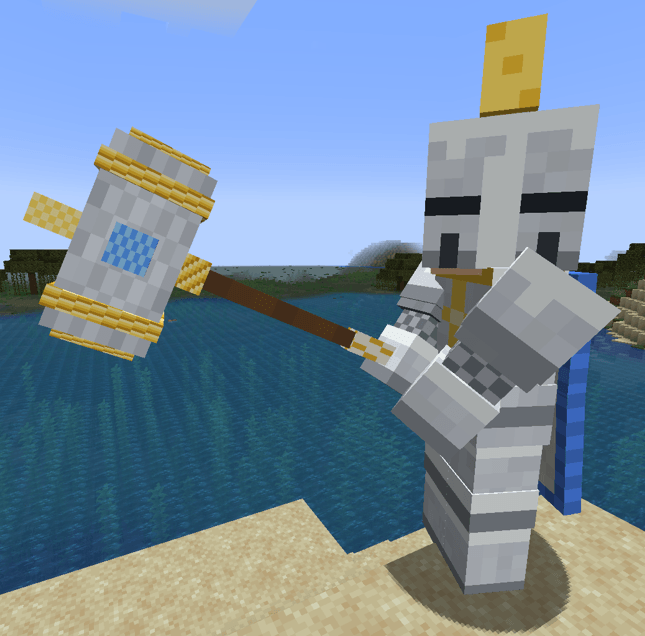
Paladin
A holy Hero who is good against undead. He fights with lightning and Holy Light.
Default special abilities:
- Lightning Bolt (10 second cooldown). The Hero throws a bolt of lightning at the nearest mob (up to 40 blocks away), dealing 15 damage and stunning it for 6 seconds.
- Aura of Regeneration. Guards, players, villagers and pets within 10 blocks regenerate 0.25 HP per second.
Water Magician
A ranged Hero who can easily destroy groups of mobs from a distance.
Default special abilities:
- Frost Bolt (15 second cooldown). Shoots an icy star from his staff that deals 20 damage and makes the mob move 50% slower for 10 seconds.
- Rain. He creates a small cloud over any burning player, guard, villager or pet within 16 blocks. Rain falls from the cloud until the fire is out. Players can borrow this power to make their crops grow 20 times faster: point at a block within 64 blocks of him and sound the Commander's Horn. He channels a 15x15 rain cloud above it until a hostile mob gets close to him or when he receives another command.
- Purifying Water (40 second cooldown). He fires a splash of holy water that heals for 20 HP at himself (when injured), injured players, guards, villagers and pets. Single target only.
- Blizzard (30 second cooldown). He waves his staff for 10 seconds and ice shards fall from the sky on a 10x10 area up to 24 blocks away. Each shard does 10 damage and makes mobs move 50% slower for 5 seconds. Since it's a channeling spell it leaves him wide open when a mob gets too close, so he only casts it when no mob is within 5 blocks of him, and he stops if a mob gets too close.

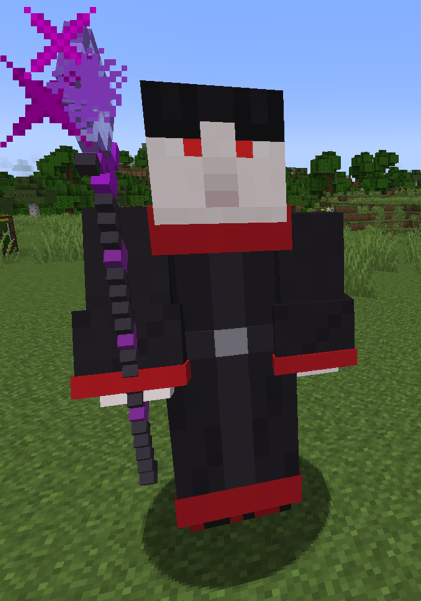
Dark Mage
The Dark Mage is a very powerful ranged hero that requires a little bit of micromanagement with the Commander's Horn to get the most out of.
Default special abilities:
- Blackout (30 second cooldown). He holds his staff in the air and a 10x10 gets engulfed by black purplish clouds. Hostile mobs inside this area takes 13 damage per second and when they die a skeleton spawns. The skeleton will fight for the Dark Mage
- Life Drain (20 second cooldown). He holds out his hand and a glowing beam of sparkling pink life energy flows into it from a hostile mob up to 24 blocks away, preferring the one that hurt him. 5 damage a second, and he heals 5 HP a second, for up to 6 seconds. He will use it when he is hurt. When no hostile mobs are nearby he will steal the life energy from guards, villagers, pets but he will stop when they get below 50% HP.
- Life Drain Orb (20 second cooldown). This is a player issued command with the Commander's Horn. He throws a purple orb at the desired block of the player's choosing where it will float in the air. Every living creature within 7 blocks of the orb will get damaged for 8 HP per second (that means it will hurt players too!). The orb remains for 10 seconds and after that it will drop to the ground as an item. Upon touching it, the player (or zombie) will get healed for the total amount of damage the orb has done.
- Dark Alchemy (1 minute cooldown). This is also a player issued command. The Hero will turn a friendly mob, such as guards, villagers, pets of the player's choosing, into either stone (80% chance, yielding 640 cobble stone), gold (15% chance, yielding 10 gold bars), diamond (5% chance, yielding 5 diamonds).
- Soul Link (2 minute cooldown). This is also a player issued command. When used his and the player's soul are linked to each other. Damage taken by the player is split 50/50 and Life drain heals both the Dark Mage and the player. Soul link ends when you are more than 64 blocks away from the Dark Mage or after 2 minutes.
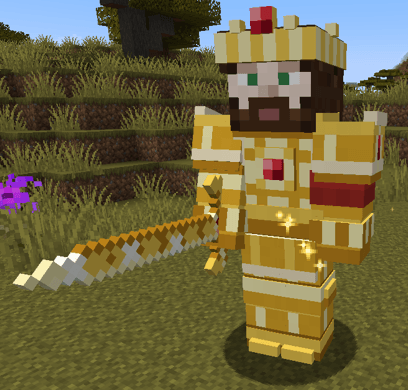
King of Fortune
A powerful Hero (especially at later levels) who is weak in the healing department but makes up for it with his wealth expanding abilities..
Default special abilities:
Sword Storm (30 second cooldown). He targets a mob up to 24 blocks away and 6 golden portals open behind him and fire 12 golden swords at his target, each sword deals 13 damage.
Golden Beam (30 second cooldown). He fires a a golden crescent moon at a mob up to 16 blocks away. It hits at most 2 mobs for 23 damage each.
Healing Potion (60 second cooldown). He pulls a Potion of Healing out of a portal and throws it to the nearest hurt player’s inventory.
Empower. This is a player issued command with the Horn. He he channels sunbeams over a 16×16 area, and blocks placed there have a 50% chance not to be used up (valuable blocks such as gold, diamond, iron are not affected to prevent duplicating them).
Blessing of Fortune (8 minute cooldown). This is a player issued command with the Horn. He blesses the player for 5 minutes. Whle under the effect, any ore mined has a 50% chance to yield 2 ores.
Ranged Guards
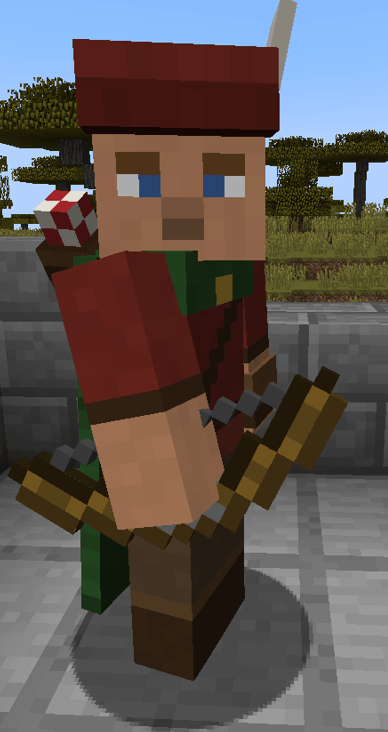
Bowman
The weakest of all the ranged guards. Cheap and replaceable.
Long-bowman
Stronger than the Bowman, and with his longbow he has a much greater range.
Special ability: Critical Arrow (30 second cooldown). He shoots a sparkling arrow that deals 15 damage instead of 6.
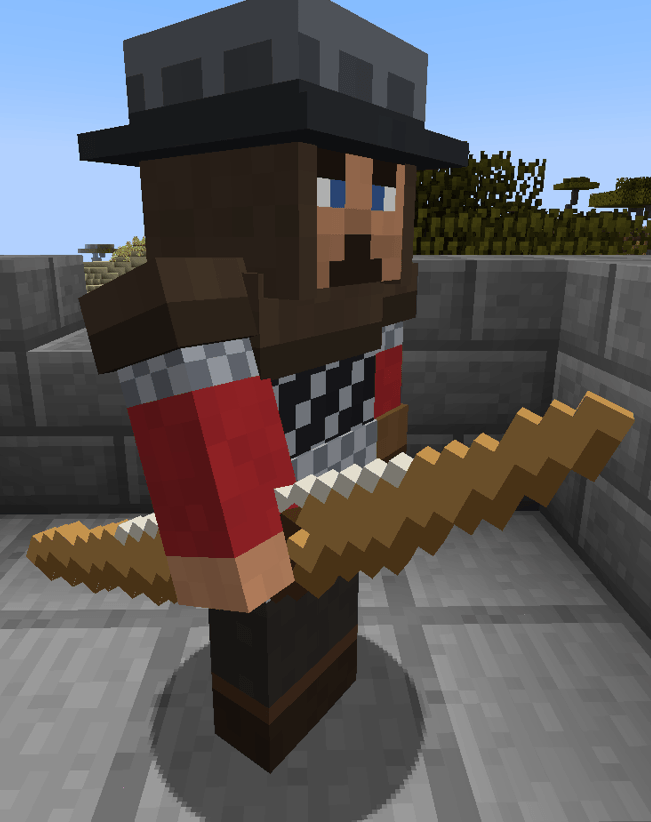
Crossbowman
Stronger than the Long-bowman but with the range of the normal Bowman. He can attack without delay once he has loaded his crossbow.
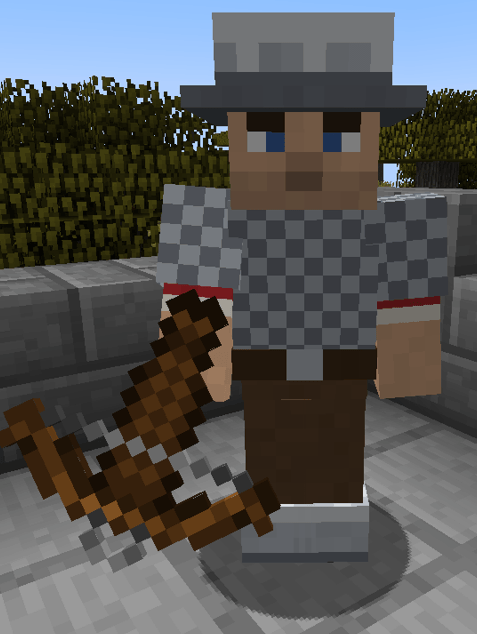
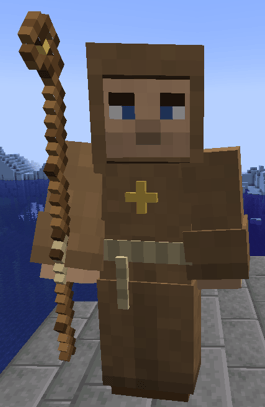
Cleric
He shoots stars of Holy Light from his staff (deals bonus damage against undead). He heals any injured players, guards, villagers and pets that he can see.
Special ability: Heal. He can heal any friendly mob or player for 0.5 HP per second.
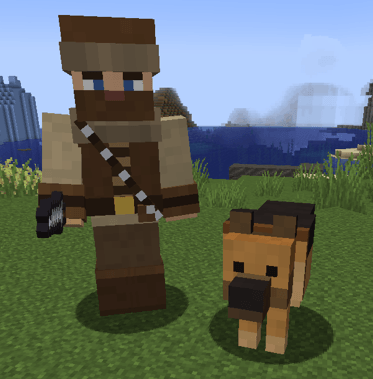
Houndmaster
He throws knives at the nearest hostile mob and his trusty canine attacks any hostile mob that he attacks or that gets too close. As the Houndmaster levels up he will get a stronger dog, ranging from a German Shepherd to a Rottweiler.
Mounted Archer
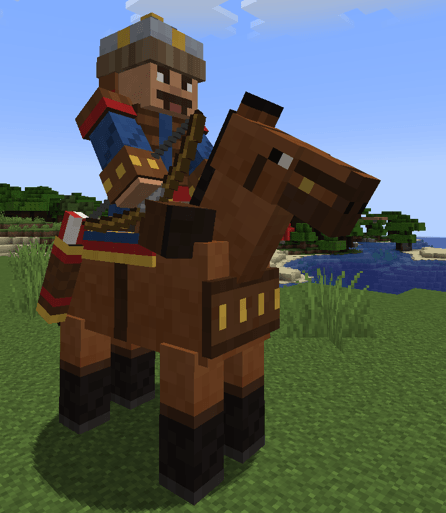
An archer on horseback. He keeps moving while fighting, making him a very difficult target for slower mobs.
Special ability: Parthian Shot (12 second cooldown). When a mob gets close to him he fires a shot that deals double damage.
Siege Engineer
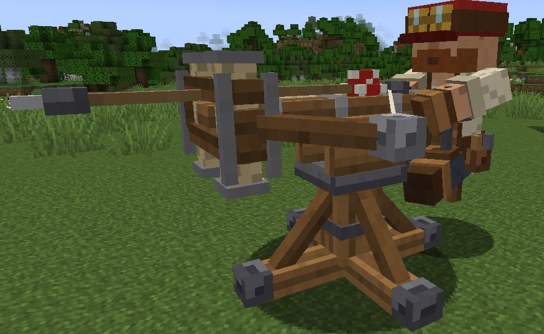
He can build a powerful Ballista or a Mangonel. He mans his own machines and repairs them as well. As he levels up his machines get more powerful. To order him to build, bind him to the Commander's Horn and issue the command.
Archer War Elephant
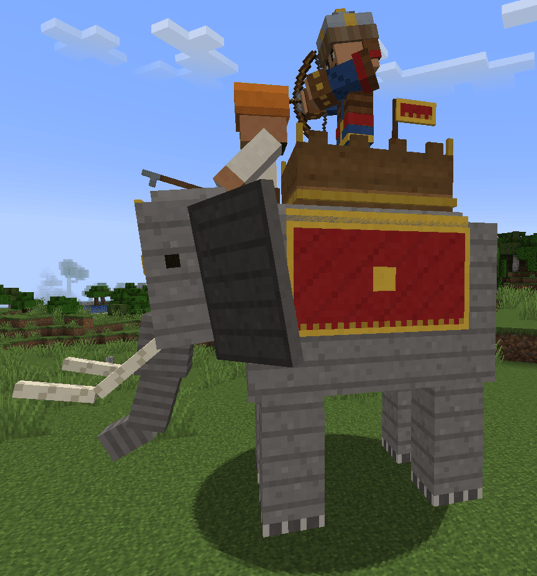
A tanky elephant with an archer riding on it. Because the archer sits up high, he has a good view of the battlefield and he can shoot over crows and small walls.
Special ability: Trunk swat (4 second cooldown). When a mob gets too close, it gets swatted away by the elephant's trunk. It deals 10 damage.
Stats of the Guards
Below are the stats of all of the guards and their default prices.
Melee Desk
| Guard | Price | HP | Damage | Attack speed | Armor | Weapon |
|---|---|---|---|---|---|---|
| Townguard | 3 coins | 50 | 3 | medium | 4 | Lance (long reach) |
| Swordfighter | 5 coins | 50 | 4 | fast | 6 | Iron sword |
| Axe-fighter | 10 coins | 35 | 9 | slow | 2 | Double-bladed battle-axe |
| Castle-guard | 30 coins | 50 | 7 | medium | 7 | Halberd (long reach, pokes and slashes) |
| Knight | 50 coins | 60 | 8 | medium | 7 | Iron sword and iron kite shield |
| Flail Knight | 100 coins | 60 | 10 | slow | 7 | Flail |
| Cataphract | 150 coins | 65 | 8 | medium | 9 | Iron broad sword and lance |
| Champion | 200 coins | 75 | 21 | every 5 s | 8 + toughness 2 | Two-handed diamond greatsword |
| War Elephant | 300 coins | 150 | 14 (Elephant) 6 (Rider's Glaive) |
every 2.5 s | 8 + toughness 2 | Tusks, Glaive |
| Phoenix Knight (Hero) | 900 coins | 100 | 30 | every 3 s | 8 + toughness 3 | Flaming two-handed netherite greatsword |
| Paladin (Hero) | 700 coins | 100 | 23 (40 against undead) | every 3.5 s | 8 + toughness 3 | Holy War hammer |
| King of Fortune (Hero) | 900 coins | 100 | 25 | every 3 s | 8 + toughness 3 | Golden long sword |
Ranged Desk
| Guard | Price | HP | Damage | Attack speed | Armor | Weapon |
|---|---|---|---|---|---|---|
| Bowman | 8 coins | 50 | ~4 per arrow | every ~2 s | 3 | Bow |
| Long-bowman | 20 coins | 50 | 6 per arrow | every 3.5 s | 3 | Longbow, range 40 blocks |
| Crossbowman | 15 coins | 50 | 12 per bolt | 3.5 s reload | 6 | Crossbow |
| Houndmaster | 30 coins | 50 | 7 per knife | every 2.5 s | 2 | Throwing knives, dog, range 10 blocks |
| Cleric | 50 coins | 30 | 3 per projectile (8 against undead) | every 2.5 s | 0 | Staff |
| Siege Engineer | 80 coins | 35 | 3 | every 3 s | 0 | Hammer |
| Mounted Archer | 120 coins | 50 | 8 per arrow | every 2.5 s | 2 | Bow, range 24 blocks |
| Archer War Elephant | 280 coins | 130 | 9 per arrow | every 2s | 6 | Bow, range 32 blocks |
| Water Magician (Hero) | 800 coins | 100 | 16 per projectile | every 2.5 s | 2 | Staff, range 22 blocks |
| Dark Mage (Hero) | 900 coins | 100 | 16 per projectile | every 2.5 s | 2 | Staff, range 22 blocks |
Getting Started
- Earn coins by killing hostile mobs (mobs have a low chance of dropping coins) or by smelting a gold nugget. One gold nugget equals 1 coin.
- Craft a recruitment desk. There's a melee desk and a ranged desk.
- Right-click the desk and buy a contract. The coins are taken from anywhere in your inventory, so you can carry them in several stacks.
- Right-click a block with the contract and your guard appears, ready to follow you. The contract is used up. Contracts stack to 16, so you can buy them in advance.
Recipes
Coins
Smelt 1 Gold Nugget in a furnace and you get 1 Coin.
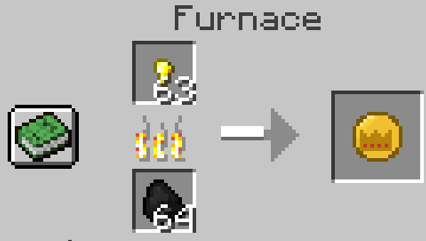
NOTE: A coin can be converted back into a gold nugget by placing it anywhere in the crafting grid.
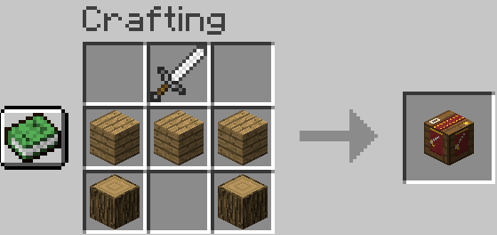
Melee Recruitment Desk
Any type of planks and logs works.
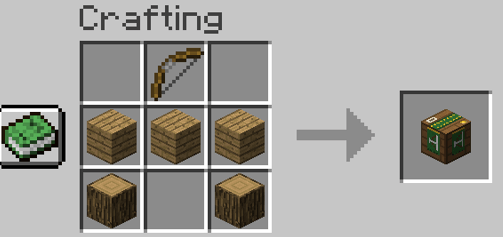
Ranged Recruitment Desk
Any type of planks and logs works.
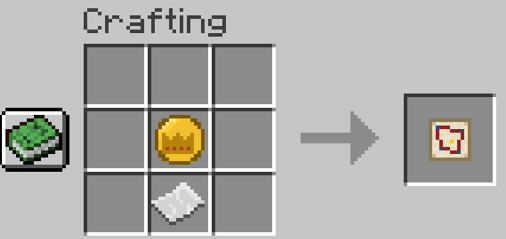
Patrol Orders
1 Paper + 1 Coin, placed anywhere in the crafting grid.
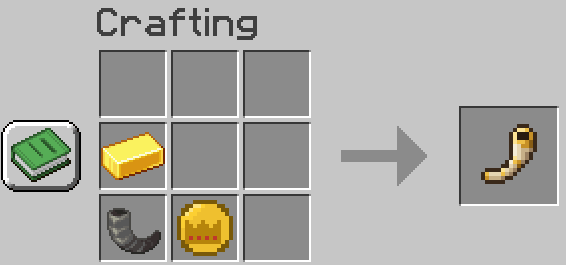
Commander's Horn
1 Goat's Horn + 1 Gold Ingot + 1 Coin, placed anywhere in the crafting grid.
Giving Orders
Only the guard's owner can give orders.
Right-clicking a guard
Right-click a guard to cycle through:
- Follow me. Guards walk at your walking pace, never sprint. If you get more than about 24 blocks away, they wait until they see you again.
- Hold this position. The guard chases enemies a short way, then returns to its spot.
- Hold position, don't jump down. The same, but the guard never drops off a ledge. Perfect for guards on town walls.
- Don't follow. The guard fights anything it sees and stays wherever the fight ends.
Crouch + right-click a guard to make it stand its ground: it won't move an inch and only fights what comes within reach. Do it again to make it follow you.
Right-click a guard with food to heal it. One item of food is consumed and the guard heals 20 HP at 1 HP per second.
Look at any guard to see its name and health above its head.
Patrols
Craft Patrol Orders and plan a route:
- Right-click blocks to set up to 8 patrol points. While you hold the orders, your planned route shows as gold markers.
- Crouch + right-click to send every guard that's following you (within 32 blocks) on that patrol route.
- Guards walk the route in a loop and wait about 5 seconds at each point. They fight anything they see, then go back to patrolling.
- Plan a new route for another group. You can run as many patrol groups as you like, and active routes show as blue markers (only visible while holding the Patrol Orders item).
- Right-click a patrolling guard to call it back. Routes are deleted automatically once no guard is walking them.
Commander's Horn
With the Commander's Horn you can give your guards orders by right-clicking with the Horn in hand. There are multiple commands available. To access them you must crouch + right-click and pick your desired command. The available commands are:
- Rally: Calls your guards back to your side. They will stop what they are doing and come running straight to you.
- Attack: Look at a mob and right-click while holding the Horn and your guards will attack your desired target.
- Move: Order your guards to move in formation to your specified block (can be used up to 128 blocks away).
- Escort: The guards will stay close by your side (2.5 blocks apart from the player) and they will move 3 blocks to chase after mobs getting too close.
- Surround: Same as Escort, except that the guards form a ring around you to protect you from all sides.
- Formation: Same as Surround, except the guards form two rows in front of you (melee guards in the front, archers in the back).
- Cancel orders: Cancels all of the orders given with the Horn.
Forming squads with the Commander's Horn
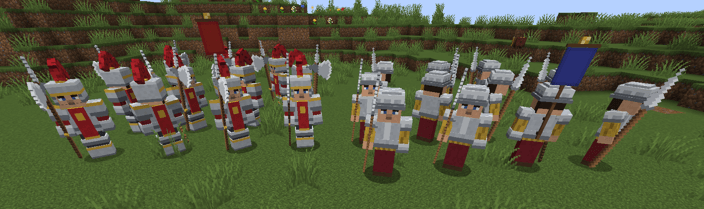
While holding the Horn you can crouch + right-click any guard(s) of your choosing to tie them to the Commander's Horn you are holding in your hand. This allows you to choose which guards must obey your Horn's orders instead of every guard that is currently following you. Perfect for sending out a selective group of guards into battle while the rest of them stay at your side!
If you have multiple Commander's Horns then you can tie guards to them. This allows you to form squads for you to command! Just switch between each Horn to command each squad.
The Commander's Horn will show you in its tooltip how many guards are currently tied to it.
A Horn with no guards tied to it commands all of the guards following you AND the guards tied to another Horn.
TIPS
- The Commander's Horn can be dyed, making it easier to tell what squad is tied to it (especially when combined with a banner, if the banner is the same color as the Horn of course).
- When forming a squad it's advised to equip one of the guards with a banner. A guard holding a banner not only allows you to tell different squads from each other, the banner-man will also always be at the center front during formations. Note that archers will never stand at the front when melee guards are part of the squad.
Borrowing a Hero's power with the Commander's Horn
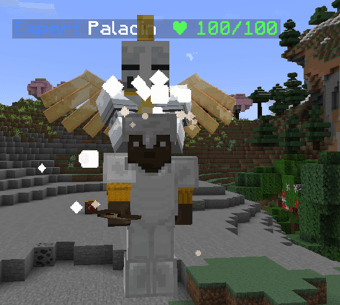
To borrow your Hero's power for yourself, equip the Horn and tie your Hero to it. Then crouch + right-click and a menu for your Hero will appear among the other commands.
Leveling Up
Guards can level up by killing hostile mobs and staying alive for a set amount of days. There are 4 levels. For guards they are: Novice, Veteran, Elite, Legendary. Each time a guard levels up he gets a colored cape tied to that level and he gets 10% more HP and attack damage. From Veteran onwards they will unlock new special abilities and strengthen their innate special abilities (if they have them).
To check a guard's progress, crouch and look at them.
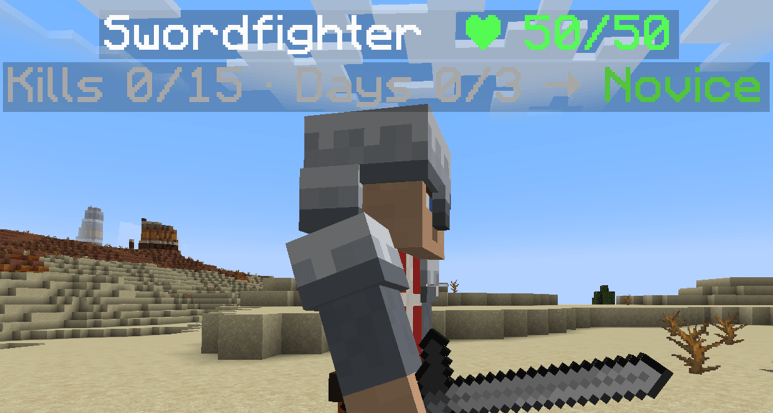
The table below gives an overview of the levels and their benefits for the guards.
| Rank | Kills | Days survived | Cape | Bonus |
|---|---|---|---|---|
| No rank | 0 | 0 | none | none |
| Novice | 15 | 3 | green | +10% attack, +10% HP |
| Veteran | 60 | 10 | blue | +20% attack, +20% HP, first special ability |
| Elite | 175 | 25 | orange | +30% attack, +30% HP, new or stronger ability |
| Legendary | 500 | 100 | purple | +40% attack, +40% HP, strongest abilities |
The Hero has his own ranks and higher requirements. He doesn't gain attack or HP. Instead each rank gives him a new ability.
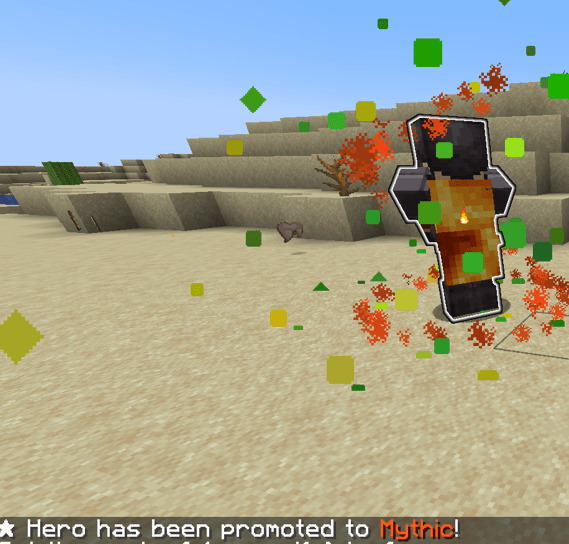
Phoenix Knight
| Rank | Kills | Days survived | Cape | New ability |
|---|---|---|---|---|
| No rank | 0 | 0 | none | none |
| Professional | 25 | 5 | green | Purify, Spirit wolves |
| Expert | 100 | 15 | blue | Teleport, Golden fireball |
| Master | 300 | 40 | orange | Faster cooldowns, Aura |
| Mythic | 1000 | 150 | lava | Phoenix Rebirth, Fire giant |
Paladin
| Rank | Kills | Days survived | Cape | New ability |
|---|---|---|---|---|
| No rank | 0 | 0 | none | none |
| Professional | 25 | 5 | green | Angelic wings |
| Expert | 100 | 15 | blue | Lightning Blade |
| Master | 300 | 40 | orange | Faster cooldowns, Strike of Justice |
| Mythic | 1000 | 150 | lava | Divine protection, Divine protectors |
Water Magician
| Rank | Kills | Days survived | Cape | New ability |
|---|---|---|---|---|
| No rank | 0 | 0 | none | none |
| Professional | 25 | 5 | green | Water elemental |
| Expert | 100 | 15 | blue | Ice-skate, Freezing aura |
| Master | 300 | 40 | orange | Faster cooldowns, Frost Nova |
| Mythic | 1000 | 150 | water | Water wave, Ice cube, Water Giant |
Dark Mage
| Rank | Kills | Days survived | Cape | New ability |
|---|---|---|---|---|
| No rank | 0 | 0 | none | none |
| Professional | 25 | 5 | green | Soul Harvest, Vampiric Aura, Shadow step |
| Expert | 100 | 15 | blue | Hex, Dominate Undead, Bone Storm |
| Master | 300 | 40 | orange | Faster cooldowns, Blackout now produces Wither skeletons, Eclipse |
| Mythic | 1000 | 150 | Dark energy | Undying, Void Rift, Dark Alchemy can now be used on Hostile mobs with better yields (70% gold, 20% emeralds, diamonds 9%, Netherite scrap 1%). |
King of Fortune
| Rank | Kills | Days survived | Cape | New ability |
|---|---|---|---|---|
| No rank | 0 | 0 | none | none |
| Professional | 25 | 5 | green | Midas Touch, Lucky strike |
| Expert | 100 | 15 | blue | Gold dust, Fortune's favour |
| Master | 300 | 40 | orange | Faster cooldowns, Jack pot |
| Mythic | 1000 | 150 | shimmering gold | Treasury gate, Rain of blades, Golden Colossus, King's ransom |
The amount of required kills and days to level up can be changed in config/guardsdeluxe-common.toml.
How Guards Fight
- They attack hostile mobs they can actually see. They don't fight through walls.
- They leave villagers, animals, tamed pets, iron golems and other passive/neutral mobs alone.
- They defend you and each other. When one guard is attacked, nearby guards join in.
- Guards never hurt you, your pets or each other. Guards never despawn (unless when they are killed of course).
Cosmetics
Scarfs
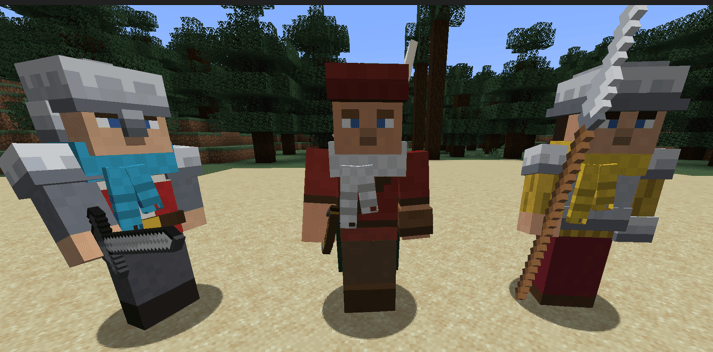
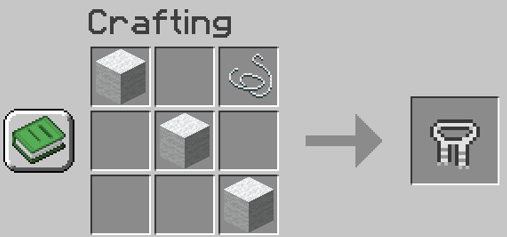
To personalize your guards you can craft scarfs for them. The scarfs can be dyed. To equip a guard with a scarf, hold the scarf in your hand and right-click the guard. To remove a scarf from a guard you have to use shears.
Below is the recipe to craft a scarf.
Nametag
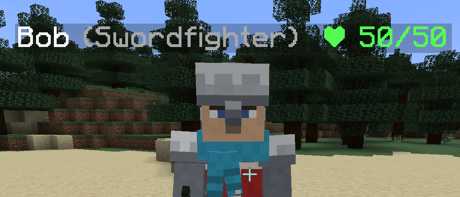
It is possible to name your guards with a nametag.
Banners
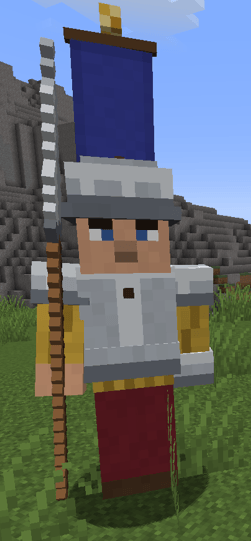
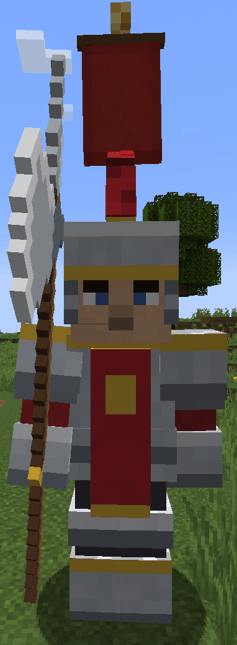
You can craft banners for your guards to wear, allowing you to easily distinguish different groups of guards. The banners are made with white wool and they can be dyed.
Cosmetics for the player
There are three cosmetics available for the player.
Royal Crown
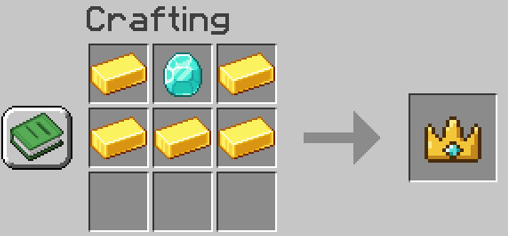
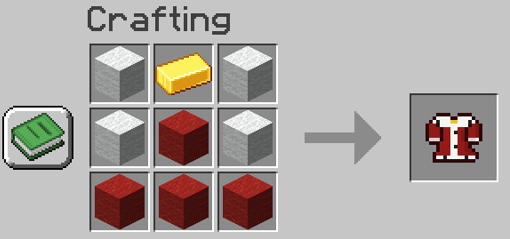
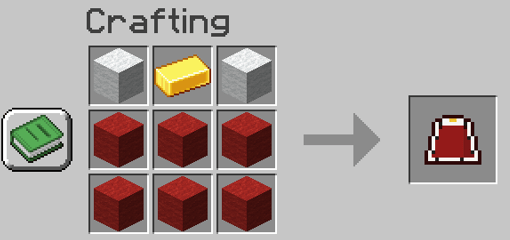
Royal Robe
The Royal Robe can be dyed.
Royal Cape
The Royal Cape can be dyed.
Configuration
The config file is config/guardsdeluxe-common.toml and it can be used to:
- Change coin drop chance and amount.
- Change the hiring price of every guard.
- Change how many kills/days are needed for a guard to level up.
ignoredMobs: mobs guards never attack.neutralMobs: mobs guards only fight when attacked.hostileMobs: mobs guards always fight (this is needed as some mods such as Ice and Fire mark some of their mobs as animals. Guards never attack animals unless they are on this list).- Change territory size.
- Territory capture radius.
- The amount of time needed to capture a flag from the opposing Faction.
config/guardsdeluxe-client.toml can be used to:
- Toggle colored Territory borders on or off (default is on).
Planned future updates
Bugfixes and whatever comes to mind. If any of you have any suggestions please let me know in the comments :-).
Credits
- All code, models and textures are original work.
- Guard death sounds: "Male grunt/yelling sounds" by HaelDB (OpenGameArt), used under CC0.
Project description from CurseForge.
Pick your setup
Guards-Deluxe by Minecraft version and loader
Choose the version and loader you play, then open the matching release.
Check the dependencies, then try the file in a copied instance before changing a world you care about.
Recent files
Guards-Deluxe versions and loaders
Guards-Deluxe v1.20.1-1.9
guardsdeluxe-v1.20.1-1.9.jar
23 Nov 2026
Client Source doesn’t say Server Source doesn’t say Dependencies No extras listed Listed on Release listing
Check the 1.20.1 · Forge setup 1.20.1Forge release
Guards-Deluxe v1.20.1-1.8
guardsdeluxe-v1.20.1-1.8.jar
19 Nov 2026
Client Source doesn’t say Server Source doesn’t say Dependencies No extras listed Listed on Release listing
Check the 1.20.1 · Forge setup 1.20.1Forge release
Guards-Deluxe v1.20.1-1.7
guardsdeluxe-v1.20.1-1.7.jar
13 Nov 2026
Client Source doesn’t say Server Source doesn’t say Dependencies No extras listed Listed on Release listing
Check the 1.20.1 · Forge setup 1.20.1Forge release
Guards-Deluxe v1.20.1-1.6
guardsdeluxe-v1.20.1-1.6.jar
12 Nov 2026
Client Source doesn’t say Server Source doesn’t say Dependencies No extras listed Listed on Release listing
Check the 1.20.1 · Forge setup 1.20.1Forge release
Guards-Deluxe v1.20.1-1.5
guardsdeluxe-v1.20.1-1.5.jar
6 Nov 2026
Client Source doesn’t say Server Source doesn’t say Dependencies No extras listed Listed on Release listing
Check the 1.20.1 · Forge setup 1.20.1Forge release
Guards-Deluxe v1.20.1-1.4
guardsdeluxe-v1.20.1-1.4.jar
2 Nov 2026
Client Source doesn’t say Server Source doesn’t say Dependencies No extras listed Listed on Release listing
Check the 1.20.1 · Forge setup 1.20.1Forge release
Guards-Deluxe v1.20.1-1.3
guardsdeluxe-v1.20.1-1.3.jar
29 Oct 2026
Client Source doesn’t say Server Source doesn’t say Dependencies No extras listed Listed on Release listing
Check the 1.20.1 · Forge setup 1.20.1Forge release
Guards-Deluxe v1.20.1-1.2
guardsdeluxe-1.20.1-1.2.jar
25 Oct 2026
Client Source doesn’t say Server Source doesn’t say Dependencies No extras listed Listed on Release listing
Check the 1.20.1 · Forge setup 1.20.1Forge release
Guards-Deluxe v1.20.1-1.1
guardsdeluxe-1.16.0.jar
24 Oct 2026
Client Source doesn’t say Server Source doesn’t say Dependencies No extras listed Listed on Release listing
Check the 1.20.1 · Forge setup 1.20.1Forge release
Guards-Deluxe
guardsdeluxe-1.15.9.jar
20 Oct 2026
Client Source doesn’t say Server Source doesn’t say Dependencies No extras listed Listed on Release listing
Check the 1.20.1 · Forge setup 1.20.1Forge release
Looking for an older file? The official CurseForge project page is in Resources.
 mod
CurseForge · Minecraft
Found Footage - VHS effect
VHS Effect turns Minecraft into an old home video, as if every moment were recorded on a 90s camcorder and played back on a worn-out tape.
 mod
CurseForge · Minecraft
Horizon's Mobs (Warriors)
So Strong Mobs!!
 mod
CurseForge + Modrinth · Minecraft
Fowl Play
Adding more birds to your Minecraft world!