ChimericLib Needed by PolyCraft (Fix Recipe Conflicts) [NeoForge] 26.2-1.1.0
requiredMatching file found Matched file: [NeoForge] 26.2-6.7.0
CurseForge · Minecraft mod
A Polymorph alternative for modern Minecraft. One set of ingredients, multiple results, you pick what you get.
Quick answer
PolyCraft (Fix Recipe Conflicts) [NeoForge] 26.2-1.1.0 targets 26.2 with NeoForge. The project page does not say whether this file belongs on the client, dedicated server, or both. All 3 required mods have matching files.
Where it goes
The project page does not say whether this file belongs on the client, dedicated server, or both.
The source does not explicitly classify this release as client-only or server-only.
[NeoForge] 26.2-1.1.0. Change the file and its required mods may change too.
Install ChimericLib, Architectury API, YetAnotherConfigLib first. We found matching files for this game-version and loader setup.
We only count dependency files that match this setup. A file for another loader does not fill the gap.
Before you install it
Built for PolyCraft (Fix Recipe Conflicts) [NeoForge] 26.2-1.1.0. Pick another file and the loader, install side or required mods may change.
Use [NeoForge] 26.2-1.1.0. It targets 26.2 with NeoForge; another release may have different loader, side or dependency requirements.
Install ChimericLib, Architectury API, YetAnotherConfigLib first. We found matching files for this game-version and loader setup.
The project page does not say whether this file belongs on the client, dedicated server, or both.
Use the “Get this file” button beside [NeoForge] 26.2-1.1.0. It opens that exact file at the source.
About this project




In a big modpack, a lot of mods add recipes that use the same ingredients. Normally the game picks one recipe and the rest can never be crafted. PolyCraft keeps all of them and lets you choose the result you want, at the station you are already standing at.
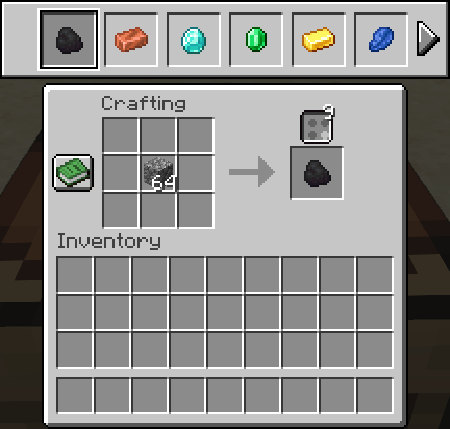
Put items in a station. If they could make more than one thing, a small button appears above the result slot, with a number showing how many choices you have.
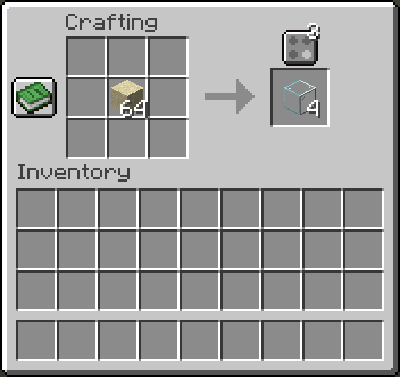
Click the button to open a row of every possible result, then click the one you want.
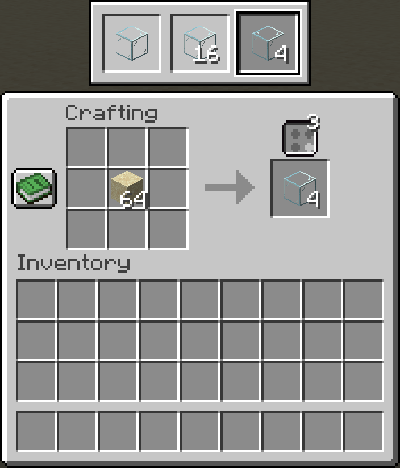
You only choose once. PolyCraft remembers your pick for each recipe conflict and saves it with the world, so the same items give you the same result next time.
Some items are in a lot of recipes. When the options don't fit on screen, the list gets scroll arrows.
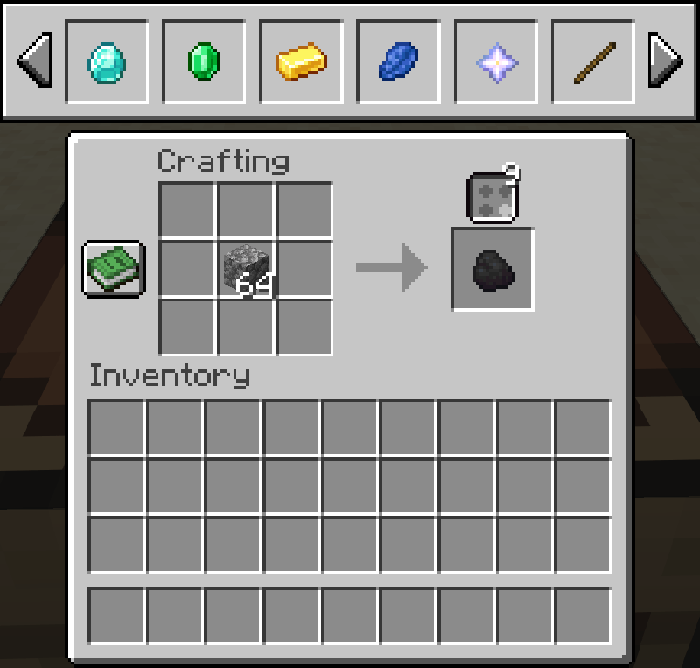
Screenshots use PolyCraft's demo datapack, which adds deliberately silly recipes so there is something to choose between.
PolyCraft adds the button to the stations you already use.
| Station | |
|---|---|
| Crafting table | ✔ |
| Your 2x2 inventory grid | ✔ |
| Furnace, blast furnace, smoker | ✔ |
| Smithing table | ✔ |
| Crafter | ✔ |
| Campfire | Uses the pack's default (there is no screen to put a button on) |
| Stonecutter | Left alone, since it already lets you choose |
Recipes placed from the recipe book count as choosing that recipe.
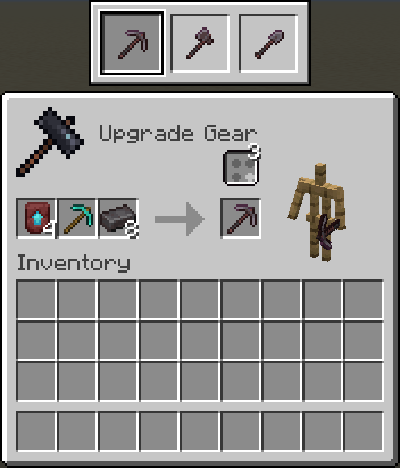
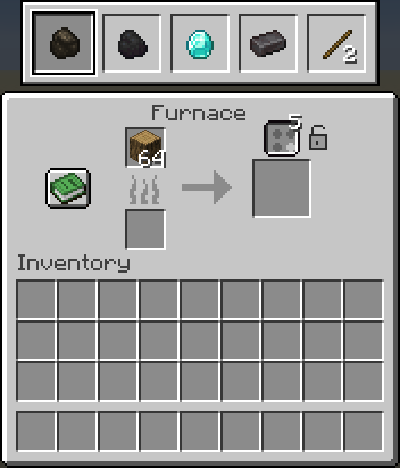
Changed your mind mid-cook? Switch recipes and the current cook becomes the new result. The time already spent carries over, and you lose no fuel or ingredients.
Automation shouldn't depend on who opened the GUI last. Furnaces, blast furnaces, smokers and Crafters have a small lock beside the button. Click it to pin the current recipe to that block.
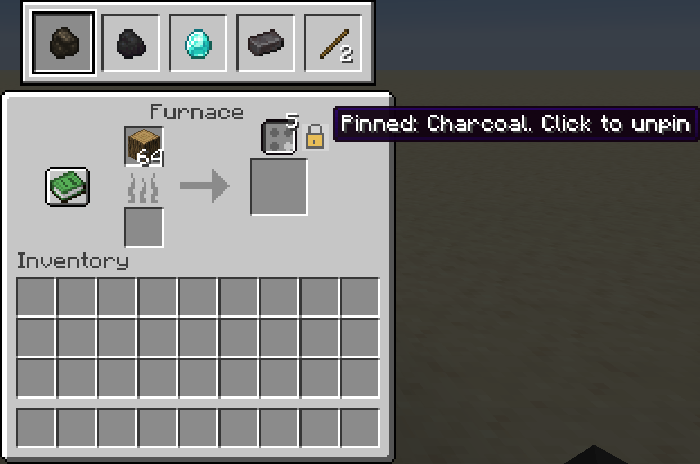
A pinned block always uses its pinned recipe, even when another player with a different choice opens it. Set up your hopper-fed furnaces and redstone-fired Crafters once and leave them alone.
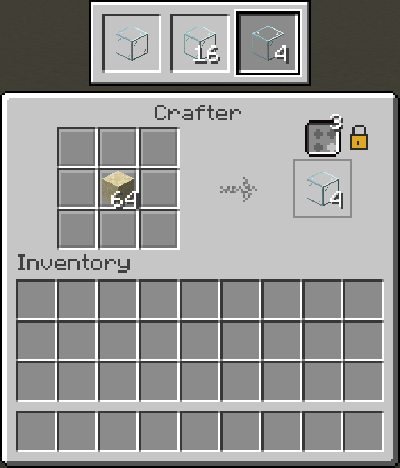
| Off | On |
|---|---|
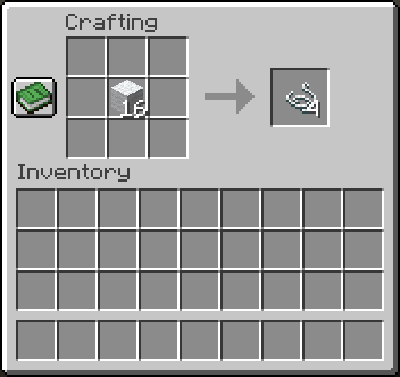 |
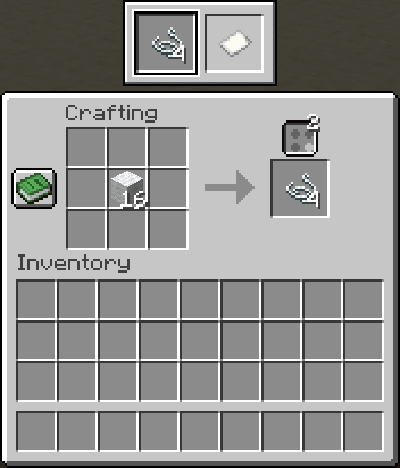 |
PolyCraft works with no setup. When you want to decide the defaults yourself, you have the controls below.
PolyCraft picks the default in this order: the block's pin, then the choice of the player using it, then your defaults, then whatever the game would normally pick. Set defaults in config/polycraft/rules.json (created the first time the game runs), or ship the same file in a datapack at data/<namespace>/polycraft/rules/<name>.json:
{
  "priority": ["minecraft:oak_planks", "othermod:planks_x4"],
  "exclude": ["badmod:duplicate_recipe"],
  "groups": {
    "<group key or recipe id>": { "default": "mod:recipe_id" }
  }
}
priority: recipes to prefer everywhere, best first.exclude: recipes never offered as a choice.groups: a default for one conflict. Use a group key from the export, or a recipe id to cover any conflict that includes it.Edit the config file, then run /polycraft reload. Datapack rules reload with /reload.
/polycraft conflicts [mod] lists what PolyCraft found, and /polycraft export writes everything to config/polycraft/conflicts.json with the group keys ready to copy into your rules.
Commands:
| Command | Who |
|---|---|
/polycraft conflicts [mod] |
Everyone |
/polycraft reset |
Everyone (forgets your own choices) |
/polycraft export |
Operators |
/polycraft reload |
Operators |
/polycraft reset <player> |
Operators |
Settings (config screen, or config/polycraft.json5)
| Setting | Default | What it does |
|---|---|---|
| Detect overlapping inputs | off | Also count recipes the same items can satisfy as a conflict |
| Enabled / disabled recipe types | empty | Limit PolyCraft to some recipe types, or leave some out. Entries are a type id or modid:* |
| Visible options | 6 | How many results show before the list gets scroll arrows |
| Show choice count | on | The number on the button |
| Remember choices | on | Save each player's choices with the world |
| Debug logging | off | Extra detail in the game log |
The repository includes a demo datapack with 40 conflicting recipes across every station, handy for trying the mod or testing a pack.
PolyCraft is not compatible with Polymorph or Polymorph+, including Polymorph's unofficial ports. They do the same job in the same places, and the game will refuse to start if both are installed.
/polycraft conflicts and export only look at the recipe types the game ships with. Conflicts at a station, including other mods' recipes that use the standard lookup, are found from the items actually in it.Found a bug or have an idea? Please use the GitHub issue tracker.
Obviously this mod would not be possible if not for the people at Mojang making an awesome game. Thanks also go to the developers of the Fabric and NeoForge mod loaders and the Architectury API.
Thanks also to the creators of Polymorph, Polymorph+, and similar mods, whose earlier work on choosing between conflicting recipes inspired this one. (PolyCraft uses no code or assets from any other mod.)
This mod is released under the MIT license. The full text of the license can be found here.
Project description from CurseForge.
Pick your setup
Choose the version and loader you play, then open the matching release.
Check the dependencies, then try the file in a copied instance before changing a world you care about.
Recent files
polycraft-neoforge-26.2-1.1.0.jar
24 Nov 2026
polycraft-fabric-26.2-1.1.0.jar
24 Nov 2026
polycraft-fabric-26.2-1.0.0.jar
22 Oct 2026
polycraft-neoforge-26.2-1.0.0.jar
22 Oct 2026
Looking for an older file? The official CurseForge project page is in Resources.
 mod
LDLib is a libarary mod for custom rendering, modular gui.
 mod
Bookshelves, crates, secret doors, and more! Simple, functional, decorative blocks for all your building and storage needs (some assembly required)
 mod
Companion mod for the World of Pannotia modpack
