Minecraft version
Back to mods 
CurseForge · Minecraft mod
VoxelMap 3D Live Map - Walk Your Server
Brings VoxelMap’s live 3D server maps straight into Minecraft.
Choose a version Pick your version below, then grab the matching file.
Quick answer
Which VoxelMap 3D Live Map - Walk Your Server release should I use?
Latest stable file VoxelMap-Fabric-26.3-0.5.5.jar
Game version 26.3
Loader Fabric
VoxelMap 3D Live Map - Walk Your Server VoxelMap-Fabric-26.3-0.5.5.jar targets 26.3 with Fabric. The project page does not say whether this file belongs on the client, dedicated server, or both. No extra mods listed for this file.
Where it goes
Is VoxelMap 3D Live Map - Walk Your Server required on the client, server, or both?
The project page does not say whether this file belongs on the client, dedicated server, or both.
Client Source doesn’t say
Dedicated server Source doesn’t say
Loader for this release Fabric
Required install it here Optional supported, not mandatory Not supported do not install here Source doesn’t say do not assume
The source does not explicitly classify this release as client-only or server-only.
What else does VoxelMap 3D Live Map - Walk Your Server VoxelMap-Fabric-26.3-0.5.5.jar need?
VoxelMap-Fabric-26.3-0.5.5.jar. Change the file and its required mods may change too.
This file does not list any required mods. Do not add a library just because a different file uses it.
This file does not list any required or optional mods.
Before you install it
Add VoxelMap 3D Live Map - Walk Your Server without breaking your instance.
Built for VoxelMap 3D Live Map - Walk Your Server VoxelMap-Fabric-26.3-0.5.5.jar. Pick another file and the loader, install side or required mods may change.
- 01
Stick to this file
Use VoxelMap-Fabric-26.3-0.5.5.jar. It targets 26.3 with Fabric; another release may have different loader, side or dependency requirements.
- 02
Bring the mods it needs
This file does not list any required mods. Do not add a library just because a different file uses it.
- 03
Put it on the correct side
The project page does not say whether this file belongs on the client, dedicated server, or both.
- 04
Pick the file you checked
Use the “Get this file” button beside VoxelMap-Fabric-26.3-0.5.5.jar. It opens that exact file at the source.
About this project
What does VoxelMap 3D Live Map - Walk Your Server add?
VoxelMap 3D Live Map - Walk Your Server
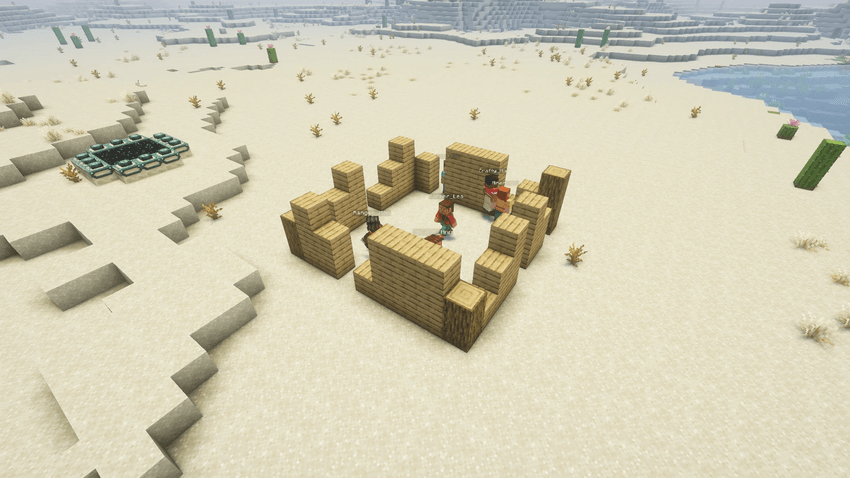
VoxelMap brings the live map of a Minecraft server into your game. Instead of looking at the map in a browser, you open it right from the multiplayer screen and walk through it as a real Minecraft world: the same blocks, the same builds, the same players moving around in real time, without having to join the server itself.
Think of it as a window into a server. You can look around, fly over the landscape, watch your friends build, follow a player through a Nether portal, or check on your base while you are away. Everything is read-only: you can see the world, but you can never change it.
Note: this mod is the in-game companion of the VoxelMap web service, a live 3D browser map for Spigot/Paper servers. It is not a minimap mod and is not related to other mods with a similar name.
What you need
- Minecraft 26.3 with Fabric Loader 0.19.5 or newer
- Fabric API
- Java 25 (the version Minecraft 26.3 ships with)
- Optional: Mod Menu, which lets you open the settings from the mod list
- A server that runs the VoxelMap plugin, or a public map link someone shared with you
The mod is client-side only. You do not need to install anything on a server to use it, and it works next to your normal multiplayer servers.
Getting started
1. Open the VoxelMap tab
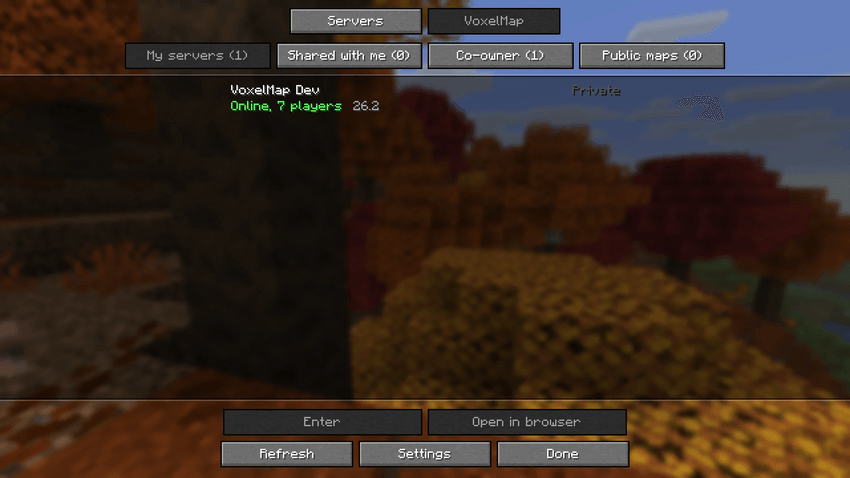
After installing the mod, open Multiplayer. At the top you now have two tabs: Servers (your normal server list, unchanged) and VoxelMap.
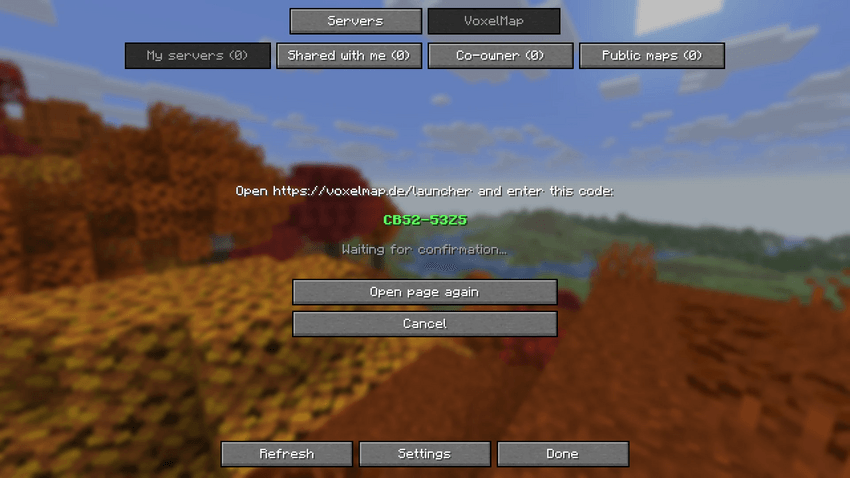
2. Sign in (optional)
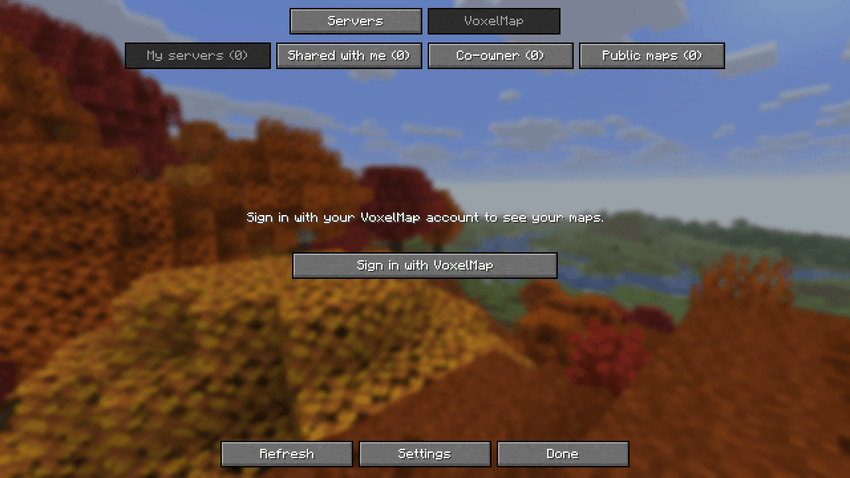
Click Sign in with VoxelMap. The mod shows you a short code and opens the VoxelMap website, where you confirm the code. You never type your password into the game.
After signing in you see all maps you have access to, sorted into groups:
- My servers: maps of servers you own
- Co-owner: servers you help manage
- Shared with me: private maps whose owner has added you to the allow list
- Public maps: public maps you have added yourself
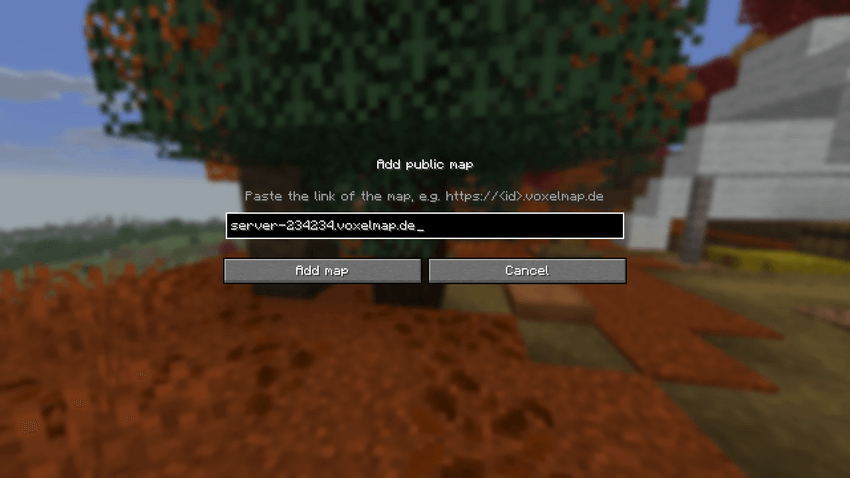
3. Or add a public map without an account
You do not need an account for public maps. Click Add map, paste the link of the map (for example one a friend sent you), and it appears in your list.
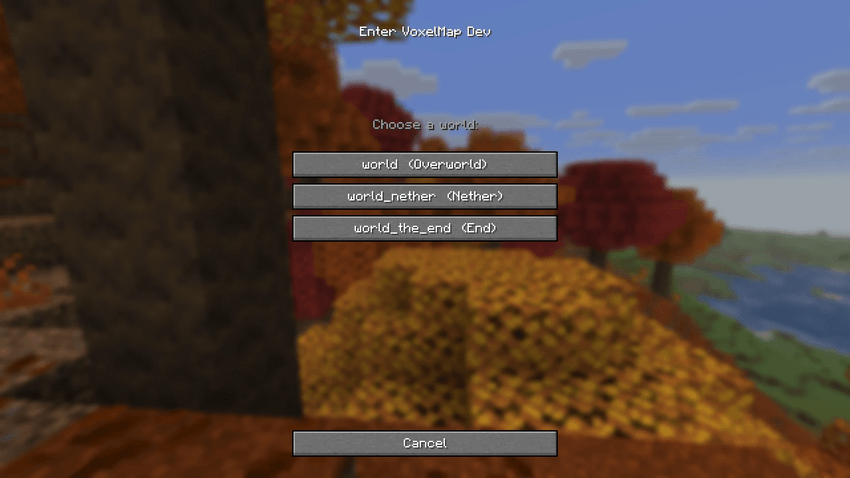
4. Enter a map
Select a map and click Enter. If the server has several worlds (Overworld, Nether, The End or custom worlds), you choose the world first. A few seconds later you are standing in the map world.
Inside a map world
Walk or spectate
You start in walking mode: you can walk, jump and fly around, but you cannot place or break anything. Press G to switch to spectator mode, where you fly through walls and see everything from any angle. Press G again to switch back. You can change the key in the controls settings.
The map loads around you as you move, just like a normal world loads chunks. Blocks that change on the real server (building, mining, explosions, pistons, growing crops, water flowing) update in your map world as they happen.
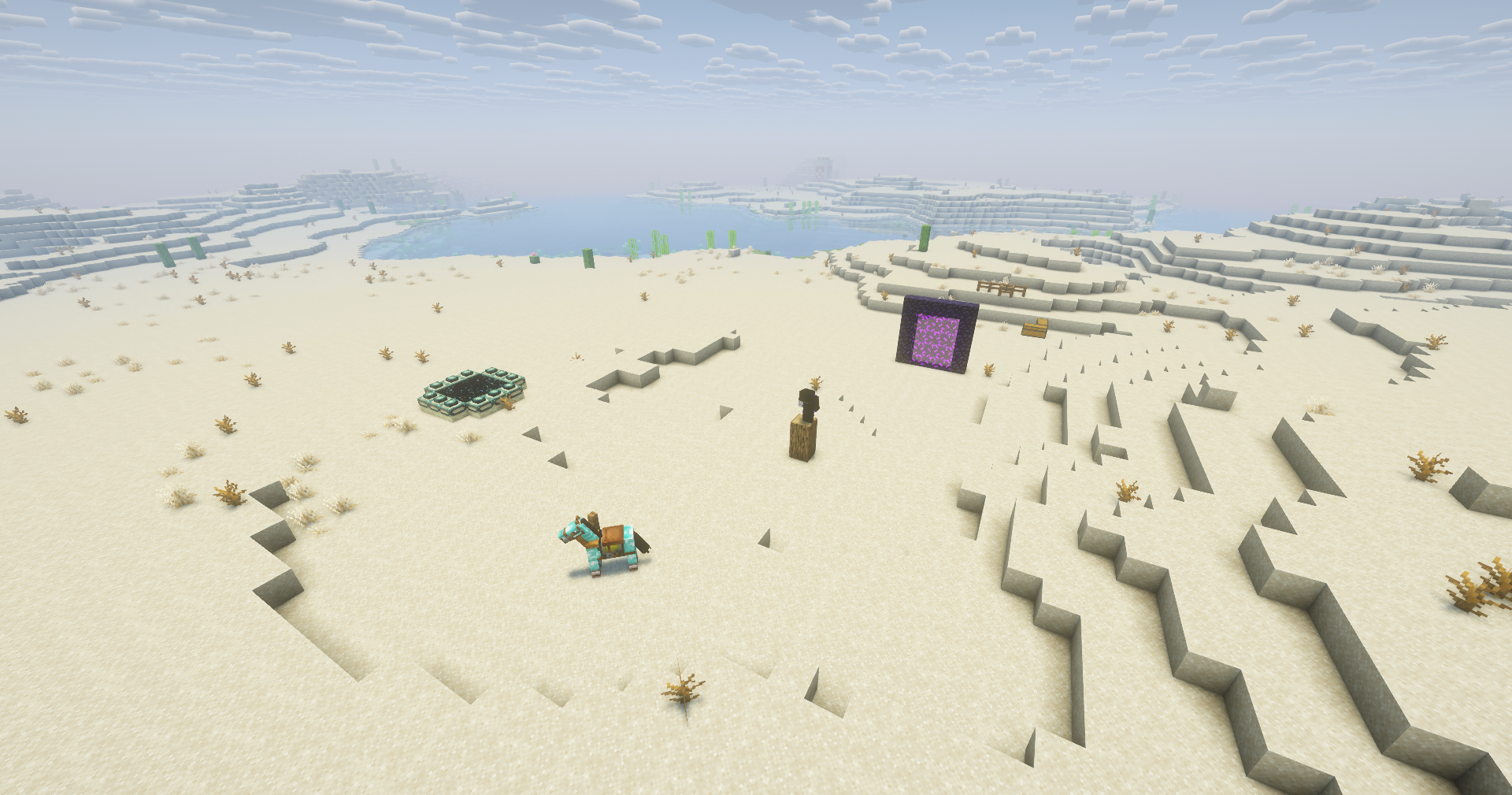
Live players
Every player who is visible on the map appears as a figure with their real skin and name. They walk, sneak, look around and swing their arms just like on the server.
Players who use anonymous mode on the server are never shown, neither in the world nor in any list. Players hidden by the map owner do not appear either.
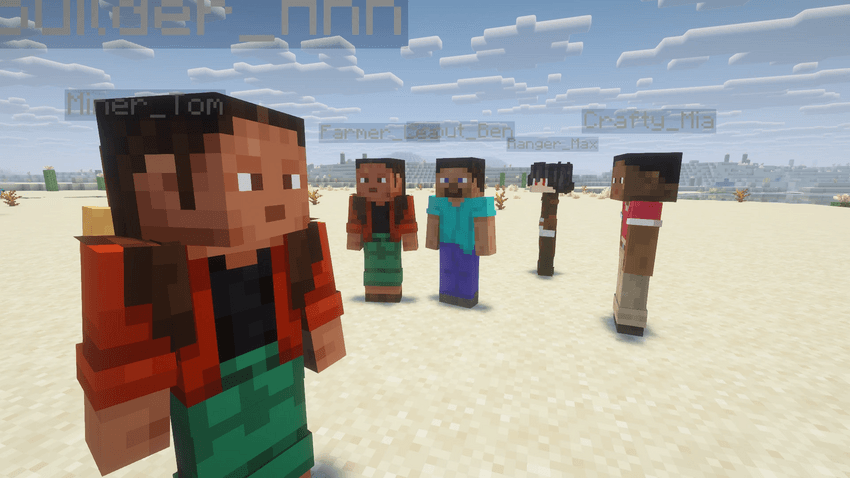
Tab list
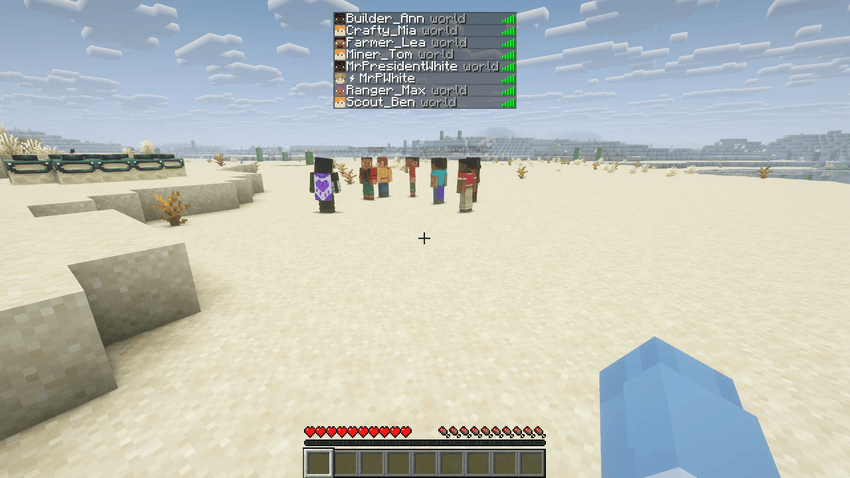
Press Tab like on any server to see who is online on the map. Next to each name you see which world that player is in.
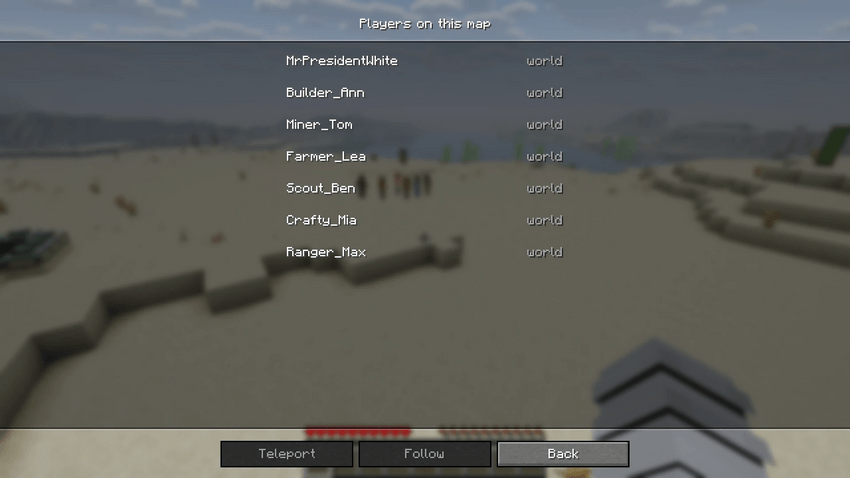
Teleport to players and follow them
Open the pause menu (Esc). Where you would normally see the social or report buttons, you now find Players on this map and Switch world.
- Teleport puts you right behind a player.
- Follow attaches your camera to a player, so you see the world from their point of view and move with them. When they go through a Nether or End portal, you follow them into the other world. Sneak to stop following.
If the player is in another world, the mod switches the world for you first.
Several worlds and real portals
The Overworld, the Nether and The End of the server are separate worlds in the map, just like in the game:
- Nether portals take you to the matching place in the Nether (or back), and you come out at the real portal on the other side.
- End portals take you to The End, and the exit portal brings you back.
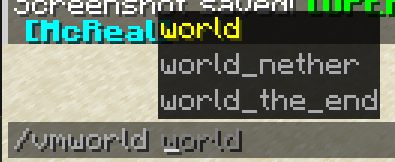
- You can also switch worlds directly via Switch world in the pause menu or with the command
/vmworld <name>. The world names are suggested as you type.
The world border of the real server is shown as well.
Mobs
Animals, monsters and villagers near you are shown with their correct look: colors and variants (cats, wolves, horses, sheep, frogs and so on), baby versions, saddles, armor and the items they hold. Primed TNT and minecarts are shown too.
To keep the game smooth, the mod only shows mobs within a configurable range around you, and at most the nearest 100 at a time. Big mob farms and crowded places therefore do not slow down your game.
Sounds and effects
The map world sounds like the server:
- Note blocks play with the right instrument and pitch, with the colored note particles.
- Jukeboxes play their disc, with notes floating above them, as long as the song is running.
- Goat horns can be heard from far away when someone blows one.
- Explosions (TNT, creepers and others) make a bang and leave smoke, and the destroyed blocks disappear.
Day and night
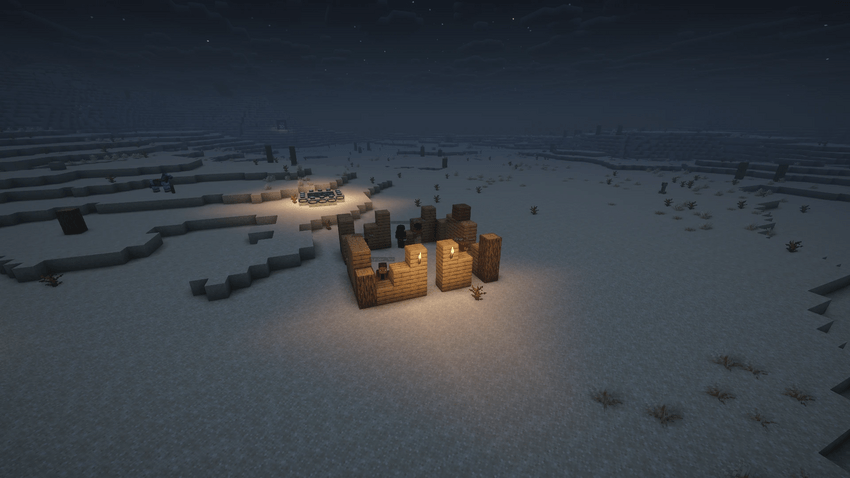
The time of day follows the real server, so sunrise, sunset and night happen in the map world when they happen on the server.
Offline copies
Everything you have seen of a map is stored on your computer. If a server is offline, you can still enter its map and walk through the local copy (marked as "offline, local copy" in the world selection). When the server comes back, the map catches up with all changes.
You can see how much space the local copies use and delete them in the settings.
Settings
Open the settings with the Settings button in the VoxelMap tab, or through Mod Menu.
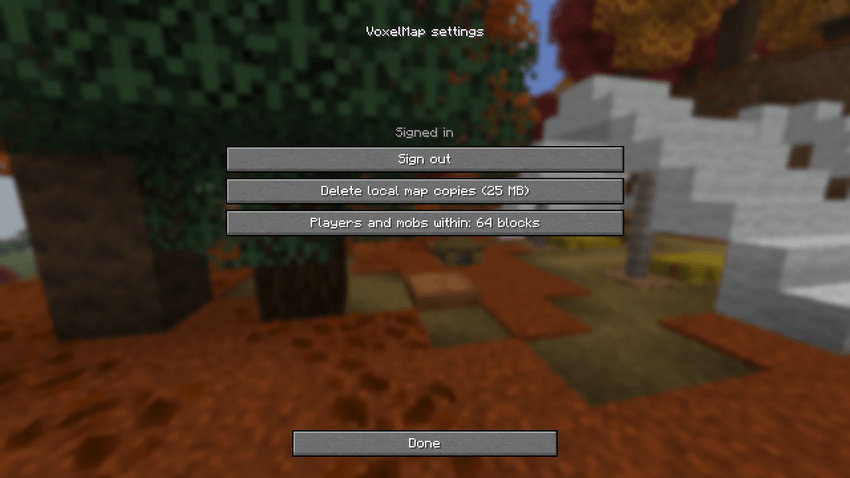
- Players and mobs within: how far around you players and mobs are shown. A smaller range is easier on weaker computers.
- Delete local map copies: frees the space used by offline copies.
- Sign out
Controls and commands
| Key / command | What it does |
|---|---|
| G | Switch between walking and spectating (can be changed in the controls) |
| Tab | Players on the map, with their world |
| Esc, then Players on this map | Teleport to or follow a player |
| Esc, then Switch world | Go to another world of the map |
| Sneak | Stop following a player |
/vmworld <name> |
Switch to a world of the map (names are suggested) |
Privacy and data
- The mod connects only to voxelmap.de (sign-in and map list) and to the map gateway gate.voxelmap.de (the live map data). These addresses are fixed and cannot be changed.
- To show player skins, Minecraft loads them from Mojang, as it does on every server.
- Signing in only links the mod to your VoxelMap account. Your Minecraft password is never involved and never asked for.
- Nothing is ever sent to the real server. You cannot chat with or influence the server from a map world, and the players on the server do not see you.
- What a map shows (players, names, skins, private or public) is decided by the server owner. Every player on the server can hide themselves with anonymous mode.
For server owners
Want your own server in this list? The server needs the free VoxelMap server plugin (Spigot, Paper, Purpur, Minecraft 1.13 up to 26.x), which is set up on the VoxelMap website (see Links below). Your players then get a live 3D map in the browser, and everyone with this mod can walk through it in-game.
This mod does not need the plugin on any server you play on, and it does not download or install anything by itself.
Known limitations
- The map world is read-only: no building, no breaking, no opening chests, no interacting with the real server.
- Players and mobs are shown as close as possible to the real server, but they may move with a small delay depending on your connection.
- A world you have never visited loads chunk by chunk while you look around; very fast flying can outrun the loading for a moment.
- A jukebox that was already playing when you arrived shows its notes, but its music starts only with the next disc (Minecraft cannot start a song in the middle).
AI disclosure
This mod is developed with the help of AI coding tools (Anthropic's Claude). AI was used to write and change parts of the source code and to draft this description. The author decides what the mod does, reviews the changes and tests every release in game before it is published.
All screenshots on this page are unedited in-game captures, taken on a test server. Some of the players shown are test bots that joined the server like normal players. No image on this page was generated, edited or enhanced with AI.
Links
- VoxelMap website (accounts, maps, server plugin): https://voxelmap.de
- Live demo map: https://demo.voxelmap.de
Project description from CurseForge.
Pick your setup
VoxelMap 3D Live Map - Walk Your Server by Minecraft version and loader
Choose the version and loader you play, then open the matching release.
Check the dependencies, then try the file in a copied instance before changing a world you care about.
Recent files
VoxelMap 3D Live Map - Walk Your Server versions and loaders
VoxelMap-Fabric-26.3-0.5.5.jar
23 Oct 2026
Client Source doesn’t say Server Source doesn’t say Dependencies No extras listed Listed on Release listing
Check the 26.3 · Fabric setup Fabric26.3 release
VoxelMap-Fabric-26.3-0.5.4.jar
23 Oct 2026
Client Source doesn’t say Server Source doesn’t say Dependencies No extras listed Listed on Release listing
Check the 26.3 · Fabric setup Fabric26.3 release
VoxelMap-Fabric-26.3-0.5.3.jar
23 Oct 2026
Client Source doesn’t say Server Source doesn’t say Dependencies No extras listed Listed on Release listing
Check the 26.3 · Fabric setup Fabric26.3 release
VoxelMap-Fabric-26.3-0.5.2.jar
22 Oct 2026
Client Source doesn’t say Server Source doesn’t say Dependencies No extras listed Listed on Release listing
Check the 26.3 · Fabric setup Fabric26.3 release
VoxelMap-Fabric-26.3-0.5.1.jar
21 Oct 2026
Client Source doesn’t say Server Source doesn’t say Dependencies No extras listed Listed on Release listing
Check the 26.3 · Fabric setup Fabric26.3 release
VoxelMap-Fabric-26.3-0.5.0.jar
21 Oct 2026
Client Source doesn’t say Server Source doesn’t say Dependencies No extras listed Listed on Release listing
Check the 26.3 · Fabric setup Fabric26.3 release
Looking for an older file? The official CurseForge project page is in Resources.
 mod
mod CurseForge · Minecraft
Moonlit Backpacks
A mod that adds Backpacks to Minecraft.
 mod
mod CurseForge · Minecraft
Ayame PaperDoll Dragon Survival Compat Fork
A fork of Ayame PaperDoll (by LucunJi / HappyRespawnanchor) with full DragonSurvival compatibility.
 mod
mod CurseForge · Minecraft
Local Multi Player
Local split-screen for 2–4 players in one Minecraft window, with separate characters, views and inventories.