Minecraft version
Back to mods 
CurseForge · Minecraft mod
Lunar Hud
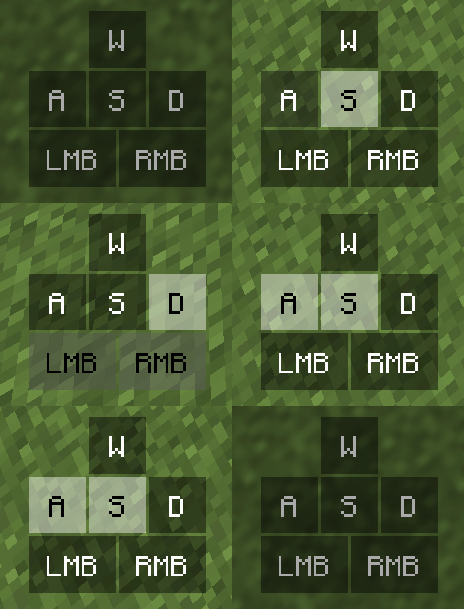
A modern, customizable HUD mod inspired by popular PvP clients. Features keystrokes, CPS counter, FPS, ping, coordinates, armor status, potion effects, reach display, crosshair customizer, and toggle sprint/sneak — all with a drag-and-drop editor.
Choose a version Pick your version below, then grab the matching file.
Quick answer
Which Lunar Hud release should I use?
Latest stable file lunar-hud-1.0.0v-1.21.11 mc by LunoX
Game version 1.21.11
Loader Fabric
Lunar Hud lunar-hud-1.0.0v-1.21.11 mc by LunoX targets 1.21.11 with Fabric. The project page does not say whether this file belongs on the client, dedicated server, or both. No extra mods listed for this file.
Where it goes
Is Lunar Hud required on the client, server, or both?
The project page does not say whether this file belongs on the client, dedicated server, or both.
Client Source doesn’t say
Dedicated server Source doesn’t say
Loader for this release Fabric
Required install it here Optional supported, not mandatory Not supported do not install here Source doesn’t say do not assume
The source does not explicitly classify this release as client-only or server-only.
What else does Lunar Hud lunar-hud-1.0.0v-1.21.11 mc by LunoX need?
lunar-hud-1.0.0v-1.21.11 mc by LunoX. Change the file and its required mods may change too.
This file does not list any required mods. Do not add a library just because a different file uses it.
This file does not list any required or optional mods.
Before you install it
Add Lunar Hud without breaking your instance.
Built for Lunar Hud lunar-hud-1.0.0v-1.21.11 mc by LunoX. Pick another file and the loader, install side or required mods may change.
- 01
Stick to this file
Use lunar-hud-1.0.0v-1.21.11 mc by LunoX. It targets 1.21.11 with Fabric; another release may have different loader, side or dependency requirements.
- 02
Bring the mods it needs
This file does not list any required mods. Do not add a library just because a different file uses it.
- 03
Put it on the correct side
The project page does not say whether this file belongs on the client, dedicated server, or both.
- 04
Pick the file you checked
Use the “Get this file” button beside lunar-hud-1.0.0v-1.21.11 mc by LunoX. It opens that exact file at the source.
About this project
What does Lunar Hud add?
Lunar HUD
Lunar Hud is a modern, fully customizable HUD mod for Minecraft Fabric. It brings the sleek, clean aesthetic of popular PvP clients to your game — without the bloat of a full client.
Features:
• Keystrokes HUD — WASD + LMB/RMB with smooth press animations and built-in CPS counter • CPS Counter — Left and right clicks per second (standalone or integrated in keystrokes) • FPS Counter — Color-coded (red under 30, yellow under 60, green 60+) • Ping Display — Real-time server latency in milliseconds • Coordinates — XYZ coordinates + biome name, compact format • Armor Status — All 4 armor slots with durability bars • Potion Effects — Active effects with remaining duration (auto-hides when empty) • Reach Display — Last hit distance in blocks (auto-hides when no recent hit) • Crosshair Customizer — Multiple shapes (cross, dot, circle) with color picker • Toggle Sprint/Sneak — Toggle sprint and sneak with keybinds
HUD Editor:
Press Right Shift in-game to open the drag-and-drop HUD editor. Every HUD can be: • Dragged to any position on screen • Rescaled from 0.5x to 2.0x • Toggled on/off individually • Background visibility toggled (transparent or with dark panel) • Accent color and text color customized (12 preset colors)
Press ESC or click Save to persist your layout. The config is saved automatically.
Keybinds:
• Right Shift — Open/close HUD Editor • G — Toggle Sprint • V — Toggle Sneak • F8 — Hide/Show all HUDs (panic key)
Requirements:
• Minecraft • Fabric Loader 0.17.3+ • Fabric API • Java 21+
Mod Menu Integration:
Lunar Hud integrates with Mod Menu — click the config button next to the mod in your Mod Menu to open the HUD editor directly.
Smooth Animations:
All HUD elements feature smooth fade-in/fade-out animations. Auto-hiding HUDs (potions, reach, toggle sprint) gracefully fade in and out instead of popping on/off screen.
Author: LunoX
License: MIT
Project description from CurseForge.
Pick your setup
Lunar Hud by Minecraft version and loader
Choose the version and loader you play, then open the matching release.
Check the dependencies, then try the file in a copied instance before changing a world you care about.
Recent files
Lunar Hud versions and loaders
lunar-hud-1.0.0v-1.21.11 mc by LunoX
lunar-hud-1.0.0v-1.21.11mc.jar
21 Oct 2026
Client Source doesn’t say Server Source doesn’t say Dependencies No extras listed Listed on Release listing
Check the 1.21.11 · Fabric setup Fabric1.21.11 release
Looking for an older file? The official CurseForge project page is in Resources.
 mod
CurseForge + Modrinth · Minecraft
Mishang Urban Construction 迷上城建
An amount of blocks and items that make a beautiful city!
 mod
CurseForge · Minecraft
Vertical Trapdoors
Allows you to place your trapdoors vertically! - It should support all modded trapdoors as well - No new blocks added.
 mod
CurseForge · Minecraft
Let Me Place: Yuushya
Let Me Place! - Yuushya brings more creative possibilities to Yuushya windows by allowing compatible blocks and decorations to share the same space.