Player Animation Library Needed by First Person PAL Expansion 1.1.1 Neoforge 26.3
requiredMatching file found Matched file: 1.2.9+26.3
CurseForge · Minecraft mod
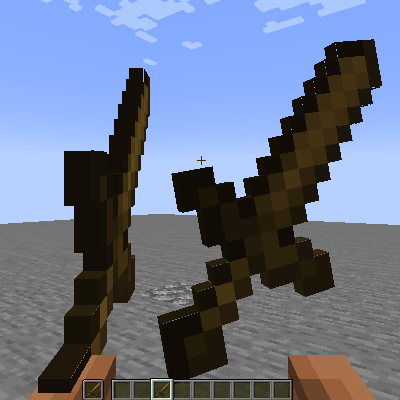
Animate the player's arms and held items in first-person view.
Quick answer
First Person PAL Expansion 1.1.1 Neoforge 26.3 targets 26.3 with NeoForge. The project page does not say whether this file belongs on the client, dedicated server, or both. All 1 required mods have matching files.
Where it goes
The project page does not say whether this file belongs on the client, dedicated server, or both.
The source does not explicitly classify this release as client-only or server-only.
First Person PAL Expansion 1.1.1 Neoforge 26.3. Change the file and its required mods may change too.
Install Player Animation Library first. We found matching files for this game-version and loader setup.
We only count dependency files that match this setup. A file for another loader does not fill the gap.
Before you install it
Built for First Person PAL Expansion 1.1.1 Neoforge 26.3. Pick another file and the loader, install side or required mods may change.
Use First Person PAL Expansion 1.1.1 Neoforge 26.3. It targets 26.3 with NeoForge; another release may have different loader, side or dependency requirements.
Install Player Animation Library first. We found matching files for this game-version and loader setup.
The project page does not say whether this file belongs on the client, dedicated server, or both.
Use the “Get this file” button beside First Person PAL Expansion 1.1.1 Neoforge 26.3. It opens that exact file at the source.
About this project
Animate the player's arms and held items in first-person view.
"Bring your Blockbench first-person rigs to life in-game."
First Person PAL Expansion is an add-on for Player Animation Library (PAL) that lets you animate the player's arms, held items and even the camera directly in first person, using the same Bedrock animation format PAL already uses.
Author your first-person animations in Blockbench, drop them into assets/<namespace>/fp_animations/, and they will drive the vanilla arm mesh, the held items and the view exactly as you see them in the Blockbench preview.
rightArm / leftArm bones, 1:1 with the Blockbench preview.fp_r_item / fp_l_item bones, so guns, tools and anything else stay glued to the animated hands.fp_camera bone moves and rolls the real view..geo.json model to render extra details (magazine, slide, flash…) in first person.fp_models/<name>.geo.json + textures/fp/<name>.png are picked up automatically from the animation.FpSyncRegistry / /fp_anim pair).Minecraft Versions: 1.21.1, 1.21.11, 26.1.2, 26.2, 26.3.
Modding Platforms:
Mod Compatibility:
leftArm / rightArm bone convention).mods folder..jar into the mods folder./fp_anim play <animationID> to preview your first-person animations.First Person PAL Expansion is built to be used as an API. Add first-person animations, pair them with third-person animations, and control them programmatically:
// Play a first-person animation on the local player
FpAnimationSystem.playFpAnimation(Minecraft.getInstance().player,
        Identifier.fromNamespaceAndPath("mymod", "fp_reload"));

// Pair a third-person animation with its first-person counterpart
FpAnimationSystem.registerPaired(
        Identifier.fromNamespaceAndPath("mymod", "reload"),
        Identifier.fromNamespaceAndPath("mymod", "fp_reload"));
Full documentation (bones, animation format, extra data, commands and Java API) lives in WIKI.
Contributions and bug reports are welcome!
This mod is licensed under the MIT License. Check the LICENSE file for details.
Created by [RazorPlay01]. Arm rendering is a 1:1 port of AzureLib's AzItemArmRenderUtil (MIT License, Copyright (c) 2024 AzureDoom). Thanks to the PAL team for the animation library this mod builds on.
"Your arms, your items, your camera — all animated, all in first person." 🎯
Project description from CurseForge.
Pick your setup
Choose the version and loader you play, then open the matching release.
Check the dependencies, then try the file in a copied instance before changing a world you care about.
Recent files
fp_pal-1.1.1-neoforge+26.3.jar
26 Oct 2026
fp_pal-1.1.1-fabric+26.3.jar
26 Oct 2026
fp_pal-1.1.1-neoforge+26.2.jar
26 Oct 2026
fp_pal-1.1.1-fabric+26.2.jar
26 Oct 2026
fp_pal-1.1.1-neoforge+26.1.2.jar
26 Oct 2026
fp_pal-1.1.1-fabric+26.1.2.jar
26 Oct 2026
fp_pal-1.1.1-neoforge+1.21.11.jar
26 Oct 2026
fp_pal-1.1.1-fabric+1.21.11.jar
26 Oct 2026
fp_pal-1.1.1-neoforge+1.21.1.jar
26 Oct 2026
fp_pal-1.1.1-fabric+1.21.1.jar
26 Oct 2026
fp_pal-1.1.0-neoforge+26.3-SNAPSHOT.jar
26 Oct 2026
fp_pal-1.1.0-neoforge+26.2-SNAPSHOT.jar
26 Oct 2026
Looking for an older file? The official CurseForge project page is in Resources.
 mod
Based on the Dedsafio series
 mod
[Let's Do] Prepare dishes from Farm&Charm directly within the game world, using a 3D interface built on the Diegesis system and inspired by the "Hands-on Delight" concept.
 mod
Adds animated text effects, name styling, and chat-interface improvements.