Quick answer
Which CombatIndicator (Health/Armor) release should I use?
Latest stable file CombatIndicator-1.21.11-1.0.0
Game version 1.21.11
Loader Fabric
CombatIndicator (Health/Armor) CombatIndicator-1.21.11-1.0.0 targets 1.21.11 with Fabric. The project page does not say whether this file belongs on the client, dedicated server, or both. All 4 required mods have matching files.
Where it goes
Is CombatIndicator (Health/Armor) required on the client, server, or both?
The project page does not say whether this file belongs on the client, dedicated server, or both.
Client Source doesn’t say
Dedicated server Source doesn’t say
Loader for this release Fabric
Required install it here Optional supported, not mandatory Not supported do not install here Source doesn’t say do not assume
The source does not explicitly classify this release as client-only or server-only.
What else does CombatIndicator (Health/Armor) CombatIndicator-1.21.11-1.0.0 need?
CombatIndicator-1.21.11-1.0.0. Change the file and its required mods may change too.
Install Mod Menu, Fabric API, Cloth Config API (Fabric/Forge/NeoForge), Text Placeholder API first. We found matching files for this game-version and loader setup. 1 comes through another mod in the chain.
3 listed on this file 1 pulled in by one of those mods
Mod Menu Needed by CombatIndicator (Health/Armor) CombatIndicator-1.21.11-1.0.0 requiredMatching file found Matched file: v17.0.1 for 1.21.11
Fabric API Needed by CombatIndicator (Health/Armor) CombatIndicator-1.21.11-1.0.0 requiredMatching file found Matched file: [1.21.11] Fabric API 0.141.6+1.21.11
Matching file found Matched file: [Fabric 1.21.11] v21.11.153
Matching file found Matched file: placeholder-api-2.8.2+1.21.10.jar
1
extra mod was pulled in by another dependency.
Indented rows show who needs each one. We only count dependency files that match this setup. A file for another loader does not fill the gap.
Before you install it
Add CombatIndicator (Health/Armor) without breaking your instance.
Built for CombatIndicator (Health/Armor) CombatIndicator-1.21.11-1.0.0. Pick another file and the loader, install side or required mods may change.
- 01
Stick to this file
Use CombatIndicator-1.21.11-1.0.0. It targets 1.21.11 with Fabric; another release may have different loader, side or dependency requirements.
- 02
Bring the mods it needs
Install Mod Menu, Fabric API, Cloth Config API (Fabric/Forge/NeoForge), Text Placeholder API first. We found matching files for this game-version and loader setup. 1 comes through another mod in the chain.
- 03
Put it on the correct side
The project page does not say whether this file belongs on the client, dedicated server, or both.
- 04
Pick the file you checked
Use the “Get this file” button beside CombatIndicator-1.21.11-1.0.0. It opens that exact file at the source.
About this project
What does CombatIndicator (Health/Armor) add?
Combat Indicator

Know your fight. Your target's health and armor are shown right above their head, while an indicator below your crosshair shows HP, damage numbers, and a low-health warning. Almost every detail — colors, positions, animations, sounds — is customizable through the built-in config screen.
Getting started
- Requires Fabric API, Mod Menu and Cloth Config API.
- Press I in game to open the settings. You can change this key in Options → Controls.
- The settings are also available from Mod Menu.
- Client-side only — it does not need to be installed on the server.
Features
Above-target indicator
- Shows the target's HP as a number, a row of hearts, or both at once.
- Shows worn armor of players with icons and durability (as a number or a percentage), optionally colored by remaining durability.
- Optional fixed armor slots: each piece stays in its own position even when other pieces are missing.
- Armor icon order (normal, reversed, or damaged first) and an option to show only low-durability pieces.
- Separate toggles for players, hostile mobs, passive mobs, and yourself.
- Separate nametag settings for other players, yourself, and invisible entities.
- Whitelist/blacklist for specific mob types.
- Custom nickname colors for individual players — handy for highlighting friends or enemies on a PvP server.
- Absorption (golden apple / enchanted golden apple) is reflected in the displayed HP.
- 24 damage animations (Shatter, Vortex, Shockwave, Electrocute, and more).
- Can be shown even for invisible entities.
Indicator below the crosshair
- Shows the HP of whoever you just hit, or whoever you're aiming at (optional hover mode) — as a number or a gradient bar (the number can be displayed right inside the bar), with an optional target name.
- Color changes based on remaining HP, with a separate color while absorption is active.
- Optional floating damage numbers with separate coloring for critical hits.
- Optional low-HP warning: screen flash, vignette, pulsing border or ring, plus a repeating sound — until the target recovers or dies.
- Optional kill sound.
- Choose alert and kill sounds from a built-in list, with a preview for each.
- Low-HP warning effects and sounds can be enabled separately for players, passive mobs, and hostile mobs (players only by default).
- Option to hide vanilla's attack indicator on the crosshair.
Customization
- Nearly every offset, scale, color, and opacity is exposed in the config screen.
- Save and load multiple settings presets (e.g. one for PvP, one for farming).
- Keybinds to open the settings and to quickly toggle the mod, the crosshair indicator, or the armor indicator (the toggles are unbound by default).
- Localized into several languages: English, Russian, Belarusian, German, Hindi, Kazakh, Polish, Turkish, Ukrainian, and Vietnamese.
Описание на русском
Знай своего противника. Здоровье и броня цели отображаются прямо над её головой, а под прицелом вы видите HP, цифры урона и предупреждение о низком здоровье цели. Почти каждая деталь — цвета, позиции, анимации, звуки — настраивается через встроенный экран конфигурации.
Как начать
- Нужны Fabric API, Mod Menu и Cloth Config API.
- Нажмите I в игре, чтобы открыть настройки. Клавишу можно поменять в Настройки → Управление.
- Настройки также доступны через Mod Menu.
- Только на стороне клиента — на сервер ставить не нужно.
Функции
Индикатор над целью
- Показывает HP цели: числом, рядом сердечек или обоими способами сразу.
- Показывает надетую броню игроков иконками с прочностью (числом или в процентах), по желанию окрашенной по остатку прочности.
- Опциональная фиксация слотов брони: каждая часть остаётся на своём месте, даже если других частей нет.
- Порядок иконок брони (обычный, обратный или сначала повреждённые) и опция показывать только части с низкой прочностью.
- Отдельные переключатели для игроков, враждебных мобов, дружелюбных мобов и себя самого.
- Отдельные настройки ника для других игроков, себя самого и невидимых существ.
- Белый/чёрный список конкретных типов мобов.
- Кастомные цвета ников для отдельных игроков — удобно выделять друзей или врагов на PvP-сервере.
- Поглощение (золотое яблоко / зачарованное золотое яблоко) учитывается в отображаемом HP.
- 24 анимации получения урона (Shatter, Vortex, Shockwave, Electrocute и другие).
- Можно показывать индикатор даже для невидимых существ.
Индикатор под прицелом
- Показывает HP того, кого вы только что ударили, либо того, на кого наведены (опциональный режим наведения) — числом или полоской с градиентом (число можно вывести прямо внутри полоски), с опциональным именем цели.
- Цвет меняется в зависимости от остатка HP, отдельный цвет при активном поглощении.
- Опциональные всплывающие цифры урона с отдельной окраской для критических ударов.
- Опциональное предупреждение о низком HP цели: вспышка экрана, виньетка, пульсирующая рамка или кольцо, плюс повторяющийся звук — до тех пор, пока цель не восстановится или не умрёт.
- Опциональный звук убийства.
- Звуки предупреждения и убийства выбираются из встроенного списка с предпрослушиванием.
- Эффекты и звуки предупреждения о низком HP включаются отдельно для игроков, мирных и враждебных мобов (по умолчанию только для игроков).
- Опция скрыть ванильный индикатор атаки на прицеле.
Кастомизация
- Почти каждое смещение, масштаб, цвет и прозрачность вынесены в экран настроек.
- Сохранение и загрузка нескольких пресетов настроек (например, один для PvP, другой для фарма).
- Хоткеи для открытия настроек и быстрого переключения мода, индикатора под прицелом или индикатора брони (переключатели по умолчанию не назначены).
- Локализация на несколько языков: английский, русский, белорусский, немецкий, хинди, казахский, польский, турецкий, украинский, вьетнамский.
Project description from CurseForge.
Pick your setup
CombatIndicator (Health/Armor) by Minecraft version and loader
Choose the version and loader you play, then open the matching release.
Minecraft version
1.21.11
1
loader build Minecraft version
1.21.4
1
loader build Minecraft version
1.20.1
1
loader build Check the dependencies, then try the file in a copied instance before changing a world you care about.
Recent files
CombatIndicator (Health/Armor) versions and loaders
combatindicator-1.21.11-1.0.0.jar
21 Oct 2026
Client Source doesn’t say Server Source doesn’t say Dependencies 4 required · matched Listed on Release listing
Check the 1.21.11 · Fabric setup → combatindicator-1.21.4-1.0.0.jar
21 Oct 2026
Client Source doesn’t say Server Source doesn’t say Dependencies 3 required · 3 unchecked Listed on Release listing
Check the 1.21.4 · Fabric setup → combatindicator-1.20.1-1.0.0.jar
21 Oct 2026
Client Source doesn’t say Server Source doesn’t say Dependencies 3 required · 3 unchecked Listed on Release listing
Check the 1.20.1 · Fabric setup → 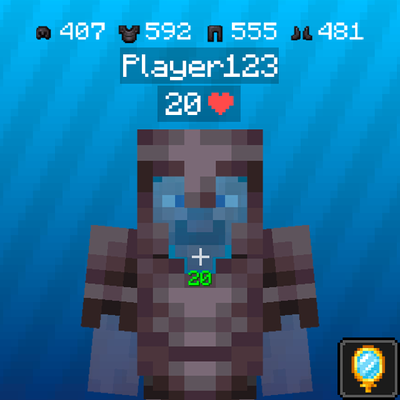
 mod
 mod
 mod