Minecraft version
Back to mods 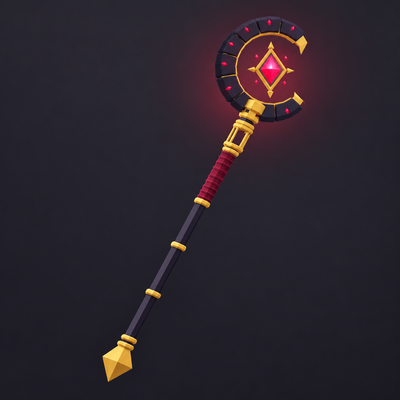
CurseForge · Minecraft mod
God Wand
God Wand adds a multi-modewand with multiple skills
Choose a version Pick your version below, then grab the matching file.
Quick answer
Which God Wand release matches Forge?
Best match for your filters God Wand 1.4.2 - Forge 1.20.1
Game version 1.20.1
Loader Forge
God Wand 1.4.2 - Forge 1.20.1 targets 1.20.1 with Forge. The project page does not say whether this file belongs on the client, dedicated server, or both. No extra mods listed for this file.
Where it goes
Is God Wand required on the client, server, or both?
The project page does not say whether this file belongs on the client, dedicated server, or both.
Client Source doesn’t say
Dedicated server Source doesn’t say
Loader for this release Forge
Required install it here Optional supported, not mandatory Not supported do not install here Source doesn’t say do not assume
The source does not explicitly classify this release as client-only or server-only.
What else does God Wand 1.4.2 - Forge 1.20.1 need?
God Wand 1.4.2 - Forge 1.20.1 on Forge. Every mod below is checked against that same setup.
This file does not list any required mods. Do not add a library just because a different file uses it.
This file does not list any required or optional mods.
Before you install it
Add God Wand without breaking your instance.
Built for God Wand 1.4.2 - Forge 1.20.1 on Forge. Pick another file and the loader, install side or required mods may change.
- 01
Stick to this file
Use God Wand 1.4.2 - Forge 1.20.1. It targets 1.20.1 with Forge; another release may have different loader, side or dependency requirements.
- 02
Bring the mods it needs
This file does not list any required mods. Do not add a library just because a different file uses it.
- 03
Put it on the correct side
The project page does not say whether this file belongs on the client, dedicated server, or both.
- 04
Pick the file you checked
Use the “Get this file” button beside God Wand 1.4.2 - Forge 1.20.1. It opens that exact file at the source.
About this project
What does God Wand add?
God Wand
One wand. Seven skills. Choose the spell, charge it, and decide when to release.
Walk through mountains, pull enemies into a gravity orb, raise a drill from the ground, hold an Atomic blast until you are ready to let it go, or draw a burning bow and fire Fuga's phoenix arrow.
⚠️ FLASH WARNING ⚠️
This mod contains intense flashing lights and visual effects that may trigger seizures in people with photosensitive epilepsy. Player discretion is advised.
Authorized China Edition Port
I authorize Mailegebai to develop, publish, and monetize a port of God Wand for the NetEase-operated Minecraft China Edition, subject to the terms agreed between us.
Original mod by hyisnoob. China Edition port by Mailegebai.
Enjoying my mods? Consider supporting my work!
Seven skills
1. Spatial Path
Open a temporary path through solid terrain. The blocks return behind you. Use its shield against incoming projectiles, or form a temporary bridge across a gap.
2. Singularity
Hold right-click to charge a gravity orb, then release to launch it. It pulls in nearby enemies and blocks before collapsing. Right-click again to trigger the collapse early. Displaced terrain returns afterward.
3. Earth Drill
Gather nearby blocks into a spinning drill, then drive it into the ground. Server settings let you keep the block lift while turning off permanent terrain damage.
4. Supernova
Hold right-click for seven seconds to unleash a black hole and a large explosion. Server owners can allow the block pull, the terrain destruction, both or neither.
5. Stone Cannon
Charge a stone projectile and fire it through enemies. Block destruction on impact can be turned off separately.
6. I am Atomic
Hold right-click as purple lines spread from your feet and build a fortress around you. Energy gathers into your sword as the camera moves from the ground to the closing roof, then returns to your character.
I AM. ATOMIC.
The fortress compresses. The screen goes dark. A heartbeat repeats while the spell waits for your release.
Let go to detonate. A column of light expands across the area, with outward shockwaves and purple wind. After it contracts, glowing marks remain on the ground for 30 seconds before fading.
Atomic includes its own camera sequence, character poses and sound effects. Your movement is locked and incoming damage is blocked while casting. Once the explosion begins, skipping the camera lets you move again. Release before the initial charge finishes to cancel.
7. Fuga
Hold right-click to gather fire between your palms. Clap them together and a burning vortex rises around you as you draw a bow made of flame. Stand still, aim, then release. Letting go before the arrow is ready cancels the cast.
The fire arrow becomes a gliding phoenix. When it hits, the phoenix rises into the sky, a blazing meteor falls and a pillar of fire erupts, setting nearby enemies and flammable blocks alight and leaving the ground glowing red-hot. Enemies caught under the meteor are slowed until it explodes.
Fuga has its own cutscene, which you can turn off in the settings, and its own soundtrack. Server owners can adjust its damage, cooldown and terrain destruction.
Pick your wand's appearance
- Eclipse
- Aqua Heartia
- Shadow Blade
Choose one yourself, or use AUTO to switch with your skill: Aqua Heartia for Earth Drill and Stone Cannon, Shadow Blade for Atomic, and Eclipse for the others.
Keep your builds safe
Destructive spells can change a large area. Terrain destruction is enabled by default.
Server owners can turn off permanent block damage for Earth Drill, Supernova, Stone Cannon, Atomic and Fuga. Earth Drill and Supernova also have separate choices for lifting blocks, so you can keep temporary block movement or use damage-only versions.
Damage, cooldowns and selected terrain ranges can be adjusted. Atomic's main blast and outer shockwaves have separate damage settings. Existing settings files automatically gain new options without replacing your choices.
Controls
| Key | Action |
|---|---|
| Hold V | Choose a skill while holding the wand |
| Right-click | Use the selected skill; hold to charge where required |
| K | Choose a wand appearance and adjust visual effects |
| Shift while Spatial Path is active | Use the temporary bridge |
| Esc or F5 during Atomic or Fuga | Skip its camera |
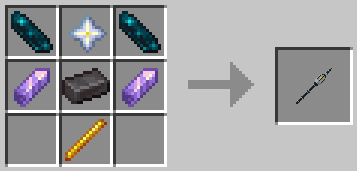
Crafting
Supported versions
- Minecraft 26.3: Fabric or NeoForge.
- Minecraft 26.1.2: Fabric or NeoForge.
- Minecraft 1.21.11: Fabric or NeoForge.
- Minecraft 1.21.1: Fabric or NeoForge.
- Minecraft 1.20.1: Fabric or Forge.
- Fabric requires Fabric API.
- Install God Wand on both your game and the server.
- An extra shaderpack is optional.
Contributors
Special thanks to KingIronMan2011 for contributing Minecraft 26.1.2 version ports, Iris shader compatibility fixes, the mod icon and build improvements.
God Wand is created and maintained by hyisnoob.
Modpacks are welcome.
Project description from CurseForge.
Pick your setup
God Wand by Minecraft version and loader
Choose the version and loader you play, then open the matching release.
Minecraft version
26.1.2
2 loader buildsMinecraft version
1.21.11
2 loader buildsMinecraft version
1.21.1
2 loader buildsMinecraft version
1.20.1
2 loader buildsCheck the dependencies, then try the file in a copied instance before changing a world you care about.
Recent files
God Wand versions and loaders
God Wand 1.4.2 - Forge 1.20.1
godwand-forge-1.20.1-1.4.2.jar
11 Nov 2026
Client Source doesn’t say Server Source doesn’t say Dependencies No extras listed Listed on Release listing
Check the 1.20.1 · Forge setup 1.20.1Forge release
God Wand 1.4.1 - Forge 1.20.1
godwand-forge-1.20.1-1.4.1.jar
7 Nov 2026
Client Source doesn’t say Server Source doesn’t say Dependencies No extras listed Listed on Release listing
Check the 1.20.1 · Forge setup 1.20.1Forge release
God Wand 1.4.0 - Forge 1.20.1
godwand-forge-1.20.1-1.4.0.jar
7 Nov 2026
Client Source doesn’t say Server Source doesn’t say Dependencies No extras listed Listed on Release listing
Check the 1.20.1 · Forge setup 1.20.1Forge release
God Wand 1.3.5 - Forge 1.20.1
godwand-forge-1.20.1-1.3.5.jar
1 Nov 2026
Client Source doesn’t say Server Source doesn’t say Dependencies No extras listed Listed on Release listing
Check the 1.20.1 · Forge setup 1.20.1Forge release
godwand-forge-1.20.1-1.3.4.jar
30 Oct 2026
Client Source doesn’t say Server Source doesn’t say Dependencies No extras listed Listed on Release listing
Check the 1.20.1 · Forge setup 1.20.1Forge release
godwand-forge-1.20.1-1.3.3.jar
30 Oct 2026
Client Source doesn’t say Server Source doesn’t say Dependencies No extras listed Listed on Release listing
Check the 1.20.1 · Forge setup 1.20.1Forge release
Looking for an older file? The official CurseForge project page is in Resources.
 mod
CurseForge + Modrinth · Minecraft
Limitless Vehicle
Limitless Vehicle is a universal vehicle mod that supports custom vehicle data packs
 mod
CurseForge · Minecraft
EX Pluralis
Adds a few things, relative to technology and ores.
 mod
CurseForge · Minecraft
The Incredible Hulk Power
Transform into Hulk, build rage, and unleash your strength in Minecraft. Require Zemo&Baki Core