Minecraft version
Back to mods 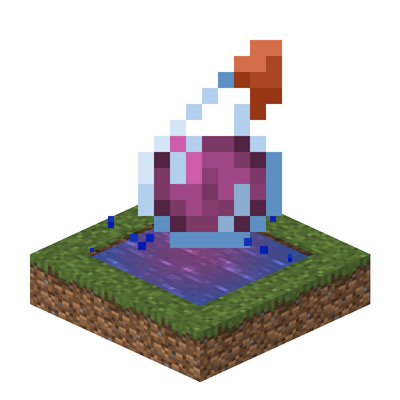
CurseForge · Minecraft mod
Potion Water
Turn small pools into colorful potion water with splash or lingering potions, then carry it anywhere in a bucket.
Choose a version Pick your version below, then grab the matching file.
Quick answer
Which Potion Water release should I use?
Latest stable file potionwater-1.0.1-neoforge-1.21.1.jar
Game version 1.21.1
Loader NeoForge
Potion Water potionwater-1.0.1-neoforge-1.21.1.jar targets 1.21.1 with NeoForge. The project page does not say whether this file belongs on the client, dedicated server, or both. No extra mods listed for this file.
Where it goes
Is Potion Water required on the client, server, or both?
The project page does not say whether this file belongs on the client, dedicated server, or both.
Client Source doesn’t say
Dedicated server Source doesn’t say
Loader for this release NeoForge
Required install it here Optional supported, not mandatory Not supported do not install here Source doesn’t say do not assume
The source does not explicitly classify this release as client-only or server-only.
What else does Potion Water potionwater-1.0.1-neoforge-1.21.1.jar need?
potionwater-1.0.1-neoforge-1.21.1.jar. Change the file and its required mods may change too.
This file does not list any required mods. Do not add a library just because a different file uses it.
This file does not list any required or optional mods.
Before you install it
Add Potion Water without breaking your instance.
Built for Potion Water potionwater-1.0.1-neoforge-1.21.1.jar. Pick another file and the loader, install side or required mods may change.
- 01
Stick to this file
Use potionwater-1.0.1-neoforge-1.21.1.jar. It targets 1.21.1 with NeoForge; another release may have different loader, side or dependency requirements.
- 02
Bring the mods it needs
This file does not list any required mods. Do not add a library just because a different file uses it.
- 03
Put it on the correct side
The project page does not say whether this file belongs on the client, dedicated server, or both.
- 04
Pick the file you checked
Use the “Get this file” button beside potionwater-1.0.1-neoforge-1.21.1.jar. It opens that exact file at the source.
About this project
What does Potion Water add?
Description
Use a potion bottle to turn small pool into a potion pool.
Throw a splash or lingering potion into water to give the pool its corresponding color and effects permanently. Creatures gain those effects on contact.
Want to take it with you? Scoop up a source block with a bucket and place it somewhere else.
Features
- Infuse up to 128 connected water blocks with a single potion.
- Supports both splash and lingering potions, preserving effect strength.
- Potion effects stay with the water when collected, placed, or flowing.
- Supports compatible modded potions that use vanilla potion items.
Support Version
NeoForge · Minecraft 1.21.1 and 26.1.2
Modpacks
You are welcome to include Potion Water in Java Edition modpacks. No additional permission is required.
If you encounter a bug, have a feature request, or want to suggest a new combat mechanic, please leave a comment on the CurseForge project page.
When reporting a problem, please include your Minecraft version, mod version, and the steps needed to reproduce it.
Project description from CurseForge.
Pick your setup
Potion Water by Minecraft version and loader
Choose the version and loader you play, then open the matching release.
Minecraft version
1.21.1
1 loader buildCheck the dependencies, then try the file in a copied instance before changing a world you care about.
Recent files
Potion Water versions and loaders
potionwater-1.0.1-neoforge-1.21.1.jar
29 Oct 2026
Client Source doesn’t say Server Source doesn’t say Dependencies No extras listed Listed on Release listing
Check the 1.21.1 · NeoForge setup 1.21.1NeoForge release
potionwater-1.0.1-neoforge-26.1.2.jar
29 Oct 2026
Client Source doesn’t say Server Source doesn’t say Dependencies No extras listed Listed on Release listing
Check the 26.1.2 · NeoForge setup NeoForge26.1.2 release
potionwater-1.0.0-neoforge-26.1.2.jar
23 Oct 2026
Client Source doesn’t say Server Source doesn’t say Dependencies No extras listed Listed on Release listing
Check the 26.1.2 · NeoForge setup NeoForge26.1.2 release
potionwater-1.0.0-neoforge-1.21.1.jar
23 Oct 2026
Client Source doesn’t say Server Source doesn’t say Dependencies No extras listed Listed on Release listing
Check the 1.21.1 · NeoForge setup 1.21.1NeoForge release
Looking for an older file? The official CurseForge project page is in Resources.
 mod
mod CurseForge · Minecraft
Craft in fusion
Craft in Fusion is a Minecraft mod that lets you combine two items to create a new one. By pressing C, the interface opens.
 mod
mod CurseForge · Minecraft
Eternal Hunts [Cataclysm & Mowzie's Mobs & Born in Chaos]
An addon for Mowzie's Mobs, Cataclysm and Born in Chaos that creates integration and adds new content.
 mod
mod CurseForge + Modrinth · Minecraft
Create Package
Create sequenced-assembly packaging support for AE2 autocrafting.