Minecraft version
Back to mods 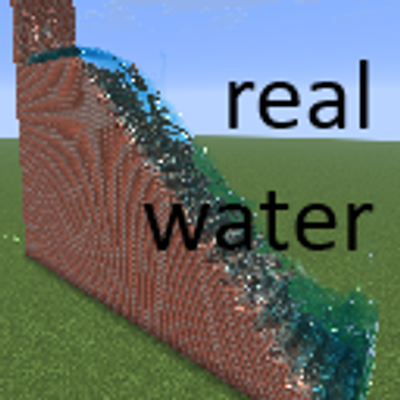
CurseForge · Minecraft mod
Real Water
A mod that adds various liquid simulations into the game that can be affected by blocks and entities.
Choose a version Pick your version below, then grab the matching file.
Quick answer
Which Real Water release should I use?
Latest stable file realwater-1.0.0.jar
Game version 26.3
Loader Fabric
Real Water realwater-1.0.0.jar targets 26.3 with Fabric. The project page does not say whether this file belongs on the client, dedicated server, or both. No extra mods listed for this file.
Where it goes
Is Real Water required on the client, server, or both?
The project page does not say whether this file belongs on the client, dedicated server, or both.
Client Source doesn’t say
Dedicated server Source doesn’t say
Loader for this release Fabric
Required install it here Optional supported, not mandatory Not supported do not install here Source doesn’t say do not assume
The source does not explicitly classify this release as client-only or server-only.
What else does Real Water realwater-1.0.0.jar need?
realwater-1.0.0.jar. Change the file and its required mods may change too.
This file does not list any required mods. Do not add a library just because a different file uses it.
This file does not list any required or optional mods.
Before you install it
Add Real Water without breaking your instance.
Built for Real Water realwater-1.0.0.jar. Pick another file and the loader, install side or required mods may change.
- 01
Stick to this file
Use realwater-1.0.0.jar. It targets 26.3 with Fabric; another release may have different loader, side or dependency requirements.
- 02
Bring the mods it needs
This file does not list any required mods. Do not add a library just because a different file uses it.
- 03
Put it on the correct side
The project page does not say whether this file belongs on the client, dedicated server, or both.
- 04
Pick the file you checked
Use the “Get this file” button beside realwater-1.0.0.jar. It opens that exact file at the source.
About this project
What does Real Water add?
Real Water
Real Water adds an actual fluid simulation to Minecraft. You build a tank, pour some liquid in, and it sloshes around, splashes off walls and flows around whatever blocks you put in its way. Thick stuff like honey oozes, sand piles up, jelly wobbles. It runs on your graphics card, so it can handle a lot of liquid at once.
I mostly made this to mess around with in a flat world, so it works best as a sandbox: build something, flood it, see what happens.
Liquids
There are 20 of them:
- Water: runny and splashy
- Lava: glows and has a dark crust drifting on top. It doesn't cool.
- Honey: slow and golden
- Slime: thick and clingy
- Milk: milk.
- Cola: fizzes a bit all the time
- Foam: elephant toothpaste. It keeps growing for a few seconds after you pour it.
- Ball Pit: light plastic balls that bounce and scatter, and float on anything
- Snow: piles up into heaps. Walking through it leaves a path.
- Oil: floats on water, with a faint rainbow sheen
- Mercury: very heavy and shiny. Almost everything floats on it, including marbles.
- Molten Gold: even heavier than mercury, and it glows
- Chocolate: thick and glossy
- Sand: heavy and grainy. It holds a slope and sinks in water.
- Mud: sticky, and slumps slowly
- Quicksand: soft, and you'll have a hard time getting out of it
- Ketchup: sits in a blob until it gets pushed
- Toothpaste: holds its shape
- Marbles: glass marbles that sink in water and knock ball pit balls around
- Jelly: springs back into shape after it lands, and you can stand and bounce on it
Heavier liquids sink under lighter ones. Pour gold, mercury, lava, water and oil into the same tank and they'll end up stacked in that order.
Blocks and items
- Liquid Sprayer: hold right-click to spray
- Liquid Bucket: right-click to pour one block's worth where you're looking
- Liquid Source: pours liquid out of every open side. Right-click to change the liquid, sneak + right-click to change how fast it pours.
- Liquid Drain: removes any liquid that touches it
Sneak + right-click with the Sprayer or Bucket to switch liquids. Hovering over any of these items shows its controls. They're all in the Real Water creative tab, and you can also get them from the settings screen in survival.
How it interacts with the world
- The liquid follows the actual shape of blocks, so it runs down stairs, around fences, under slabs and so on.
- You can build and break blocks while it's moving and it reacts straight away.
- Players, mobs and dropped items push liquid out of the way when they move through it.
- Thicker liquids slow you down. Honey, mud and quicksand are the worst.
- You bounce off jelly like a slime block. Sneak if you just want to land on it.
Visuals
- Smooth surfaces with refraction, so you can see the floor bend through water
- Sky reflections that change with the time of day and the weather
- Light patterns (caustics) on the floor under clear liquids
- Foam where liquid gets churned up
- Fog and tint when your head is underwater (or under honey, or under milk...)
- Splash sounds that match the liquid
Getting started
- Stand where you want it and run
/realwater tank. This builds a 32x24x32 tank around you, starting at your feet. - Grab a Liquid Bucket or Liquid Sprayer from the creative tab.
- Pour something in.
Liquid only exists inside tanks. You can have up to four at a time, and each one has an outline so you can see its edges.
Settings
Press R (you can rebind it) or run /realwater to open the settings screen. From there you can:
- set the size and detail level for new tanks
- build, remove, clear or pause tanks
- pick a liquid and drop a cube of it in
- turn foam, caustics and tank outlines on or off
- set how much of your GPU the simulation is allowed to use
- get any of the items
Your settings are saved between sessions.
Commands
| Command | What it does |
|---|---|
/realwater |
Opens the settings screen |
/realwater tank |
Builds a tank around you |
/realwater tank <x> <y> <z> [detail] |
Builds a tank of a specific size (detail 2-6) |
/realwater tank remove, removeall, list |
Remove the nearest tank, remove all of them, or list them |
/realwater drop <liquid> [size] |
Drops a cube of liquid into the nearest tank |
/realwater reset |
Clears all liquid |
/realwater pause |
Freezes the simulation |
/realwater stats |
Shows particle counts and how long each step takes |
/realwater budget <10-100> |
How much of your GPU the liquid can use |
/realwater look surface or look dots |
Normal view, or every particle as a dot |
/realwater foam on/off, caustics on/off, outline on/off |
Toggles those effects |
/realwater gpu |
Checks whether your graphics card can run it |
Requirements
- Minecraft 26.3
- Fabric Loader 0.19.5 or newer
- Fabric API
- A graphics card that supports OpenGL 4.6. Most dedicated NVIDIA and AMD cards do. Some older or built-in laptop graphics don't, and
/realwater gpuwill tell you.
Performance
The detail setting matters most. Detail 4 is a good middle ground. If a big tank is slow, drop it to 2 or 3 or make the tank smaller. If your game stutters while liquid is moving, lower the GPU budget in the settings. /realwater stats shows how much work your GPU is doing.
Multiplayer
It has to be installed on both the server and every client, since it adds blocks and items. The liquid is simulated separately on each player's computer, though, so players don't see each other's liquid. Mobs only get slowed down by liquid in single player.
Project description from CurseForge.
Pick your setup
Real Water by Minecraft version and loader
Choose the version and loader you play, then open the matching release.
Check the dependencies, then try the file in a copied instance before changing a world you care about.
Recent files
Real Water versions and loaders
realwater-1.0.0.jar
23 Oct 2026
Client Source doesn’t say Server Source doesn’t say Dependencies No extras listed Listed on Release listing
Check the 26.3 · Fabric setup Fabric26.3 release
Looking for an older file? The official CurseForge project page is in Resources.
 mod
CurseForge · Minecraft
Breed faster Happy Ghasts
Breed faster Happy Ghasts, boost flight speed with Speed Potions or Snowballs, and inspect mount stats with a Book and Quill.
 mod
CurseForge + Modrinth · Minecraft
CreativeCore
a core mod
 mod
CurseForge · Minecraft
Mod Update Checker
Checks installed mods for available updates