Minecraft version
Back to mods 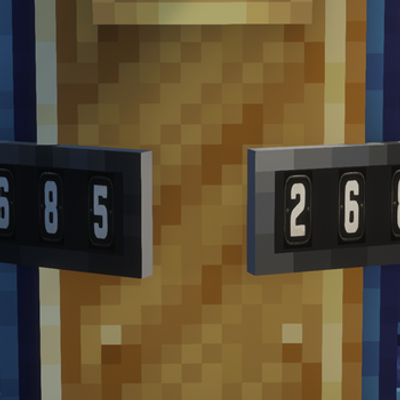
CurseForge · Minecraft mod
BubbyCraft Boards
number boards for create trains among other things!
Choose a version Pick your version below, then grab the matching file.
Quick answer
Which BubbyCraft Boards release should I use?
Latest stable file bubbycraft_boards-1.4.0-neoforge-1.21.1 (1).jar
Game version 1.21.1
Loader NeoForge
BubbyCraft Boards bubbycraft_boards-1.4.0-neoforge-1.21.1 (1).jar targets 1.21.1 with NeoForge. The project page does not say whether this file belongs on the client, dedicated server, or both. No extra mods listed for this file.
Where it goes
Is BubbyCraft Boards required on the client, server, or both?
The project page does not say whether this file belongs on the client, dedicated server, or both.
Client Source doesn’t say
Dedicated server Source doesn’t say
Loader for this release NeoForge
Required install it here Optional supported, not mandatory Not supported do not install here Source doesn’t say do not assume
The source does not explicitly classify this release as client-only or server-only.
What else does BubbyCraft Boards bubbycraft_boards-1.4.0-neoforge-1.21.1 (1).jar need?
bubbycraft_boards-1.4.0-neoforge-1.21.1 (1).jar. Change the file and its required mods may change too.
This file does not list any required mods. Do not add a library just because a different file uses it.
This file does not list any required or optional mods.
Before you install it
Add BubbyCraft Boards without breaking your instance.
Built for BubbyCraft Boards bubbycraft_boards-1.4.0-neoforge-1.21.1 (1).jar. Pick another file and the loader, install side or required mods may change.
- 01
Stick to this file
Use bubbycraft_boards-1.4.0-neoforge-1.21.1 (1).jar. It targets 1.21.1 with NeoForge; another release may have different loader, side or dependency requirements.
- 02
Bring the mods it needs
This file does not list any required mods. Do not add a library just because a different file uses it.
- 03
Put it on the correct side
The project page does not say whether this file belongs on the client, dedicated server, or both.
- 04
Pick the file you checked
Use the “Get this file” button beside bubbycraft_boards-1.4.0-neoforge-1.21.1 (1).jar. It opens that exact file at the source.
About this project
What does BubbyCraft Boards add?
Have you ever wanted to have actual number boards on your locomotives in the create mod? Look no further!! This mod allows you to craft and place numberboads on your trains!
THE BEST PART? You can right click the board with an open hand and use the interface to PUT THE BOARD ANYWHERE and AT ANY ANGLE!!!!
There are 4 boards to choose from!
BUT WAIT - How about a copycat block that let's you place anything anywhere too? Try out the XYZPYR copycat block! Pronouced Zizpeer! As long as the block can go into a copycat block then it will work in the XYZPYR!! Same as the boards, right click it with an open hand and use the interface to move anything anywhere!!
BUT WAIT - Have you ever wanted to put custom artwork on a locomotive with Immersive painting, but only to see it fall off when you click assemble? GUESS WHAT?? THAT'S FIXED TOO BABY!!!!! WOOOOOOOOOOOOOOOOOOOOOOOOOOOOO!!!! Introducing built in Immersive Paintings/Create mod compatibility!!!!! LET'S GOOOOOOOOOOOOOO!!!!
Project description from CurseForge.
Pick your setup
BubbyCraft Boards by Minecraft version and loader
Choose the version and loader you play, then open the matching release.
Check the dependencies, then try the file in a copied instance before changing a world you care about.
Recent files
BubbyCraft Boards versions and loaders
bubbycraft_boards-1.4.0-neoforge-1.21.1 (1).jar
bubbycraft_boards-1.4.0-neoforge-1.21.1-1.jar
7 Nov 2026
Client Source doesn’t say Server Source doesn’t say Dependencies No extras listed Listed on Release listing
Check the 1.21.1 · NeoForge setup 1.21.1NeoForge release
bubbycraft_boards-1.3.0-neoforge-1.21.1.jar
23 Oct 2026
Client Source doesn’t say Server Source doesn’t say Dependencies No extras listed Listed on Release listing
Check the 1.21.1 · NeoForge setup 1.21.1NeoForge release
Looking for an older file? The official CurseForge project page is in Resources.
 mod
CurseForge · Minecraft
Create: Bee Economy
This mod adds Bees that can be used as money in Create mod.
 mod
CurseForge + Modrinth · Minecraft
Mendable Anvils
A mod that allows players to fix their anvils by shift + right-clicking an anvil with an iron ingot
 mod
CurseForge · Minecraft
Akuma no Mi
This is an addon to Mine mine no mi that adds a TON to the world government faction from vanilla marine -> agent progression to potentially being able to be a celestial dragon. New armor, weapons, traits and the most powerful of devil fruits.