Applied Energistics 2 Needed by Applied Avaritia AppliedAvaritia-1.7.10-0.4.2
requiredNo matching file

CurseForge · Minecraft mod
Adds native 9x9 Avaritia crafting patterns and direct Applied Energistics 2 autocrafting for Minecraft 1.7.10.
Quick answer
Applied Avaritia AppliedAvaritia-1.7.10-0.4.2 targets 1.7.10 with Forge. The project page does not say whether this file belongs on the client, dedicated server, or both. 2 required mods need a matching file.
Where it goes
The project page does not say whether this file belongs on the client, dedicated server, or both.
The source does not explicitly classify this release as client-only or server-only.
AppliedAvaritia-1.7.10-0.4.2. Change the file and its required mods may change too.
Install Applied Energistics 2, Avaritia first, but 2 required mods have no matching file for this setup. Do not mix loader builds to force a match.
We only count dependency files that match this setup. A file for another loader does not fill the gap.
Before you install it
Built for Applied Avaritia AppliedAvaritia-1.7.10-0.4.2. Pick another file and the loader, install side or required mods may change.
Use AppliedAvaritia-1.7.10-0.4.2. It targets 1.7.10 with Forge; another release may have different loader, side or dependency requirements.
Install Applied Energistics 2, Avaritia first, but 2 required mods have no matching file for this setup. Do not mix loader builds to force a match.
The project page does not say whether this file belongs on the client, dedicated server, or both.
Use the “Get this file” button beside AppliedAvaritia-1.7.10-0.4.2. It opens that exact file at the source.
About this project
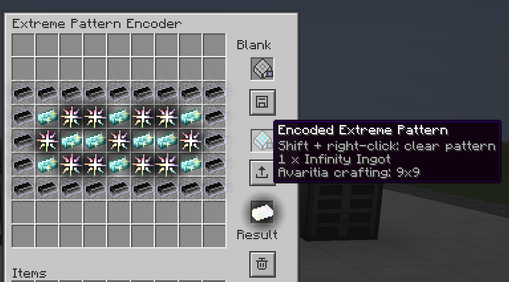
Applied Avaritia adds native Avaritia crafting patterns and a dedicated ME assembler for Minecraft 1.7.10. Encode recipes in a 9×9 grid and request their results through your regular Applied Energistics 2 crafting terminal.
Automate recipes such as the Infinity Ingot using AE2’s crafting planner and CPU.
Features
Extreme Pattern Encoder: a 9×9 ghost grid for preparing and encoding Avaritia recipes. Setting ingredients does not consume them.
ME Extreme Assembler: holds up to nine encoded patterns and crafts directly through your ME network.
Recursive autocrafting: AE2 can plan intermediate crafting steps using available patterns.
Ore Dictionary substitution: compatible material variants can be mixed when the actual Avaritia recipe accepts them. NBT-sensitive ingredients retain their exact identity.
Direct output delivery: crafted items and returned containers go back into ME storage. Buffered outputs wait for power and available storage space.
Result previews: assembler slots display the recipe output by default. Hold Shift in other inventories to preview an encoded pattern’s result.
Reusable patterns: hold an encoded pattern and press Shift + right-click to turn it back into a blank pattern.
Optional NEI recipe transfer support.
Getting started
The encoder can encode patterns without a network connection. Each assembler performs one craft at a time.
Requirements
Install Applied Avaritia on both the client and server. NEI 1.0.5.120 is optional on the client for recipe transfer.
Project description from CurseForge.
Pick your setup
Choose the version and loader you play, then open the matching release.
Check the dependencies, then try the file in a copied instance before changing a world you care about.
Recent files
AppliedAvaritia-1.7.10-0.4.2-alpha.jar
23 Oct 2026
Looking for an older file? The official CurseForge project page is in Resources.
 mod
Workling traz novas formas de fazer as coisas em Minecraft, combinando mecânicas úteis, novas possibilidades e pequenos ajudantes para o seu mundo.
 mod
This mod is an addon for AnvilCraft, with main content including production-friendly machines
 mod
Adds functioning record players that can play 7" singles and 12" LPs containing music within the game.