Minecraft version
Back to mods 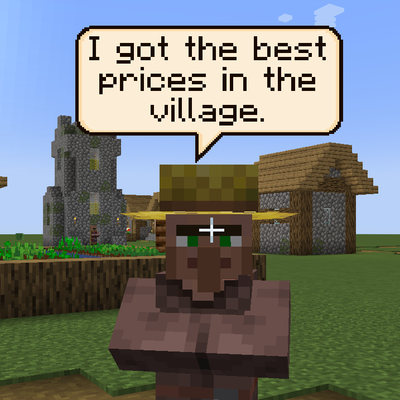
CurseForge · Minecraft mod
Idle Chatter
Villagers and pillagers now talk in small pixel-art speech bubbles above their heads, with every line editable through data packs and resource packs.
Choose a version Pick your version below, then grab the matching file.
Quick answer
Which Idle Chatter release should I use?
Latest stable file idlechatter-1.0.0.jar
Game version 1.20.2, 1.20.5, 1.20.1
Loader Forge
Idle Chatter idlechatter-1.0.0.jar targets 1.20.2, 1.20.5, 1.20.1 with Forge. The project page does not say whether this file belongs on the client, dedicated server, or both. No extra mods listed for this file.
Where it goes
Is Idle Chatter required on the client, server, or both?
The project page does not say whether this file belongs on the client, dedicated server, or both.
Client Source doesn’t say
Dedicated server Source doesn’t say
Loader for this release Forge
Required install it here Optional supported, not mandatory Not supported do not install here Source doesn’t say do not assume
The source does not explicitly classify this release as client-only or server-only.
What else does Idle Chatter idlechatter-1.0.0.jar need?
idlechatter-1.0.0.jar. Change the file and its required mods may change too.
This file does not list any required mods. Do not add a library just because a different file uses it.
This file does not list any required or optional mods.
Before you install it
Add Idle Chatter without breaking your instance.
Built for Idle Chatter idlechatter-1.0.0.jar. Pick another file and the loader, install side or required mods may change.
- 01
Stick to this file
Use idlechatter-1.0.0.jar. It targets 1.20.2, 1.20.5, 1.20.1 with Forge; another release may have different loader, side or dependency requirements.
- 02
Bring the mods it needs
This file does not list any required mods. Do not add a library just because a different file uses it.
- 03
Put it on the correct side
The project page does not say whether this file belongs on the client, dedicated server, or both.
- 04
Pick the file you checked
Use the “Get this file” button beside idlechatter-1.0.0.jar. It opens that exact file at the source.
About this project
What does Idle Chatter add?
Idle Chatter
Villagers and pillagers now talk. Every so often a mob in front of you says something in a small pixel-art speech bubble above its head, then the bubble fades and it goes quiet again. It adds no items, blocks or mobs and doesn't change how anything plays.
What it does
Each villager or pillager in view speaks roughly once every 20 to 30 seconds, and a busy village is capped so you never get a wall of bubbles. Mobs also react when they are hurt, and pillagers shout something when they come after you. Long lines are split across several bubbles in turn rather than one huge one. Villagers talk according to their job, so a farmer, a librarian and a nitwit don't say the same things, and villagers without a job aren't trying to sell you anything. The bubbles face the camera, sit above the mob's head, use the normal Minecraft font, and are hidden by walls like anything else in the world.
Changing what they say
All the dialogue is plain JSON rather than baked into the mod, so you can change it with a data pack or a resource pack and add lines for other mobs, including modded ones. In a data pack, put a file at data/<anything>/dialogue/yourfile.json:
{
  "minecraft:villager": {
    "random": ["Lovely weather.", ["This is one bubble,", "and this is the next."]],
    "hurt": ["Ow!"]
  },
  "minecraft:villager[profession=farmer]": {
    "random": ["The crops won't tend themselves."]
  },
  "minecraft:pillager": {
    "target": ["Hold still."]
  }
}
The three conditions are random, hurt and target. A plain string is one bubble and a list of strings is several in a row. The square brackets after a mob name are a selector, which currently understands profession, level and baby, so profession!=none|nitwit means every villager with a job. Your lines are added to the built-in ones, unless you put "replace": true at the top of the file, in which case only yours are used. Unknown mobs and conditions are ignored, so a pack can safely include mods the player hasn't installed. The same format works in a resource pack under assets/<anything>/dialogue/, and F3 + T reloads it.
Configuration
config/idlechatter-client.toml controls how often mobs talk, their cooldowns, how many bubbles can be on screen, how long they last, text wrapping, bubble size and height, and how far away bubbles show.
Client and server
With the mod on the client only, idle chatter works on any server, including ones without the mod, using the built-in dialogue or your resource packs. Installing it on the server as well adds the hurt and targeting reactions, and dialogue from data packs, which the server sends to players when they join. On a server alone it does nothing visible, because the bubbles are drawn on the client. Only mobs that are currently speaking are tracked, so it stays light.
Notes
Villagers and pillagers are the only mobs with dialogue out of the box, so anything else needs a pack. A couple of the default villager lines are mildly sweary, which you can replace with a data pack if that's a problem. The text is plain, with no translation support yet. A bubble is drawn along with its mob, so if the mob's body is off screen its bubble disappears too, even if the bubble itself would still be in view.
Future Updates Planned
- Customizable speech bubble colors, shapes, sizes and fonts
- Emoji support!
- Compatibility with Illager Blabber
Project description from CurseForge.
Pick your setup
Idle Chatter by Minecraft version and loader
Choose the version and loader you play, then open the matching release.
Minecraft version
1.20.5
1 loader buildMinecraft version
1.20.4
1 loader buildMinecraft version
1.20.3
1 loader buildMinecraft version
1.20.2
1 loader buildMinecraft version
1.20.1
1 loader buildCheck the dependencies, then try the file in a copied instance before changing a world you care about.
Recent files
Idle Chatter versions and loaders
idlechatter-1.0.0.jar
24 Oct 2026
Client Source doesn’t say Server Source doesn’t say Dependencies No extras listed Listed on Release listing
Check the 1.20.6 · Forge setup 1.20.21.20.51.20.1Forge release
Looking for an older file? The official CurseForge project page is in Resources.
 mod
mod CurseForge · Minecraft
Ultimate NPC
Mod to create custom NPC, quests, trade and more
 mod
mod CurseForge · Minecraft
BSP SERVER UTILITIES
Server utilities to help servers run rule screens, kick afk players, report admin actions to prevent abuse and more
 mod
mod CurseForge · Minecraft
BSP REGION GUARD
A claims and regions guard system made for the official BSP server and Forge.