Minecraft version
Back to mods 
CurseForge · Minecraft mod
Build Blueprint
See any build as see-through ghost blocks in your world, with a materials list, layers and build copying.
Choose a version Pick your version below, then grab the matching file.
Quick answer
Which Build Blueprint release should I use?
Latest stable file Build Blueprint 1.2.10 for NeoForge Minecraft 1.21
Game version 1.21
Loader NeoForge
Build Blueprint 1.2.10 for NeoForge Minecraft 1.21 targets 1.21 with NeoForge. The project page does not say whether this file belongs on the client, dedicated server, or both. No extra mods listed for this file.
Where it goes
Is Build Blueprint required on the client, server, or both?
The project page does not say whether this file belongs on the client, dedicated server, or both.
Client Source doesn’t say
Dedicated server Source doesn’t say
Loader for this release NeoForge
Required install it here Optional supported, not mandatory Not supported do not install here Source doesn’t say do not assume
The source does not explicitly classify this release as client-only or server-only.
What else does Build Blueprint 1.2.10 for NeoForge Minecraft 1.21 need?
Build Blueprint 1.2.10 for NeoForge Minecraft 1.21. Change the file and its required mods may change too.
This file does not list any required mods. Do not add a library just because a different file uses it.
This file does not list any required or optional mods.
Before you install it
Add Build Blueprint without breaking your instance.
Built for Build Blueprint 1.2.10 for NeoForge Minecraft 1.21. Pick another file and the loader, install side or required mods may change.
- 01
Stick to this file
Use Build Blueprint 1.2.10 for NeoForge Minecraft 1.21. It targets 1.21 with NeoForge; another release may have different loader, side or dependency requirements.
- 02
Bring the mods it needs
This file does not list any required mods. Do not add a library just because a different file uses it.
- 03
Put it on the correct side
The project page does not say whether this file belongs on the client, dedicated server, or both.
- 04
Pick the file you checked
Use the “Get this file” button beside Build Blueprint 1.2.10 for NeoForge Minecraft 1.21. It opens that exact file at the source.
About this project
What does Build Blueprint add?
 Stop guessing. Start building.
Ever tried to copy a build from a picture or a video and lost count halfway through? Build Blueprint puts the whole build into your world as see-through ghost blocks. You place the real blocks right where the ghosts are, one layer at a time, until it’s done.
🔥 What it does
👻 See it before you build it
The full build appears as ghost blocks in your world. Move it, turn it, mirror it or drop it onto the ground until it’s exactly where you want it. Then press Delete to lock it in place.
🧱 Build layer by layer
Start at the bottom. The mod shows one layer at a time and moves you up when you finish it. If you break a block in a layer you already finished, it takes you back to fix it.
📋 Know exactly what you need
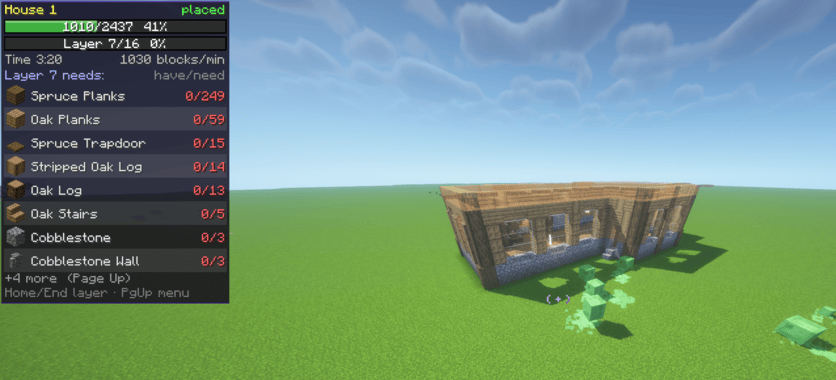
A live list shows every block the build needs, how many you have, and how many are left. Hover any block to see how many stacks you still need. Opened chests nearby that hold blocks you still need get a green glow.
🎯 Never lose your place
A pulsing box shows the next block to place. Middle-click any ghost block to put that block in your hand.
🎨 Make it yours
Click any block in the list and pick another one to use instead: any block in the game, even blocks from other mods you have. Search by name, or start with similar blocks (stairs stay stairs, closest colours first). Every block of that kind in the build changes, and Undo swap puts it back.
📸 Copy any build in your world/Other servers
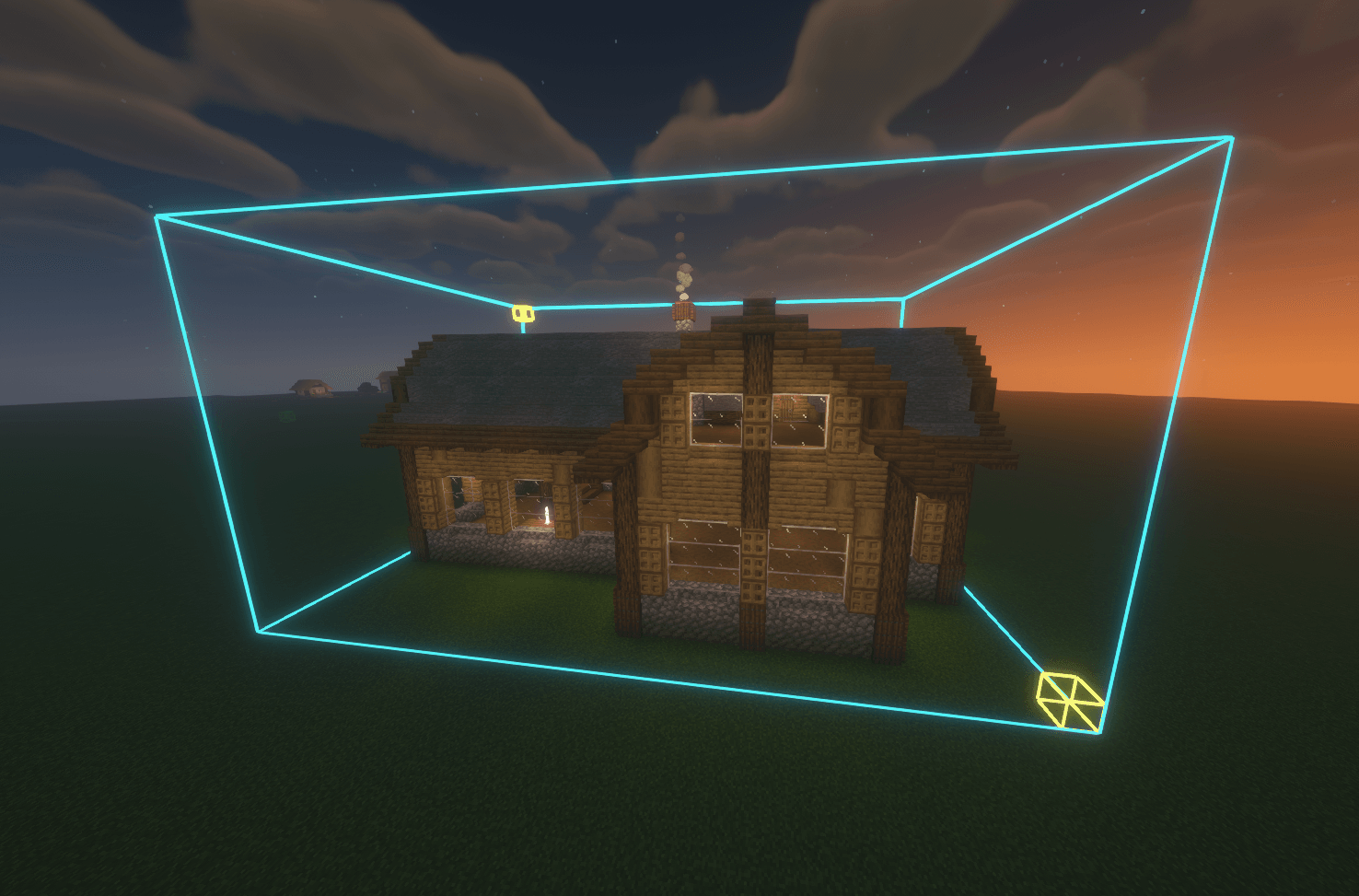
Look at a corner of a build and press Insert. A box starts on that block: make it as big as the build with the arrow keys, or look at the far corner and press Page Down to stretch it there. Save it, share it as a code, or build it again somewhere else.
⚡ Creative mode extras
In Creative mode the mod can build it for you. Auto-build places the whole build at once, Build layer places just the layer you’re on, and Undo build takes it all back if you change your mind. On servers this needs operator rights.
💾 It remembers
Leave the world and come back, and your blueprint is still there, right where you left it.
🎮 Controls
| Key | What it does |
|---|---|
| Page Up | Open the menu |
| Arrow keys | Move the build (hold Shift for 5 blocks) |
| Page Down | Turn it |
| Delete | Place it and start building |
| Home / End | Go up or down a layer |
| Insert | Copy a build from your world |
| Middle-click | Hold the ghost block you’re looking at |
Change any key in Options → Controls.
📦 Requirements
- Fabric: Minecraft 1.16.5 to 26.3 (needs Fabric Loader and Fabric API)
- Forge: Minecraft 1.18 to 26.3
- NeoForge: Minecraft 1.20.2 to 26.3
- Pick the file for your Minecraft version and loader on the Files tab.
- Client-side only, so it works in single-player and on any server.
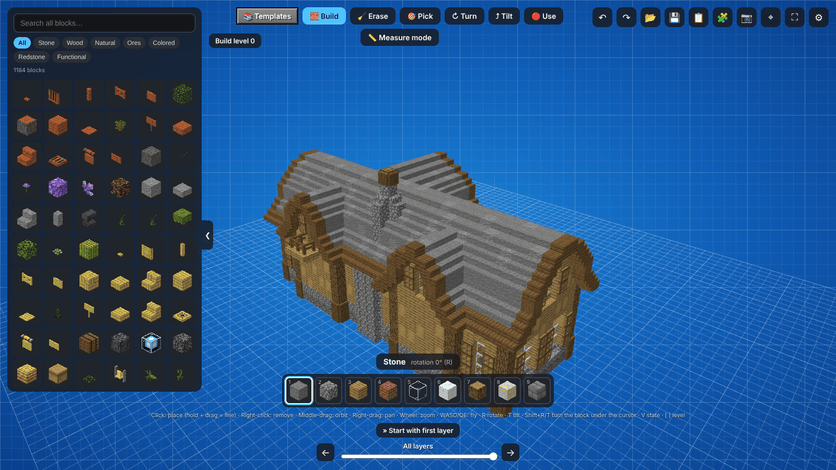
Companion app - free building templates
Get the free Block Blueprint app for Windows and start from a ready-made template: a giant sailing ship, smaller boats, a cozy house, a robot and more. Pick one, tweak it if you want, and press Send to Minecraft. It shows up in the mod's Saved builds, ready to place as a blueprint in your world.
- Building templates to use straight away, with more added over time
- Design your own builds block by block in 3D with real Minecraft textures
- Swap blocks and colours before you build, and see exactly how many blocks you need
- Builds you copy in game (even from other servers) show up in the app too
- Free, and it updates itself
Download it here: https://github.com/CosmicLogic0/block-blueprint
❤️ Support the mod
Build Blueprint and the Block Blueprint app are free. Donations keep the mod up to date with fixes, new Minecraft versions and new features. Donate with PayPal - any amount helps. Thank you!
Project description from CurseForge.
Pick your setup
Build Blueprint by Minecraft version and loader
Choose the version and loader you play, then open the matching release.
Minecraft version
26.2
2 loader buildsMinecraft version
26.1.2
2 loader buildsMinecraft version
26.1.1
2 loader buildsMinecraft version
26.1
2 loader buildsMinecraft version
1.21.11
2 loader buildsMinecraft version
1.21.10
2 loader buildsMinecraft version
1.21.9
3 loader buildsMinecraft version
1.21.8
2 loader buildsMinecraft version
1.21.7
2 loader buildsMinecraft version
1.21.6
2 loader buildsMinecraft version
1.21.5
1 loader buildShowing the newest 12 of 33 game versions. Older files are in the list below.
Check the dependencies, then try the file in a copied instance before changing a world you care about.
Recent files
Build Blueprint versions and loaders
Build Blueprint 1.2.10 for NeoForge Minecraft 1.21
buildblueprint-1.2.10+neoforge-1.21.jar
26 Oct 2026
Client Source doesn’t say Server Source doesn’t say Dependencies No extras listed Listed on Release listing
Check the 1.21 · NeoForge setup 1.21NeoForge release
Build Blueprint 1.2.10 for NeoForge Minecraft 1.21.7
buildblueprint-1.2.10+neoforge-1.21.7.jar
26 Oct 2026
Client Source doesn’t say Server Source doesn’t say Dependencies No extras listed Listed on Release listing
Check the 1.21.7 · NeoForge setup 1.21.7NeoForge release
Build Blueprint 1.2.10 for NeoForge Minecraft 1.21.2
buildblueprint-1.2.10+neoforge-1.21.2.jar
26 Oct 2026
Client Source doesn’t say Server Source doesn’t say Dependencies No extras listed Listed on Release listing
Check the 1.21.2 · NeoForge setup NeoForge1.21.2 release
Build Blueprint 1.2.10 for Forge Minecraft 1.18
buildblueprint-1.2.10+forge-1.18.jar
26 Oct 2026
Client Source doesn’t say Server Source doesn’t say Dependencies No extras listed Listed on Release listing
Check the 1.18 · Forge setup 1.18Forge release
Build Blueprint 1.2.10 for NeoForge Minecraft 1.21.9
buildblueprint-1.2.10+neoforge-1.21.9.jar
26 Oct 2026
Client Source doesn’t say Server Source doesn’t say Dependencies No extras listed Listed on Release listing
Check the 1.21.9 · NeoForge setup NeoForge1.21.9 release
Build Blueprint 1.2.10 for NeoForge Minecraft 1.21.6
buildblueprint-1.2.10+neoforge-1.21.6.jar
26 Oct 2026
Client Source doesn’t say Server Source doesn’t say Dependencies No extras listed Listed on Release listing
Check the 1.21.6 · NeoForge setup 1.21.6NeoForge release
Build Blueprint 1.2.10 for Forge Minecraft 1.19.1
buildblueprint-1.2.10+forge-1.19.1.jar
26 Oct 2026
Client Source doesn’t say Server Source doesn’t say Dependencies No extras listed Listed on Release listing
Check the 1.19.1 · Forge setup Forge1.19.1 release
Build Blueprint 1.2.10 for Forge Minecraft 1.20
buildblueprint-1.2.10+forge-1.20.jar
26 Oct 2026
Client Source doesn’t say Server Source doesn’t say Dependencies No extras listed Listed on Release listing
Check the 1.20 · Forge setup Forge1.20 release
Build Blueprint 1.2.10 for Forge Minecraft 26.1.1
buildblueprint-1.2.10+forge-26.1.1.jar
26 Oct 2026
Client Source doesn’t say Server Source doesn’t say Dependencies No extras listed Listed on Release listing
Check the 26.1.1 · Forge setup Forge26.1.1 release
Build Blueprint 1.2.10 for Forge Minecraft 26.1.2
buildblueprint-1.2.10+forge-26.1.2.jar
26 Oct 2026
Client Source doesn’t say Server Source doesn’t say Dependencies No extras listed Listed on Release listing
Check the 26.1.2 · Forge setup Forge26.1.2 release
Build Blueprint 1.2.10 for Forge Minecraft 26.1
buildblueprint-1.2.10+forge-26.1.jar
26 Oct 2026
Client Source doesn’t say Server Source doesn’t say Dependencies No extras listed Listed on Release listing
Check the 26.1 · Forge setup Forge26.1 release
Build Blueprint 1.2.10 for Forge Minecraft 1.21
buildblueprint-1.2.10+forge-1.21.jar
26 Oct 2026
Client Source doesn’t say Server Source doesn’t say Dependencies No extras listed Listed on Release listing
Check the 1.21 · Forge setup 1.21Forge release
Looking for an older file? The official CurseForge project page is in Resources.
 mod
mod CurseForge · Minecraft
Swapping Double Hotbar
Adds a second hotbar row to Minecraft, letting you quickly swap item rows or swap individual slots with configurable controls. Includes in-game settings and enable/disable commands. Built for Fabric on Minecraft 26.1.2
 mod
mod CurseForge · Minecraft
Permadeath by BOrrad0
An escalating 70-day hardcore permadeath survival mod featuring progressive mob mutations, custom dimensions, and punishing endgame mechanics
 mod
mod CurseForge · Minecraft
Far Plane Two Continuation
This mod is unofficial reworked continuation of Far Plain Two. Allows you to play with render distance at 30.000.000 blocks without lags