Fabric API Needed by Cassonade 1.16.0
requiredMatching file found Matched file: [26.3] Fabric API 0.165.2+26.3

CurseForge · Minecraft mod
Less friction, more life. Fixes the hundred small annoyances of survival and brings the world to life, with no new ores, magic or machines.
Quick answer
Cassonade 1.16.0 targets 26.3 with Fabric. The project page does not say whether this file belongs on the client, dedicated server, or both. All 1 required mods have matching files.
Where it goes
The project page does not say whether this file belongs on the client, dedicated server, or both.
The source does not explicitly classify this release as client-only or server-only.
Cassonade 1.16.0 on 26.3. Every mod below is checked against that same setup.
Install Fabric API first. We found matching files for this game-version and loader setup.
We only count dependency files that match this setup. A file for another loader does not fill the gap.
Before you install it
Built for Cassonade 1.16.0 on 26.3. Pick another file and the loader, install side or required mods may change.
Use Cassonade 1.16.0. It targets 26.3 with Fabric; another release may have different loader, side or dependency requirements.
Install Fabric API first. We found matching files for this game-version and loader setup.
The project page does not say whether this file belongs on the client, dedicated server, or both.
Use the “Get this file” button beside Cassonade 1.16.0. It opens that exact file at the source.
About this project
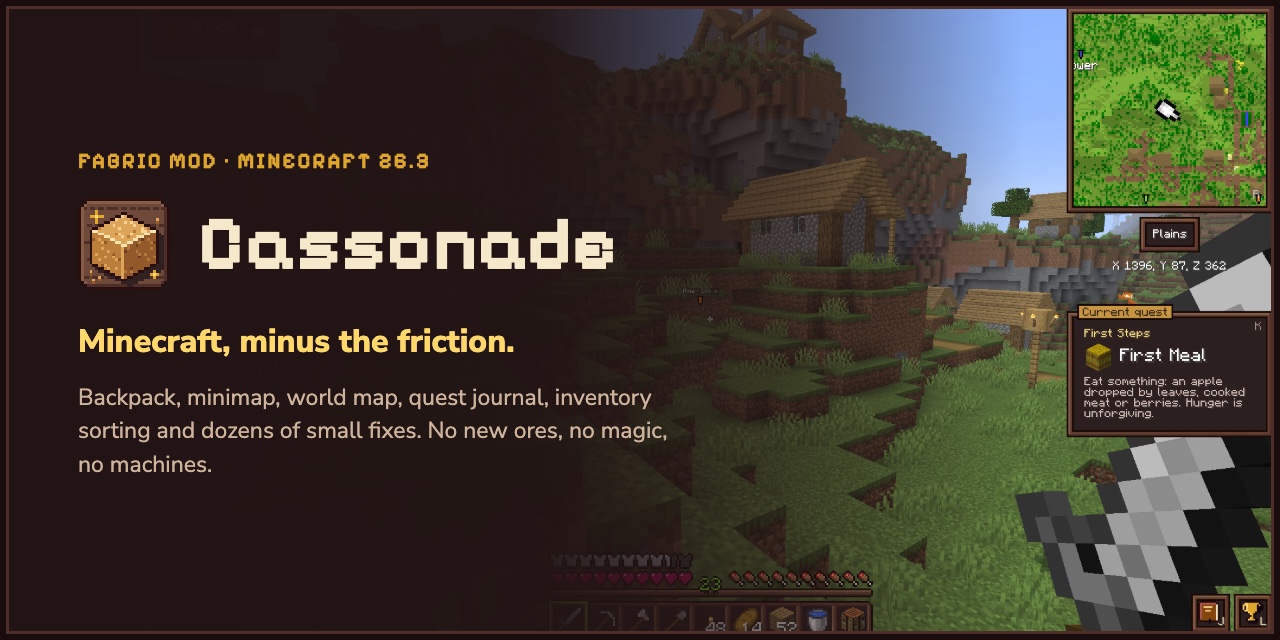
Cassonade is a vanilla+ quality-of-life mod for Minecraft 26.3 on Fabric. It fixes the hundred small annoyances of survival and brings the world to life with birds, waves and starry nights. No new ores, no magic, no machines: the same game you know, just smoother and less empty.
Website · Source code · Report a bug
54 more slots, as much as a large chest, crafted from 4 leather, 4 string and a bundle.
B or from a tab at the top of the inventory, in a leather panel where the recipe book usually sits.Always there, nothing to equip: only what makes a place feel inhabited, and none of it changes the game.
Equip a compass to get a minimap in the top-right corner, drawn with the colors of vanilla maps.
Craft a world map from an empty map and eight sticks, and open a full-screen map of every chunk you have explored, under a fog of war.
Shift over a place to see its biome and, once you have been to the Nether, where that spot leads through a portal; a panel lists the map's shortcuts.Shift + middle click: every player in the dimension sees it marked with your name for a few seconds.Equip a clock to see the time, the weather, the day count and the moon's phase, with a small bed and a soft chime when you can sleep. Combine it with a lightning rod to make a barometer: it also shows the next weather change, read from the server's own weather timers.
Fast travel once the game is "finished", and only between waystones. Craft one from a world map on top of 5 chiseled stone bricks, under a chorus fruit, so it comes after reaching the End. Right-click it to list the others you placed or have been near, in every dimension, and click one to go there. Name it at its screen or at an anvil. Waystones also show on the world map as landmarks, but travel only ever starts from the block. Needs the mod on the server.
Ctrl+F: names, enchantments and the contents of bundles and Shulker boxes.Alt-click: sorting, stashing and Shift-click leave them alone, and Q won't throw them away.G, so each row can hold a set: tools, building blocks, food and torches.Ctrl-click a recipe to craft as many as your inventory allows.Right-click a ripe crop to harvest and replant it: wheat, carrots, potatoes, beetroots, nether wart and cocoa. Same drops as breaking it, Fortune included, minus the seed that goes back in the ground.
Elytra get their own slot, next to the offhand: fly without taking your chestplate off. They fly, wear out and take Mending exactly as in vanilla.
Every hopper gets a filter slot: put one item in, and the hopper only accepts that item. Put a bundle or a Shulker box in the filter to let through every item it holds. A row of filtered hoppers makes a full item sorter, no redstone needed.
Combine a compass with a sculk sensor to make a sculk compass: health bars over the mobs you fight, a "!" when a mob starts chasing you, and an eye in the corner of the screen while anything is hunting you, even out of sight. The minimap shows where the mobs hunting you come from, and the other players around you.
Every spyglass gets a round lens and a finer zoom with the scroll wheel. Combine one with a book and a sculk sensor to make a naturalist's spyglass, which reads what you look at: a horse's speed, jump and health, when animals can breed or grow up, a villager's level and sold-out trades, how far crops have grown, a beehive's honey.
Combine a torch with a sculk sensor to make a sculk torch. Held in either hand, it lights around you and shows every block nearby where monsters can spawn, at any time or only at night. Light those spots up and the marks go away.
The stonecutter's twin for wood, crafted from an iron ingot over three planks: put a plank in, pick stairs, slabs, fences, doors, trapdoors, signs, buttons or pressure plates of the same wood, and take them out without loss. Both cutters and the loom remember what you picked for the next stack.
Sepia wood panels, dark slots and cream text across the HUD, the chat, inventories and tooltips; windows that rise gently into place over a softly blurred world; status effects with their time left; a recipe book that looks like a book, and an enchanting table that shows every enchantment an option will give.
Available in English, French, Spanish, Portuguese, German, Chinese, Russian and Japanese.
| Vanilla | With Cassonade | |
|---|---|---|
| Cutting down a tree | Leaves decay one by one for minutes | Leaves fall right away, drops included |
| Walking under trees | Leaves at head height | Taller trunks, two blocks of air under the canopy |
| Repairing at the anvil | "Too Expensive!" | Any repair you can pay for |
| Renaming at the anvil | Costs levels | Free when renaming alone |
| Enchanting table | One enchantment, then "…?" | Every enchantment the option will give |
| Mending and Infinity | Incompatible on a bow | Work together |
| Chiseled bookshelves | Take a book out to read its title | Look at its slot to see its title |
| Boats on land | Stuck on a 1-pixel step | Glide over paths, farmland, carpets, snow |
| Leaving a boat or minecart | You land anywhere | Beside it, on the free side closest to where you look |
| Double doors | Open each door separately | Both open together |
| Editing a book | Pages only added at the end | Insert a page anywhere, or delete one |
| Editing a sign | No mouse, copy line by line | The mouse places the cursor and selects; copy and paste the whole sign |
| Writing a long sign | Typing stops at the end of a line | The word carries over to the next line |
| A sign on a chest | Clicking it edits the sign | Clicking it opens the chest or barrel (sneak to edit the sign) |
| An item frame on a chest | Clicking it turns the item | Clicking it opens the chest or barrel (sneak to turn the item) |
| Named chests | The name only shows once opened | Look at a renamed chest, barrel or Shulker box to see its name |
| Wandering traders | Their departure time is hidden | Their trade screen shows how long they have left |
| Composter | 1 bone meal, after a delay | 8 bone meal, right away |
| Bone meal | Does nothing on sugar cane and cactus | Grows them by one block |
| Daytime | 10 minutes, then night falls | 20 minutes, the night is unchanged |
| Going to bed | 5 seconds to skip the night | 2.5 seconds |
| Death screen | Buttons locked for a second | Respawn immediately |
| Nether portal | 4 seconds of warping and noise | Step in, you're through |
| Moving villagers | Boats, rails, trapping | Put them on a lead |
| A villager's workstation | Watch where it goes | A button beside its trades points it out |
| Noisy mobs | Only with commands | A blank name tag silences a mob |
| Getting hit | The screen flashes red | A red arc points where the hit came from |
| A mob in tall grass | The hit cuts the grass | The hit goes through grass, flowers and crops to the mob |
| Sweeping a sword | Also hits your own wolf or horse | Spares the animals you tamed |
| A swing that misses | Hits your own wolf or horse in the way | Passes through your animals to what is behind them |
| Torch in hand | Lights nothing until placed | Lights up around you, as do torches dropped, held by others or burning mobs |
| Flower pots | Empty the pot before planting another | Right-click with another flower or sapling: they swap |
| Item frames | Always show their frame | Shears hide the frame, the item stays on the wall |
| Ladders | Placed one by one, from the bottom | Right-click a ladder with one: it extends up, or down when looking down |
| Farmland | Turns back to dirt when you jump on it | Only mobs trample it, never players |
| Furnaces | Watch the arrow fill | How long until everything is cooked, and how much more the fuel cooks |
| Grindstone | The experience is a surprise | Shown before you take the item |
| Note blocks | Count the clicks to know the note | Look at one to see its note |
| Jukebox | Its song only shows when it starts | Look at a playing jukebox to see the song's name |
| Redstone | Guess a wire's power from its glow | With redstone dust in hand, look at a wire to see its power |
| Placing a piston, hopper… | Which way it will face is a surprise | A small mark previews the working face of the block to come |
| Waxed copper | Looks the same as unwaxed | With a honeycomb or an axe in hand, look at it: waxed or not |
| Armor stands | Take each piece off, one by one | Alt and right-click with an empty hand: your whole armor swaps |
| Armor stand poses and arms | Only with commands | Sneak and right-click for Bedrock's 13 poses; placed with arms |
| Dyed wool, carpets, beds, glass | Stay dyed for good | Right-click a water cauldron: the whole stack goes back to plain |
| Concrete powder | Place it by water, block by block | Right-click a water cauldron: the whole stack hardens |
| Filled maps | Stay drawn for good | Right-click a water cauldron: blank again |
| Paintings | A random one, the largest that fits | Sneak and scroll to go through all that fit |
| Bridging | Lean over the edge | Sneak and aim at the far side of your block: a block goes in front of it |
| Snow | Break it, all layers at once | Right-click with a shovel: one layer comes off |
| Ender chests | Silk Touch, or 8 obsidian | Drop themselves with any pickaxe |
| Mobs behind terrain | Drawn in full, even inside a mountain | Not drawn until they can be seen, for a smoother game |
| Game in the background | Draws as fast as in play | Held to 30 frames per second, to spare the battery and the fans |
| Menus | Only Esc goes back |
Mouse button 4 does too |
| Your name in the chat | Easy to miss | A soft bell, and your name in gold |
Some vanilla recipes eat a whole block for a single button. Cassonade only changes how many items a recipe gives, never its shape or when you unlock it: 16 buttons or pressure plates, 24 wooden trapdoors, 32 sticks from 2 planks, 8 ladders, 8 stairs, 12 signs, doors or bowls, 8 chests or barrels, 6 paper from 3 sugar cane. Stairs and slabs craft back into full blocks without loss, wool back into its 4 string, a nether wart block into its 9 nether wart, and packed ice into its 9 ice.
New ores, metals or gear tiers; magic, machines or tech trees; new mobs, biomes or dimensions; anything that makes the game easier to beat rather than nicer to play.
Multiplayer: install the mod on the server and on every player's game. In singleplayer, there is nothing else to do. If you join a server without the mod, the game stays playable and falls back to vanilla where the server is needed.
Yes, you can include Cassonade in your modpack. It is released under the GPL-3.0: you can also change it or reuse its code, as long as your version stays under the GPL-3.0, credits its author and publishes its source.
If Cassonade makes your worlds a little nicer, you can support its development with a coffee on Ko-fi. If you enjoy the mod, sharing it with friends on social media is the best way to help us keep going.
Not an official Minecraft product. Not approved by or associated with Mojang or Microsoft.
Project description from CurseForge.
Pick your setup
Choose the version and loader you play, then open the matching release.
Check the dependencies, then try the file in a copied instance before changing a world you care about.
Recent files
cassonade-1.16.0.jar
3 Nov 2026
cassonade-1.15.0.jar
3 Nov 2026
cassonade-1.14.1.jar
3 Nov 2026
cassonade-1.14.0.jar
2 Nov 2026
cassonade-1.13.0.jar
2 Nov 2026
cassonade-1.12.0.jar
1 Nov 2026
cassonade-1.11.0.jar
31 Oct 2026
cassonade-1.10.2.jar
31 Oct 2026
cassonade-1.10.1.jar
31 Oct 2026
cassonade-1.10.0.jar
31 Oct 2026
cassonade-1.9.0.jar
30 Oct 2026
cassonade-1.8.1.jar
30 Oct 2026
Looking for an older file? The official CurseForge project page is in Resources.
 mod
A Path of Exile-style skill tree: 522 nodes in six schools of magic, 30 castable abilities and 12 keystones. Plan paths, share build codes, respec anytime. Links up with Remnants | RPG Player Skills.
 mod
Hire named sellswords with gold and lead them as a warband: five classes, a command wheel, formations, aggro and taunts, downed-not-dead revives, a Warbanner to rally on, and a Chronicle of every ally's deeds.
 mod
With each mob you defeat, you have a chance to receive a loot bag containing valuable rewards