Minecraft version
Back to mods 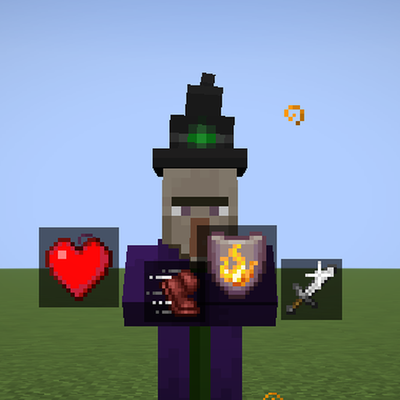
CurseForge · Minecraft mod
Effect Aura
Adds floating effect icons to mobs
Choose a version Pick your version below, then grab the matching file.
Quick answer
Which Effect Aura release matches 26.3?
Best match for your filters effect-aura-1.0.0.jar
Game version 26.3
Loader Fabric
Effect Aura effect-aura-1.0.0.jar targets 26.3 with Fabric. The project page does not say whether this file belongs on the client, dedicated server, or both. No extra mods listed for this file.
Where it goes
Is Effect Aura required on the client, server, or both?
The project page does not say whether this file belongs on the client, dedicated server, or both.
Client Source doesn’t say
Dedicated server Source doesn’t say
Loader for this release Fabric
Required install it here Optional supported, not mandatory Not supported do not install here Source doesn’t say do not assume
The source does not explicitly classify this release as client-only or server-only.
What else does Effect Aura effect-aura-1.0.0.jar need?
effect-aura-1.0.0.jar on 26.3. Every mod below is checked against that same setup.
This file does not list any required mods. Do not add a library just because a different file uses it.
This file does not list any required or optional mods.
Before you install it
Add Effect Aura without breaking your instance.
Built for Effect Aura effect-aura-1.0.0.jar on 26.3. Pick another file and the loader, install side or required mods may change.
- 01
Stick to this file
Use effect-aura-1.0.0.jar. It targets 26.3 with Fabric; another release may have different loader, side or dependency requirements.
- 02
Bring the mods it needs
This file does not list any required mods. Do not add a library just because a different file uses it.
- 03
Put it on the correct side
The project page does not say whether this file belongs on the client, dedicated server, or both.
- 04
Pick the file you checked
Use the “Get this file” button beside effect-aura-1.0.0.jar. It opens that exact file at the source.
About this project
What does Effect Aura add?
Effect Aura
See effects on every mob.
Effect Aura shows a small icon for each effect on a monster, animal or player: slowed, weakened, poisoned, glowing, asleep and more. You see what it is, how strong it is, and how long it lasts, without guessing.
Vanilla only shows you your own effects. In a fight you never know if that slowness potion really landed. Effect Aura fixes that, and i tried it to look like it belongs in the game.
What you see
- An icon for every effect. Potion effects use the game's own icons, so you already know them.
- How strong. Speed, Slowness, Resistance and Haste show their percent ("Slowness 30%"), other effects show their level ("Strength II"). Small effects no longer go unnoticed.
- How long. A thin timer bar under each icon shows the time left.
- A line when it lands. A short line rises over the monster the moment an effect is applied, for example "Slowness 30%".
- A warning before it ends. In its last two seconds an icon can fade, pulse or flicker, so you know when to act. You can also let the icon fade out together with the time left.
Two styles
Orbiting: the icons circle around the monster. The ones behind it get smaller. (default) 
Over head: a tidy row above the monster. 
Both can be shown with or without the dark plate behind the icons.
Your look, your choice
Everything is a setting for each player, in the mod menu:
| Setting | What it does |
|---|---|
| Mob effects | Over head, Orbiting or Off |
| Icon plate | How dark the plate behind each icon is. Off removes it completely |
| Effect text | The percent or level under each icon, and the rising lines |
| Timer bar | The thin bar under each icon |
| Show icons of | Everyone, or only the effects you caused (for mods that tell Effect Aura who did it) |
| Running out | What an icon does at the end: Fade, Pulse, Flicker or Nothing |
| Fade with time left | The icon gets fainter as its time runs out |
| Show on players | Also show effects over other players (never over yourself) |
| Icons per mob, When too many | How many icons one mob shows (1 to 30, default 4; a high number can cause lag) and which ones stay when there are more effects: Longest first, Shortest first or As listed |
| Icon size, Icon range, Mobs with icons | Sliders |
| Reset to defaults | One button puts every setting back to how it started |
Works with other mods
Effect Aura works on its own and shows all vanilla effects. Other mods can add their own effects to it with a small interface: a name, an icon, a percent or a level, and a time. Those show up like any other effect, with the same look, timer and settings.
Mod authors: a short guide with an example comes with the source.
Good to know
- Install it on the server, and in the game of every player who wants to see the icons. A game is not told about the effects on other mobs by itself, so the server sends them, but only to players who have the mod. The icons and settings are client side, so every player can set them differently.
- Works in singleplayer without anything extra.
- Settings are in the mod menu. Needs Fabric API.
Note
- I made this functionality for one of my other mods and decided to make it a standalone version. Hope you have fun.
Project description from CurseForge.
Pick your setup
Effect Aura by Minecraft version and loader
Choose the version and loader you play, then open the matching release.
Check the dependencies, then try the file in a copied instance before changing a world you care about.
Recent files
Effect Aura versions and loaders
effect-aura-1.0.0.jar
24 Oct 2026
Client Source doesn’t say Server Source doesn’t say Dependencies No extras listed Listed on Release listing
Check the 26.3 · Fabric setup Fabric26.3 release
Looking for an older file? The official CurseForge project page is in Resources.
 mod
CurseForge · Minecraft
Femboy Mod: Socks, Ears & Backpacks
A cozy, meme-flavored fashion mod: programming socks, cat ears and fox tails, backpacks full of charms, a gamer room, new friends - and a public API for addons.
 mod
CurseForge · Minecraft
Beach Craft – Raft Survival
Raft survival on an endless ocean: build your own raft, sail to islands, reefs and wrecks, meet the people of the sea, dive deep and face the Leviathan.
 mod
CurseForge · Minecraft
Golem Spawn Animation
An animation that plays when an Iron Golem or Snow Golem is spawning