Player Clone
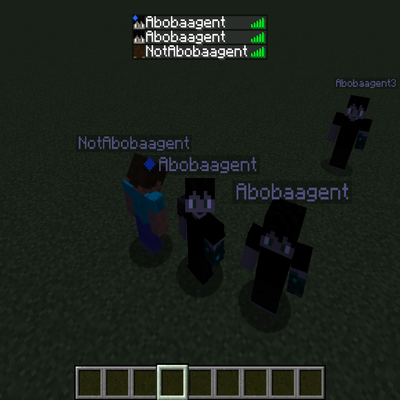
Player Clone is a server-side Minecraft mod for creating realistic player-like clones that look like actual players instead of ordinary armor stands. Give each clone a custom name, choose its skin, change its size, and control its visibility in the player list — all through simple in-game commands.
Player Clone works with vanilla clients, meaning players can see your clones without installing the mod themselves.
Features
- Real Player Skins: Copy a skin from an existing Minecraft username or use a direct Mojang/Minecraft texture URL.
- Custom Names: Give every clone its own name, with optional overhead name-tag customization.
- Adjustable Scale: Resize clones from 0.0625× to 16× their normal size.
- Player List Control: Choose whether clones appear in the in-game player list (TAB).
- NBT Support: Apply custom NBT data when spawning clones and use NBT filters when removing them.
- Easy Clone Management: Remove individual clones or clear all clones with a single command.
- Persistent Clones: Clone data is designed to survive world saves and reloads.
------------------------------------------------------------------------------ Commands
All commands require permission level 2 or higher.
Command/Description
- /playerclone spawn <name> mojang <nick> <scale> <tab> <display> - Create a clone using the skin of an existing Minecraft username.
- /playerclone spawn <name> link <url> <scale> <tab> <display> - Create a clone using a Minecraft/Mojang texture URL.
- /playerclone kill <name> - Remove a clone with the specified name.
- /playerclone kill all - Remove all loaded clones across server dimensions.
- /playerclone kill <name> <nbt> - Remove clones with the specified name that match the given NBT data.
- /playerclone kill all <nbt> - Remove all clones matching the given NBT data.
Command parameters:
- <name> — The clone's internal name.
- <nick> — The Minecraft username whose skin you want to copy.
- <url> — A direct skin texture URL hosted on an accepted Minecraft/Mojang domain.
- <scale> — Clone size multiplier, from 0.0625 to 16.
- <tab> — true to show the clone in the player list, or false to hide it.
- <display> — The clone's displayed player-list name; use false to disable the custom overhead name and use the default hidden name tag.
- <nbt> — Optional Minecraft NBT compound data used to customize a clone or filter clones for removal.
Example:
/playerclone spawn Guard mojang Notch 1.0 true "Server Guard"
Creates a normal-sized clone named Guard using Notch's skin, displays it in the player list, and sets its overhead name to Server Guard.
/playerclone spawn Giant link "https://textures.minecraft.net/texture/YOUR_TEXTURE_HASH" 4.0 false false
Creates a giant clone at four times normal size, hides it from the player list, and disables its custom overhead name.
Why Download PlayerClone?
Want to make your Minecraft server feel more alive? PlayerClone gives you the freedom to populate your world with convincing player-like characters without requiring every player to install another mod.
Use clones as guards at spawn, NPC-like decorations, shopkeepers, mysterious figures, fake players for screenshots, lobby characters, or oversized statues. Recreate memorable players, build immersive environments, or add personality to your server with custom skins and names.
With simple commands, flexible customization, persistent world data, and vanilla client compatibility, PlayerClone is a lightweight tool for server owners, map makers, builders, and content creators who want more creative control over their worlds.
Install PlayerClone and bring your Minecraft world to life — one clone at a time.
Project description from CurseForge.