Minecraft version
Back to mods 
CurseForge · Minecraft mod
Captured Mobs
Capture mobs, automate their drops, and customize your farm with blades, lucky charms, and storage upgrades.
Choose a version Pick your version below, then grab the matching file.
Quick answer
Which Captured Mobs release matches 26.3?
Best match for your filters NeoForge_CapturedMobs-26.3-1.1.1.jar
Game version 26.3
Loader NeoForge
Captured Mobs NeoForge_CapturedMobs-26.3-1.1.1.jar targets 26.3 with NeoForge. The project page does not say whether this file belongs on the client, dedicated server, or both. No extra mods listed for this file.
Where it goes
Is Captured Mobs required on the client, server, or both?
The project page does not say whether this file belongs on the client, dedicated server, or both.
Client Source doesn’t say
Dedicated server Source doesn’t say
Loader for this release NeoForge
Required install it here Optional supported, not mandatory Not supported do not install here Source doesn’t say do not assume
The source does not explicitly classify this release as client-only or server-only.
What else does Captured Mobs NeoForge_CapturedMobs-26.3-1.1.1.jar need?
NeoForge_CapturedMobs-26.3-1.1.1.jar on 26.3. Every mod below is checked against that same setup.
This file does not list any required mods. Do not add a library just because a different file uses it.
This file does not list any required or optional mods.
Before you install it
Add Captured Mobs without breaking your instance.
Built for Captured Mobs NeoForge_CapturedMobs-26.3-1.1.1.jar on 26.3. Pick another file and the loader, install side or required mods may change.
- 01
Stick to this file
Use NeoForge_CapturedMobs-26.3-1.1.1.jar. It targets 26.3 with NeoForge; another release may have different loader, side or dependency requirements.
- 02
Bring the mods it needs
This file does not list any required mods. Do not add a library just because a different file uses it.
- 03
Put it on the correct side
The project page does not say whether this file belongs on the client, dedicated server, or both.
- 04
Pick the file you checked
Use the “Get this file” button beside NeoForge_CapturedMobs-26.3-1.1.1.jar. It opens that exact file at the source.
About this project
What does Captured Mobs add?
CAPTURED MOBS
Capture mobs and build your own automated mob farm! Collect creatures in Capture Balls, place them inside a farm, and upgrade its speed, loot, and storage.
Capture and release
Right-click an adult mob with an empty Capture Ball to capture it instantly. Sneak-right-click the ground to release it again. Captured mobs retain their names and variants, including sheep colors. Baby mobs and bosses cannot be captured.
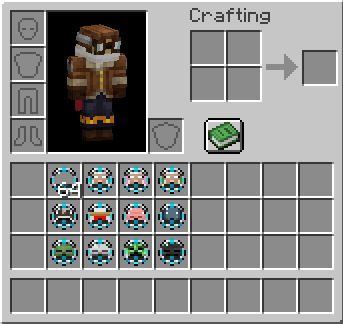
Build your farm
Each farm starts with one mob slot. Add Cage Expansions to unlock up to three slots—all active mobs are farmed together.
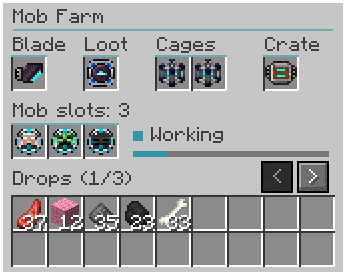
A blade is required to run the farm:
Wood: one cycle every 10 seconds
Stone: every 8 seconds
Iron: every 6 seconds
Diamond: every 4 seconds
Netherite: every 2 seconds
Improve your loot
Lucky Charms apply Looting levels to the farm’s drops:
Iron: Looting I
Emerald: Looting II
Diamond: Looting III
Netherite: Looting IV
Actual drops depend on the mob’s loot table.
Storage and automation
Expand the internal storage from 9 slots to 27 or 54 slots. Use hoppers from above or the sides to supply Capture Balls and blades, and extract drops from below.
Farms require no fuel and generate no experience. Blade durability is disabled by default. Enable it and adjust the wear rate through the in-game configuration. Netherite blades remain unbreakable. Farm-Time changable. Looting 4 Lucky Charm can be disabled.
For players who enjoy mob farming, automatic loot collection, mob capture, hopper automation, and upgradeable farms.
Development disclosure: Developed with AI assistance for code and artwork, with manual editing and gameplay testing. Questions, bug reports, or feature requests? Feel free to reach out to me on Twitter/X: x.com/ilawayy
Project description from CurseForge.
Pick your setup
Captured Mobs by Minecraft version and loader
Choose the version and loader you play, then open the matching release.
Minecraft version
26.2
2 loader buildsMinecraft version
26.1.2
2 loader buildsMinecraft version
26.1.1
2 loader buildsMinecraft version
26.1
2 loader buildsMinecraft version
1.21.1
2 loader buildsCheck the dependencies, then try the file in a copied instance before changing a world you care about.
Recent files
Captured Mobs versions and loaders
NeoForge_CapturedMobs-26.3-1.1.1.jar
28 Oct 2026
Client Source doesn’t say Server Source doesn’t say Dependencies No extras listed Listed on Release listing
Check the 26.3 · NeoForge setup NeoForge26.3 release
Fabric_CapturedMobs-26.3-1.1.1.jar
28 Oct 2026
Client Source doesn’t say Server Source doesn’t say Dependencies 2 required · 2 unchecked Listed on Release listing
Check the 26.3 · Fabric setup Fabric26.3 release
Fabric_CapturedMobs-26.3-1.1.0.jar
captured-mobs-1.1.0-fabric-mc26.3.jar
28 Oct 2026
Client Source doesn’t say Server Source doesn’t say Dependencies 2 required · 2 unchecked Listed on Release listing
Check the 26.3 · Fabric setup Fabric26.3 release
NeoForge_CapturedMobs-26.3-1.1.0.jar
captured-mobs-1.1.0-mc26.3.jar
27 Oct 2026
Client Source doesn’t say Server Source doesn’t say Dependencies No extras listed Listed on Release listing
Check the 26.3 · NeoForge setup NeoForge26.3 release
Looking for an older file? The official CurseForge project page is in Resources.
 mod
CurseForge + Modrinth · Minecraft
Simple Tracking Compass
Simple Tracking Compass is a Minecraft mod that adds a Compass to the top-left corner of your screen which lets you track other players.
 mod
CurseForge + Modrinth · Minecraft
KoHs Inventory Tweaks
Fast, precise, and fully customizable client-side inventory controls
 mod
CurseForge + Modrinth · Minecraft
World Portal
Create custom world portal to travel between dimensions.