Minecraft version
Back to mods 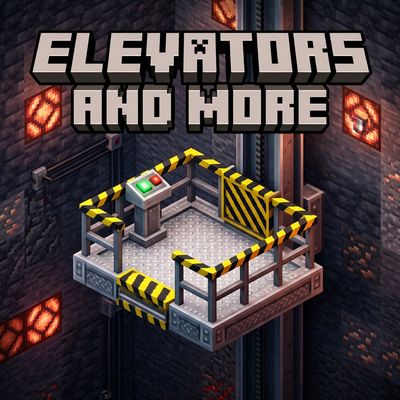
CurseForge · Minecraft mod
Elevators and More
Elevators and More brings heavy-duty, realistic, multi-floor industrial elevators and travel utilities into Minecraft
Choose a version Pick your version below, then grab the matching file.
Quick answer
Which Elevators and More release should I use?
Latest stable file elevatorsandmore-1.0.0.jar
Game version 26.3
Loader NeoForge
Elevators and More elevatorsandmore-1.0.0.jar targets 26.3 with NeoForge. The project page does not say whether this file belongs on the client, dedicated server, or both. No extra mods listed for this file.
Where it goes
Is Elevators and More required on the client, server, or both?
The project page does not say whether this file belongs on the client, dedicated server, or both.
Client Source doesn’t say
Dedicated server Source doesn’t say
Loader for this release NeoForge
Required install it here Optional supported, not mandatory Not supported do not install here Source doesn’t say do not assume
The source does not explicitly classify this release as client-only or server-only.
What else does Elevators and More elevatorsandmore-1.0.0.jar need?
elevatorsandmore-1.0.0.jar. Change the file and its required mods may change too.
This file does not list any required mods. Do not add a library just because a different file uses it.
This file does not list any required or optional mods.
Before you install it
Add Elevators and More without breaking your instance.
Built for Elevators and More elevatorsandmore-1.0.0.jar. Pick another file and the loader, install side or required mods may change.
- 01
Stick to this file
Use elevatorsandmore-1.0.0.jar. It targets 26.3 with NeoForge; another release may have different loader, side or dependency requirements.
- 02
Bring the mods it needs
This file does not list any required mods. Do not add a library just because a different file uses it.
- 03
Put it on the correct side
The project page does not say whether this file belongs on the client, dedicated server, or both.
- 04
Pick the file you checked
Use the “Get this file” button beside elevatorsandmore-1.0.0.jar. It opens that exact file at the source.
About this project
What does Elevators and More add?
Elevators and More
Elevators and More brings heavy-duty, realistic, multi-floor industrial elevators and travel utilities into Minecraft 26.3 with smooth entity movement and custom platform building!
Tired of simple instant-teleport elevators? Elevators and More lets you construct true dynamic elevator platforms with physical rails, wall call stations, onboard control pedestals, safety railings, and realistic mechanical sound effects.
🛗 Features at a Glance
- 🏗️ Custom Platform Footprint: Build platforms of any shape and size up to 49 blocks (configurable up to 121 blocks) using
Industrial Elevator Floorblocks. - 🚡 Smooth Moving Carriages: Platforms smoothly turn into physical entities while in motion with collision and camera interpolation—no jittering or clipping through the floor!
- 📶 Multi-Floor Shafts: Place
Industrial Guide Railsvertically from bedrock all the way to build height (up to 384+ blocks). - 🎛️ Elevator Control Boards (Landings):
- Place control boards at each floor level.
- Automatically discovers floors along the vertical shaft.
- Includes a
DOCKEDindicator light so you know when the carriage is ready. - Call the elevator directly to your floor or send it anywhere.
- Rename floor stops (e.g. "Deepslate Quarry", "Basement Storage", "Penthouse").
- 🕹️ Onboard Control Pedestal:
- Install a control column right on your moving platform.
- Select your destination floor mid-ride or slam the Emergency Stop button if something is blocking your way.
- 🚧 Industrial Safety Railings: Keep your passengers, pets, and cargo securely on the platform.
- 🔊 Atmospheric Audio: Mechanical gear sounds, motor hums, and solid iron docking clunks when arriving at a floor.
📖 Quick Start Guide
Step 1: Guide Rail Column
Place a vertical column of Industrial Guide Rails along the wall of your elevator shaft from bottom to top.
Step 2: Build the Elevator Platform
At your desired starting level, construct the floor of your platform using Industrial Elevator Floor blocks touching or adjacent to the Guide Rail. Add Industrial Safety Railings around the perimeter and place an Elevator Control Pedestal on the floor so you can operate it from inside.
Step 3: Install Floor Landing Boards
On each floor where you want the elevator to stop, mount an Elevator Control Board on the wall within 2 blocks of the platform edge.
Step 4: Configure & Ride!
Right-click your Control Board or Pedestal to open the custom GUI:
- Rename the floor station if desired (e.g. "Floor 1 - Base").
- Press Call Elevator Here to bring the platform to your level.
- Step aboard, open the pedestal interface, choose your destination, and hit Go!
🔨 Crafting Recipes
- Industrial Guide Rail (x6): 2 columns of Iron Ingots sandwiching Iron Bars in the middle.
- Industrial Elevator Floor (x4): 4 Iron Ingots cross-pattern around Smooth Stone.
- Industrial Safety Railing (x6): 3 Iron Bars along top, 2 Yellow Dye below.
- Elevator Control Board (x2): Stone Button flanked by Redstone Torches, with Iron Ingots top and bottom.
- Elevator Control Pedestal (x1): Stone Button on top, Redstone in the middle, Iron Ingot on bottom.
⚙️ Configuration Options
Server admins and pack makers can configure the following in the config file:
maxPlatformBlocks: Maximum number of platform floor blocks (Default:49, Max:121).maxHorizontalSpan: Maximum horizontal reach from the guide rail (Default:7).maxShaftHeight: Maximum vertical travel height (Default:384blocks).elevatorSpeed: Travel speed in blocks per tick (Default:0.20= 4 blocks per second).
📌 Requirements
- Minecraft: 26.3
- Mod Loader: NeoForge (version 26.3.0.48-beta or later)
- Environment: Client and Server required.
💬 Modpacks & Permissions
You are welcome to include Elevators and More in any public or private modpack!
Project description from CurseForge.
Pick your setup
Elevators and More by Minecraft version and loader
Choose the version and loader you play, then open the matching release.
Check the dependencies, then try the file in a copied instance before changing a world you care about.
Recent files
Elevators and More versions and loaders
elevatorsandmore-1.0.0.jar
25 Oct 2026
Client Source doesn’t say Server Source doesn’t say Dependencies No extras listed Listed on Release listing
Check the 26.3 · NeoForge setup NeoForge26.3 release
Looking for an older file? The official CurseForge project page is in Resources.
 mod
CurseForge · Minecraft
SKY ACES
Dogfight in 30+ flyable jets, WWII warbirds and helicopters, then take warships and submarines to sea. F-22, F-35, Spitfire, Apache, a sailing Nimitz carrier, air refuelling and a campaign. (Formerly known as Fighter Jets Overhaul)
 mod
CurseForge · Minecraft
Ant Colonies
Catch wild ants, raise Queens in living Formicariums, and grow colonies that produces resources
 mod
Modrinth · Minecraft
UniverseGate
Create your own portals between long distance and dimensions and discover the Rift dimension!