Minecraft version
Back to mods 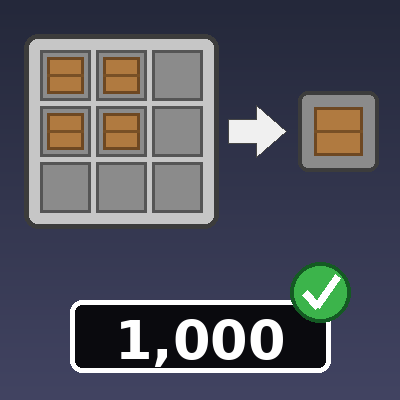
CurseForge · Minecraft mod
BulkCrafting
Type how many items you want (or how many stacks), shift-click the result, and craft huge no of items at once straight from your inventory. Clear warnings tell you exactly what you are missing, in stacks.
Choose a version Pick your version below, then grab the matching file.
Quick answer
Which BulkCrafting release should I use?
Latest stable file bulkcrafting-26.3.jar
Game version 26.3
Loader NeoForge
bulkcrafting-26.3.jar targets 26.3 with NeoForge. The project page does not say whether this file belongs on the client, dedicated server, or both. No extra mods listed for this file.
Where it goes
Is BulkCrafting required on the client, server, or both?
The project page does not say whether this file belongs on the client, dedicated server, or both.
Client Source doesn’t say
Dedicated server Source doesn’t say
Loader for this release NeoForge
Required install it here Optional supported, not mandatory Not supported do not install here Source doesn’t say do not assume
The source does not explicitly classify this release as client-only or server-only.
What else does bulkcrafting-26.3.jar need?
bulkcrafting-26.3.jar. Change the file and its required mods may change too.
This file does not list any required mods. Do not add a library just because a different file uses it.
This file does not list any required or optional mods.
Before you install it
Add BulkCrafting without breaking your instance.
Built for bulkcrafting-26.3.jar. Pick another file and the loader, install side or required mods may change.
- 01
Stick to this file
Use bulkcrafting-26.3.jar. It targets 26.3 with NeoForge; another release may have different loader, side or dependency requirements.
- 02
Bring the mods it needs
This file does not list any required mods. Do not add a library just because a different file uses it.
- 03
Put it on the correct side
The project page does not say whether this file belongs on the client, dedicated server, or both.
- 04
Pick the file you checked
Use the “Get this file” button beside bulkcrafting-26.3.jar. It opens that exact file at the source.
About this project
What does BulkCrafting add?
Bulk Crafting
Stop shift-clicking the crafting result hundreds of times. Bulk Crafting adds two small number boxes to the crafting table so you can craft a huge amount in one click.
How to use
- Put a recipe in the crafting grid (by hand or with the recipe book).
- Click a box and type a number:
- amount (under the result slot): the exact number of items you want.
- stacks (above the result slot): whole stacks of the result item. Typing 2 for an item that stacks to 64 means 128 items.
- Shift-click the result slot.
If you fill in both boxes, they are added together. Leave both empty and the crafting table works exactly like vanilla.
Features
- Craft up to 50,000 items in one go.
- Works with every recipe in the crafting table (3x3 grid).
- Materials are taken from the grid first, then from your inventory and off-hand.
- Amounts are rounded up to whole crafts: asking for 10 planks from a recipe that gives 4 crafts 3 times and gives you 12.
- If your inventory is full, the extra items are dropped on the ground next to you instead of being lost.
- Clear warnings above the crafting menu instead of in chat. If you are short on materials, it adds up the same ingredient across all grid slots and shows the missing amount in stacks, for example
Missing: 31 stacks + 17 Stone. - The boxes only work while a recipe is in the grid. Whole numbers only; no decimals.
- Typing grows outward from the middle of the box, and Ctrl+A / Ctrl+C / Ctrl+X / Ctrl+V, Backspace and Tab work as you would expect.
Installation
- Requires NeoForge (see the supported versions on the Files tab).
- Install on both the client and the server. In single player, one install is enough.
- Drop the jar into your
modsfolder.
Notes
- Server-side crafting: all crafting is validated by the server, so it cannot be used to craft without the materials.
- This mod does not add any blocks, items or recipes.
Project description from CurseForge.
Pick your setup
BulkCrafting by Minecraft version and loader
Choose the version and loader you play, then open the matching release.
Minecraft version
26.2
1 loader buildMinecraft version
26.1.2
1 loader buildMinecraft version
26.1.1
1 loader buildMinecraft version
26.1
1 loader buildMinecraft version
1.21.1
1 loader buildCheck the dependencies, then try the file in a copied instance before changing a world you care about.
Recent files
BulkCrafting versions and loaders
bulkcrafting-26.3.jar
25 Oct 2026
Client Source doesn’t say Server Source doesn’t say Dependencies No extras listed Listed on Release listing
Check the 26.3 · NeoForge setup NeoForge26.3 release
bulkcrafting-26.2.jar
25 Oct 2026
Client Source doesn’t say Server Source doesn’t say Dependencies No extras listed Listed on Release listing
Check the 26.2 · NeoForge setup NeoForge26.2 release
bulkcrafting-26.1.jar
25 Oct 2026
Client Source doesn’t say Server Source doesn’t say Dependencies No extras listed Listed on Release listing
Check the 26.1.2 · NeoForge setup NeoForge26.126.1.126.1.2 release
bulkcrafting-1.21.1.jar
25 Oct 2026
Client Source doesn’t say Server Source doesn’t say Dependencies No extras listed Listed on Release listing
Check the 1.21.1 · NeoForge setup 1.21.1NeoForge release
Looking for an older file? The official CurseForge project page is in Resources.
 mod
CurseForge + Modrinth · Minecraft
Mob Locator
This mod ports the locator bar mechanic to the mobs.
 mod
CurseForge · Minecraft
Minion Farmer
Cute Minions that farm, fish, chop trees and guard for you. They run on emeralds, carry the harvest to a chest, chatter in their own gibberish and nap at night. Plus a jetpack for you to fly!
 mod
CurseForge + Modrinth · Minecraft
Create: Applied Kinetics
Applied Kinetics's integration with Create