Minecraft version
Back to mods 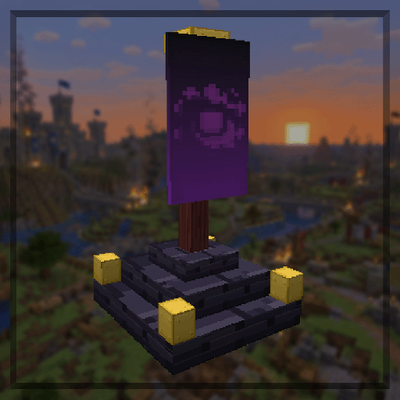
CurseForge · Minecraft mod
WarMod ReForged Edition
Conquer enemy outposts, capture their main bases, and absorb defeated teams as you fight to become the last surviving team in this multiplayer war mod.
Choose a version Pick your version below, then grab the matching file.
Quick answer
Which WarMod ReForged Edition release should I use?
Latest stable file WarMod 1.3.1 (MC 1.20.2)
Game version 1.20.2
Loader NeoForge
WarMod ReForged Edition WarMod 1.3.1 (MC 1.20.2) targets 1.20.2 with NeoForge. The project page does not say whether this file belongs on the client, dedicated server, or both. No extra mods listed for this file.
Where it goes
Is WarMod ReForged Edition required on the client, server, or both?
The project page does not say whether this file belongs on the client, dedicated server, or both.
Client Source doesn’t say
Dedicated server Source doesn’t say
Loader for this release NeoForge
Required install it here Optional supported, not mandatory Not supported do not install here Source doesn’t say do not assume
The source does not explicitly classify this release as client-only or server-only.
What else does WarMod ReForged Edition WarMod 1.3.1 (MC 1.20.2) need?
WarMod 1.3.1 (MC 1.20.2). Change the file and its required mods may change too.
This file does not list any required mods. Do not add a library just because a different file uses it.
This file does not list any required or optional mods.
Before you install it
Add WarMod ReForged Edition without breaking your instance.
Built for WarMod ReForged Edition WarMod 1.3.1 (MC 1.20.2). Pick another file and the loader, install side or required mods may change.
- 01
Stick to this file
Use WarMod 1.3.1 (MC 1.20.2). It targets 1.20.2 with NeoForge; another release may have different loader, side or dependency requirements.
- 02
Bring the mods it needs
This file does not list any required mods. Do not add a library just because a different file uses it.
- 03
Put it on the correct side
The project page does not say whether this file belongs on the client, dedicated server, or both.
- 04
Pick the file you checked
Use the “Get this file” button beside WarMod 1.3.1 (MC 1.20.2). It opens that exact file at the source.
About this project
What does WarMod ReForged Edition add?
WarMod
Build a base. Hide your flags. Conquer everyone else.
A multiplayer base-conquest war for Minecraft on NeoForge.
Required on the server and on the client. No configuration needed.
What is WarMod?
Every player builds a base made of one Main Flag and three Outpost Flags. Everyone starts on their own team. When every player has pressed WAR, the war begins: hunt down enemy outposts, capture their headquarters, and absorb the defeated into your team. The last independent team standing wins.
Everything that matters is decided by the server: mining, captures, votes, ownership and victory. There is no way to fake a capture from the client, and registered flags cannot be broken, moved or blown up once the war starts.
How a war plays out
- Prepare - Place your Main Flag, then three Outpost Flags (A, B and C) within 1,000 blocks of it. Name your base, pick a colour and add a banner.
- Vote - Press WAR in the Main Flag screen. The war starts automatically once every player is online, set up and has voted.
- Hunt - Enemy outposts are marked in the world. Mine them with a pickaxe (a diamond pickaxe takes about 10 seconds). Defenders are warned instantly.
- Capture - Once all three outposts of a base are down, its Main Flag is revealed. Stand in the glowing capture field for 30 seconds.
- Conquer - The defeated team, and every base it controlled, join you. Their flag goes dark for good.
- Win - When only one independent team remains, the war is over.
Features
- Two custom flag blocks with real banner rendering; during a capture the defender's banner lowers while the attacker's rises
- Capture field: a glowing ring on the ground marks exactly where to stand, follows the terrain and fills as the capture progresses
- Main Flag screen with base name, owner, controlling team, banner preview, outpost status and distance, requirements and votes
- Shared team progress: any teammate can continue an outpost or capture where another left off
- Defender warnings: "WARNING: OUTPOST B UNDER ATTACK - ATTACKER: PlayerName"
- Defenders can fight back: standing in the field reverses an enemy capture
- In-world waypoints for the objectives you may attack (no minimap mod needed)
- Flag Finder: a handheld tool that says whether you are getting closer or farther from the nearest enemy flag
- Real conquest: members, every controlled base and all progress transfer to the conqueror
- Locked and protected once the war starts: no breaking, moving, exploding or pushing flags, even in creative mode
- Persistent across restarts, chunk unloading and reconnects
- Operator toolkit including solo-testing commands
Crafting recipes
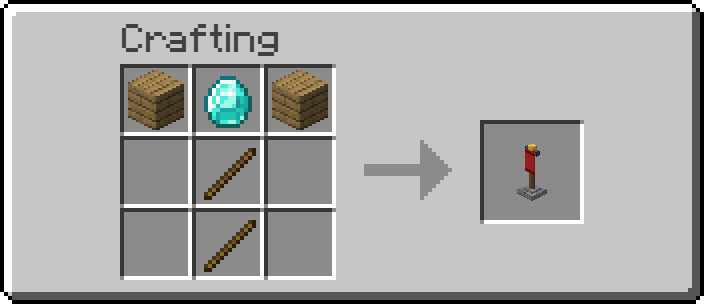
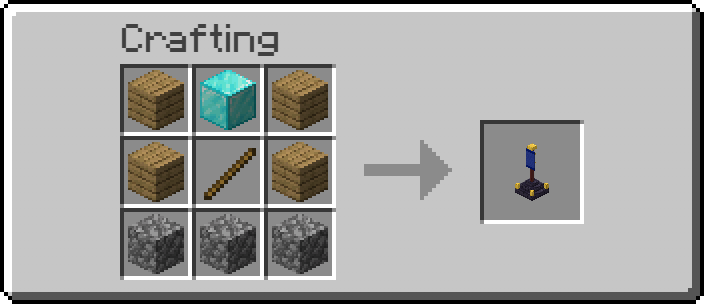
All three items are shaped recipes and are also in the WarMod creative tab.
Outpost Flag
Main Flag
Flag Finder
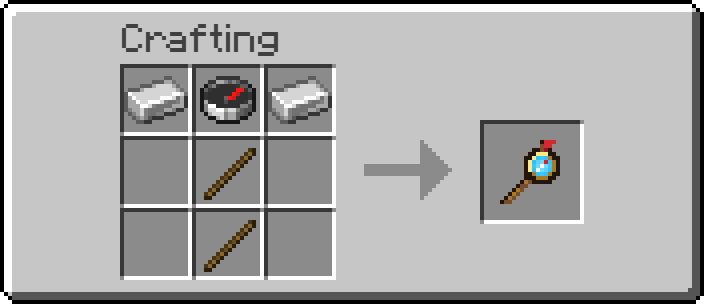
The Flag Finder
Hold it in either hand during a war. The action bar says whether you are getting closer or getting farther from the nearest enemy flag, with a rough range. A chime plays when the trend changes (high pitch = closer, low pitch = farther). It always points at the nearest flag you can attack: an outpost, or a Main Flag once all three of its outposts are down. It never shows an exact distance and only uses targets the server already lets you see.
Rules at a glance
| Topic | Rule |
|---|---|
| Base layout | 1 Main Flag + 3 Outposts (A, B, C), each within 1,000 blocks (horizontal) of the Main Flag, same dimension |
| Starting | All players online, set up and voted; at least 2 players; the roster locks at the start |
| Mining an outpost | Pickaxe only: wood 30 s, gold 24 s, stone 20 s, iron 14 s, diamond 10 s, netherite 8 s |
| Capturing a Main Flag | All 3 outposts destroyed by your team, then 30 s inside the 8-block capture field |
| Interruptions | Progress is kept when you leave; teammates continue it; defenders reverse it |
| Conquest | The defeated team and all bases it controlled join the winner; the captured flag is permanently inactive |
| Victory | Exactly one independent team remains |
For server owners
| Command | Purpose |
|---|---|
/war status, participants, teams, flags |
Inspect the war |
/war diagnose [player] |
Find exactly why a setup is invalid |
/war repair, /war restore |
Fix a flag whose block went missing |
/war end, /war reset |
End a stuck war and clear the results (click-to-confirm) |
/war testbase, /war forcestart |
Test a whole war alone |
FAQ
Do all players need the mod? Yes: install it on the server and on every client.
Can players join late? No. The roster locks when the war starts. Reconnecting players resume as normal.
What if someone never comes back? Their team can still be conquered, so the war can always end.
Can flags be griefed? Not once the war has started.
Does adding a banner use it up? No. The design is copied.
Can I try it alone? Yes: /war testbase, place your own flags, then press WAR or run /war forcestart.
License
(c) 2026 WarMod Team. All rights reserved.
You may play WarMod, run it on servers, feature it in videos and streams (including monetised ones), and include the unmodified official file in free modpacks with credit and a link back to this page. You may not copy or re-upload it, modify or fork it, reuse its code or art, or sell it or profit from it in any other way. WarMod is an unofficial mod and is not affiliated with Mojang or Microsoft.
Project description from CurseForge.
Pick your setup
WarMod ReForged Edition by Minecraft version and loader
Choose the version and loader you play, then open the matching release.
Minecraft version
26.2
1 loader buildMinecraft version
26.1.2
1 loader buildMinecraft version
1.21.11
1 loader buildMinecraft version
1.21.10
1 loader buildMinecraft version
1.21.8
1 loader buildMinecraft version
1.21.5
1 loader buildMinecraft version
1.21.4
1 loader buildMinecraft version
1.21.3
1 loader buildMinecraft version
1.21.1
1 loader buildMinecraft version
1.21
1 loader buildMinecraft version
1.20.6
1 loader buildShowing the newest 12 of 14 game versions. Older files are in the list below.
Check the dependencies, then try the file in a copied instance before changing a world you care about.
Recent files
WarMod ReForged Edition versions and loaders
WarMod 1.3.1 (MC 1.20.2)
warmod-1.20.2-1.3.1.jar
3 Nov 2026
Client Source doesn’t say Server Source doesn’t say Dependencies No extras listed Listed on Release listing
Check the 1.20.2 · NeoForge setup 1.20.2NeoForge release
WarMod 1.3.1 (MC 1.21.5)
warmod-1.21.5-1.3.1.jar
3 Nov 2026
Client Source doesn’t say Server Source doesn’t say Dependencies No extras listed Listed on Release listing
Check the 1.21.5 · NeoForge setup 1.21.5NeoForge release
WarMod 1.3.1 (MC 1.21.8)
warmod-1.21.8-1.3.1.jar
3 Nov 2026
Client Source doesn’t say Server Source doesn’t say Dependencies No extras listed Listed on Release listing
Check the 1.21.8 · NeoForge setup 1.21.8NeoForge release
WarMod 1.3.1 (MC 1.20.4)
warmod-1.20.4-1.3.1.jar
3 Nov 2026
Client Source doesn’t say Server Source doesn’t say Dependencies No extras listed Listed on Release listing
Check the 1.20.4 · NeoForge setup 1.20.4NeoForge release
WarMod 1.3.1 (MC 1.21)
warmod-1.21-1.3.1.jar
3 Nov 2026
Client Source doesn’t say Server Source doesn’t say Dependencies No extras listed Listed on Release listing
Check the 1.21 · NeoForge setup 1.21NeoForge release
WarMod 1.3.1 (MC 1.20.6)
warmod-1.20.6-1.3.1.jar
3 Nov 2026
Client Source doesn’t say Server Source doesn’t say Dependencies No extras listed Listed on Release listing
Check the 1.20.6 · NeoForge setup 1.20.6NeoForge release
WarMod 1.3.1 (MC 1.21.4)
warmod-1.21.4-1.3.1.jar
3 Nov 2026
Client Source doesn’t say Server Source doesn’t say Dependencies No extras listed Listed on Release listing
Check the 1.21.4 · NeoForge setup 1.21.4NeoForge release
WarMod 1.3.1 (MC 1.21.3)
warmod-1.21.3-1.3.1.jar
3 Nov 2026
Client Source doesn’t say Server Source doesn’t say Dependencies No extras listed Listed on Release listing
Check the 1.21.3 · NeoForge setup 1.21.3NeoForge release
WarMod 1.3.1 (MC 1.21.11)
warmod-1.21.11-1.3.1.jar
3 Nov 2026
Client Source doesn’t say Server Source doesn’t say Dependencies No extras listed Listed on Release listing
Check the 1.21.11 · NeoForge setup NeoForge1.21.11 release
WarMod 1.3.1 (MC 1.21.10)
warmod-1.21.10-1.3.1.jar
3 Nov 2026
Client Source doesn’t say Server Source doesn’t say Dependencies No extras listed Listed on Release listing
Check the 1.21.10 · NeoForge setup NeoForge1.21.10 release
WarMod 1.3.1 (MC 26.2)
warmod-26.2-1.3.1.jar
3 Nov 2026
Client Source doesn’t say Server Source doesn’t say Dependencies No extras listed Listed on Release listing
Check the 26.2 · NeoForge setup NeoForge26.2 release
WarMod 1.3.1 (MC 26.3)
warmod-26.3-1.3.1.jar
3 Nov 2026
Client Source doesn’t say Server Source doesn’t say Dependencies No extras listed Listed on Release listing
Check the 26.3 · NeoForge setup NeoForge26.3 release
Looking for an older file? The official CurseForge project page is in Resources.
 mod
CurseForge + Modrinth · Minecraft
Runeborn | Soulslike RPG progression
A soulslike RPG overhaul: earn runes, level eight attributes at Ember Shrines, wield 74 scaling armaments and hunt seven Sovereigns.
 mod
CurseForge · Minecraft
Savaru's Affixology [Fabric/NeoForge]
An advanced RPG affix system that transforms weapons with rarity tiers, dynamic effects, and secret inscriptions.
 mod
CurseForge · Minecraft
Minecolonies: War 'N Taxes
War and Taxes Addon for Minecolonies