Minecraft version
Back to mods 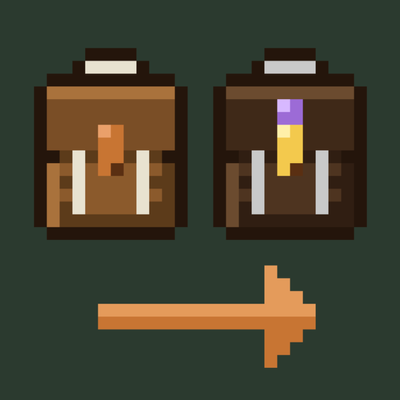
CurseForge · Minecraft mod
Packwright
Backpacks with a spare elytra slot, one-click quick-stack into nearby chests, auto-refill while building, sorting and a one-key wing swap.
Choose a version Pick your version below, then grab the matching file.
Quick answer
Which Packwright release should I use?
Latest stable file packwright_qol-1.0.0.jar
Game version 1.21.1
Loader NeoForge
packwright_qol-1.0.0.jar targets 1.21.1 with NeoForge. The project page does not say whether this file belongs on the client, dedicated server, or both. No extra mods listed for this file.
Where it goes
Is Packwright required on the client, server, or both?
The project page does not say whether this file belongs on the client, dedicated server, or both.
Client Source doesn’t say
Dedicated server Source doesn’t say
Loader for this release NeoForge
Required install it here Optional supported, not mandatory Not supported do not install here Source doesn’t say do not assume
The source does not explicitly classify this release as client-only or server-only.
What else does packwright_qol-1.0.0.jar need?
packwright_qol-1.0.0.jar. Change the file and its required mods may change too.
This file does not list any required mods. Do not add a library just because a different file uses it.
This file does not list any required or optional mods.
Before you install it
Add Packwright without breaking your instance.
Built for packwright_qol-1.0.0.jar. Pick another file and the loader, install side or required mods may change.
- 01
Stick to this file
Use packwright_qol-1.0.0.jar. It targets 1.21.1 with NeoForge; another release may have different loader, side or dependency requirements.
- 02
Bring the mods it needs
This file does not list any required mods. Do not add a library just because a different file uses it.
- 03
Put it on the correct side
The project page does not say whether this file belongs on the client, dedicated server, or both.
- 04
Pick the file you checked
Use the “Get this file” button beside packwright_qol-1.0.0.jar. It opens that exact file at the source.
About this project
What does Packwright add?
Packwright
Backpacks, quick-stack, auto-refill, sorting and an elytra swap in one small, vanilla-style mod for NeoForge 1.21.1.
Packs
- Leather Field Pack: 27 slots, crafted from leather, string, copper and a chest or barrel.
- Reinforced Artisan Pack: 54 slots. Upgrade your Field Pack with iron, gold, chests and an amethyst shard, and everything inside carries over, name included.
- Each pack has a side slot for a spare chestplate or elytra.
- Open a pack by right-clicking it, pressing B, or right-clicking it in any inventory slot.
- Packs can't hold other packs, shulker boxes or bundles.
Quick-stack
Press K or the copper button. Every item in your main inventory that a nearby chest, barrel or shulker box already holds goes into that container. Items in your pack can go too, if you leave that switched on in the pack.
- Your hotbar, armour, off-hand and locked slots are never touched.
- Furnaces, hoppers and other machines are never used.
- Containers that haven't been opened yet (structure loot) are skipped.
Locked slots
Alt + click an inventory slot to give it a gold border. Quick-stack and sort will leave it alone.
Sort
One button sorts your pack, your inventory, or the chest, barrel, shulker box or ender chest you have open. Matching stacks are merged first.
Auto-refill
Place the last block of a stack, or break your pickaxe, axe, shovel or hoe, and the slot refills from your inventory or pack. Works for the main hand and the off-hand. Switch it on or off inside the pack.
Wing swap
Press G to swap your chestplate for the elytra in your pack's side slot, and press it again to swap back. Without a pack, it uses the first elytra or chestplate in your inventory. Enchantments and durability come along. Curse of Binding is respected.
Built to protect your items
Every transfer happens on the server. It is checked against what was planned and undone completely if anything doesn't add up.
Controls
| Action | Default key |
|---|---|
| Open pack | B |
| Quick-stack | K |
| Wing swap | G |
| Lock slot | Alt + click |
All keys can be rebound under Options → Controls → Key Binds → Packwright. If B, K or G clash with another mod, change them there.
Requirements
- Minecraft 1.21.1 with NeoForge
- Install on both the client and the server. Singleplayer works out of the box.
Server settings
config/packwright_qol-common.toml:
enableQuickStackquickStackRadius(3–16 blocks, default 7)enableAutoRefillenableWingSwapper
Known limits
- Quick-stack doesn't check land-claim mods. Server owners can turn it off or shrink the radius.
- Sorting goes by item ID (blocks first), not creative-menu order.
All code and art are original. License: MIT.
Project description from CurseForge.
Pick your setup
Packwright by Minecraft version and loader
Choose the version and loader you play, then open the matching release.
Check the dependencies, then try the file in a copied instance before changing a world you care about.
Recent files
Packwright versions and loaders
packwright_qol-1.0.0.jar
25 Oct 2026
Client Source doesn’t say Server Source doesn’t say Dependencies No extras listed Listed on Release listing
Check the 1.21.1 · NeoForge setup 1.21.1NeoForge release
Looking for an older file? The official CurseForge project page is in Resources.
 mod
CurseForge · Minecraft
Polis
A registry for land, contracts, money and a court - it records what players do and never prevents it.
 mod
CurseForge · Minecraft
opal Shaders
A shader pack loader for Vulkan and OpenGL.
 mod
CurseForge + Modrinth · Minecraft
Experience Skills
Earn separate experience for each skill just by playing — walking, mining, fighting, swimming, fishing, etc. — and level them up for attribute bonuses that grow with every level.