Back to mods
Foundry Machines project artwork

CurseForge · Minecraft mod

Foundry Machines

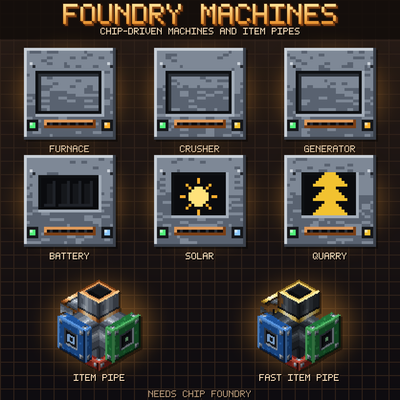
Chip-driven machines for expert packs: electric furnace, crusher, fuel generator, battery, solar field, quarry and item pipes. Logic chips set speed, memory chips set buffers. Needs Chip Foundry.

Choose a version Pick your version below, then grab the matching file.

Quick answer

Which Foundry Machines release should I use?

Updated 12 days ago
beta file Foundry Machines 0.1.0
Game version 1.21.1
Loader NeoForge

Foundry Machines 0.1.0 targets 1.21.1 with NeoForge. The project page does not say whether this file belongs on the client, dedicated server, or both. All 1 required mods have matching files.

Where it goes

Is Foundry Machines required on the client, server, or both?

The project page does not say whether this file belongs on the client, dedicated server, or both.

Client Source doesn’t say
Dedicated server Source doesn’t say
Loader for this release NeoForge
Required install it here Optional supported, not mandatory Not supported do not install here Source doesn’t say do not assume

The source does not explicitly classify this release as client-only or server-only.

What else does Foundry Machines 0.1.0 need?

Foundry Machines 0.1.0. Change the file and its required mods may change too.

All 1 required mods have matching files

Install Chip Foundry first. We found matching files for this game-version and loader setup.

Chip Foundry Needed by Foundry Machines 0.1.0
required
Matching file found Matched file: Chip Foundry 0.1.0
We only count dependency files that match this setup. A file for another loader does not fill the gap.

Before you install it

Add Foundry Machines without breaking your instance.

Built for Foundry Machines 0.1.0. Pick another file and the loader, install side or required mods may change.

  1. 01

    Stick to this file

    Use Foundry Machines 0.1.0. It targets 1.21.1 with NeoForge; another release may have different loader, side or dependency requirements.

  2. 02

    Bring the mods it needs

    Install Chip Foundry first. We found matching files for this game-version and loader setup.

  3. 03

    Put it on the correct side

    The project page does not say whether this file belongs on the client, dedicated server, or both.

  4. 04

    Pick the file you checked

    Use the “Get this file” button beside Foundry Machines 0.1.0. It opens that exact file at the source.

About this project

What does Foundry Machines add?

Foundry Machines

Machines where the chip is the tier.

Foundry Machines is a small set of basic machines - furnace, crusher, power, quarry and pipes - that you do not upgrade with upgrade cards but with the chips from Chip Foundry. Every machine has a control bay: logic chips set how fast and how strong it works, memory chips set its buffers and chambers. Better chip nodes and better chip grades make it better. It is made for expert packs, but plays on its own.

What is in it

  • Electric Furnace - smelts everything a furnace smelts, without fuel. Speed, power use, chambers and buffer depend on the chips.
  • Crusher - ore to two raw metals, cobblestone to gravel to sand, raw metal to dust (where a pack has dust). Chance for a by-product such as flint or quartz. Its own recipe type, so packs can add recipes.
  • Fuel Generator - burns anything with a burn time (not items that leave something behind). Output is the number of logic chips times a value per speed step (160 FE/t with four 10 um chips, 2560 with four 7 nm chips); finer chips also burn more efficiently. Memory chips give the buffer. With a full buffer it burns nothing.
  • Battery Bank - capacity from memory chips, throughput from logic chips. Input and output are set per side, a redstone signal stops it, a comparator reads the charge. Keeps its energy when you pick it up.
  • Solar Panels and Solar Inverter - panels are plain blocks; the inverter counts the connected panels of a field (up to a limit per chip stage) and turns them into power by time of day, rain and sky view. Several inverters share one field without counting twice.
  • Quarry - mines a field layer by layer: 2 chunks wide without chips, up to 10 with memory chips. Every block is broken as the owner, so protection mods such as Chunk Market can say no. Bedrock, fluids and blocks with a block entity are left alone. Output slots, a filter and a visible frame.
  • Item Pipe (8 items every 20 ticks) and Fast Item Pipe (32 items every 10 ticks) - connect to pipes and to any block with an item inventory. Each side can be output, input (with a filter) or off; set it by sneaking with an empty hand or with a wrench. No flying items, no buffer: items go round-robin to all targets and never back to the source.

Chip grades from Chip Foundry matter: the better the grade of a chip, the more it gives. Energy goes only through the Forge Energy capability, so the machines work with any other energy mod. All values are in the config.

Requirements

  • Chip Foundry 0.1.1 or newer (required).
  • Optional: JEI (19.51 or newer) shows crusher recipes and the furnace as a smelting place. Jade shows status, progress and chips of a machine.

Minecraft 1.21.1, NeoForge 21.1.x. English and German.

This mod is made for the Margin Call modpack, but works on its own with Chip Foundry.


A note on how this was made

This mod was built with substantial help from AI. I gave the direction; the design, the code, the textures and this text were written by an AI assistant. I would rather say that plainly than have you wonder.

Discord

Questions, bug reports, ideas, or just want to show your factory? Join the Discord - that is where I answer fastest.

Project description from CurseForge.

Pick your setup

Foundry Machines by Minecraft version and loader

Choose the version and loader you play, then open the matching release.

1 available setups

Check the dependencies, then try the file in a copied instance before changing a world you care about.

Recent files

Foundry Machines versions and loaders

1 of 1 releases match

Looking for an older file? The official CurseForge project page is in Resources.