Minecraft version
Back to mods 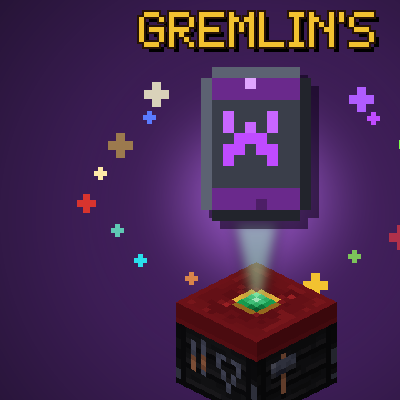
CurseForge · Minecraft mod
Gremlin's Transmogs
Change the appearance of vanilla armour, tools and weapons at a new smithing table
Choose a version Pick your version below, then grab the matching file.
Quick answer
Which Gremlin's Transmogs release should I use?
Latest stable file Gremlin's Transmogs 1.2.1
Game version 1.21.1
Loader NeoForge
Gremlin's Transmogs 1.2.1 targets 1.21.1 with NeoForge. The project page does not say whether this file belongs on the client, dedicated server, or both. No extra mods listed for this file.
Where it goes
Is Gremlin's Transmogs required on the client, server, or both?
The project page does not say whether this file belongs on the client, dedicated server, or both.
Client Source doesn’t say
Dedicated server Source doesn’t say
Loader for this release NeoForge
Required install it here Optional supported, not mandatory Not supported do not install here Source doesn’t say do not assume
The source does not explicitly classify this release as client-only or server-only.
What else does Gremlin's Transmogs 1.2.1 need?
Gremlin's Transmogs 1.2.1. Change the file and its required mods may change too.
This file does not list any required mods. Do not add a library just because a different file uses it.
This file does not list any required or optional mods.
Before you install it
Add Gremlin's Transmogs without breaking your instance.
Built for Gremlin's Transmogs 1.2.1. Pick another file and the loader, install side or required mods may change.
- 01
Stick to this file
Use Gremlin's Transmogs 1.2.1. It targets 1.21.1 with NeoForge; another release may have different loader, side or dependency requirements.
- 02
Bring the mods it needs
This file does not list any required mods. Do not add a library just because a different file uses it.
- 03
Put it on the correct side
The project page does not say whether this file belongs on the client, dedicated server, or both.
- 04
Pick the file you checked
Use the “Get this file” button beside Gremlin's Transmogs 1.2.1. It opens that exact file at the source.
About this project
What does Gremlin's Transmogs add?
Gremlin's Transmogs
Gremlin's Transmogs adds a Transmog Table and 18 themed sets that reskin your armour, weapons, tools and shields. Make your diamond sword a Katana, your netherite chestplate a Dragonlord cuirass with a wing cape, your pickaxe a Pneumatic Drill-Pick, or your shield a Tesla Deflector.
It's purely cosmetic. Stats, enchantments and durability don't change, and armour trims still show, wrapped onto each set's own shape.
Minecraft 1.21.1 · NeoForge
What's New in 1.1.0
- Shields. Every set now has its own shield.
- The hotbar shows the transmog name when you select a transmogged item.
- Pan's Chosen weapons and tools have been redrawn.
- Dark Lord templates now take Netherite Scrap instead of Netherite Ingots.
- Transmog items no longer show up twice in the vanilla creative tabs.
What You Can Transmog
Each set has its own look for all 13 of these:
- Armour: Helmet, Chestplate, Leggings, Boots
- Weapons: Sword, Axe, Trident, Bow, Crossbow
- Tools: Pickaxe, Shovel, Hoe
- Shield
The Transmog Table
This is where you transmog your gear: a black smithing table with a red cloth thrown over it and an emerald set in the top.
| Recipe | |
|---|---|
| Top middle | Amethyst Shard |
| Bottom row | Wool · Smithing Table · Wool |
The Sets
Each set has its own template. Templates work like armour trim templates: one is used up each time you transmog an item.
- Craft a template: 8 Diamonds around the set's material.
- Copy a template: 7 Diamonds, the template (top middle) and the set's material (centre) make two.
| Set | Style | Material |
|---|---|---|
| Paladin | Holy Warrior Knight | Iron Block |
| Dark Lord | Evil Knight | Netherite Scrap |
| Pan's Chosen | Fae | Amethyst Block |
| Pharaoh | Ancient Egyptian Royalty | Gold Block |
| Frost Jarl | Norse Ice Warlord | Diamond Block |
| Clockwork Engineer | Steampunk Inventor | Copper Block |
| Deep Warden | Ancient City Guardian | Sculk |
| Tidecaller | Drowned Sea-King | Prismarine Crystals |
| Samurai | Lacquered Warrior | Redstone Block |
| Seraph | Radiant Angel | Quartz Block |
| Beastmaster | Tribal Hunter | Emerald Block |
| Arcanist | Starry Wizard | Lapis Block |
| Bonecaller | Necromancer | Bone Block |
| Stormbringer | Storm-Sailing Pirate | Dried Kelp Block |
| Voidwalker | Wanderer of the End | Obsidian |
| Dragonlord | Rider of the End | Dragon Egg ✦ |
| Mad Scientist | Lightning-Mad Experimenter | Slime Block |
| Garry of Riveira | White-Haired Monster Hunter | Wolf Armor |
✦ The Dragon Egg is never used up, whether you're crafting a template, copying one or using the table. You always get it back.
How to Use It
- Craft a Transmog Table and place it.
- Craft a template for the set you want.
- Open the table and put in:
- the template
- the item you want to reskin
- one of the set's material
- Take your transmogged item. The template and the material are used up.
Changed your mind? Put a transmogged item in the table on its own to get its original look back, free.
A transmogged item shows its themed name in the hotbar (e.g. Kabuto with Crescent Crest). Hover over it to see that name with the real item underneath.
Extras
- Armour trims work on every set. Trim your armour at a smithing table before or after transmogging it, and the trim wraps around the set's own shape instead of the vanilla armour's.
- The rarest sets (Dragonlord, Dark Lord and Frost Jarl) give off ambient particles. You can turn them down or off in the client config.
- Every item is in the Gremlin's Transmogs creative tab.
Project description from CurseForge.
Pick your setup
Gremlin's Transmogs by Minecraft version and loader
Choose the version and loader you play, then open the matching release.
Check the dependencies, then try the file in a copied instance before changing a world you care about.
Recent files
Gremlin's Transmogs versions and loaders
Gremlin's Transmogs 1.2.1
gremlins-transmogs-1.2.1.jar
10 Nov 2026
Client Source doesn’t say Server Source doesn’t say Dependencies No extras listed Listed on Release listing
Check the 1.21.1 · NeoForge setup 1.21.1NeoForge release
Gremlin's Transmogs 1.2.0
gremlins-transmogs-1.2.0.jar
5 Nov 2026
Client Source doesn’t say Server Source doesn’t say Dependencies No extras listed Listed on Release listing
Check the 1.21.1 · NeoForge setup 1.21.1NeoForge release
Gremlin's Transmogs 1.1.0
gremlins-transmogs-1.1.0.jar
30 Oct 2026
Client Source doesn’t say Server Source doesn’t say Dependencies No extras listed Listed on Release listing
Check the 1.21.1 · NeoForge setup 1.21.1NeoForge release
Gremlin's Transmogs 1.0.0
gremlins-transmogs-1.0.0.jar
25 Oct 2026
Client Source doesn’t say Server Source doesn’t say Dependencies No extras listed Listed on Release listing
Check the 1.21.1 · NeoForge setup 1.21.1NeoForge release
Looking for an older file? The official CurseForge project page is in Resources.
 mod
CurseForge · Minecraft
Traveler's Lantern
Hang a lantern on your belt: it lights your way hands-free with smooth moving light and swings as you move. Works client-only on any server.
 mod
CurseForge · Minecraft
wenxingtools
A functional mod featuring three powerful features
 mod
CurseForge · Minecraft
Create :River Power
Three material upgrades for Create large water wheels with configurable stress and speed.