Minecraft version
Back to mods 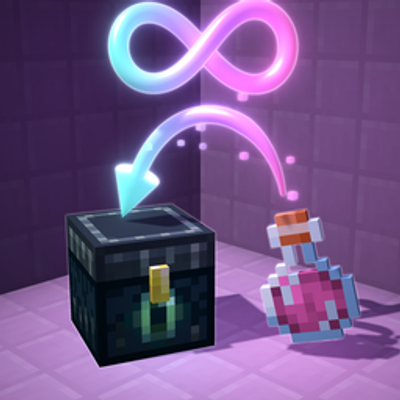
CurseForge · Minecraft mod
Ender Brews
Store 8 potions in your Ender Chest and their effect becomes endless. Server-side, works with vanilla clients.
Choose a version Pick your version below, then grab the matching file.
Quick answer
Which Ender Brews release matches 26.3?
Best match for your filters EnderBrews-1.0.0+mc26.1-26.3
Game version 26.1, 26.1.1, 26.1.2
Loader Fabric, Forge, NeoForge
Ender Brews EnderBrews-1.0.0+mc26.1-26.3 targets 26.1, 26.1.1, 26.1.2 with Fabric, Forge, NeoForge. The project page does not say whether this file belongs on the client, dedicated server, or both. No extra mods listed for this file.
Where it goes
Is Ender Brews required on the client, server, or both?
The project page does not say whether this file belongs on the client, dedicated server, or both.
Client Source doesn’t say
Dedicated server Source doesn’t say
Loader for this release Fabric, Forge, NeoForge
Required install it here Optional supported, not mandatory Not supported do not install here Source doesn’t say do not assume
The source does not explicitly classify this release as client-only or server-only.
What else does Ender Brews EnderBrews-1.0.0+mc26.1-26.3 need?
EnderBrews-1.0.0+mc26.1-26.3 on 26.3. Every mod below is checked against that same setup.
This file does not list any required mods. Do not add a library just because a different file uses it.
This file does not list any required or optional mods.
Before you install it
Add Ender Brews without breaking your instance.
Built for Ender Brews EnderBrews-1.0.0+mc26.1-26.3 on 26.3. Pick another file and the loader, install side or required mods may change.
- 01
Stick to this file
Use EnderBrews-1.0.0+mc26.1-26.3. It targets 26.1, 26.1.1, 26.1.2 with Fabric, Forge, NeoForge; another release may have different loader, side or dependency requirements.
- 02
Bring the mods it needs
This file does not list any required mods. Do not add a library just because a different file uses it.
- 03
Put it on the correct side
The project page does not say whether this file belongs on the client, dedicated server, or both.
- 04
Pick the file you checked
Use the “Get this file” button beside EnderBrews-1.0.0+mc26.1-26.3. It opens that exact file at the source.
About this project
What does Ender Brews add?
Put 8 potions of the same kind in your Ender Chest and that effect becomes endless. Take them out and it's gone.
🧪 How it works
- Brew potions as usual.
- Store 8 of the same potion in your Ender Chest. A shulker box inside the Ender Chest works too, so one box holds 27.
- Enjoy the effect. It shows
∞in the HUD and never runs out. Take the potions out and it's gone.
💡 Good to know
- Only the Ender Chest counts. Not your inventory, not other chests. Every player has their own endless effects.
- Stronger potions stack on top. Drink Strength II over endless Strength I and you get II until it ends, then endless I comes back.
- Milk and totems don't break it. The effects return on the next tick.
- Pause what annoys you. Run
/enderbrewsand click an effect to pause it, for example invisibility or slow falling while you build. - No instant or harmful effects. Healing and harming are never endless. Poison, weakness and the like aren't either, unless the server enables
allow_harmful_effects. - Your server, your rules. You can change the potion count, set it per effect, cap the level and ban effects in the config.
📥 Install
One jar works as a mod and as a plugin. Pick the file for your Minecraft version and loader.
It only has to be on the server. Vanilla clients can join, and in singleplayer you just install it.
Installing it on the client as well adds potion tooltips (Strength: 5/8 in Ender Chest), a chat list that updates in place, click-to-pause on the effect icons and a pause-all key.
⌨️ Commands
| Command | Who | What |
|---|---|---|
/enderbrews |
everyone | Your endless effects and pause buttons |
/enderbrews pause|resume|toggle <effect> |
everyone | Pause or resume one effect |
/enderbrews reload |
operators | Reload the config |
⚙️ Config
config/enderbrews.toml (plugin: plugins/EnderBrews/enderbrews.toml). How many potions you need, per-effect amounts, max level, limits, blacklist and whitelist and more. Every option is commented in the file.
Project description from CurseForge.
Pick your setup
Ender Brews by Minecraft version and loader
Choose the version and loader you play, then open the matching release.
Minecraft version
26.2
4 loader buildsMinecraft version
26.1.2
4 loader buildsMinecraft version
26.1.1
4 loader buildsMinecraft version
26.1
4 loader buildsMinecraft version
1.21.11
4 loader buildsMinecraft version
1.21.1
4 loader buildsForge EnderBrews-1.0.0+mc1.21-1.21.1 1
stable file
· 1 total · 29 Oct 2026Fabric EnderBrews-1.0.0+mc1.21-1.21.1 1
stable file
· 1 total · 29 Oct 2026Quilt EnderBrews-1.0.0+mc1.21-1.21.1 1
stable file
· 1 total · 29 Oct 2026NeoForge EnderBrews-1.0.0+mc1.21-1.21.1 1
stable file
· 1 total · 29 Oct 2026
Minecraft version
1.21
4 loader buildsForge EnderBrews-1.0.0+mc1.21-1.21.1 1
stable file
· 1 total · 29 Oct 2026Fabric EnderBrews-1.0.0+mc1.21-1.21.1 1
stable file
· 1 total · 29 Oct 2026Quilt EnderBrews-1.0.0+mc1.21-1.21.1 1
stable file
· 1 total · 29 Oct 2026NeoForge EnderBrews-1.0.0+mc1.21-1.21.1 1
stable file
· 1 total · 29 Oct 2026
Minecraft version
1.20.1
4 loader buildsCheck the dependencies, then try the file in a copied instance before changing a world you care about.
Recent files
Ender Brews versions and loaders
EnderBrews-1.0.0+mc26.1-26.3
EnderBrews-1.0.0-mc26.1-26.3.jar
29 Oct 2026
Client Source doesn’t say Server Source doesn’t say Dependencies No extras listed Listed on Release listing
Check the 26.3 · Fabric setup FabricForgeNeoForgeQuilt release
Looking for an older file? The official CurseForge project page is in Resources.
 mod
CurseForge + Modrinth · Minecraft
Inventory Slots
A Fabric Minecraft mod for viewing container slot index's at the click of a button! Useful for development/configuration!
 mod
CurseForge + Modrinth · Minecraft
Remnants | RPG Mobs
Monsters grow stronger the farther, deeper and longer you play, with levels, five ranks, sixteen traits and rare named Remnants with boss bars.
 mod
CurseForge · Minecraft
Sleepframe Unfocus Limiter
Client-side FPS saver , caps your frame rate to 30 FPS while the Minecraft window is in the background, then restores your limit. Less heat and GPU load while alt-tabbed.