Minecraft version
Back to mods 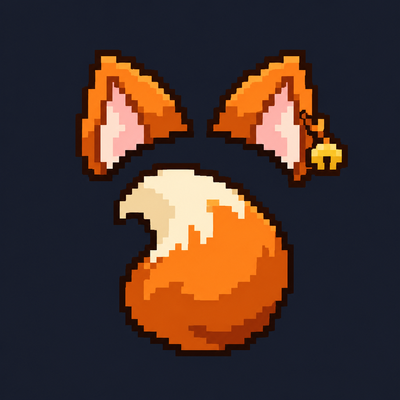
CurseForge · Minecraft mod
🐾 Tailcraft — Ears, Tails & Accessories
Customizable ears, tails, and collars with smooth physics, fluffy styles, and multiplayer support.
Choose a version Pick your version below, then grab the matching file.
Quick answer
Which 🐾 Tailcraft — Ears, Tails & Accessories release should I use?
Latest stable file TailCraft-1.21.1-NeoForge-1.2.8
Game version 1.21.1
Loader NeoForge
🐾 Tailcraft — Ears, Tails & Accessories TailCraft-1.21.1-NeoForge-1.2.8 targets 1.21.1 with NeoForge. The project page does not say whether this file belongs on the client, dedicated server, or both. No extra mods listed for this file.
Where it goes
Is 🐾 Tailcraft — Ears, Tails & Accessories required on the client, server, or both?
The project page does not say whether this file belongs on the client, dedicated server, or both.
Client Source doesn’t say
Dedicated server Source doesn’t say
Loader for this release NeoForge
Required install it here Optional supported, not mandatory Not supported do not install here Source doesn’t say do not assume
The source does not explicitly classify this release as client-only or server-only.
What else does 🐾 Tailcraft — Ears, Tails & Accessories TailCraft-1.21.1-NeoForge-1.2.8 need?
TailCraft-1.21.1-NeoForge-1.2.8. Change the file and its required mods may change too.
This file does not list any required mods. Do not add a library just because a different file uses it.
This file does not list any required or optional mods.
Before you install it
Add 🐾 Tailcraft — Ears, Tails & Accessories without breaking your instance.
Built for 🐾 Tailcraft — Ears, Tails & Accessories TailCraft-1.21.1-NeoForge-1.2.8. Pick another file and the loader, install side or required mods may change.
- 01
Stick to this file
Use TailCraft-1.21.1-NeoForge-1.2.8. It targets 1.21.1 with NeoForge; another release may have different loader, side or dependency requirements.
- 02
Bring the mods it needs
This file does not list any required mods. Do not add a library just because a different file uses it.
- 03
Put it on the correct side
The project page does not say whether this file belongs on the client, dedicated server, or both.
- 04
Pick the file you checked
Use the “Get this file” button beside TailCraft-1.21.1-NeoForge-1.2.8. It opens that exact file at the source.
About this project
What does 🐾 Tailcraft — Ears, Tails & Accessories add?
🐾 Tailcraft — Ears, Tails & Accessories
Give your Minecraft character a personal touch with customizable ears, expressive tails, and neck accessories. Mix different styles, create your own color combinations, and bring them to life with adjustable physics—all through an in-game menu.
✨ Create your own look
- Choose from 10 ear and tail types, including cats, dogs, foxes, wolves, raccoons, rabbits, squirrels, red pandas, and Nanachi-inspired designs.
- Explore five cat-ear variants, including small, fluffy, tufted, and folded ears.
- Adjust ear and tail size, proportions, angles, and bends.
- Choose from 24 tail poses and 10 ear poses.
- Customize outer ears, inner ears, tail colors, and individual tail segments.
- Add gradients, stripes, and contrasting tips.
- Choose short, fluffy, layered, long-lock, or fluffy-tip fur—or keep the tail without extra fur.
🎀 Accessories and neckwear
Complete your character with bows, rings, and bells for ears and tails.
Neckwear includes chains, chokers, spiked collars, leather collars with buckles, double chokers, bandanas, bow collars, and collars with tags or studs. A choker with a yellow bell is also available!
Customize fabric colors, metal finishes, bow styles, and accessory sizes.
🌿 Expressive movement
Tails react to movement and turns, with adjustable follow delay from the base to the tip. Tune stiffness, damping, inertia, and the movement of ears, fur, and pendants.
Enable occasional ear twitches or optional idle tail swaying and wagging. Visual collision lets tails bend away from blocks and the player’s legs.
Physics are cosmetic. Brief clipping may occur during sudden movement or in tight spaces.
🎨 Customize in-game
Press K to open the customization menu, featuring:
- A rotating character preview.
- Three interface themes: Classic, Warm Book, and Sakura.
- Animated menus and buttons.
- English and Russian, selected automatically through Minecraft’s language settings.
The menu key can be changed in Controls. Optional first-person tail visibility is also available.
👥 Multiplayer
To see each other’s cosmetics, install the same Tailcraft version on the server and participating clients. For LAN worlds, the host and guests need the mod.
Without the server mod, your cosmetics remain local to your client.
📦 Requirements
- Minecraft Java Edition 1.21.1 to 26.3
- NeoForge 21.1.259+
- Java 21
- No additional mod libraries required.
Place the JAR in your mods folder, launch the game, and press K to get started!
**Main version: 1.21.1. This version will receive updates first!
(TailCraft mod version 1.2.6 has noticeable bugs related to tail poses. Please download the more stable version 1.2.8)**
Project description from CurseForge.
Pick your setup
🐾 Tailcraft — Ears, Tails & Accessories by Minecraft version and loader
Choose the version and loader you play, then open the matching release.
Minecraft version
26.2
1 loader buildMinecraft version
26.1.2
1 loader buildMinecraft version
26.1.1
1 loader buildMinecraft version
26.1
1 loader buildMinecraft version
1.21.11
1 loader buildMinecraft version
1.21.10
1 loader buildMinecraft version
1.21.9
1 loader buildMinecraft version
1.21.8
1 loader buildMinecraft version
1.21.7
1 loader buildMinecraft version
1.21.6
1 loader buildMinecraft version
1.21.5
1 loader buildShowing the newest 12 of 16 game versions. Older files are in the list below.
Check the dependencies, then try the file in a copied instance before changing a world you care about.
Recent files
🐾 Tailcraft — Ears, Tails & Accessories versions and loaders
TailCraft-1.21.1-NeoForge-1.2.8
tailcraft-1.21.1-neoforge-1.2.8.jar
28 Oct 2026
Client Source doesn’t say Server Source doesn’t say Dependencies No extras listed Listed on Release listing
Check the 1.21.1 · NeoForge setup 1.21.1NeoForge release
TailCraft-1.21.1-NeoForge-1.2.7
tailcraft-1.21.1-neoforge-1.2.7.jar
27 Oct 2026
Client Source doesn’t say Server Source doesn’t say Dependencies No extras listed Listed on Release listing
Check the 1.21.1 · NeoForge setup 1.21.1NeoForge release
TailCraft-26.3-NeoForge-1.2.4
tailcraft-26.3-neoforge-1.2.4.jar
27 Oct 2026
Client Source doesn’t say Server Source doesn’t say Dependencies No extras listed Listed on Release listing
Check the 26.3 · NeoForge setup NeoForge26.3 release
TailCraft-26.2-NeoForge-1.2.4
tailcraft-26.2-neoforge-1.2.4.jar
27 Oct 2026
Client Source doesn’t say Server Source doesn’t say Dependencies No extras listed Listed on Release listing
Check the 26.2 · NeoForge setup NeoForge26.2 release
TailCraft-26.1.2-NeoForge-1.2.4
tailcraft-26.1.2-neoforge-1.2.4.jar
27 Oct 2026
Client Source doesn’t say Server Source doesn’t say Dependencies No extras listed Listed on Release listing
Check the 26.1.2 · NeoForge setup NeoForge26.1.2 release
TailCraft-26.1.1-NeoForge-1.2.4
tailcraft-26.1.1-neoforge-1.2.4.jar
27 Oct 2026
Client Source doesn’t say Server Source doesn’t say Dependencies No extras listed Listed on Release listing
Check the 26.1.1 · NeoForge setup NeoForge26.1.1 release
TailCraft-26.1-NeoForge-1.2.4
tailcraft-26.1-neoforge-1.2.4.jar
27 Oct 2026
Client Source doesn’t say Server Source doesn’t say Dependencies No extras listed Listed on Release listing
Check the 26.1 · NeoForge setup NeoForge26.1 release
TailCraft-1.21.11-NeoForge-1.2.4
tailcraft-1.21.11-neoforge-1.2.4.jar
27 Oct 2026
Client Source doesn’t say Server Source doesn’t say Dependencies No extras listed Listed on Release listing
Check the 1.21.11 · NeoForge setup NeoForge1.21.11 release
TailCraft-1.21.10-NeoForge-1.2.4
tailcraft-1.21.10-neoforge-1.2.4.jar
27 Oct 2026
Client Source doesn’t say Server Source doesn’t say Dependencies No extras listed Listed on Release listing
Check the 1.21.10 · NeoForge setup NeoForge1.21.10 release
TailCraft-1.21.9-NeoForge-1.2.4
tailcraft-1.21.9-neoforge-1.2.4.jar
27 Oct 2026
Client Source doesn’t say Server Source doesn’t say Dependencies No extras listed Listed on Release listing
Check the 1.21.9 · NeoForge setup NeoForge1.21.9 release
TailCraft-1.21.8-NeoForge-1.2.4
tailcraft-1.21.8-neoforge-1.2.4.jar
27 Oct 2026
Client Source doesn’t say Server Source doesn’t say Dependencies No extras listed Listed on Release listing
Check the 1.21.8 · NeoForge setup 1.21.8NeoForge release
TailCraft-1.21.7-NeoForge-1.2.4
tailcraft-1.21.7-neoforge-1.2.4.jar
27 Oct 2026
Client Source doesn’t say Server Source doesn’t say Dependencies No extras listed Listed on Release listing
Check the 1.21.7 · NeoForge setup 1.21.7NeoForge release
Looking for an older file? The official CurseForge project page is in Resources.
 mod
mod CurseForge + Modrinth · Minecraft
Lychee (Neo/Forge)
Define in-world crafting & interactions using JSON recipes. item interaction, burning, touching fluid, anvil, crushing, lightning, exploding...
 mod
mod CurseForge · Minecraft
Truce Dialogue and Town Lib
Dialogue tree library for Minecraft mods
 mod
mod CurseForge · Minecraft
Masters of the Memeverse
Adds one of the most famous and iconic memes to the game: the singing He-Man!