Minecraft version
Back to mods 
CurseForge · Minecraft mod
RPG Health Bar
A highly customizable GUI mod, bringing RPG-style bars to Minecraft.
Choose a version Pick your version below, then grab the matching file.
Quick answer
Which RPG Health Bar release should I use?
Latest stable file v2.0.1-1.20.1-forge.jar
Game version 1.20.1
Loader Forge
RPG Health Bar v2.0.1-1.20.1-forge.jar targets 1.20.1 with Forge. The project page does not say whether this file belongs on the client, dedicated server, or both. No extra mods listed for this file.
Where it goes
Is RPG Health Bar required on the client, server, or both?
The project page does not say whether this file belongs on the client, dedicated server, or both.
Client Source doesn’t say
Dedicated server Source doesn’t say
Loader for this release Forge
Required install it here Optional supported, not mandatory Not supported do not install here Source doesn’t say do not assume
The source does not explicitly classify this release as client-only or server-only.
What else does RPG Health Bar v2.0.1-1.20.1-forge.jar need?
v2.0.1-1.20.1-forge.jar. Change the file and its required mods may change too.
This file does not list any required mods. Do not add a library just because a different file uses it.
This file does not list any required or optional mods.
Before you install it
Add RPG Health Bar without breaking your instance.
Built for RPG Health Bar v2.0.1-1.20.1-forge.jar. Pick another file and the loader, install side or required mods may change.
- 01
Stick to this file
Use v2.0.1-1.20.1-forge.jar. It targets 1.20.1 with Forge; another release may have different loader, side or dependency requirements.
- 02
Bring the mods it needs
This file does not list any required mods. Do not add a library just because a different file uses it.
- 03
Put it on the correct side
The project page does not say whether this file belongs on the client, dedicated server, or both.
- 04
Pick the file you checked
Use the “Get this file” button beside v2.0.1-1.20.1-forge.jar. It opens that exact file at the source.
About this project
What does RPG Health Bar add?
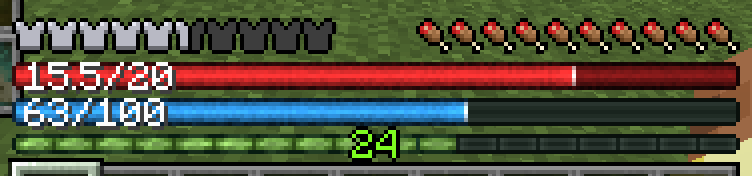
My original plan was to only replace the vanilla hearts with an RPG-style health bar and add a similar mana bar when Iron's Spells 'n Spellbooks is installed, but now this has turned into a full-blown GUI customization mod, optionally supporting BOTH Iron's and Confluence, with the goal of looking not too far from Vanilla.
Features
- Health bar that goes beyond the vanilla max of 20 for mods that increase max health (
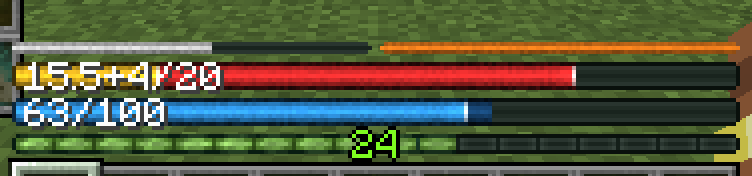
32/40). - Absorption fills the health bar in yellow, and the text shows it separately (
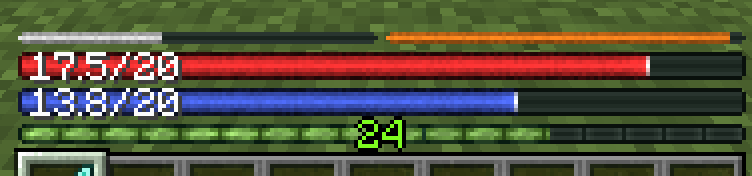
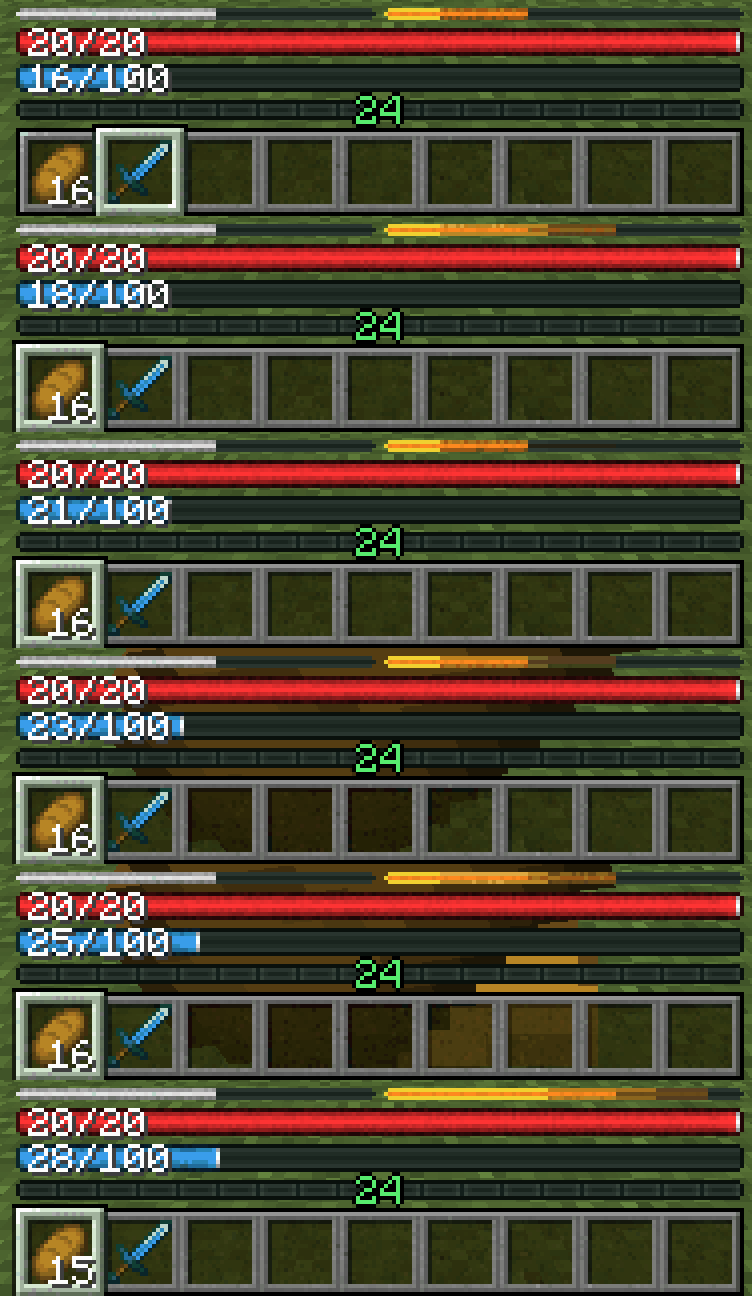
15.5+4/20) or added in (19.5/20). - Mana bar support: Supports mana bars from Iron's Spells 'n Spellbooks and/or Confluence: Otherworld, in the same style as the health bar.
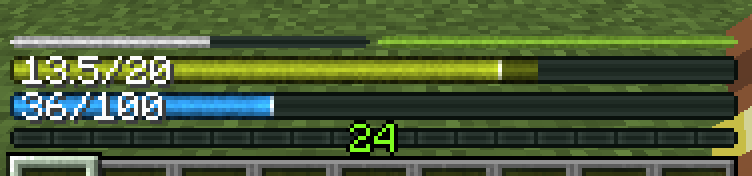
- Status colors: the health bar changes when poisoned, withered or frozen. The hunger bar changes with the Hunger effect. On 1.21.1, heart colors added by other mods are followed too.
- Armor and hunger can be the vanilla icons (default), thin bars, or hidden.
- AppleSkin support: saturation is outlined in yellow on the hunger bar, and held food's value flashes on it, like AppleSkin's preview on the icons.
- Heavy customization: move individual pieces of the HUD wherever you like, and more, explained below.
Armor and hunger as bars, with absorption
Status colors: poison and the Hunger effect
Confluence: Otherworld's mana bar
No mana mod? No mana bar
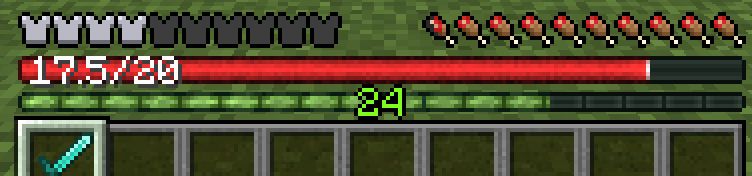
AppleSkin: saturation and food preview
Customization:
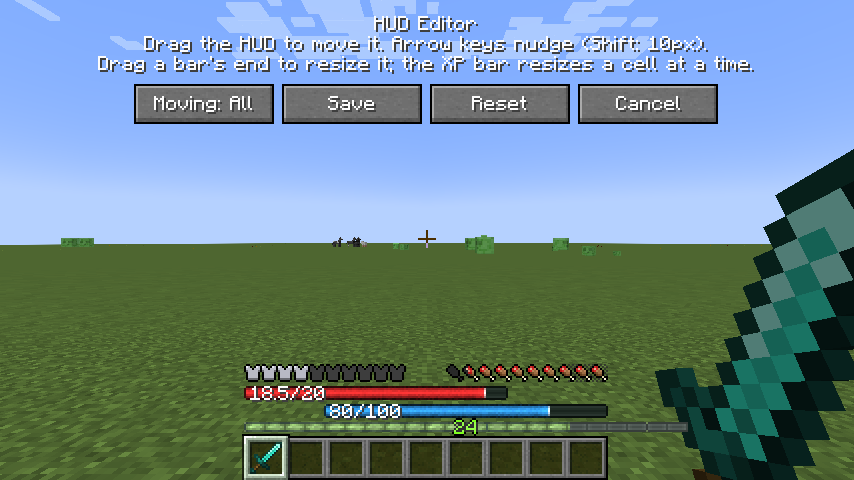
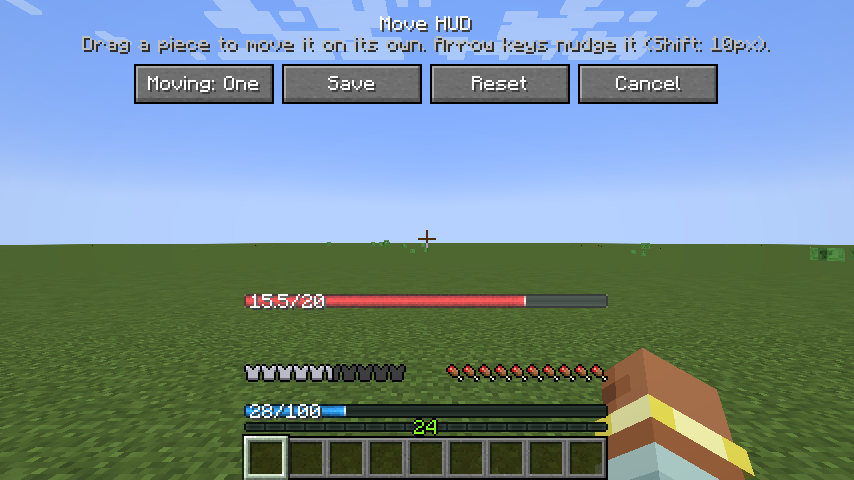
- Move the HUD by dragging it: can either move the whole set, including the XP bar and level, or each piece (armor, hunger, health, each mana bar, XP bar) on its own. It stays in place when you change the window size or GUI scale.
- Half-size bars: health and mana can each be full or half width, and moved individually.
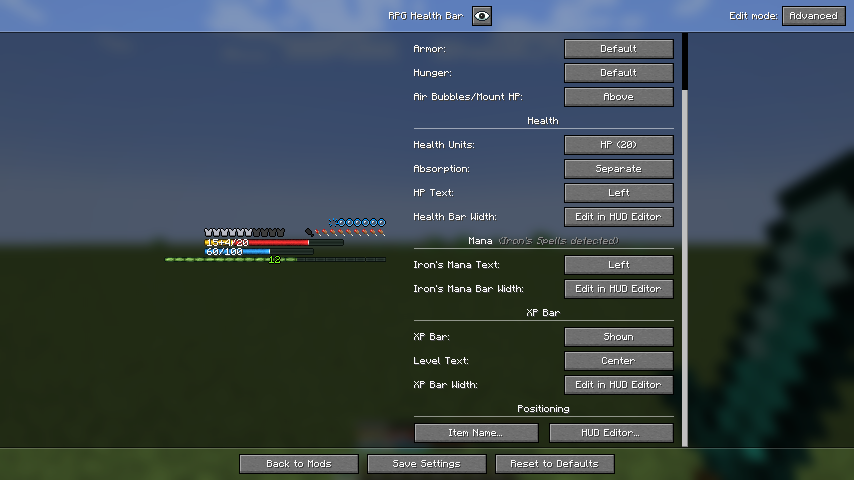
- Advanced edit mode: For users who want even more customization, you can set the health, mana and XP bars to any width by dragging their ends in the HUD Editor.
- XP bar: put the level number in the center or at either end, or hide the XP bar entirely.
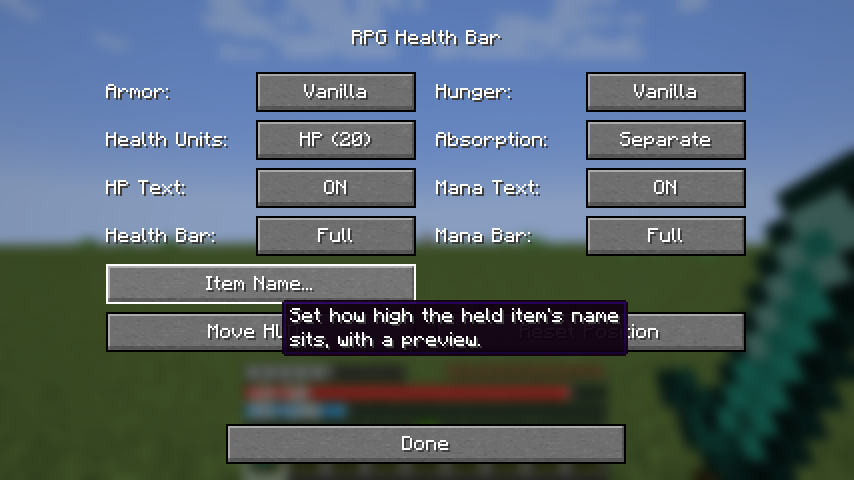
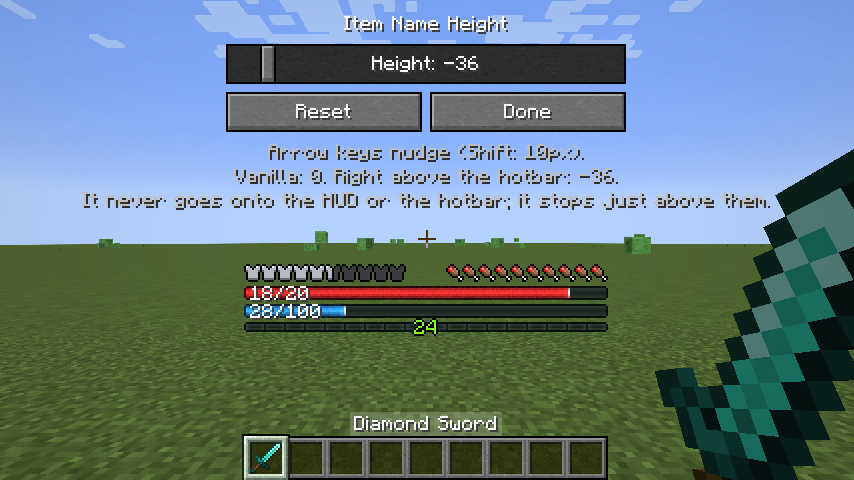
- Item name height: set how high the held item's name sits, with a preview that moves as you change it. It starts at vanilla's height, which leaves room for mods that add hotbars.
- Air bubbles and mount health can sit above hunger, like vanilla, or below it, for layouts with health or mana above hunger.
- Text position: the numbers on the health and mana bars can sit on the left, right or center, or be turned off.
- On/off switch: turn the whole mod off for a fully vanilla HUD, and back on, without losing your settings.
- Live preview: the config screen can show the HUD beside the options, drawn as your settings would, so you see each change without leaving the screen.
- Everything in game: changes show on the HUD as you make them, no restart. Save Settings keeps them, and leaving without saving asks first.
Compatibility
| 1.21.1 (NeoForge) | 1.20.1 (Forge) | |
|---|---|---|
| Mod loader | NeoForge 21.1.1+ | Forge 47.0.0+ |
| Iron's Spells 'n Spellbooks | 3.4.0+ | 1.1.5+ (spell cost preview: 3.1.4+) |
| AppleSkin | 3.0.4+ | 2.5.0+ |
| Confluence: Otherworld | 1.1.4+ | 1.2.9+ |
| Double Hotbar | Any (Double Hotbar NeoForge, unofficial port by retrospective) | 1.3.2.1+ (Double Hotbar by sidezbros) |
- Client-side only: servers don't need it, and it works on servers that don't have it.
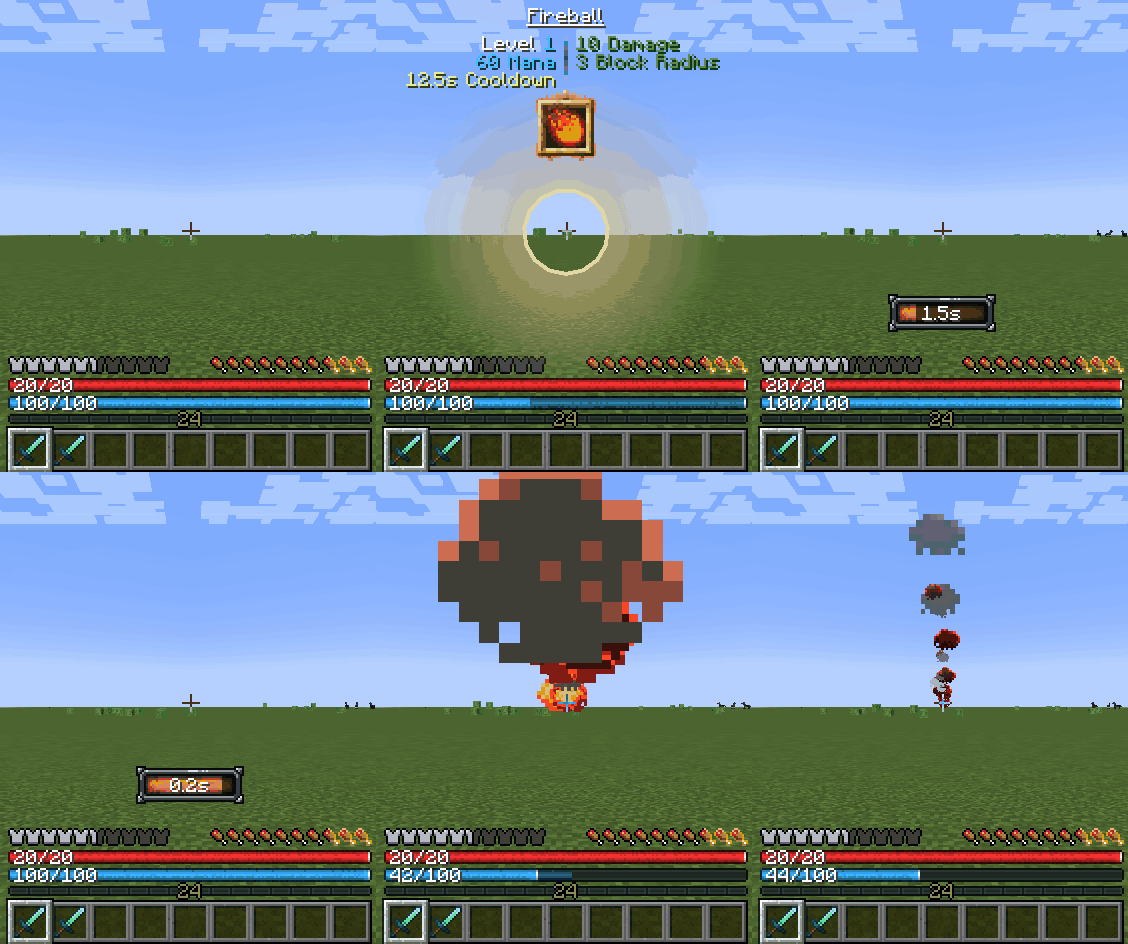
- Iron's Spells 'n Spellbooks by Iron431 and Lab3: optional. When it's installed you get the mana bar and the spell cost preview, and Iron's own mana bar is hidden.
- AppleSkin by squeek502: optional. When it's installed, saturation is outlined in yellow on the hunger bar and held food's value flashes on it; with the vanilla hunger icons, AppleSkin's own overlays move with them.
- Confluence: Otherworld: optional. When it's installed its mana gets its own darker blue bar, below Iron's when both are installed; with Confluence's convertIronsSpellMana on (1.21.1 only: Confluence's Forge build doesn't use it), Iron's spells use Confluence's mana, so only that bar shows, with the spell cost preview. Confluence's own health and mana displays are hidden while this mod is on (in soul mode its soul display stays); with Armor or Hunger on Default, Confluence's own armor and hunger displays show, if they're on in its config. They move with the HUD, like vanilla's. On 1.20.1, Confluence needs a PortLib version that matches it; see Confluence's page.
- Double Hotbar: compatible with Double Hotbar by sidezbros on 1.20.1, and its unofficial NeoForge port, Double Hotbar NeoForge by _retrospective_, on 1.21.1. Open the HUD Editor… and drag the HUD up above the second hotbar once; the bars, XP bar and level move together and stay there, and the item name stays above them.
- Works with other mods that draw near the hotbar the same way: drag the HUD, or just the pieces in the way, clear of them.
- Air bubbles and mount health stay vanilla, stacked above hunger or below it.
- Texture packs: armor and hunger on Default use your pack's icons, and the hotbar, XP bar, air bubbles and mount health stay vanilla, so packs restyle them. The health and mana bars, and armor and hunger as bars, are drawn by the mod and don't change with a pack.
Iron's Spells: what spell cost preview looks like
Settings
The config screen
Advanced mode: the width options open the HUD Editor
Advanced mode: resizing bars in the HUD Editor
Moving the whole HUD
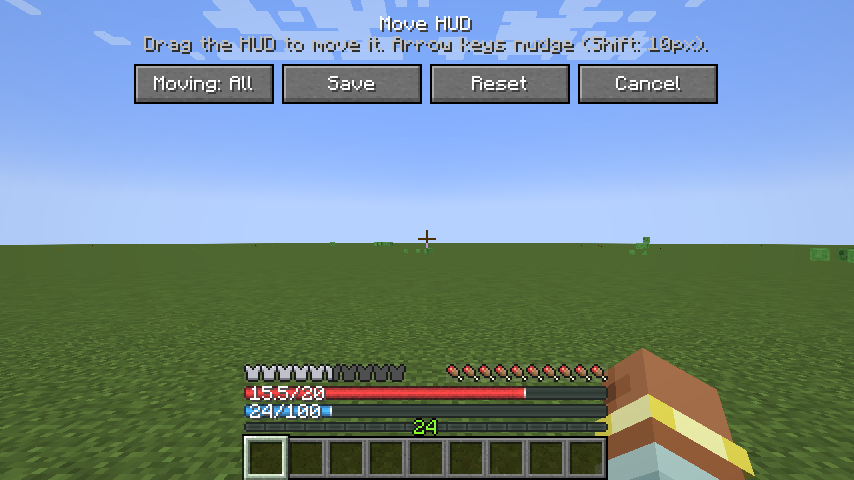
Moving a single piece
Setting the item name height
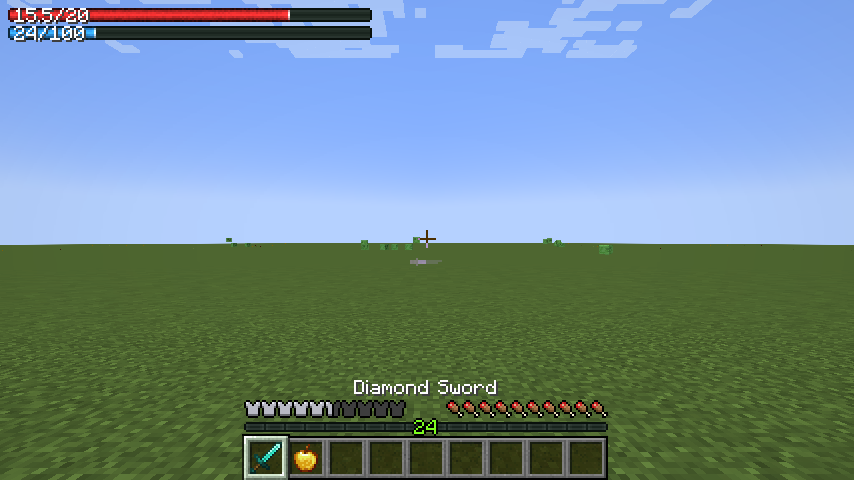
Example layout: health and mana in the top-left
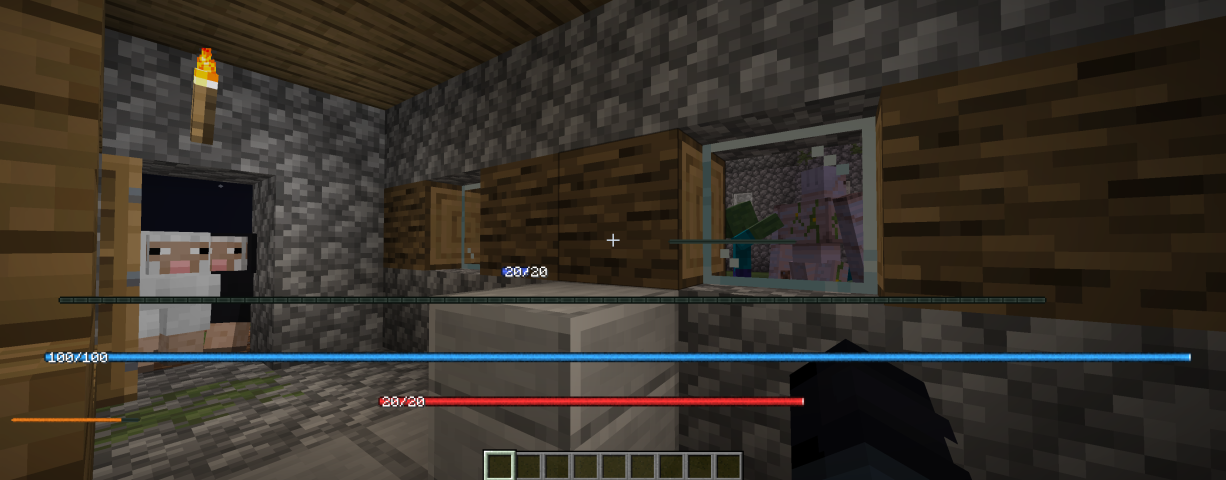
I will not judge you for your layouts even if it looks like this:
Project description from CurseForge.
Pick your setup
RPG Health Bar by Minecraft version and loader
Choose the version and loader you play, then open the matching release.
Minecraft version
1.20.1
1 loader buildCheck the dependencies, then try the file in a copied instance before changing a world you care about.
Recent files
RPG Health Bar versions and loaders
v2.0.1-1.20.1-forge.jar
rpghealthbar-v2.0.1-1.20.1-forge.jar
23 Nov 2026
Client Source doesn’t say Server Source doesn’t say Dependencies No extras listed Listed on Release listing
Check the 1.20.1 · Forge setup 1.20.1Forge release
v2.0.1-1.21.1-neoforge.jar
rpghealthbar-v2.0.1-1.21.1-neoforge.jar
23 Nov 2026
Client Source doesn’t say Server Source doesn’t say Dependencies No extras listed Listed on Release listing
Check the 1.21.1 · NeoForge setup 1.21.1NeoForge release
v2.0.0-1.21.1-neoforge
rpghealthbar-2.0.0.jar
23 Nov 2026
Client Source doesn’t say Server Source doesn’t say Dependencies No extras listed Listed on Release listing
Check the 1.21.1 · NeoForge setup 1.21.1NeoForge release
v2.0.0-1.20.1-forge
rpghealthbar-2.0.0-1.20.1.jar
23 Nov 2026
Client Source doesn’t say Server Source doesn’t say Dependencies No extras listed Listed on Release listing
Check the 1.20.1 · Forge setup 1.20.1Forge release
v1.4.0-1.21.1-neoforge
rpghealthbar-1.4.0.jar
3 Nov 2026
Client Source doesn’t say Server Source doesn’t say Dependencies No extras listed Listed on Release listing
Check the 1.21.1 · NeoForge setup 1.21.1NeoForge release
v1.4.0-1.20.1-forge
rpghealthbar-1.4.0-1.20.1.jar
3 Nov 2026
Client Source doesn’t say Server Source doesn’t say Dependencies No extras listed Listed on Release listing
Check the 1.20.1 · Forge setup 1.20.1Forge release
v1.3.2-1.20.1-forge
rpghealthbar-1.3.2+1.20.1.jar
28 Oct 2026
Client Source doesn’t say Server Source doesn’t say Dependencies No extras listed Listed on Release listing
Check the 1.20.1 · Forge setup 1.20.1Forge release
v1.3.2-1.21.1-neoforge
rpghealthbar-1.3.2.jar
28 Oct 2026
Client Source doesn’t say Server Source doesn’t say Dependencies No extras listed Listed on Release listing
Check the 1.21.1 · NeoForge setup 1.21.1NeoForge release
v1.3.1-1.21.1-neoforge
rpghealthbar-1.3.1.jar
27 Oct 2026
Client Source doesn’t say Server Source doesn’t say Dependencies No extras listed Listed on Release listing
Check the 1.21.1 · NeoForge setup 1.21.1NeoForge release
v1.3.0-1.21.1-neoforge
rpghealthbar-1.3.0.jar
27 Oct 2026
Client Source doesn’t say Server Source doesn’t say Dependencies No extras listed Listed on Release listing
Check the 1.21.1 · NeoForge setup 1.21.1NeoForge release
v1.2.1-1.21.1-neoforge
rpghealthbar-1.2.1.jar
27 Oct 2026
Client Source doesn’t say Server Source doesn’t say Dependencies No extras listed Listed on Release listing
Check the 1.21.1 · NeoForge setup 1.21.1NeoForge release
v1.1.0-1.21.1-neoforge
rpghealthbar-1.1.0.jar
27 Oct 2026
Client Source doesn’t say Server Source doesn’t say Dependencies No extras listed Listed on Release listing
Check the 1.21.1 · NeoForge setup 1.21.1NeoForge release
Looking for an older file? The official CurseForge project page is in Resources.
 mod
CurseForge + Modrinth · Minecraft
ChatSphere
A sleek social chat mod for Minecraft that replaces vanilla chat with channels, private messaging, and a modern GUI.
 mod
CurseForge + Modrinth · Minecraft
Multi Builder Tool
Build Multiblocks with one click
 mod
CurseForge + Modrinth · Minecraft
ServerUtilities - GTNH
Various utilities for players and admins