Minecraft version
Back to mods 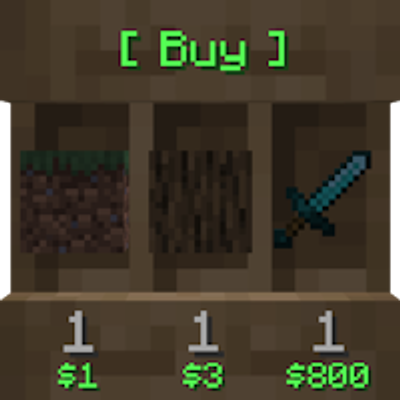
CurseForge · Minecraft mod
ShopShelves
New advanced way of admin shops and playershops. ShopShelves and PlayerShelves
Choose a version Pick your version below, then grab the matching file.
Quick answer
Which ShopShelves release matches 26.3?
Best match for your filters ShopShelves-1.0.14.jar
Game version 26.3
Loader Fabric
ShopShelves-1.0.14.jar targets 26.3 with Fabric. The project page does not say whether this file belongs on the client, dedicated server, or both. No extra mods listed for this file.
Where it goes
Is ShopShelves required on the client, server, or both?
The project page does not say whether this file belongs on the client, dedicated server, or both.
Client Source doesn’t say
Dedicated server Source doesn’t say
Loader for this release Fabric
Required install it here Optional supported, not mandatory Not supported do not install here Source doesn’t say do not assume
The source does not explicitly classify this release as client-only or server-only.
What else does ShopShelves-1.0.14.jar need?
ShopShelves-1.0.14.jar on 26.3. Every mod below is checked against that same setup.
This file does not list any required mods. Do not add a library just because a different file uses it.
This file does not list any required or optional mods.
Before you install it
Add ShopShelves without breaking your instance.
Built for ShopShelves-1.0.14.jar on 26.3. Pick another file and the loader, install side or required mods may change.
- 01
Stick to this file
Use ShopShelves-1.0.14.jar. It targets 26.3 with Fabric; another release may have different loader, side or dependency requirements.
- 02
Bring the mods it needs
This file does not list any required mods. Do not add a library just because a different file uses it.
- 03
Put it on the correct side
The project page does not say whether this file belongs on the client, dedicated server, or both.
- 04
Pick the file you checked
Use the “Get this file” button beside ShopShelves-1.0.14.jar. It opens that exact file at the source.
About this project
What does ShopShelves add?
ShopShelves - Admin Shops & Player-Owned Shops
Using Bukkit, Spigot, Paper, or Purpur?
To get the most accurate list of features and general information for server plugins, please visit the Spigot site:
👉 View the Plugin version on the SpigotMC page
Recommended Client-Side Companion
Looking to enhance the shopping visual experience?
👉 WIITS - Client-side Shopping Mod

ShopShelves transforms the Shelf Block into flexible, server-friendly shops! This powerful server-side Fabric mod allows administrators to create permanent, fixed-price shops and gives players the ability to set up their own chest-linked "Player Shelves" with custom prices, all powered by a configurable in-game economy.
📷 Pictures Explained
The following pictures depict the in-game shelf blocks in order:
- Buy Shop | Sell Shop | Buy & Sell Shop | Custom Label | Player Shop
- Statistics Book → Shows total money earned / lost per slot item.
- Custom Price GUI → Shift right-click a shelf to set custom prices per slot.
- Customer-Friendly Viewer GUI → Inspect full item details (potions, enchantments, NBT data, etc.).


📦 Required Dependencies

Required Mod: EcoBal Economy API
✨ Features
Robust Shop Types
- Admin Shops (Buy / Sell / Dual): Admins can create persistent shops using the Shelf Block for buying, selling, or dual trade. Admin shops are immune to world allowlists and cannot be broken through the front-facing item slots.
- Player Shops (PlayerShelves): Players can create their own shops by Sneaking + Placing a Shelf Block against a chest, barrel, or copper chest.
- Automatically links to the container (including double chests) for stock management.
- Supports custom prices set per slot via the in-game Price GUI (shift right-click the shelf).
- Configurable single-type mode: lock a player shop to one item across all three slots with a shared price, or allow each slot to hold different items.
- Configurable creation limits via permission nodes.
- Breaking the linked container automatically safely resets the shelf back to a plain vanilla shelf without leftover floating displays.
Custom Shop Labels
- Set a custom floating label on any shelf via the Price GUI.
- Supports legacy color codes (
&c,&l, etc.), hex colors (&#RRGGBB), and newline markers (\nor&n). - Surrounding whitespace around newlines is stripped cleanly.
- Length limit (
label_max_lengthinconfig.yml, default 64) measures visible characters only. - Fully configurable bracket formatting in
messages.yml(toggle per-line or full-block brackets). - Right-click the label icon in the Price GUI to clear the label instantly.
Dynamic Item Pricing
- Global Pricing (
pricing.yml): Set default buy/sell values for items—including potions, enchanted books, goat horns, and player heads. - Custom Price Stamps: Use
/shops priceto stamp held items with custom pricing rules to configure shelves on the fly. - Flexible Quantity Ratios: Set prices by quantity (e.g., $10 for 64 blocks); unit values are calculated automatically.
- In-GUI Price Editing: Shift right-click any shelf to edit pricing via increment buttons or exact chat input.
- Instant Price Reset: Reset slot pricing to default values directly inside the GUI.
Statistics Book
- Track cumulative profits and losses per slot for both Admin Shops and Player Shelves.
- All profit/loss metrics persist across server reboots.
Display Aesthetics & Tech
- Dynamic Floating Text: Rendered using vanilla Text Display Entities that sync live with stock and price updates.
- Scale & Distance Tuning: Fully configurable render distances and text scaling multipliers (1–10).
- Two Display Modes:
TRIPLEPRICE(individual price per slot) andSINGLEPRICE(merged price display). - Localization: Supports standard Minecraft locale files (
en_us,de_de,fr_fr, etc.) fetched on boot.
Server Protection & Management
- Break Protection: Shelf item slots (8×16 px hitboxes) ignore normal hit interactions; breaking requires targeting the border bands.
- Container Security: Linked storage cannot be opened or broken by unauthorized players.
- Explosion Proofing: Shelves and linked inventories resist TNT, creeper, and wither damage.
- Auto-Migration: Automatically updates configuration files with newly introduced keys without overwriting existing settings.
- Live Reloading: Refresh configurations on the fly via
/shops reload.
💻 Commands
| Command | Permission | Description |
|---|---|---|
/shops or /shopshelves |
shopshelves.command |
Displays help menu with interactive commands |
/shops admin |
shopshelves.admin |
Toggles Admin Mode to bypass restrictions |
/shops reload |
shopshelves.reload |
Reloads all configuration and pricing files |
/shops update |
shopshelves.update |
Forces a global re-render of text displays |
/shops mode [mode] |
shopshelves.mode |
Sets message target (CHAT/ACTIONBAR) or price style |
/shops itemprice |
shopshelves.itemprice |
Inspects global price settings for held item |
/shops itemprice <price> <type> <amount> |
shopshelves.itemprice |
Sets global price for held item |
/shops price <price> <type> <amount> |
shopshelves.price |
Creates a temporary custom price stamp on held item |
🔑 Permissions
shopshelves.command— Access to/shopshelp command (Default: Everyone)shopshelves.admin— Access to/shops adminmode (OP Level 2)shopshelves.reload— Access to/shops reload(OP Level 2)shopshelves.update— Access to/shops update(OP Level 4)shopshelves.mode— Access to/shops mode(OP Level 4)shopshelves.itemprice— Manage global item pricing (OP Level 2)shopshelves.price— Create custom item price stamps (OP Level 2)shopshelves.playershelf— Permission to create PlayerShelves (Default: Everyone)shopshelves.playershelves.unlimited— Unlimited PlayerShelf creation (OP Level 4)shopshelves.playershelves.<number>— Sets custom shelf limit (e.g.shopshelves.playershelves.10)shopshelves.setlabel— Set custom floating shop labels (OP Level 2)shopshelves.setlabel.color— Use color/hex formatting in labels (OP Level 4)
🛠️ Developer API
For mod developers, ShopShelves exposes internal shop shelf methods via the ShopshelvesApi class:
package me.andy.shopshelves.api;

import me.andy.shopshelves.logic.ShopHelper;
import me.andy.shopshelves.util.ShopShelf;
import net.minecraft.block.entity.BlockEntity;
import net.minecraft.block.entity.ShelfBlockEntity;
import org.jetbrains.annotations.Nullable;

import java.util.Optional;
import java.util.UUID;

public final class ShopshelvesApi {

    private static final ShopshelvesApi INSTANCE = new ShopshelvesApi();

    private ShopshelvesApi() {}

    public static ShopshelvesApi getInstance() {
        return INSTANCE;
    }

    // Checks if a given BlockEntity is an active ShopShelf.
    public boolean isShopShelf(@Nullable BlockEntity blockEntity) {
        if (!(blockEntity instanceof ShelfBlockEntity) || !(blockEntity instanceof ShopShelf shopShelf)) {
            return false;
        }
        return shopShelf.getShopMode() != ShopHelper.ShopMode.NONE;
    }

    // Gets the current shop mode for a BlockEntity.
    public Optional<ShopHelper.ShopMode> getShopMode(@Nullable BlockEntity blockEntity) {
        if (blockEntity instanceof ShopShelf shopShelf && isShopShelf(blockEntity)) {
            return Optional.of(shopShelf.getShopMode());
        }
        return Optional.empty();
    }

    // Gets the UUID of the shop owner.
    public Optional<UUID> getShopOwner(@Nullable BlockEntity blockEntity) {
        if (blockEntity instanceof ShopShelf shopShelf && isShopShelf(blockEntity)) {
            return shopShelf.getOwner();
        }
        return Optional.empty();
    }
}
💬 Support & Contact Policy
Primary Support (Discord)
All questions, bug reports, and suggestions should go through our Official Discord Server so other community members can find existing solutions.
Urgent PM Policy
Direct private messages are reserved for critical production emergencies:
- Allowed Reason: Severe server crashes or critical item exploits directly caused by the mod.
- Requirement: Must be the server owner/administrator.
- Hours: 10:00 AM – 10:00 PM CET (Brussels Time).
📜 Modpack Policy
- ✅ You are welcome to include ShopShelves in public or private modpacks.
- ❌ Direct redistribution or re-hosting behind a paywall is prohibited.
Project description from CurseForge.
Pick your setup
ShopShelves by Minecraft version and loader
Choose the version and loader you play, then open the matching release.
Minecraft version
26.2
1 loader buildMinecraft version
26.1.2
1 loader buildMinecraft version
26.1.1
1 loader buildMinecraft version
26.1
1 loader buildMinecraft version
1.21.11
1 loader buildMinecraft version
1.21.10
1 loader buildMinecraft version
1.21.9
1 loader buildCheck the dependencies, then try the file in a copied instance before changing a world you care about.
Recent files
ShopShelves versions and loaders
ShopShelves-1.0.14.jar
shopshelves-1.0.14.jar
27 Oct 2026
Client Source doesn’t say Server Source doesn’t say Dependencies No extras listed Listed on Release listing
Check the 26.3 · Fabric setup Fabric26.3 release
Looking for an older file? The official CurseForge project page is in Resources.
 mod
CurseForge + Modrinth · Minecraft
Block Blocker
Event Prevention for Blocks
 mod
CurseForge · Minecraft
Mo Glass
Minecraft mod that adds glass stairs and glass slabs. They look great in any build and connect seamlessly with vanilla glass blocks.
 mod
CurseForge · Minecraft
WI Freecam
Allows you to move the camera without moving your character. As seen in Wurst.