Minecraft version
Back to mods 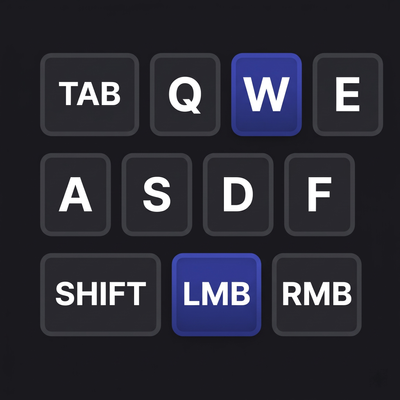
CurseForge · Minecraft mod
Keyboard mouse overlay
A keystrokes display for your screen — the same idea as the overlay streamers use, but built for everyday play
Choose a version Pick your version below, then grab the matching file.
Quick answer
Which Keyboard mouse overlay release matches 26.1?
Best match for your filters keyboard-mouse-overlay-1.1.0+mc26.1.jar
Game version 26.1
Loader Fabric
Keyboard mouse overlay keyboard-mouse-overlay-1.1.0+mc26.1.jar targets 26.1 with Fabric. The project page does not say whether this file belongs on the client, dedicated server, or both. No extra mods listed for this file.
Where it goes
Is Keyboard mouse overlay required on the client, server, or both?
The project page does not say whether this file belongs on the client, dedicated server, or both.
Client Source doesn’t say
Dedicated server Source doesn’t say
Loader for this release Fabric
Required install it here Optional supported, not mandatory Not supported do not install here Source doesn’t say do not assume
The source does not explicitly classify this release as client-only or server-only.
What else does Keyboard mouse overlay keyboard-mouse-overlay-1.1.0+mc26.1.jar need?
keyboard-mouse-overlay-1.1.0+mc26.1.jar on 26.1. Every mod below is checked against that same setup.
This file does not list any required mods. Do not add a library just because a different file uses it.
This file does not list any required or optional mods.
Before you install it
Add Keyboard mouse overlay without breaking your instance.
Built for Keyboard mouse overlay keyboard-mouse-overlay-1.1.0+mc26.1.jar on 26.1. Pick another file and the loader, install side or required mods may change.
- 01
Stick to this file
Use keyboard-mouse-overlay-1.1.0+mc26.1.jar. It targets 26.1 with Fabric; another release may have different loader, side or dependency requirements.
- 02
Bring the mods it needs
This file does not list any required mods. Do not add a library just because a different file uses it.
- 03
Put it on the correct side
The project page does not say whether this file belongs on the client, dedicated server, or both.
- 04
Pick the file you checked
Use the “Get this file” button beside keyboard-mouse-overlay-1.1.0+mc26.1.jar. It opens that exact file at the source.
About this project
What does Keyboard mouse overlay add?
Keyboard Mouse Overlay
A keystrokes display for your screen — the same idea as the overlay streamers use, but built for everyday play.
It draws a compact keyboard and mouse in the corner of your HUD, and each key lights up the instant you press it. You can see at a glance whether your SHIFT is actually held, whether your W registered, or whether that click landed — useful for PvP, parkour, bridging, recording, or just checking your own habits.
**What's on screen**
Number row (
~ 1 2 3 4 5), TAB,Q W E R T,A S D F G, SHIFT,Z X C V B, CTRL, ALT and a wide SPACE barLeft and right mouse buttons with a mouse body beside the keyboard
Pressed keys change color and text color so input is unmistakable
Labels can be hidden if you prefer a clean, minimal look
**Making it yours**
Toggle it instantly with **O** (rebindable in Controls), with an on-screen ON/OFF confirmation
/keyboard-mouse-overlay scale 0.1–2.0resizes it;/kamoworks as a short aliasA full config screen in Mod Menu: size, position, key size, spacing, and corner roundness — from sharp square keys all the way to fully rounded
Pick any color by dragging on a live color wheel/square, with alpha for transparency
One-click themes: Default, Dark, Light, Neon
Everything saves automatically and comes back exactly as you left it
**Good to know**
Client-side only — works on any server, including ones you don't own, and nobody else needs it installed
Hides together with the rest of the HUD when you press F1
Lightweight: it doesn't touch gameplay, rendering of the world, or networking
Free and open source under the MIT license
Built by **mayank** / **AFKZ Studios** for Fabric, available for 1.21.11, 26.1, 26.1.1, 26.1.2, 26.2 and 26.3.
Project description from CurseForge.
Pick your setup
Keyboard mouse overlay by Minecraft version and loader
Choose the version and loader you play, then open the matching release.
Minecraft version
26.2
1 loader buildMinecraft version
26.1.2
1 loader buildMinecraft version
26.1.1
1 loader buildMinecraft version
26.1
1 loader buildMinecraft version
1.21.11
1 loader buildCheck the dependencies, then try the file in a copied instance before changing a world you care about.
Recent files
Keyboard mouse overlay versions and loaders
keyboard-mouse-overlay-1.1.0+mc26.1.jar
28 Oct 2026
Client Source doesn’t say Server Source doesn’t say Dependencies No extras listed Listed on Release listing
Check the 26.1 · Fabric setup Fabric26.1 release
Looking for an older file? The official CurseForge project page is in Resources.
 mod
CurseForge · Minecraft
stashdisk
Portable storage disks that carry their items with them, linked by a thin glowing cable network with terminals, autocrafting, buses, patterns and optional JEI support.
 mod
Modrinth · Minecraft
Useless Things
Mod that adds some pretty "useless" things.
 mod
CurseForge · Minecraft
Camera Unbound
Immersive camera perspectives, responsive fishing and movement, cinematic respawn, and customizable crosshairs.