Minecraft version
Back to mods 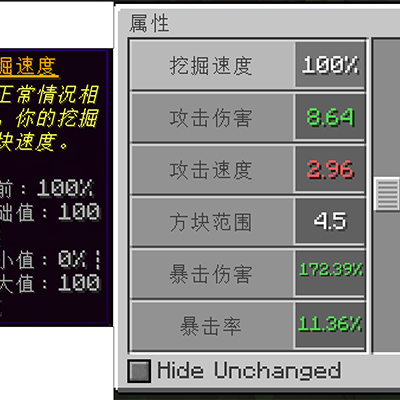
CurseForge · Minecraft mod
AttributesLib
The attributesLib module offers an attribute interface, modifies the original armor reduction calculation formula, provides enchantment tooltip, attribute formatting and attribute expansion.
Choose a version Pick your version below, then grab the matching file.
Quick answer
Which AttributesLib release should I use?
Latest stable file attributeslib-1.12.2-1.0.0-SNAPSHOT.jar
Game version 1.12.2
Loader Forge
attributeslib-1.12.2-1.0.0-SNAPSHOT.jar targets 1.12.2 with Forge. The project page does not say whether this file belongs on the client, dedicated server, or both. No extra mods listed for this file.
Where it goes
Is AttributesLib required on the client, server, or both?
The project page does not say whether this file belongs on the client, dedicated server, or both.
Client Source doesn’t say
Dedicated server Source doesn’t say
Loader for this release Forge
Required install it here Optional supported, not mandatory Not supported do not install here Source doesn’t say do not assume
The source does not explicitly classify this release as client-only or server-only.
What else does attributeslib-1.12.2-1.0.0-SNAPSHOT.jar need?
attributeslib-1.12.2-1.0.0-SNAPSHOT.jar. Change the file and its required mods may change too.
This file does not list any required mods. Do not add a library just because a different file uses it.
This file does not list any required or optional mods.
Before you install it
Add AttributesLib without breaking your instance.
Built for attributeslib-1.12.2-1.0.0-SNAPSHOT.jar. Pick another file and the loader, install side or required mods may change.
- 01
Stick to this file
Use attributeslib-1.12.2-1.0.0-SNAPSHOT.jar. It targets 1.12.2 with Forge; another release may have different loader, side or dependency requirements.
- 02
Bring the mods it needs
This file does not list any required mods. Do not add a library just because a different file uses it.
- 03
Put it on the correct side
The project page does not say whether this file belongs on the client, dedicated server, or both.
- 04
Pick the file you checked
Use the “Get this file” button beside attributeslib-1.12.2-1.0.0-SNAPSHOT.jar. It opens that exact file at the source.
About this project
What does AttributesLib add?
Overview
AttributesLib is a library mod, derived from Apothic Attributes. Its functionality is primarily related to attributes.
Attributes Screen
AttributesLib provides an attributes GUI, accessible via the sword button in the character inventory. This GUI displays all attributes attached to the player.
You can filter the displayed attributes to show only modified ones — that is, attributes that differ from vanilla. Hovering over an attribute shows its description and detailed information.
Armor Calculation
To support armor penetration, armor shredding, protection penetration, and protection shredding, AttributesLib changes the way armor and protection damage reduction is calculated.
In vanilla, armor determines the amount of damage reduction based on your armor toughness value and the incoming damage value, which makes damage reduction a non-linear function of armor. The mod restores the formula to a linear one, namely DR = 50 / (50 + armor), where the denominator (50 + armor) is the part that has been made linear.
However, the formula as a whole is not linear — in fact, it is not even inversely proportional.
The armor toughness attribute reduces the effectiveness of enemy armor shredding and armor penetration, but does not reduce the damage taken.
Enchantment Tooltips
Another feature is the change to enchantment tooltips. Descriptions are added to potion items that provide potion effects rather than simply providing attribute modifiers. When you hover your cursor over a potion effect's icon, these descriptions (along with the attribute modifiers — that is, the resulting attribute changes) are shown in the tooltip.
Attribute Formatting
AttributesLib allows attributes to set a custom format for their own tooltips. The most notable examples of attributes with custom formats are percentage-based attributes, which always display their values as percentages regardless of their modifier type. For example, the vanilla attributes movement speed and knockback resistance are displayed in a percentage-based format.
Another part of this feature is additional tooltip information. Enabling advanced tooltips (F3+H) will display additional information about modifier types and base values.
Attribute Expansion
AttributesLib expands many attributes, including but not limited to dodge chance, armor penetration, life steal, and more. All of these can be seen in the in-game attributes screen.
If developers want to use these attributes, they can depend on this library and reference the relevant attributes; see GitHub for details.
Project description from CurseForge.
Pick your setup
AttributesLib by Minecraft version and loader
Choose the version and loader you play, then open the matching release.
Minecraft version
1.18.1
1 loader buildMinecraft version
1.16.4
1 loader buildMinecraft version
1.12.2
1 loader buildCheck the dependencies, then try the file in a copied instance before changing a world you care about.
Recent files
AttributesLib versions and loaders
attributeslib-1.12.2-1.0.0-SNAPSHOT.jar
2 Nov 2026
Client Source doesn’t say Server Source doesn’t say Dependencies No extras listed Listed on Release listing
Check the 1.12.2 · Forge setup Forge1.12.2 release
attributeslib-1.12.2-1.0.0.jar
attributeslib-1.12.2-1.0.0-SNAPSHOT.jar
28 Oct 2026
Client Source doesn’t say Server Source doesn’t say Dependencies No extras listed Listed on Release listing
Check the 1.12.2 · Forge setup Forge1.12.2 release
attributeslib-1.20.1_1.0.0.jar
28 Oct 2026
Client Source doesn’t say Server Source doesn’t say Dependencies No extras listed Listed on Release listing
Check the 1.20.1 · Forge setup 1.20.1Forge release
attributeslib-1.18.1_1.0.0.jar
28 Oct 2026
Client Source doesn’t say Server Source doesn’t say Dependencies No extras listed Listed on Release listing
Check the 1.18.1 · Forge setup 1.18.1Forge release
attributeslib-1.16.4_1.0.0.jar
28 Oct 2026
Client Source doesn’t say Server Source doesn’t say Dependencies No extras listed Listed on Release listing
Check the 1.16.4 · Forge setup Forge1.16.4 release
Looking for an older file? The official CurseForge project page is in Resources.
 mod
CurseForge + Modrinth · Minecraft
VO: Better Dogs
Enhances vanilla wolves with unique personalities (Aggressive, Pacifist, Normal), smarter AI, safety behaviors, and combat improvements.
 mod
CurseForge · Minecraft
Project Night City - Cyberpunk
Adds a full quest, map, and cyberpunk night city simulation into minecraft
 mod
CurseForge · Minecraft
Balanced Enchantments
Awesome enchantments, fully customizable, that's what you can find in this mod